TOGGL FOR AMERICAN LEGAL TEAMS

The burden of proof is yours

Legal teams need every hour to stand up to billing, payroll, reporting and scrutiny. Toggl gives them one reliable record, shaped by 20 years of defining how modern teams track time.

Four jobs. One set of hours.

Legal teams do not have a time tracking problem. They have four obligations that all read from the same hours, and no single system that serves all four.

Billing the client

Tenths of an hour, and a written description of every activity on the log. Categorised to the matter, so the right client gets billed for the right work.

Paying the team

Total hours for the pay period, with overtime calculated correctly. No matter detail required, and a completely different shape of data.

Proving where the time went

Entity, fund, grant, department. A defensible split of someone's salary across categories, because a funder, a regulator or an auditor will ask for it.

Running the firm

Utilization, realization, matter margin, capacity. Four measures the firm manages against, none of which it can currently produce on request.

Most firms solve the first with legal billing software, the second with payroll, the third with a spreadsheet, and the fourth with a guess.


×Unbilled hours nobody chased×Realization you cannot explain×Write-downs discovered after the invoice×Fixed fees priced on instinct×Capacity answered from a spreadsheet×Allocation rebuilt every reporting period×Timesheets reviewed twice, manually×Matter margin nobody can produce on request
Toggl product tour preview
Watch the product tour

Three tools to manage these tasks is not the expensive part. The expensive part is every decision made in the gap between them.

Toggl is one place to record the hours, and every way the firm needs to read them.

Let's close the gap

Take the hassle out of time tracking for your attorneys

Attorneys move between calls, hearings, email, documents and meetings all day. Asking them to reconstruct that work later means missed time and incomplete records.

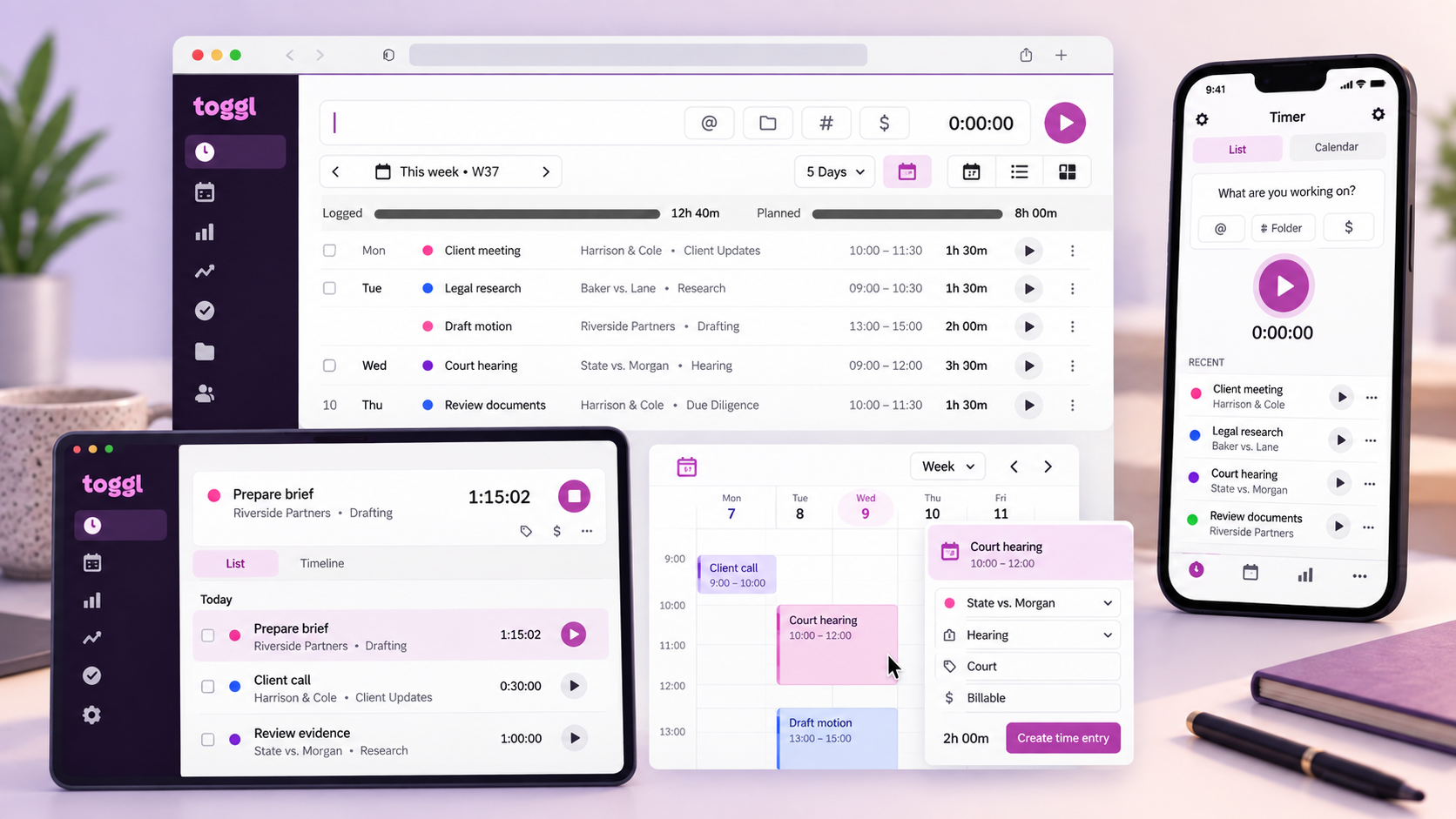
So Toggl gives each person the lowest-effort way to capture it: start a timer when it makes sense, turn calendar events into entries, use Smart Suggestions for recurring work, or privately reconstruct the day from desktop activity.

No one wants to spend more time tracking time. The lower the effort, the better the record.

Toggl time tracking on desktop, tablet and phone with legal matters and calendar entries
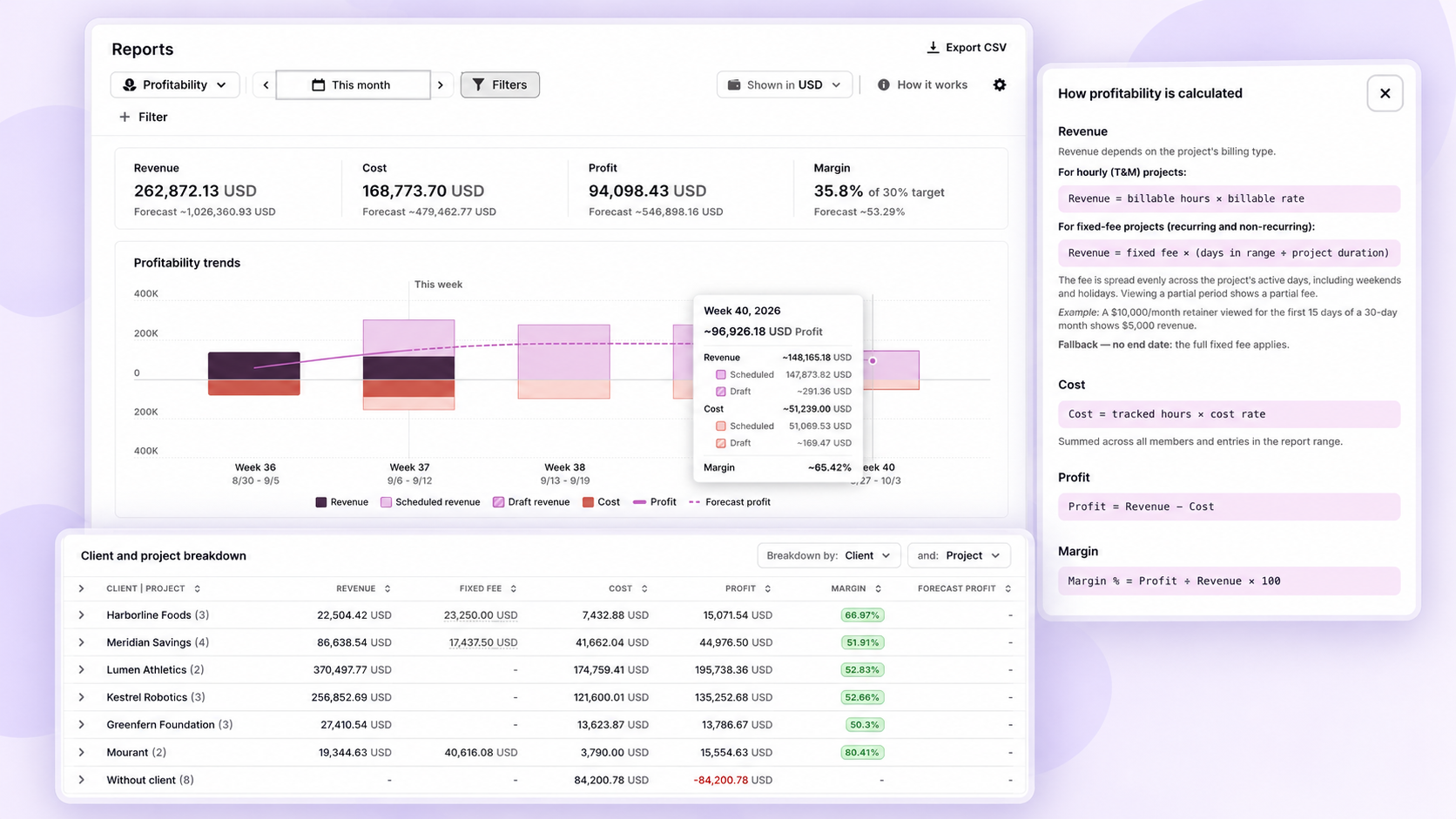
Toggl Reports profitability dashboard showing revenue, cost, profit, margin, weekly trends and client and project breakdown

See which matters pay before the write-down

Set rates by person, role or matter so a partner, associate and paralegal carry the right value on the same file. Compare tracked effort against the estimate or the fixed fee, and get alerted when a matter crosses the threshold you set.

Hourly, retainer and flat-fee work all report the same way, so you can see which fee structures are actually working and price the next engagement on evidence.

Answer the capacity question without a spreadsheet

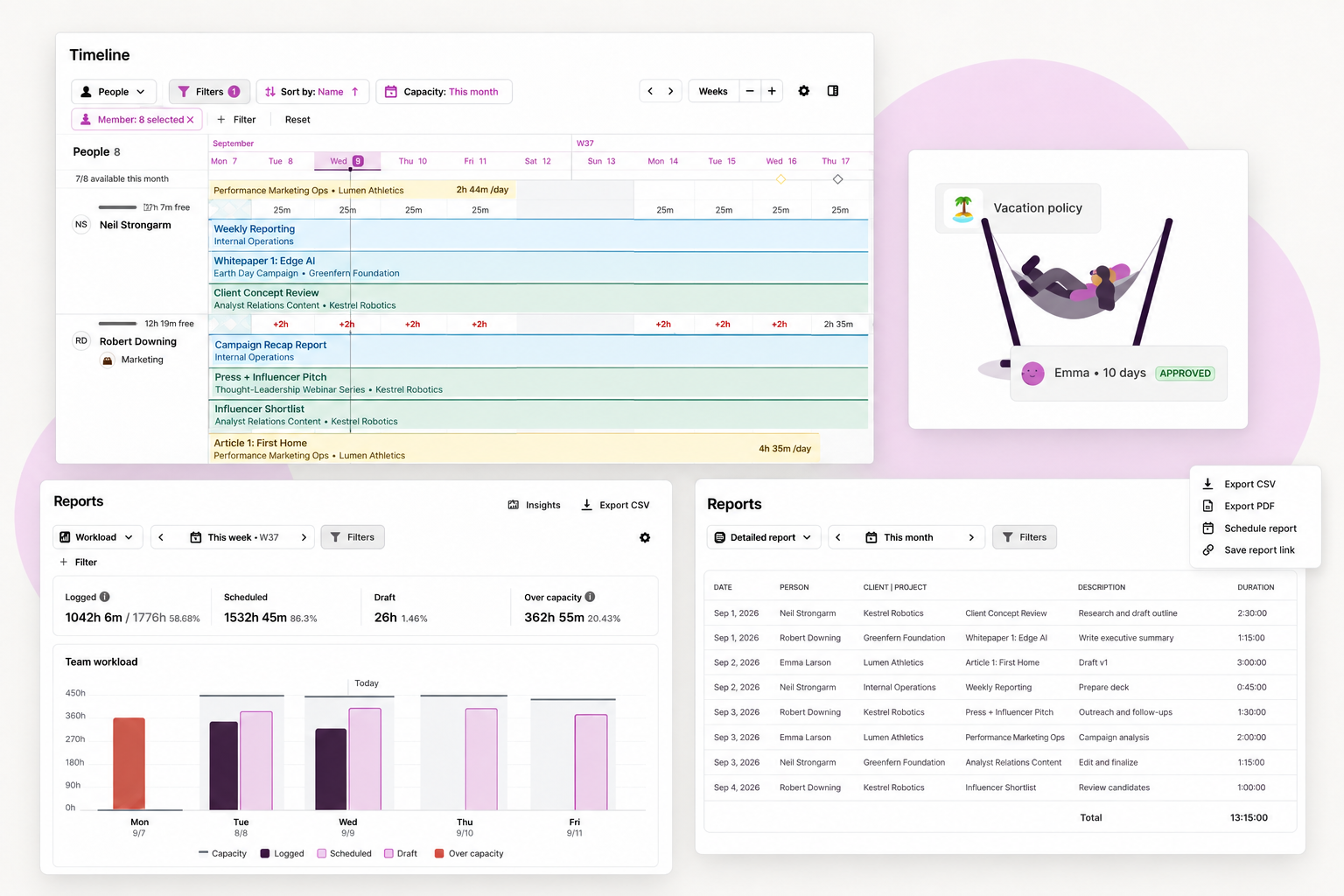
Utilization shows how much tracked time became billable work. Adherence shows tracked hours against expected hours. The same view looks forward, showing what the team can take on once schedules, leave, court dates and committed work are accounted for.

Reports save, schedule and export. Client-facing reports carry every entry with its description, filtered to one matter, rounded to your billing increment.

Toggl Timeline and Reports showing team capacity, workload, and scheduled work across people and projects

The evidence you need. None of the surveillance you don't.

Toggl doesn't just avoid screenshots, keystrokes, webcams and location tracking — we don't build those features. Your team knows you chose a tool that can't monitor them.

Read our anti-surveillance statement

Built for how legal teams are structured

Client-service law firms

Matter margin, utilization and capacity per client and per person, without stitching together a tracker, a resourcing sheet and a reporting tool.

Legal aid, public interest and multi-entity organisations

Allocate staff time across restricted funds and separate legal entities, so the split you report is one you can evidence when a funder asks.

In-house legal and legal operations

Show what the work required. The case for headcount or outside counsel gets made from effort you can point to.

ISO 27001SOC 2 Type IIOpen API

One question

How long after the work is done does time get logged at your firm?

Be the first to answer

No email. See where you sit against everyone else who has answered.

Questions legal teams ask

Our team enters time at the end of the day or the end of the week. Does that work?

Yes. The timesheet view is a grid: pick the matter, enter the hours, done. A full week can be copied forward, rows and hours together. Live timers exist and are entirely optional, and plenty of firms never use them.

Can it round to tenths of an hour?

Yes, and the increment is set per person. Billing attorneys can work in six-minute tenths while operations and support staff work in quarters, in the same workspace.

Does Toggl use AI to write timesheets from email and documents?

No, and that is a deliberate choice. Some tools generate a draft time log from your inbox and files for the attorney to approve. An approved guess is still a guess, and it is the firm that has to defend the entry. Where automation genuinely helps, it is pattern-based: a calendar event you have filed once gets categorised the same way next time.

Can we split time across multiple entities, funds or departments?

Yes. Time is recorded against a client, a project and a task, with a free-text description, and organisations with multiple entities typically map the top level to the entity and the next to the purpose. One person's hours then split cleanly for allocation and reporting.

How long does it take to roll out?

For a firm of around 60 people, a week to two weeks. Existing clients, matters and tasks import by CSV. Onboarding covers configuration, admin training and team training.

Will attorneys actually use it?

They can track from the tool they are already in, on desktop or mobile, or convert a calendar event with one click. There is no screenshot capture, no keystroke logging and no location monitoring, and there is no version of this product that surveils your people. Better adoption produces better data. Better data produces better decisions.

The burden of proof is yours.
The time tracking expertise is ours.

Bring a month of real matters and we will show you what the record looks like when it lives in one place.