Choosing the right marketing project management software can feel maddening. Dozens of tools promise to be everything — faster, smarter, and now “agentic” — making it difficult to understand how each one stands apart and whether that matters for your team or not.
The truth is, great marketing project management isn’t about flashy features. It’s about a core set of capabilities that help teams plan confidently, manage shifting workloads, collaborate without friction, and deliver campaigns on time (without burning people out in the process).
Most importantly, it’s about fitting those capabilities to your workflows in a way that doesn’t cause friction or lead to people hating project planning altogether.
In this guide, we’ll break down the 12 essential features to look for in marketing project management software — and show how different tools stack up depending on whether your biggest challenge is resource planning, campaign execution, or asset management.
Here are all the tools we’ll explore below:
- Toggl 2.0
- Asana
- ClickUp
- Wrike
- Ziflow
- Hive
- Bynder
- Papirfly
- Canto
Whether you’re rebuilding your stack or sanity-checking your current setup, this list will help you focus on what actually matters.
12 features to look for in a marketing project management software
While every team has it’s unique needs and preferences, good project management usually comes down to a handful of essential features that help you move faster, get clarity, and align on shared goals. These include:
- Project planning. With multiple campaigns running on tight schedules, most marketing teams need a PM tool that combines visual timelines and project boards with nested tasks, dependencies, and templates for repeated workflows. Put all this together, and you’ll channel your team’s creativity in the right direction, and deliver all your assets on time.
- Task and workload management. A good marketing PM platform shows who’s slammed, who’s free, and who’s two rounds of AM revisions away from burnout. Functionality like Gantt charts, time tracking, and utilization tracking helps distribute work fairly and manage team members’ capacity proactively.
- Resource forecasting. Marketing teams often deal with goalposts that move without warning. Deadlines shift because of stalled approvals. Campaign scope evolves because of new requests. As a solution, resources forecasting features are a true lifesaver that show you how upcoming to-dos overload the team, when it’s time to hire (or outsource), and what you can realistically deliver in Q2 while still slogging on with Q1.
- Team collaboration tools. From content handoffs to campaign brainstorming, you’ll need a convenient share updates and ask for a second pair of eyes. The best collaboration tools empower everyone to work asynchronously without drowning in Slack pings.
- Cost tracking. Anyone running complex projects knows how unexpectedly budget overruns crop up to ruin your day. The reasons may be ample, but the result is always the same: you’re bleeding profitability. To avoid this, look for tools that provide real-time information about logged billable hours and expenses per client or project, so you’re never blindsided by an empty coffer.
- Proofing and approvals. Endless email chains are where creative assets get buried for good. Prioritize platforms with built-in markup tools, threaded feedback, and customizable approval workflows to loop stakeholders in throughout the campaign lifecycle.
- Creative campaign workflows. To deliver on time, you need more than duct-taped spreadsheets. A solid workflow keeps every brief, asset, comment, and approval in one tidy lane, so your designers aren’t chasing files and your marketers aren’t guessing which version’s ready for the world.
- Reporting and dashboards. Stakeholders want to see impacts and return on investment (ROI.) Clients want to track project progress, and you, as the project manager, want to know what’s holding back those last deliverables. Strong reporting functionality around team capacity, project timelines, and used budget makes team performance and bottlenecks impossible to ignore.
- Reporting and dashboards. Stakeholders want to see impacts and return on investment (ROI.) Clients want to track project progress, and you, as the project manager, want to know what’s holding back those last deliverables. Strong reporting functionality around team capacity, project timelines, and used budget makes team performance and bottlenecks impossible to ignore.
Outside of these must-haves, there are other functionalities that some teams don’t consider essential but others can’t live without, like:
- Digital asset management (DAM). Your marketing strategy will always remain just a strategy when your team is stuck with reviewing drafts or painstakingly searching for this year’s promo banners. A platform with lightweight DAM capabilities and version control keeps creative assets searchable, shareable, and brand safe.
- Agency collaboration and client access. If you work with external partners or clients, look for granular permissions, shareable views, and secure spaces for feedback management. This keeps communication effective and saves your people heaps of time on routine status updates.
- Integrations. Native or Zapier-friendly integrations with your favorite creative suites, messaging apps, file storage, and CRMs help you automate busywork and keep your stack connected.
9 best marketing project management software for different teams and use cases
Now that you know what to look for, let’s discuss the actual tools. We chosen nine solutions that fit various team sizes, scenarios, and budgets, so you can make a well-informed decision.
Despite their differences, they all offer some forms of task, resource, and capacity management, as well as various ways to visualize workloads, collaborate on projects, and report on results.
1. Toggl 2.0
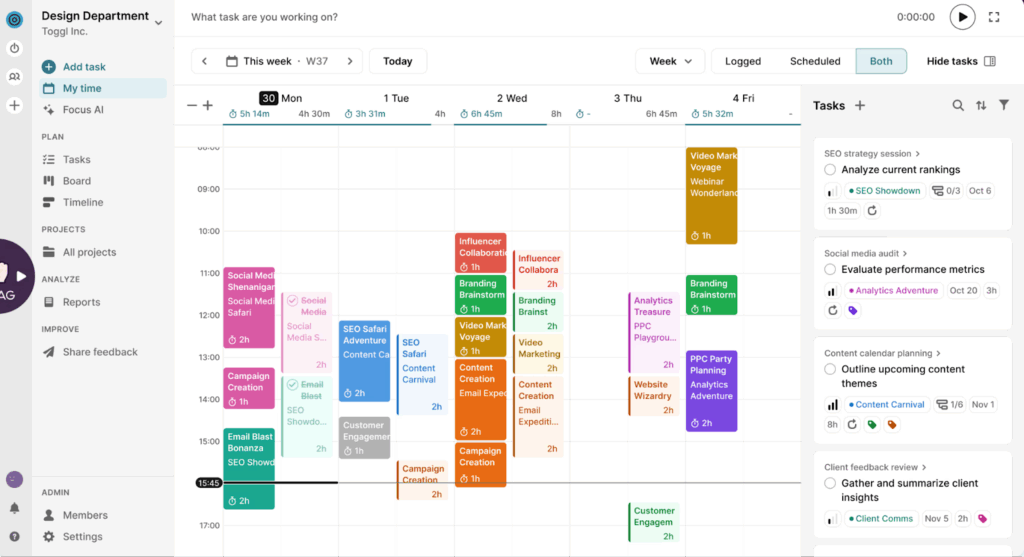
Toggl 2.0 is our marketing project management tool that delivers reality-proof capacity management and project planning, powered by accurate time data.
The built-in time-tracker captures hours to a second and gives you simple but powerful task lists, project timelines, and capacity views. No more frantic check-ins or second-guessing on deadlines.
You’ll get data-backed visibility across your entire campaign lifecycle, or a snapshot of your team’s real workload, using Kanban boards, a timeline view, or as a calendar. These insights inform your project timelines and resource planning with full visibility into capacity, dynamically adjusted in real-time.
Because Toggl 2.0 makes time tracking a breeze, you can detect scope creep early, push back with confidence, or adjust invoicing to protect your profit margins. Likewise, when leadership wants more output with less headcount, you’ll have the numbers that build your case for extra resource allocation.
In short, Toggl 2.0 gives you the truth about your team’s workload so you can run marketing projects based on accurate, reliable time data, instead of wishful thinking.
Key features
- Built-in time tracking with different modes for consistently accurate logs.
- User-friendly project management experience, designed to spot priorities, dependencies, and potential blockers.
- Capacity and workload insights that optimize workload distribution and add extra resources when things get hectic.
- Kanban boards, Timelines, and Calendar views for planning and executing campaigns in a format that fits real marketing workflows.
- Powerful filters to slice your data by member, team, client, priority, status, or project to make more informed decisions.
Pricing
From $9/user per month. Free for up to five users.
2. Asana
Source: G2.com
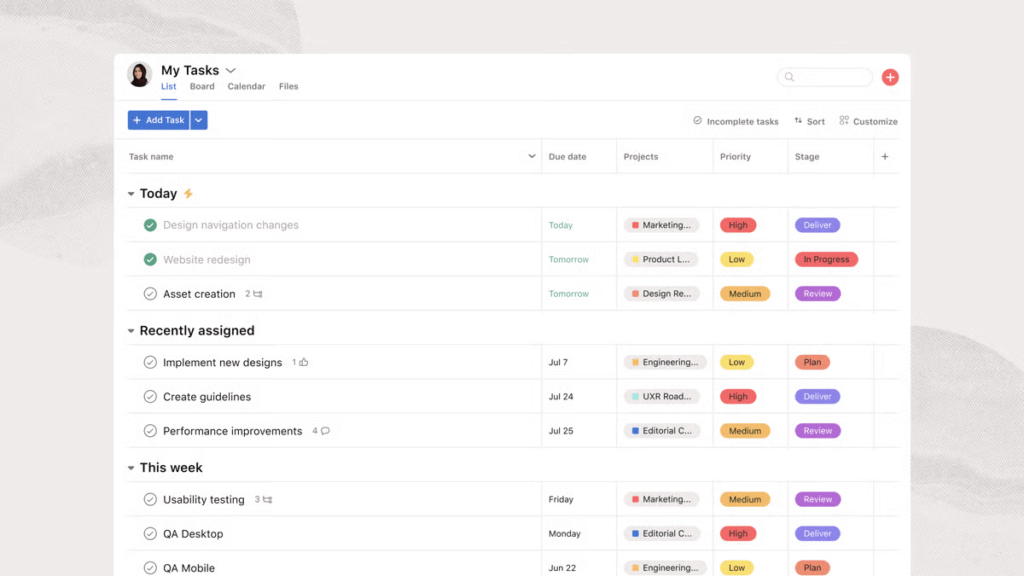
Asana is one of those project management tools you can mold to almost any use case. And that’s what makes it a great fit for marketing teams. You can plan campaigns as lists or on Kanban boards, map dependencies on a timeline, or step back and use Portfolio view to understand how every initiative ladders up to broader marketing goals.
Asana stands out for how it connects priorities, resourcing, and execution. Share goals in a central hub, track related groups of projects, linked to them, and use Workload views to spot capacity issues before they impact delivery.
When it comes to capacity planning, Asana lets you add either percentage allocation for different tasks and projects or estimated hours. Be aware though, that these aren’t automatically tied to real team time-tracking data, and you’ll need to adjust them manually for self-reporting.
Key features
- Multiple workspace views (lists, boards, timelines, calendars, portfolios, workload) to support any marketing workflow.
- Streamlined approval workloads to assign reviewers, track feedback, and manage sign-offs.
- Pre-made integrationswith 100+ popular business apps, including CRM, DAM, analytics, design tools, and time trackers.
- Smart task relationship management, including multi-project subtasks and automatic notifications when blockers are cleared.
- Database of pre-made, no-code AI workflows.
Pricing
From $10.99/user per month. Free for 1-2 people, managing personal projects.
3. ClickUp
Source: G2.com
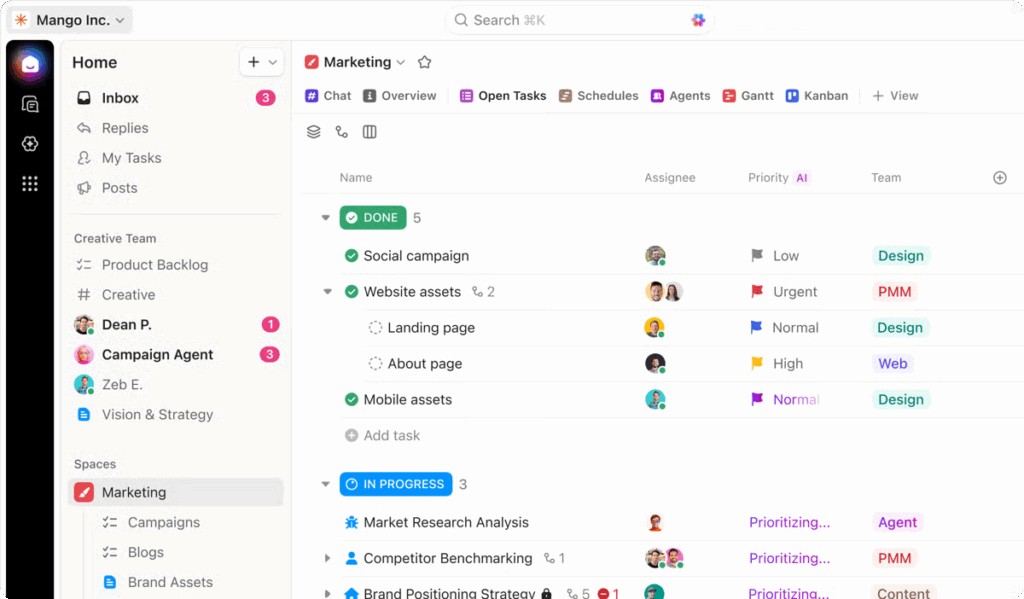
ClickUp is built for teams that want to build a centralized work hub. At its core, it’s a deeply customizable workspace where you can plan campaigns, create and share briefs, document processes, and oversee production.
You can shape tasks into almost anything, for example, content requests, ad variations, sprint tickets, or event deliverables. And because ClickUp ties Docs, whiteboards, and tasks together, teams move from ideas to execution without losing context.
One standout is the platform’s visibility. ClickUp’s dashboards can highlight campaign timelines, team workloads, budget data, and even sprint velocity, giving leaders a real-time pulse on how work is progressing. Custom views, including calendars, boards, and Gantt charts, make it easy for every function (design, content, paid, ops) to work exactly how they like, while staying aligned.
ClickUp also leans heavily into automation, allowing you to set a lot of grunt work on autopilot. The downside is a pretty steep learning curve, which may slow down onboarding and adoption.
Key features
- A highly configurable workspace you can fashion to match your workflows and team systems.
- Descriptive task cards with custom fields, file uploads, comments, due dates, tags, checklists, and time estimates.
- 35+ prebuilt project workflows to jump-start planning or execution.
- DIY and pre-made reporting dashboards. Choose the necessary metrics and preferred data visualization formats to track progress, budgets, and team performance.
- Client portals that offer stakeholders real-time visibility and a dedicated space for questions and feedback.
Pricing
From $7/user per month. Free plan available.
4. Wrike
Source: Wrike
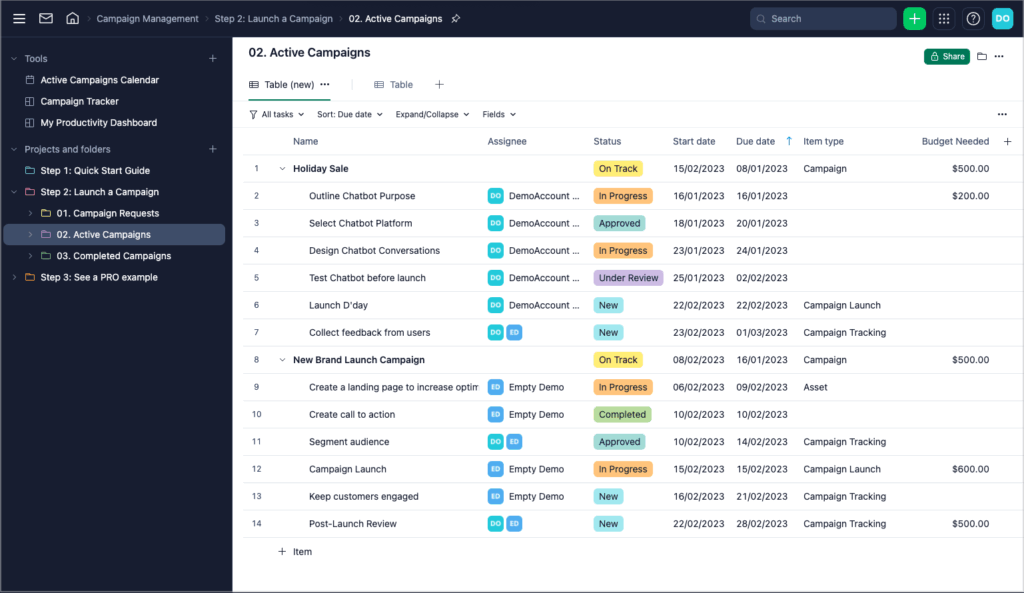
Wrike is a strong contender for campaign management, providing a simple yet scalable way to link scattered workflows. At the intake stage, you can set up customizable request forms to collect all the necessary information to break into tasks. From here, you’ll generate full project setups instantly, using saved blueprints or available templates.
Once creative work is underway, Wrike adds structure — a step teams often struggle with. Approvals are built directly into the platform, leaving no room for information asymmetry. Marketing calendars provide additional visibility, allowing cross-functional teams to sync their efforts around key milestones.
Wrike has also leaned into collaborative ideation with its new Whiteboard feature. Teams can sketch concepts, map dependencies, and then convert the whole session into actionable tasks in a click, with Wrike’s AI automatically grouping ideas and prioritizing next steps.
Key features
- Custom request forms with dynamic logic for clean intake and automatic task creation.
- Robust proofing and approvals for creative assets, with an extension for Adobe Creative Cloud.
- 400+ automations to streamline repetitive tasks and bring data across from other business apps.
- Budget reporting dashboards to monitor spending and ROI across projects.
- Highly customizable Gantt charts to map dependencies, prioritize work, and keep the delivery on schedule.
Pricing
From $10/user per month. Free plan available.
5. Ziflow
Source: Ziflow
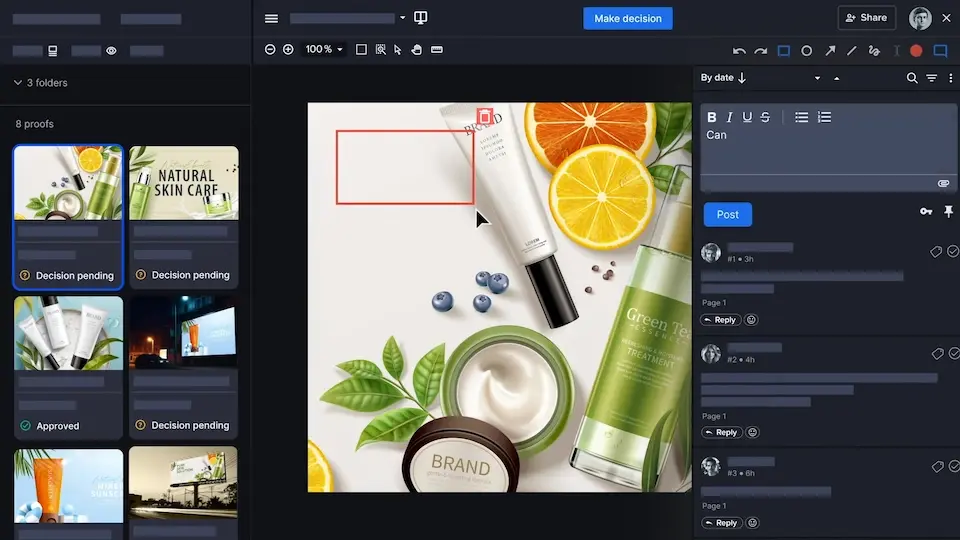
If your team needs to rein in the endless approval cycles, Ziflow may be a good option. It’s an enterprise-grade system for creative campaign management.
Instead of juggling comments across email, chat, and DAM, Ziflow pulls everything into one structured, semi-automated workflow. You can review videos, images, documents, and multi-asset campaigns side by side, complete with version history, consolidated feedback, and clear sign-off paths.
Ziflow is also engineered for scale. Teams can run large volumes of assets through repeatable workflows, powered by automated routing, deadline management, and reviewer sequences. This reduces the admin overhead that typically slows down busy production cycles. Thanks to precise markup tools, controlled permissions, and brand guidelines support, Ziflow adds another layer of assurance to teams with strict brand requirements.
While Ziflow isn’t strictly a project management tool, it integrates seamlessly with Asana, monday.com, Jira, ClickUp, Trello, and others.
Key features
- Centralized online proofing for creative campaign assets with built-in brand compliance checks.
- Templates and automation triggers for designing repeatable approval sequences.
- Compliance-friendly review tools, including precise visual markup, controlled permissions, and brand-safety workflows.
- Real-time commenting and visual annotations to consolidate feedback and reduce miscommunication.
- Integrations with popular PM tools, DAM, design, and communication apps.
Pricing
From $199/month for up to 15 years. Free plan available.
6. Hive
Source: G2.com
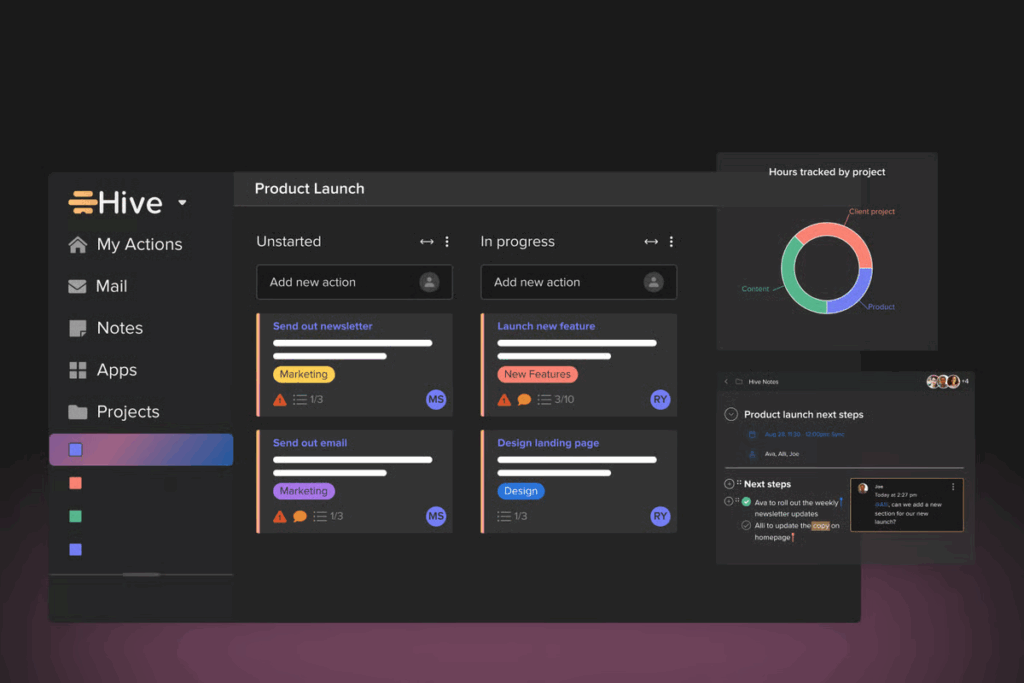
Hive conveniently combines essential project management functionality with creative proofing. A single subscription unlocks access to task management, resource scheduling, intake forms, asset proofing, and streamlined approvals.
You can set optimized request forms to aggregate all requests, and all the information will be auto-logged as an action card in Hive. To avoid those ‘actions’ piling up, you’ll have to proactively groom them, unless you implement automation.
From there, lay out all planned work across different views, such as Kanban, calendar, lists, or timelines. Next, you’ll assign to-dos, add estimated hours, prioritize tasks, and track overall progress. It’s also easy to share custom dashboard views with external collaborators and clients. Likewise, you can submit assets for external approval via Hive’s internal
proofing functionality, which includes loads of editing and commenting options, such as text notes, shapes and signatures.
Hive may lack the bells and whistles of more sophisticated PM software, but it has most of the features smaller creative teams need to deliver stellar work.
Key features
- Intuitive project and task management experience, with goals, milestones, time tracking, and collaborative features.
- Custom reporting dashboards to spot teamwork blockers, monitor campaign progress, and rebalance resources.
- Built-in automation suite that enables cross-app automations across supported tools.
- Online asset proofing for images, videos, and PDFs with version control.
- Configurable forms to collect intake information and route new requests.
Pricing
From $5/user per month.
7. Bynder
Source: G2.com
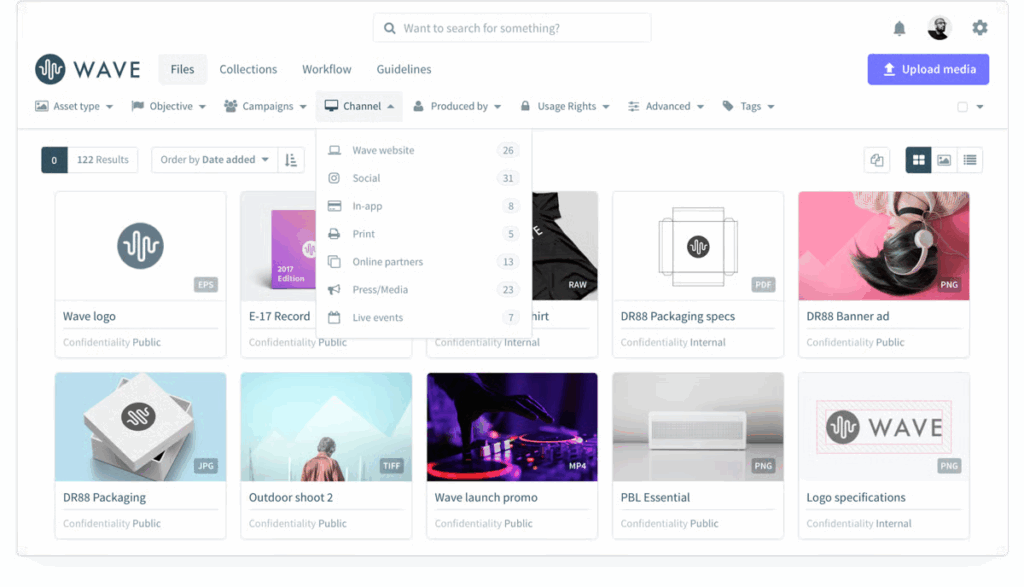
Bynder is a well-known name within the DAM space, having been around since 2013. It’s a virtual workspace for storing, sharing, creating, briefing, proofing, and approving digital assets. Lately, it’s also added AI modules to power natural speech search, machine translations, image generation, and automatic duplicate detection. And, like others on our list, you can use specialized AI agents to streamline your repetitive workflows.
From a central campaign workspace, you can provide different teams with personalized Toolkits, such as pre-approved content built for specific purposes (e.g., franchise marketing), personas, channels, and markets. This speeds up GTM without diluting brand equity — essentially, your messaging stays consistent no matter where it’s displayed.
Key features
- Enterprise-grade DAM experience with AI-powered search, granular access controls, and seamless sharing.
- Studio workspace to create on-brand images, videos, and GIFs in minutes from scratch or using brand-approved templates.
- Internal landing pages, showcasing available assets and collections for different types of projects, with role-based access.
- Custom and templated asset workflows to streamline creative collaboration through features like versioning, annotations, and customized approvals.
- Robust AI functionality to augment your teams’ efforts by reducing the grunt work.
Pricing
Accurate pricing is available from the vendor on request, based on required used modules.
8. Papirfly
Source: G2.com
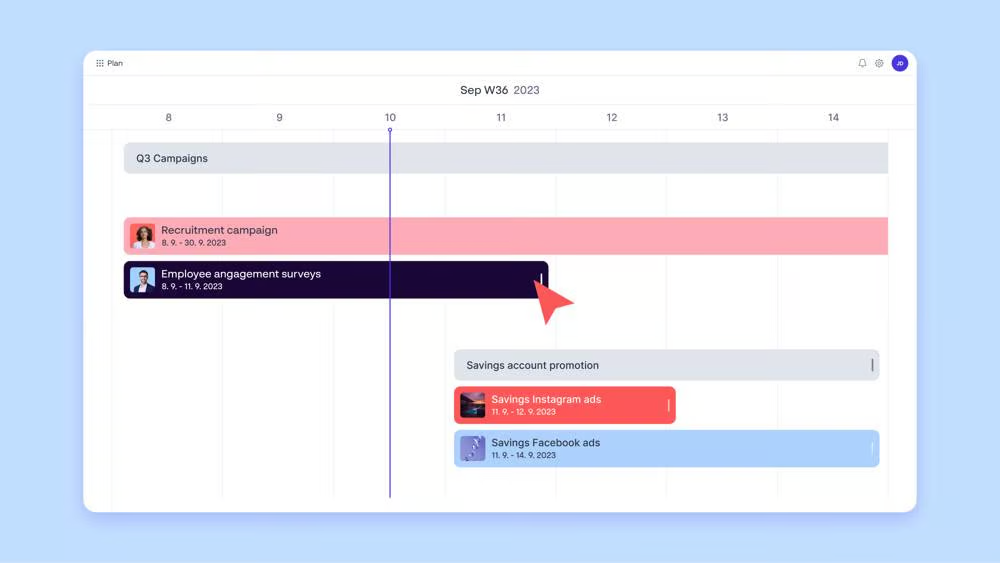
Papirfly is a slightly less intimidating platform compared to Bynder. It focuses on solving two tasks: asset organization and content creation. The DAM module provides an intuitive way to organize and curate brand-approved assets, including typography, color palettes, and tone of voice examples. Thanks to AI metadata tagging, everything is easily searchable and automated duplicate detection keeps your data clean. Meanwhile, embedded brand compliance software makes sure everything is reviewed, approved, and signed off accordingly.
The Content Creation suite provides self-service access to pre-made templates that other teams use to create essential promo materials. To avoid any goofs, you can lock in brand features that cannot change (e.g., typography) and define areas where users add their own text for approval.
Papirfy also recently added several campaign management features. Build custom timelines for different campaigns, set deadlines, clip DAM assets, and share status updates. The features aren’t as robust as in prolific PM apps, but they bring a greater sense of organization to product projects running in parallel.
Key features
- Intuitive DAM portal with version control, brand guardrails, and automated review and sign‑off workflows.
- Templated Content Creation tools that guide users in creating on-brand content from pre-approved assets.
- GDPR consent management with AI facial recognition to streamline brand governance.
- Analytics dashboards to analyze asset usage rates and measure key activities at the region, department, and team level.
- Timeline-based project management functionality to organize incoming tasks for creative production.
Pricing
Accurate pricing is available from the vendor on request.
9. Canto
Source: G2.com
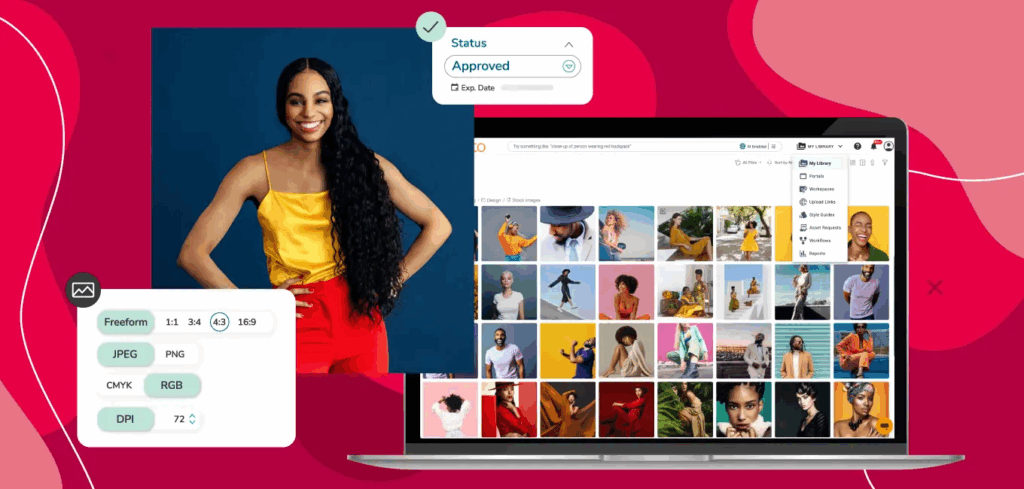
Canto is another long-standing player in the DAM space, currently offering the 11th generation of its platform. The two core products are Canto DAM and PIM — a product information management platform for organizing large product families. Both are seamlessly interconnected, allowing creative teams to pull accurate product data for marketing purposes and enable other teams to benefit from relevant, channel-specific visuals.
On top of these, you can also run several workflow tools. The latest tools include an Approval Hub for centralized proofing across all popular formats (including barcode and print materials). You can assign reviewers, add context, set deadlines, and chase people with automated notifications. Another new addition is a self-serve Brand Studio, which allows you to share pre-approved templates for users to customize manually or with built-in AI tools.
Speaking of AI, an algorithmic assistant always runs in the background, helping with automatic structure application to all files, similar visual asset grouping, and duplicate detection.
Key features
- A dual DAM + PIM platform infusing the latest product information into the creative process.
- Collaborative workspaces with digital rights management, asset expiration dates, and style guides.
- Unlimited customizable brand portals to share with different partners.
- In-depth engagement analytics to monitor asset usage trends across teams, partners, and channels.
- Convenient approval hub to collect feedback, compare different versions side by side, and sign off on the finals.
Pricing
Accurate pricing is available from the vendor on request, based on selected modules.
Assembling your marketing project management stack
Let’s be real: there’s no miracle app waiting to rescue your whole operation.
The smarter approach is to anchor your choice in real friction points. What’s really messing up your day — poor resource visibility, slipping timelines, chaotic campaign planning, or haphazard usage of brand assets?
Once you pinpoint your biggest peeve, you can pick the tool that nails that problem instead of going for an “all-in-one” solution.
This is exactly why Toggl 2.0 stands out as an essential element of any marketing project management tech stack. It offers the clarity other tools gloss over, and it grounds your planning in real resourcing and budgeting data, not guesstimation.
Get the visibility your team’s been missing. Try Toggl 2.0 for free.

Elena is a senior content strategist and writer specializing in technology, finance, and people management. With over a decade of experience, she has helped shape the narratives of industry leaders like Xendit, UXCam, and Intellias. Her bylines appear in Tech.Co, The Next Web, and The Huffington Post, while her ghostwritten thought leadership pieces have been featured in Forbes, Smashing Magazine, and VentureBeat. As the lead writer behind HLB Global’s Annual Business Leader Survey, she translates complex data and economic trends into actionable insights for executives in 150+ countries. Armed with a Master’s in Political Science, Elena blends analytical depth with sharp storytelling to create content that matters.
![How To Calculate ROI For A Project [Steps, Formula, Example]](https://toggl.com/blog/wp-content/uploads/2024/04/calculate-project-roi-673x404.jpg)