If you’ve ever tried to manage your capacity planning using a trusty, old spreadsheet, you already know you’re fighting a losing battle.
Spreadsheets have a habit of being inflexible and freezing key information in time. So, you might make a beautifully accurate capacity roadmap on Monday morning, only for it to fall apart by lunchtime because someone just handed in their notice or your go-to specialist is out sick.
Sure, with enough external data and heroic formulas, you can make a spreadsheet dynamic-ish. But it still can’t pull in real availability or warn you when your project teams are about to tip from “busy” into “burnout.” It only knows what you know.
Capacity planning tools are the solution that connect the dots and give you a live, reliable picture of whether your team can take work on and do it well. That’s why in this guide, we” explore the best capacity planning platforms for different teams and use cases, including:
- Toggl 2.0
- Float
- monday work management
- Scoro
- Productive
- Runn
- Resource Guru
- Saviom
- Smartsheet
But first, let’s talk about the key features and capabilities these tools must bring to the table.
7 features every great capacity planning tool should have
While everyone’s needs are different, most teams and even freelancers should keep the following features top of mind when comparing capacity planning solutions:
- Time-aware capacity planning: Vibes and gut feel? Pretty useless when it comes to capacity planning. Look for tools that use actual tracked time as the foundation for planning.
- Real resource visibility: The best tools deliver a live view of who’s doing what and when they’re doing it to inform your overall capacity.
- Forecasting and scenario analysis: This feature uses your live and historical data to give you a long-term view, projected across weeks, months, quarters, or even years. You’ll easily answer questions like “What if we add another client?” or “What if two devs go on vacation in the same sprint?”
- Reporting and utilization: The best capacity planning tools turn numbers into pretty charts you can share with your teams and stakeholders. Check your tool can display workload heatmaps, utilization rates, and planned vs actual capacity, and that you’ll easily understand the output.
- Communication and task management: Look for workforce capacity planning tools that combine planning with day-to-day task management features like boards, project timelines, comments, and @mentions. When your team can see what’s on their plate and understand how it affects overall capacity, it improves accountability.
- Data consistency and guardrails: The best tools bake in guardrails like required fields, audit logs, and validation checks to keep your capacity data tidy and trustworthy.
- Integrations with the rest of your tech stack: Make sure your product of choice is a successful collaboration with your other favorite tools, whether that’s via connectors, integrations, or solutions like Zapier.
9 best capacity planning tools (plus an honorable mention)
We’ve rounded up nine standout capacity planning tools (and an extra that turned our head) each with their own quirks and strengths. Let’s meet the contenders that could solve your workload problems.
1. Toggl 2.0
Best for: Teams and freelancers requiring accurate, time-driven capacity planning and project management in one place.
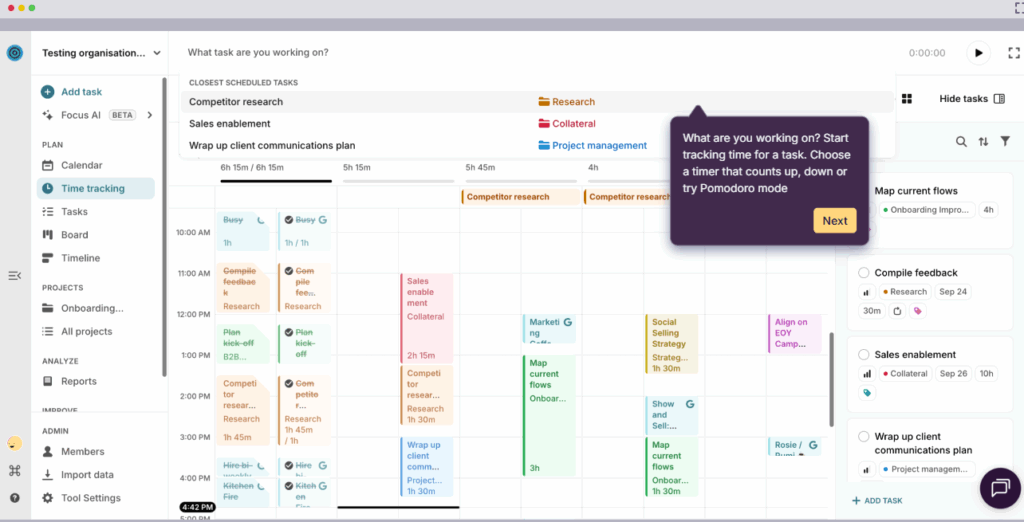
Toggl 2.0 is built around accurate and reliable time data.
The platform blends world-class time tracking, planning, and capacity management in one place, so you don’t have to jump between apps to understand whether a project is genuinely doable. Instead, you’re hit with a sense of calm clarity as you see your team’s real availability and upcoming workload in one shared view.
If you want a tool that helps you plan confidently, protect your team’s bandwidth, and make informed decisions based on how long work actually takes — not how long you wish it would — Toggl 2.0 is an obvious fit.
Key features
- Crystal-clear capacity planning: Toggl 2.0 pulls in working hours, time off, public holidays, and active projects so you can understand availability and plan with the confidence of someone who never double-books by mistake. Switch between Board, Calendar, or Timeline, depending on how you like to see the world.
- Drag-and-drop planning: Need to shift a deadline? Move a task to someone else? Rebalance a week that suddenly exploded? Just drag your plans into place for the kind of rescheduling that feels like tidying a digital desk.
- Time tracking that powers everything: Track time however you like — timer, manual entry, Pomodoro, or from calendar events. All of it feeds straight into your capacity plan, so your plans are based on actual effort instead of collective optimism.
- Reports that help you make data-driven decisions (minus the headache): See where time goes, who’s cruising, who’s overloaded, and how busy your next few weeks look. Filter by team, project, client, billability, tags, whatever helps you understand the story. Then export the deets if you need to impress someone in a meeting.
- Clean, consistent data without chasing people all week: Built-in reminders nudge your team to log their time. Required fields make messy entries a thing of the past. Timesheet approvals keep things accurate. Audit logs tell you who changed what. Basically: your data stays clean so your plans stay trustworthy.
User reviews
“Toggl 2.0 is amazing. The UX is perfect and matches my workflowin a shocking way!” — Toggl Community feedback
“I’m super excited. I love how you’ve combined Toggl Plan and Toggl Track. And the Calendar View is fantastic!” — Toggl Community feedback
“This is an amazing app!It has neatly consolidated my old workflow of juggling Google Tasks and Toggl” — Toggl Community feedback
Pricing
- Free: For up to five users. Includes time tracking, simple planning tools, personal productivity insights, and core scheduling essentials.
- Starter: $9 per user/mo. Adds smarter planning, capacity basics, like PTO, public holidays, and flexible hours, and team visibility.
- Premium: $20 per user/mo. Adds full capacity management.
- Enterprise: Custom pricing is available for larger organizations needing scalable support.
2. Float
Best for: Lean teams who want flexible, visual resource and capacity planning
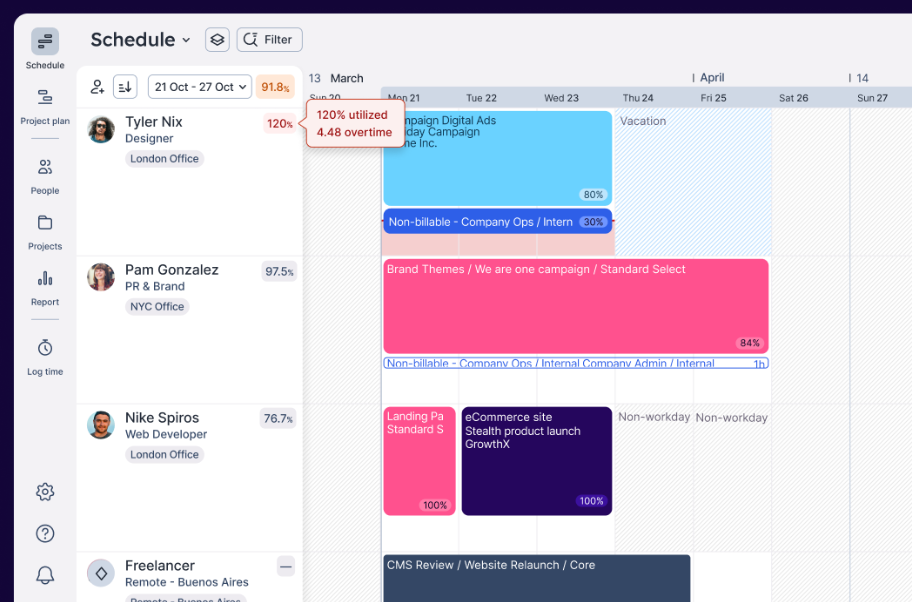
Float is a light and versatile resource management software. As one of the more recognizable names in capacity planning, it’s built for teams craving a clear, no-nonsense way to see who’s doing what to keep workloads balanced week to week. One of Float’s biggest strengths is how naturally capacity planning fits into your everyday workflows. With clean visuals, real-time availability, and effortless resource scheduling, Float makes it easy to optimize your team’s bandwidth, without the overhead of heavyweight enterprise tools.
Key features
- Live capacity tracking: See utilization indicators and over-capacity warnings so you can catch conflicts or overloads before they derail your schedule.
- Availability settings: Store each person’s working days and hours, so you only allocate what they’re truly available for.
- Time-off management: Define custom leave policies, approval workflows, and auto-assign regional holidays, helping your capacity view stay reliable.
- Custom team setups: Tag team members by location, skill, seniority, or role, with filtering to find the right person at the right time.
- Integrations: Plug into your existing calendars, project trackers, productivity apps, so your capacity planning sits directly in your workflow.
User reviews
“Although Float is a great platform overall, it would be even better if it offered more advanced reporting features and analytics dashboards natively, without needing third-party integrations.” — A civil engineering user
“Float is a great resource management tool that makes scheduling and planning easy. The interface is simple and easy to use, even for beginners.” — Hiren M., a technical lead
Pricing
- Free trial for 30 days
- Paid plans from $7 per scheduled person/mo
- 3 plans available: Starter, Pro, Enterprise
3. monday work management
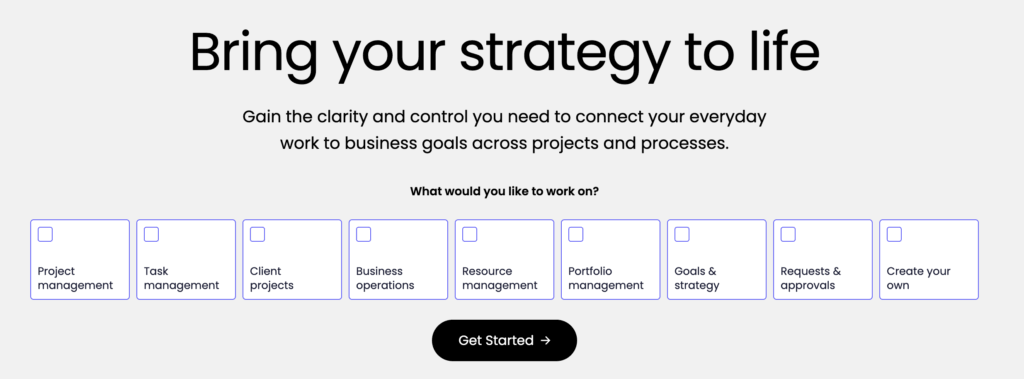
Best for: Teams requiring a general-purpose work hub
monday work management runs on top of the monday.com Work OS, a fully customizable platform where teams can build and automate any type of workflow.
Instead of being a traditional capacity planning tool, monday work management acts as a central command center for your entire operation, whether you’re managing human resources, machinery usage, production timelines, or cross-team operations. Capacity planning becomes more powerful here because it connects directly to tasks, timelines, available resources, projects, approvals, and assets.
If your team loves the idea of designing a workspace around your processes rather than adapting your processes to a tool, monday work management delivers.
Key features
- Workload View: A visual display of each person’s assigned tasks and effort, helping you improve teamwork by spotting overloaded workers and streamline your scheduling.
- Battery Widget: An at-a-glance workload indicator that fills or drains based on assigned capacity, making bottlenecks easier to catch.
- Custom dashboards: A selection of charts, widgets, timelines, and boards displayed on tailored dashboards that reflect your team’s real planning and capacity metrics.
- Automations: Create rules that assign tasks, shift statuses, send alerts, and update fields. These workflows reduce the manual admin that can cloud your capacity decision-making.
- Integrations: Connect monday work management to core apps, like Slack, Teams, Jira, calendar tools, marketing systems, and CRMs, so capacity signals follow the rest of your work.
User reviews
“We love the workload view and dashboards — they help us balance team capacity and stay ahead of deadlines.” — Alina R., senior manager, marketing technology
“It’s so helpful to track tasks and see our overall capacity as a team. It makes the team very open about their workload and how much they have on.” — Ruby A., a digital marketing executive for a small business
Pricing
- Free plan for up to 2 seats
- Paid plans from $9 per seat/mo
- 4 paid plans available: Basic, Standard, Pro, and Enterprise
4. Scoro
Best for: Professional services teams that want to connect capacity planning with financial insights
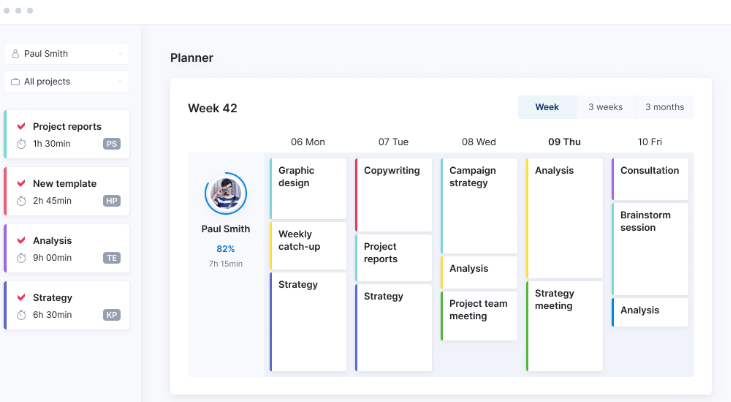
Scoro is an all-in-one work management platform built specifically for professional services — the agencies, consultancies, IT teams, and studios that live and die by margins and billable hours.
Where many tools stop at “here’s what everyone’s working on,” Scoro connects capacity to revenue, pipeline, quoting, financials, and delivery. Every time you adjust a timeline or add a soft booking, you see the ripple effects across everything else, like your workload and budgets, too.
Scoro’s scheduling experience is also notably sophisticated. The Planner and Gantt chart tools update in real time, auto-adjust dependencies, and spot overload risks the moment they appear.
Key features
- Real-time capacity views: Live resource utilization dashboards, role-based availability, and workload heatmaps for spotting overload early.
- Agile Gantt chart with automatic updates: Build plans with dependencies that adjust instantly as schedules shift.
- Tentative bookings: Soft-book roles or specific people to explore scenarios, check feasibility, or model upcoming work before locking anything in.
- Integrated business workflows: Because Scoro ties your new projects to quoting, invoicing, budgets, and pipeline, your capacity plan reflects the actual health of the business.
- Customizable dashboards: Bring together your business goals, utilization, financials, and project progress in flexible, client-ready views.
User reviews
“Exceptional capacity tracking is Scoro’s standout feature for us. It provides a crystal-clear view of our team’s availability, which is crucial for realistic scheduling, hitting deadlines, and maintaining a healthy workload.” — Marta B., a senior project manager
“Like any robust platform, it takes a bit of time to get fully set up and learn all the features.” — Julia L, a group finance director
Pricing
- Free trial for 14 days
- Paid plans from $19.90 per user/mo
- 4 paid plans available: Core, Growth, Performance, and Enterprise
5. Productive
Best for: Agencies optimizing for profitability, budgets, and resource capacity planning in one place
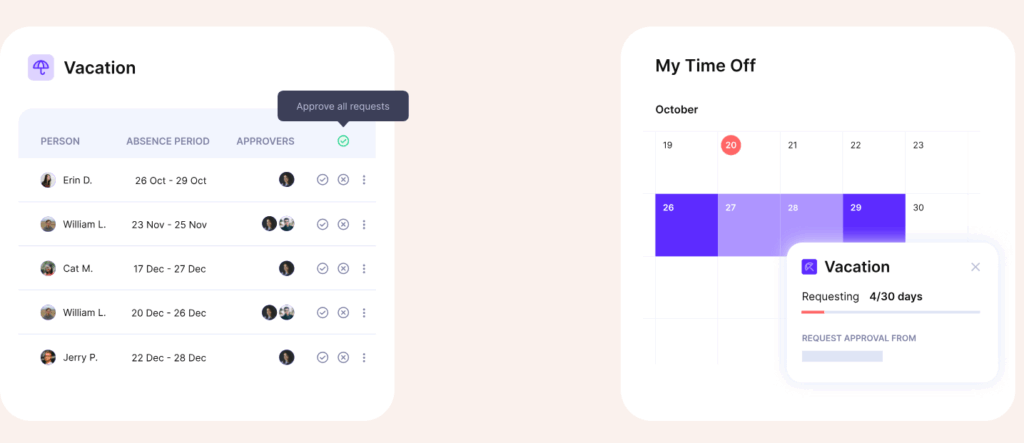
Productive is a full professional services automation (PSA) platform built for agencies that want one tool to run the entire business. It brings scheduling, budgeting, time tracking, and profitability into a single system, so your capacity plan isn’t floating off on its own.
What makes Productive stand out is the agency focus. Every hour you schedule ties back to budgets, billable targets, and revenue. If you care about keeping your future projects healthy and profitable (which of course, you should!) Productive gives you visibility without hurting your brain.
Key features
- Resource grouping and filtering: Organize people by skills, teams, departments, seniority, or custom fields then filter by project, client, or role to simplify high-level planning
- Availability and workload overview: See who’s booked, who has capacity, and who’s out on vacation or sick leave, all in one view.
- Placeholder bookings for future planning: Model hiring needs or contractor roles and get a clearer picture of upcoming costs and capacity gaps.
- Pre-scheduled time and smart timesheet suggestions: Book work in advance so time tracking becomes faster and more accurate. Productive suggests entries based on scheduled work to simplify timesheets.
- Integrated time-off management: Approve vacation requests inside Productive, with time-off entries automatically reflected in your capacity plan.
- HR and people-system integrations: Connect Productive to your existing HR software so PTO, availability, and staffing changes stay synced across tools.
User reviews
“The most helpful thing for us as an agency is the visibility we have over everything going on in the business.” — Marc S., an operations director
“Onboarding for new team members is very easy, and it helps our managers keep on track with budgets, tasks, and resource planning.” — Zuzana N., a managing director
Pricing
Premium plans require a minimum of three users. Volume discounts are available on plans with 50+ users.
- Free trial for 14 days
- Paid plans from $9/mo
- 3 paid plans available: Essential, Professional, and Ultimate
6. Runn
Best for: Project-based teams requiring affordable capacity planning with simple scheduling views
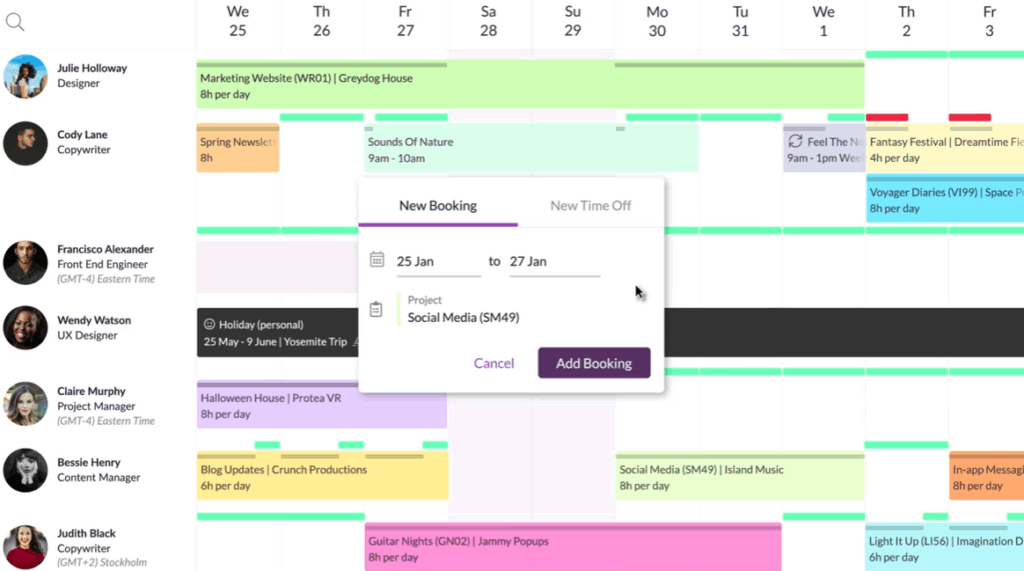
Runn is a cloud-based resource and capacity planning tool especially popular with project-based organizations, who need to see how their people, projects, and timelines fit together week to week.
What makes Runn appealing is how approachable it feels, although the platform also has some surprisingly strong forecasting features. You can model future roles and even track the revenue impact of your planning decisions. For teams who want reliable capacity planning without breaking the budget, Runn is an easy win.
Key features
- Balanced workloads over time: View your entire resource pool across both short-term and long-term timelines. See how upcoming projects impact your team before they start.
- Custom work hours per person: Set working days and hours individually (full-time, part-time, flexible) so you allocate work only when people are truly available.
- Time off and holiday visibility: Track leave, vacations, and regional holidays in the same view so your scheduling never surprises you.
- Tagging by skills, location, or role: Filter and slot in people using custom tags (skill-set, location, seniority) to match tasks or roles fast.
- Live insights into capacity, revenue, and utilization: Drill down into each person’s workload, billed hours, utilization rates, and see how resources tie into revenue outcomes.
- Placeholder allocations for hiring forecasting: Use dummy roles or placeholders in your plans to model future capacity, contract vs hire decisions, and track when you’ll need additional resources.
- Roles and teams assignments: Group people into teams or roles for faster, higher-level scheduling and capacity modeling.
User reviews
“Runn works well for our organization because it’s inexpensive, cloudbased, and meets our scheduling needs as project managers.” — David B., an executive director of strategic accounts in the hospitality industry
“Runn allows us to create schedules for our team of consultants. By viewing a person, we can see each project assigned and the weekly hours allocated.” — A sales user
Pricing
- Free for up to five people
- Paid plans for $10 per person/mo
- 3 paid plans available: Starter, Professional, and Premium
7. Resource Guru
Best for: Teams that want simple capacity overviews across human and non-human assets
Resource Guru gives you visibility across everything you book: people, rooms, equipment, whatever your team depends on. Its standout feature is the color-coded heatmap view that makes overloads and gaps obvious at a glance. It’s also built around ease of use.
The platform is intentionally lightweight. While it does include project management software, the focus is on forecasting and scheduling, enough to keep everything in one place, without turning into a full PSA system.
For many teams, one of the biggest draws is the price: you get high-quality capacity views at a fraction of the cost of enterprise platforms. If you want to see your capacity clearly and act fast, Resource Guru is a solid choice.
Key features
- Capacity heatmaps: Color-coded views that reveal overload risks, under-utilization, and bottlenecks at a glance.
- Project and booking management: Assign work, manage resource allocations, and keep project schedules aligned with real availability.
- Leave and availability management: Track vacations, sick leave, holidays, and custom hours to keep capacity accurate.
- Clash management: Guru automatically flags double-bookings or conflicts so you don’t overschedule people or gear.
- Powerful filters and tags: Filter by role, skill, resource type, department, project, or custom fields to find the best fit for each task.
- Reporting dashboards: See utilization, billable vs. non-billable time, project load, capacity trends, and more.
- Integrations: Connect with calendar tools, project systems, identity providers, and more, depending on the plan.
User reviews
“Resource Guru offers flexibility in booking people and provides better visibility into our current capacity, helping us plan more effectively.” — Cecilia G., chief operating officer for a small business
“Resource Guru makes it super easy to balance workloads and forecast capacity. This way we can plan ahead without getting lost in spreadsheets.” — A user in the consulting space
Pricing
- Free trial for 30 days
- Paid plans from $5 per person/mo
- 3 paid plans available: Grasshopper, Blackbelt, and Master
8. Saviom
Best for: Enterprise-scale capacity and resource planning across departments or regions
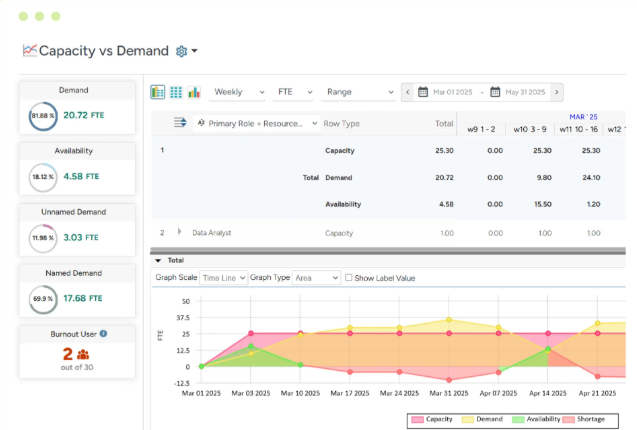
Saviom is an enterprise-grade resource and capacity planning platform built for organizations with complex, multi-team operations. It’s designed for environments where you’re coordinating hundreds of people, roles, skills, locations, and timelines, often across entire business units.
Capacity planning sits at the core of Saviom’s platform. The tool gives executives, PMOs, and resource managers a real-time picture of future demand forecasting versus actual availability, so they can respond early by distributing work, hiring, reskilling, or adjusting delivery plans.
Unlike many modern tools, Saviom does not include built-in time tracking. Instead, it leans heavily on long-horizon planning. It’s designed for organizations with mature processes and large data sets, rather than small teams looking for simpler functionality.
Key features
- Capacity vs. demand reporting: See projected shortages or excesses across your pipeline so you can act before bottlenecks appear.
- Multi‐dimensional scheduling: Schedule people, equipment, roles, even across region, with drag-and-drop, bulk booking, and layered filters.
- Skills and competency matching: Match resources to tasks based on skills, scenario modeling and competency matrixes so you’re not just assigning “someone free” but “someone fit.”
- What-if analysis: Test hiring decisions, project starts, changes in demand and see the impact on capacity, cost, utilization, and schedule.
- Advanced analytics and dashboards: Real-time utilization heatmaps, forecast vs actual comparisons, and enterprise-grade reporting inform strategic decisions.
User reviews
“It has robust forecasting capabilities that help anticipate future resource needs.” — Puja K., a mid-market associate
“We were always reacting to staffing issues, never ahead of them. The embedded capacity planner changed that. It shows us future resource gaps in time to act, whether that means reskilling, hiring smartly, or tweaking deadlines.” — Glenn Holt
Pricing
Accurate pricing is available from the vendor on request.
9. Smartsheet
Best for: Teams who like spreadsheet-style planning
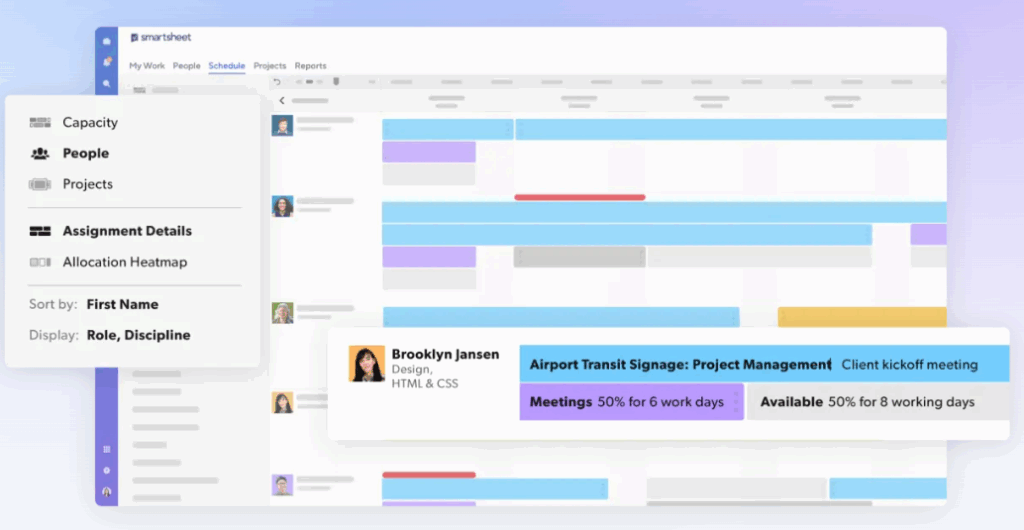
If you’ve ever used Excel or Google Sheets (so… basically everyone), Smartsheet will feel instantly familiar. It takes that classic grid layout and layers real work management features on top — things like automations and resource planning tools that spreadsheets simply can’t handle.
Teams can choose one of two paths for their capacity planning needs:
- Turn on Resource Management by Smartsheet, an optional feature available as part of the Business and Enterprise plans, or included in the Advanced Work Management plan. This unlocks scheduling, utilization tracking, forecasting, and skill-based assignments.
- Use Smartsheet’s free capacity planning templates, which are perfect for lighter setups. They let you build workload trackers, staffing forecasts, and team-capacity sheets without enabling the full module.
This flexibility is a huge part of Smartsheet’s appeal. If your team likes planning in grids but has fallen out of love with Excel, Smartsheet gives you a solid middle ground.
Key features
- Capacity heatmaps and utilization dashboards: Spot over-allocation and under-capacity with color-coded views across teams and roles.
- Skills- and role-based assignments: Allocate work based on skills or placeholder roles when specific people aren’t confirmed.
- Portfolio management visibility: Roll up capacity, performance trends, and bottlenecks across all active projects.
- Dashboards and automations: Build dashboards for workload, project health, and resource demand; automate reminders, approvals, and updates.
User reviews
“About 9 months after starting our journey, we are starting to learn more tricks to improve our reports and dashboards to better balance our team’s capacity and visualize progress toward completing deliverables.” — Erin O., senior director of strategic research for a small business
“The dashboard was a doddle to implement to a TV screen downstairs allowing real time viewing of our capacity.” — Jacob P., a production planner for an enterprise company
Pricing
- Free plan for two editors/viewers
- Paid plans from $9 per user/mo
- 4 paid plans available: Pro, Business, Enterprise, and Advanced Work Management
Honorable mention: Planroll
Planroll is the new kid on the block, recently launched after its founder “got fed up with expensive and overly-complex resource planning tools.” There’s only one plan, but it’s 100% free and easy to use.
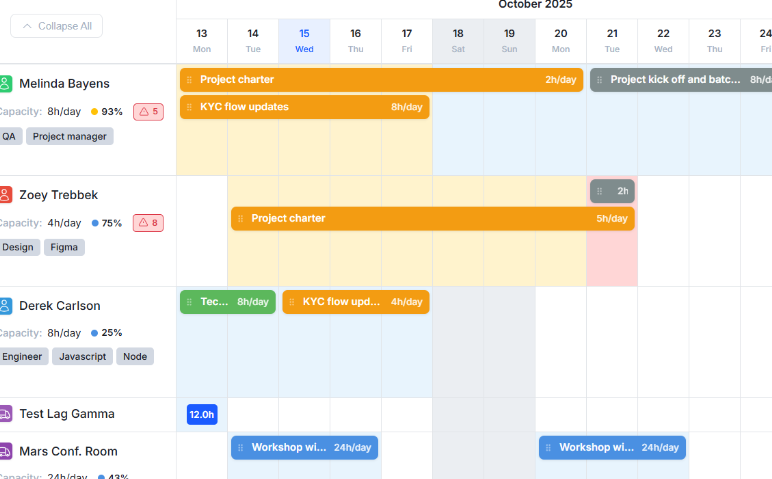
Planroll’s features include:
- Visual capacity planning: Instantly see who’s booked, who’s free, and where capacity is stretched using clear drag-and-drop timelines.
- Resource availability tracking: Monitor and allocate team members based on real availability.
- Workload balancing: Shift tasks between people, filter by who can take on new work, and keep deadlines realistic.
- Task management: Manage work centrally with priority settings, deadlines, statuses, filters and grouping features.
- Integrated time tracking: Log time spent, generate flexible reports, and assess productivity patterns without switching tools.
- Easy import of data: Bring in your existing tasks, projects or resources via a guided wizard to get started fast.
Note: As Planroll is a new tool, user reviews aren’t currently available. But as a free tool, with no surprise fees or add-ons, it’s a good shout for startups or smaller businesses that want to experiment with capacity planning functionality without putting a dent in their budget.
4 best practices for selecting the right capacity planning tool
Pretty timelines and blinged-up dashboards are well and good. But the only thing that matters is that your tool of choice gives you laser-sharp visibility into your organization’s capacity.
Here are four practical steps you can take to choose the best tool for your team, and avoid getting stuck with something that looks great in demos but flops in real life.
1. Start with the problem you’re trying to solve
Before you even glance at a features page, know why you need a tool in the first place.
Capacity planning tools solve different problems, such as:
- We keep overbooking people without realizing it
- We have no idea who’s at capacity until it’s too late
- We don’t know how much work we can take on next quarter
- We’re flying blind on utilization and billable hours
- We can’t forecast hiring needs with confidence
Once you understand your top pain points, it’s much easier to filter tools. For example, if forecasting and long-term visibility are your biggest struggles, skip tools that only show weekly workloads. If utilization matters, avoid tools that don’t have extensive time tracking capabilities.
2. Decide how important accurate time data is to your planning
One of the biggest differentiators between tools is how seriously they track time. Basically there are two types of capacity planning software:
- Estimate-based tools: Guess task durations and hope the reality matches the plan.
- Time-data-driven tools: Base capacity and forecasting on actual tracked time, historical patterns, and real availability.
If your work is billable, deadline-sensitive, or dependent on utilization targets, you’ll want the second category.
Tracking and keeping a record of every minute that goes into your tasks prevents you from overpromising; instead, you’ll make realistic budgeting commitments you can keep. Tools with weak or optional time tracking often create more problems than they solve.
Again, this is exactly where Toggl 2.0 stands out. It’s built around world-class time tracking first, then wraps project planning and capacity around that data. You plan based on what your team actually spends time on, not what you think they spend time on.
3. Match the tool’s complexity to your team size and workflow
A lot of teams overshoot this part. They buy an enterprise-sized platform … and then spend six months trying to get people to actually use it. Ask yourself:
- How big is the team using the tool?
- Do we need simple visibility, or advanced forecasting across several of our teams?
- Are we managing billable clients, product development, cross-functional initiatives, or a combo of everything?
- Does the tool need to replace our current PM tool, or sit alongside it?
As a general rule of thumb:
| Team type and size | Look for … |
| Small teams Agencies Product squads | Simple setup Visual planning (boards, calendars, timelines) Strong time tracking |
| Growing teams Multi-project environments | All the above plus … Utilization reports Forecasting Team-level planning |
| Large orgs | All the above plus … Role-based allocation Multi-team dashboards More rigid workflows. |
4. Do a deep dive into pricing
Last but not least, pricing is a huge consideration as you’re exploring different partners.
Check:
- Is capacity planning included, or is it an enterprise-only feature?
- Are utilization or forecasting tools paywalled?
- Is time tracking included, basic, or nonexistent?
- Is the free plan truly usable, or just a teaser?
Reveal your real bandwidth with Toggl 2.0
Capacity planning is about people — your people — and giving them the time and balance they need to do their best work. When you understand your team’s true bandwidth, everything changes. Instead of hoping you’ll have the capacity to deliver, you know you do.
Toggl 2.0 delivers clarity you can trust. Once you’ve unlocked that clarity, you can make smarter commitments and run projects you’re proud of.
This is your moment. Start your journey with Toggl 2.0 and open the door to smoother capacity planning.
Frequently asked questions (FAQs) about capacity planning tools
What is the best tool for capacity planning?
The “best” capacity planning tool really depends on what your team needs. Factors like your team size, budget, industry, and preferred tech stack all play a part. For example, a small studio might prioritize clean scheduling and easy drag-and-drop planning, while a professional services firm might need deeper forecasting and financial insights.
If you want a tool that uses real tracked time as the backbone of your capacity planning, sign up for a free Toggl 2.0 account to kickstart your planning, or upgrade to the Starter plan to unlock capacity basics.
What is a capacity planning tool?
A capacity planning tool reveals how much work your team can realistically take on. Looking closely at factors like availability, skill sets, working hours, time off, and demand, it shows who’s overloaded, who has bandwidth, and whether those upcoming projects you promised to take on are feasible.
Can you do capacity planning in Excel?
Yes, you can certainly try to do basic capacity planning in Excel. If you’re an early-stage team with a simple schedule and a penchant for tiny cells, then Excel could be a good fit. But as capacity planning requires constant manual updates, most businesses switch to a dedicated tool as soon as teams grow or something goes wrong.
Is capacity planning the same as resource planning?
No, capacity planning and resource planning are not the same thing. Capacity planning sets the limits (like how much work you can take on) while resource planning distributes the work inside those limits (who is doing what, and when?) Ideally, teams need both as the best way to avoid the delays and burnout associated with overbooking.

Rebecca has 10+ years' experience producing content for HR tech and work management companies. She has a talent for breaking down complex ideas into practical advice that helps businesses and professionals thrive in the modern workplace. Rebecca's content is featured in publications like Forbes, Business Insider, and Entrepreneur, and she also partners with companies like UKG, Deel, monday.com, and Nectar, covering all aspects of the employee lifecycle. As a member of the Josh Bersin Academy, she networks with people professionals and keeps her HR skills sharp with regular courses.