Creative teams are stuck in admin mode all too often, slogging to keep their creative projects on track.
In a recent project management survey, 97% of agency professionals faced at least one major creative project challenge, such as budget overrun (55%), missed deadlines (54%), or constraints on creativity (47%).
The underlying reason behind many of these mishaps? Lack of structure.
Many teams approach every project as a one-off effort and rebuild the entire process from scratch. Briefs change formats. Scoping happens on gut instinct. Feedback arrives as scattered messages.
Other teams fall into the trap of confusing “being busy” with “delivering value”, and end up chasing the wrong priorities and diverting energy away from meaningful work.
The fix to these is a stronger creative project management approach. This guide explores how to build such an approach by covering the creative project lifecycle, best practices, and tools built for creative project management.
What is creative project management?
Creative project management is a collection of methods for organizing and delivering creative work. In its most basic form, it helps teams establish the end-goals, chart a path towards them, and get there smoothly.
To do so, you need to:
- Determine the project objectives
- Define deliverables and success criteria
- Break these into tasks and subtasks
- Establish timelines and set deadlines
- Allocate resources
- Coordinate workflows
- Handle bottlenecks
- Manage approvals
- Monitor deadlines
- Review outcomes
- Give feedback to your team
This list sounds like a lot, but when you have an established system and the right creative project management tools, these steps happen on autopilot. Individual contributors understand their role, expected timeline, and required inputs at each stage of the project. Managers see where slowdowns and slip-ups are a risk, so they can fix things proactively.
The purpose of creative project management isn’t to be more effective on paper, i.e., push out more deliverables in less time. Instead, the process should remove the frustrating bottlenecks, low-value workload, and communication slog so your people have more room for creativity.
And to get to this blissful state, you need to understand the mechanics behind the creative work.
The creative project lifecycle (4 main steps)
Many creative projects don’t have much in common in terms of outputs, but most share an underlying set of processes. Graphic design projects and PR campaigns may differ in output, but both rely on a similar series of steps — from research to execution, reviews, and a launch.
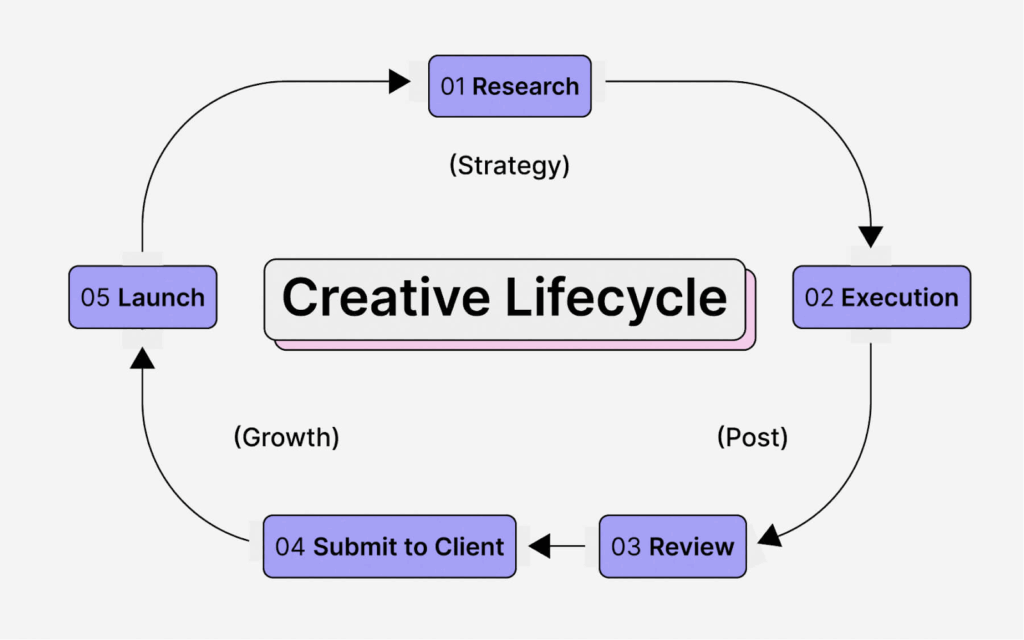
Source: Motion
#1 Project initiation
The initiation stage aligns what needs to be done, why it matters, and what a successful project would look like.
Whether you’re working with a client or internal stakeholders, you’ll need to establish:
- Deliverables: What will your team deliver at the final outcome and at various milestones (media plan, creative concepts, final proofs, etc.)?
- Budget: Break down the total cost across sub-items, such as design hours, project management overheads, freelancers’ fees, etc.
- Milestones: Set fixed timeline points to indicate completion dates for important stages, approvals, or deliverables.
- Timelines: Assign start and end dates for key milestones and sub-tasks with some buffer time for external inputs and feedback.
- Reporting: Outline expectations for team collaboration. How often and which updates should be shared and with whom?
When you do the work upfront, fewer surprises happen later. Everyone has a shared view of the project and the final destination. From there, you can jump into the brainstorming stage to hash out the finer creative details.
#2 Project planning
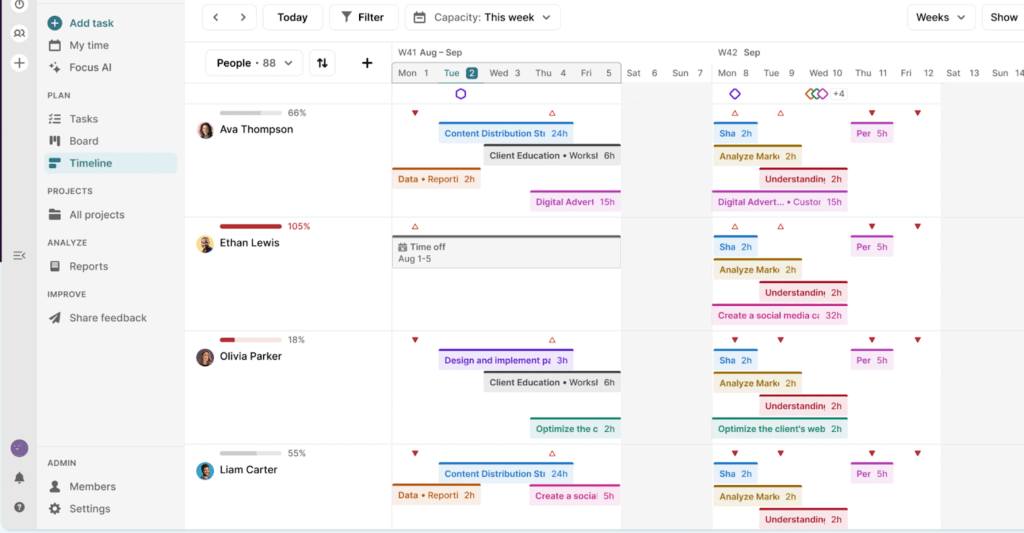
As part of the planning phase, you translate the project scope into a plan your team can follow. Break project goals into tasks and to-dos. Map out dependencies between different people and inputs, assign owners, set deadlines, and then pull together a project timeline.
For example, here’s how smart project planning might look in Toggl 2.0 — our simple but powerful project management and capacity planning solution.
As you plan, watch out for:
- Timelines with zero breathing room. Always leave buffer time for inevitable delays, revisions, or prolonged review cycles. Most imporatntly, leave room for creativity, as you never know when a great idea will strike and force you to reorganize a few tasks.
- Hidden dependencies. Check for tasks that rely on someone else’s work, approvals, or assets and sequence them in the right order.
- Unlimited team bandwidth. Your people need breaks, weekends, and PTO. Always check your planned workloads don’t cross into burnout territory.
- Vague task definitions. Avoid writing tasks so broad that no one knows what’s “done.” This leads to slowdowns and unmet expectations.
- No comms plan. Failing to clarify how and when to share updates, handoffs, and questions is a cardinal sin of teamwork.
Work with your team to create realistic and manageable workloads. Remember, they’re likely working on several projects and need some breathing room in between.
Also, don’t forget about risk management. Project risks like scope changes, budget overruns, and partner delays often derail the ideal strategies. So, keep some mitigation strategies in the back of your head.
#3 Execution
The execution stage is pretty straightforward: it’s where you get stuff done.
Since you’ve invested time upfront building a comprehensive plan, mitigating risks, and assigning tasks and due dates, your team member should more or less be able to run with it.
Of course, things don’t always go smoothly, so you should track progress, monitor project budgets, manage dependencies, adjust timelines, and support your team members when things feel slightly hectic.
Time tracking is a powerful way to make project progress happen without pushing your people too hard. By analyzing everyone’s time entries, you can understand how workload flows across tasks, projects, and clients.
#4 Review and feedback
Every project wraps after all the feedback is in, approvals are signed off, and the work is passed on to the next team or the client. The review process itself can be quite tedious if it lacks structure.
Set clear deadlines for when stakeholders must provide approvals or request edits. Ask for consolidated feedback, so your team doesn’t task-switch to address “one last small issue.”
For bigger projects, host a feedback session with your team. How did things go internally? Any particular peeves? What could be done better next time? Use constructive feedback to streamline workflows, automate repeatable steps in the project management process, or improve client onboarding.
Next, look into your project data for extra context. Have we delivered on time and on budget? What tasks took the most time? Who was overloaded and who was slightly under capacity?
You can also use time data to tie workload to profitability. For example, you can set billable rates and run budget forecasts based on the estimated revenue minus incurred costs. Or compare estimated vs logged hours to accurately forecast project timelines and budget burn rates.
6 best practices for effective creative project management
The beauty of project management is the ability to tailor proven methods and frameworks to the way your creative team works. That way, project management can support the creative process instead of stifling it.
And since each creative team is different, treat the following suggestions as recommendations, rather than unquestioned principles you should follow to the letter.
1. Start with a simple system
You don’t have to become a certified Scrum Master (real title) or an Agile ninja (sadly not) to deliver projects without constant fire drills. But understanding the main traditional project management methodologies can help you structure and allocate work.
Here are three great methods for creative agencies:
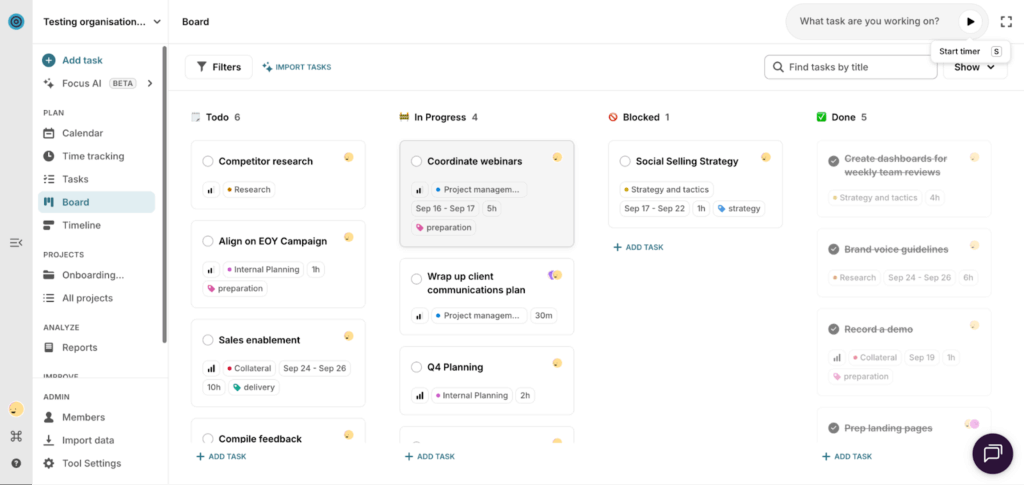
- Kanban boards are a simple visual system where all work moves through To Do → In Progress → Review → Done stages. It’s ideal for managing a high volume of small tasks, huddled within the same project.
With a Toggl 2.0 Kanban board, you can set deadlines, priority levels, and even time estimates for each assigned task. And use custom tags to comb through different action-items to get more context.
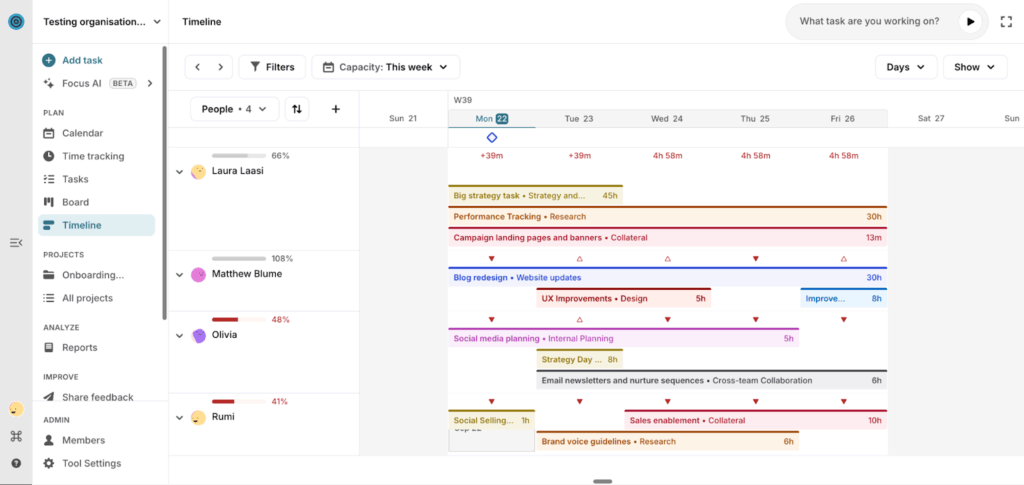
- Lightweight Gantt charts present all planned work on a visual timeline, so you can sequence tasks and see dependencies. It’s a quick way to see who’s busy and who’s available to pick up extra work, based on assigned tasks and planned work hours.
- Scrum-style sprints are an effective way to move from ideation to action on a big project. A sprint is a time-boxed work cycle (e.g., one or two weeks) when your team focuses on delivering a prioritized set of tasks. Together, you’ll choose which tasks to handle and how to complete the work before the end of the sprint.
Place selected sprint tasks on a Kanban board or on a timeline, both saved as templates(and with Toggl 2.0, you can actually switch between these two views anytime).
Once the time is up, the team demos what has been done to get stakeholder and/or client feedback. As a manager, you can also host sprint retrospective meetings — a no-judgement, candid discussion about opportunities to do even better next time.
Pro tip: Match your project management approach to your company
Smaller teams don’t need layers upon layers of project management. A simple, flexible setup works just fine.
The key is to make your process repeatable…something you can replicate with a few tweaks when you have more people on board and more parallel workstreams running.
It’s easier to scale an existing base project management approach than to start from the ground up. You’ll face less cultural resistance and spend less time training people to follow your method.
2. Create a metrics layer
Once you have some semblance of a system for scheduling work, you can start measuring its effectiveness. You don’t need an alphabet soup of complex KPIs. Most creative teams only need three ways to check they’re on track:
- Time tracking shows how long work actually takes, which tasks overrun, and where you lose focus.
- Budget tracking connects those hours to real costs, so you can see if a project’s still profitable or drifting into the red.
- Workload tracking adds the human layer — who’s slammed, who’s underutilized, and whether the team has enough capacity to take on the next request.
When these three tracking methods work together, you stop planning with guesswork. Time tells you the effort, budget tells you the impact, and workload tells you whether your team can deliver without stress spikes. It’s the trifecta that keeps creative work predictable, sustainable, and actually enjoyable.
Take it from creative professionals who rely heavily on smart tracking.
Bethany Kaylor of RogueMark Studios, a female-founded creative agency, shared that time data helped them understand how long each creative process step takes.
“Unless you’re in the creative industry, you probably don’t realize how much time, collaboration, and revision go into every finished product. With stop-motion animation, a video that’s 10 seconds can take weeks to produce,” Bethany said.
With accurate time data, the RogueMark team builds more realistic schedules to match client timelines and reflect available budgets. The team regularly checks how many hours are left for each stage. For example, if 50 hours were scoped for storyboarding and 35 are already used, they can adjust the remaining 15 to stay on budget and on schedule. This simple habit boosts flexibility and keeps communication clear with both teammates and clients.
Candybox Marketing, in turn, uses time and workload data to improve its client assessments.
After crunching its numbers at the end of the year, the team discovered they were undercharging for website development work. They improved their scoping process and adjusted the client pricing, resulting in a more sustainable team workload and higher agency revenue. They’re now growing at 40% YoY.
3. Monitor and address blockers
Once you have tracking in place, you can correlate different outcomes with different actions. Delays in campaign launches might map back to a slow legal review. And budget overruns in design projects may point to shaky initial estimates. But with the right data, you stop guessing and start diagnosing.
Brian Lee, President at Revelation PR, shared that “Toggl has made us more aware of the time we’re devoting to each task … and we’ve been improving our efficiency as a result.”
Even though his team doesn’t bill hourly, visibility into work duration shapes a lot of major decisions, like whether to accept or defer additional client requests. “I appreciate that I can now see how far along we are in the budget for a project at any given time,” he says, “and that allows me to either accept or defer additional tasks within the project.”
Once you’ve diagnosed what’s slowing the team down, through data, workflow analysis, and honest team feedback, you can apply targeted fixes. For example, you might:
- Tighten review loops with a smaller number of approvers or shorter feedback windows.
- Add more thorough intakes to properly capture and scope all assets, requirements, and client expectations.
- Speed up issue escalation with cleaner passes for reporting ‘repeat offences’ among clients or other departments.
- Adopt more collaboration tools to centralize assets and documentation, and keep all related notes and messages in one place.
Ultimately, great project managers are professional unblockers. They work relentlessly to remove friction, protect the team’s time, and foster an environment where creative work can flow without constant interruptions.
Pro tip: Conduct team ‘health’ check-ins
PMs often get obsessed with fixing processes and managing deliverables, making it easy to overlook other important team ‘vitals’ like:
- Individual clarity on roles and responsibilities
- Alignment on priorities
- Communication quality
- Shared success metrics
- Moral/energy levels
Creative teams often work under (sometimes self-imposed) pressure. Multiple projects, scope shifts, personality clashes, changes in wider company objectives, or lapses in personal time management each contribute to project success rates.
“We bring up [personal] metrics at coaching meetings, but we don’t obsess over them,” shared Beth Trajo, CEO of social media agency Chatterkick. “It’s important that our team tracks their time and tries to hit utilization targets, because it gives us better data to manage workload and planning. We want to give people a sense of organization without it feeling like handcuffs.”
Combining metrics with more personal check-ins allows you to detect early signs of friction, disengagement, or burnout before they become a bigger nuisance.
4. Build stronger collaboration practices
Collaboration is a widely praised pillar of effective project management. But it’s often harder to orchestrate than many managers think.
As humans, we naturally gravitate toward the path of least resistance. So collaboration often defaults to whatever feels easiest at the moment: Slack pings, scattered DM threads, half-sketched whiteboard screenshots, and “quick” meetings that solve nothing.
Low friction for one person becomes high chaos for everyone else. And the more people are involved — other departments, clients, partnering orgs, contractors — the more chaotic the process can become.
Creative teams need a few cultural norms that add clarity and intention to the process. Here are some practices that may sound appealing to you, too.
Spotify’s collaborative brief
One of the first things Nicole Burrow, Design Director for the Consumer Experience, did was introduce a collaborative brief. Designers and product partners build each brief together, defining the “why” before ideation starts. This shared alignment reduces misfires later and gives creatives the context to produce high-quality work.
Steal this idea: Create a shared template, used by different teams, where each fills in their respective sections. For example, in an out-of-home campaign production, Marketing would define the campaign goals, provide audience insights, key messages, and required formats. Design would outline the creative direction, constraints, and asset needs. Media or Operations would add placement specs, vendor requirements, and the technical details needed for final delivery.
Pixar’s Braintrust model
Some of Pixar’s most creative solutions were a result of “Braintrust” — asking a rotating group of colleagues to give constructive feedback on work-in-progress. Using this framework, “everyone could be extremely candid without anyone feeling attacked. It was an unwritten rule that became the foundation for the creative process on multiple films,” shared Ed Catmull, former President of Pixar.
Steal this idea: Invite people from other functions, such as Support, Sales, Engineering, to critique your work. Cross-functional reviews like these prevent isolation, identify your blind spots, and improve quality with plenty of room for experimentation.
H&M Group’s weekly workshops
To noodle on early-stage ideas, Dan Cariño, Product Designer at H&M Group, hosts
quick, structured Innovation workshops. The goal is to generate and prioritize concepts in under an hour.
For bigger decisions, they bring together a designer, a business voice, a tech lead — and critically, a Decider who can green-light execution. This keeps ideas flowing while avoiding the team becoming stuck in endless brainstorming.
Steal this idea: If you’re stuck with deciding on the key campaign messaging, carve 45-60 minutes of team time for rapid-fire iteration, based on your problem statement. Prioritize the best ideas and create tasks for the next sprint.
5. Optimize your team structure
Creative agencies sometimes lack formal project management capabilities, or even designated Team Leads. But when no one’s steering the ship, project chaos creeps in fast. Overcome this risk with a quick audit of your org chart to reveal where roles, responsibilities, and expectations should shift. Start by asking:
Are the right people in the right roles?
Some teams end up with an army of account execs and two overwhelmed creative designers. DoorDash’s Super Bowl Integrated Marketing Lead, Catherine Fagan, recently shared how a better team structure avoids this scenario — their creative studio uses three core roles with clear ownership:
- A business lead to integrate the whole process and keep things on brand, on brief, and under budget
- A creative director to uphold and elevate the creative vision
- A project manager to keep everything on schedule and to spec.
From there, they assembled a “pod” — a cross-functional group spanning marketing, PR, social, partnerships, media, CRM, product, engineering, and legal, who each report to these three roles. Everyone knows their lane, their decisions, and their responsibilities. No gaps, no overlaps.
Are the current teams too big?
Creative teams work best when they’re small and focused. Product design and development agency Impekable learned this first-hand after analyzing its annual project hours in Toggl Track to discover that smaller, dedicated teams are more efficient.
By reducing average project team size by 50%, they cut resource hours by 33% and increased profit margins, all while delivering stronger work. Smaller teams mean cleaner communication, faster decisions, and less time lost to coordination overhead.
Do we have the right number of leaders?
Too many reporting layers slow everything down. Too few leaders create bottlenecks because all decisions funnel through the same person.
Paxson Fay is a five-person, Seattle-based communications agency that realized they could be doing so much more if their leadership wasn’t constantly overwhelmed. Using employee time and capacity insights, they figured out how to better divide work and put people on projects where they have complete ownership. This improved their hiring strategy and freed the C-suite to focus more on business development.
Steal this idea: To diagnose issues at your company, look for signs like stalled approvals, unclear ownership, or one person becoming the “default” decision-maker for everything. Often, a small structural tweak, like adding a discipline lead, formalizing a project owner, or redistributing approvals, is enough to keep work moving faster.
6. Create more formal operations processes
As your team grows, the “everyone does everything” model eventually hits a wall. What worked for a five-person creative team doesn’t scale when you’re 20, 50, or 200-people deep.
You’ll have more specialized people, and with that, you need a more mature operational structure.
Take design teams as an example. Early on, a single UX designer might handle research, wireframes, copy, visuals, and motion. As the org matures, new specialist roles emerge — design researchers, UX writers, brand designers, illustrators, motion designers. That’s when a dedicated Ops function is essential.
For example, DesignOps teams handle all the supporting work — from briefing and tooling to hiring and resource management — creative teams need to focus on the craft instead of wrestling with the process.
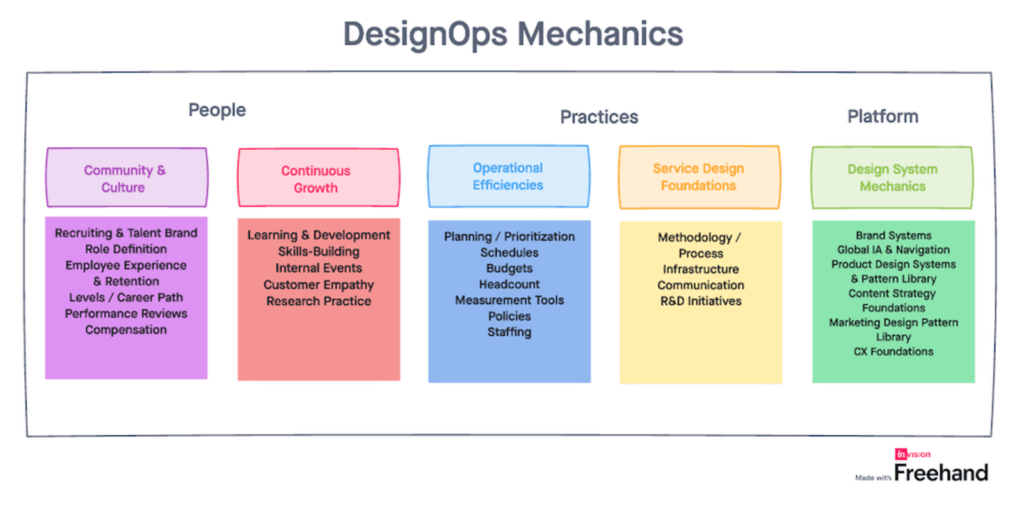
Source: First Round/Invision
Other teams introduce a wider CreativeOps process and team behind it, in charge of maintaining support shared policies, knowledge bases, tooling, creative workflows, and cultural practices for everyone else.
Investing more in the operational side of things allows you to achieve greater operating efficiencies, higher team engagement, and an effective system that scales with you.
Recommended creative project management software
Project management is all about finding the right method to handle your type of madness. Some teams struggle to keep the workloads sane. Others can’t stay on budget.
For this guide, we’ve picked three popular project management tools capable of fixing common creative teams’ woes. If you want a complete deep-dive, check our guide on the 40 best project management tools.
Toggl 2.0
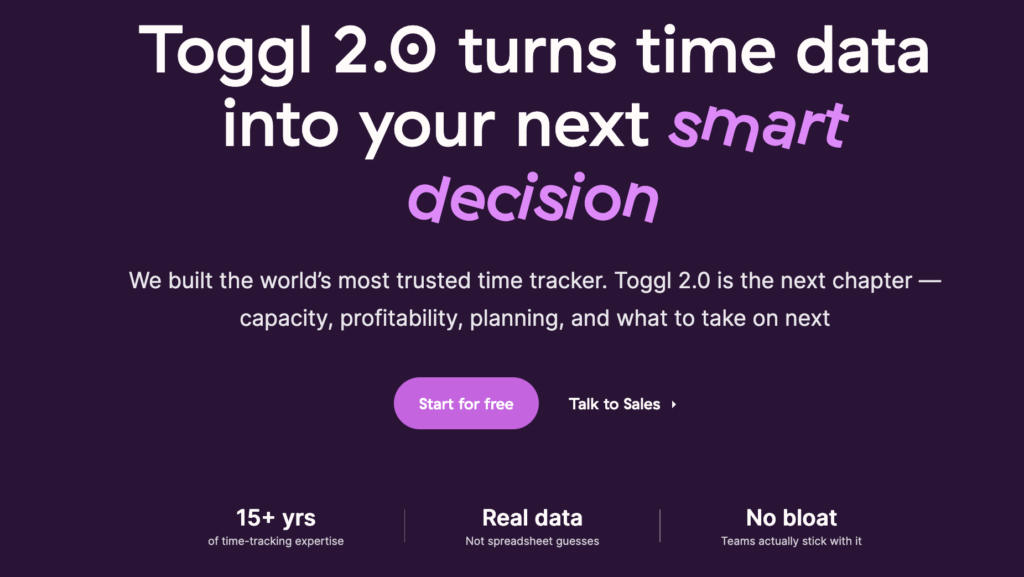
If you struggle with resource allocation and task management, take a look at Toggl 2.0. It allows you to plan projects visually, using your team’s time-based insights.
As opposed to simply dropping tasks on the board and hoping they get done, our tool provides a clear view of everyone’s capacity and availability. Based on that, you can build more realistic timelines, divvy up tasks fairly, and bring in some extra help whenever your team is up against it.
Thanks to built-in time tracking, you’ll know exactly how long tasks take and where unbillable admin work cuts into your team’s productivity. This improves estimation for future projects and ongoing task distribution.
Creative teams love Toggl 2.0 for its clean interface, multiple dashboard views, robust reporting capabilities, and the gentlest learning curve.
Air
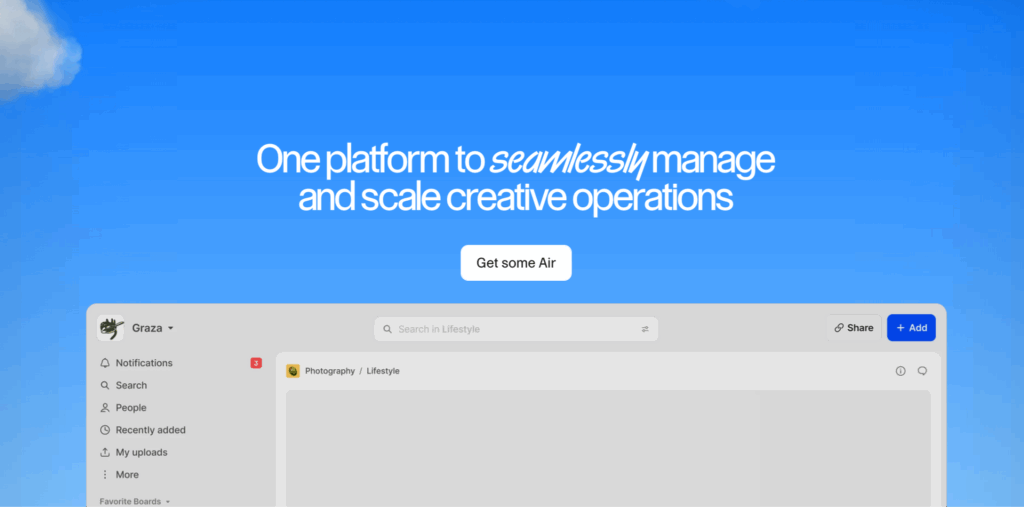
Teams drowning in creative assets may want to grab some Air. It’s a new creative asset management platform to store, categorize, sort through, and share all deliverables and WIP assets.
Apart from several TBs of cloud storage space, you also get robust AI-based keyword research to surface “that ad version with a couple in a green PJs” kind of thing. The assistant also generates concise summaries for your content, so you waste less time on swiping. Automated people detection in photos allows fast identification and organization of everyone captured in the content.
Features like advanced annotation commenting, timestamp commenting, built-in version control, and deletion recovery make Air a popular choice among creatives.
Lytho
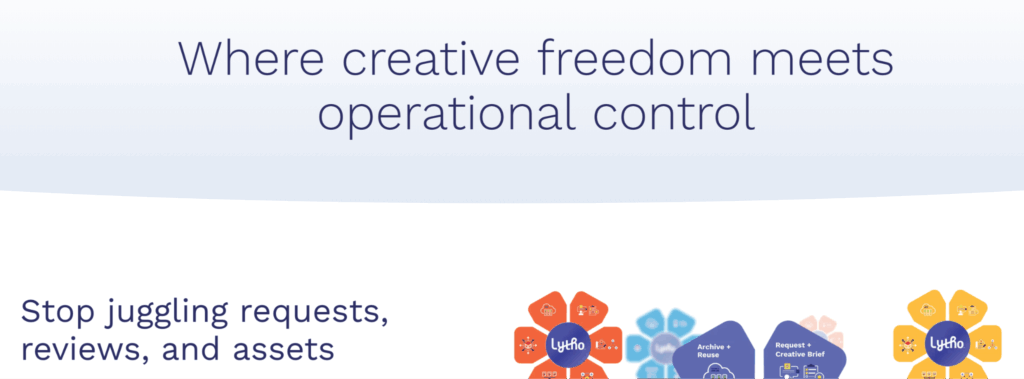
For creatives on a crusade against information asymmetry, Lytho could be a great sidekick.
This creative operations platform replaces ad-hoc emails and messy briefs with a standardized creative request form (which you set up to your liking). Choose what information you need to get started, capture more context from clients and stakeholders, then route these requests to the right people on your team.
Once the work is done, Lytho’s built-in review and approval loops keep feedback, versioning, and sign-offs organized. Reviewers can annotate and leave notes directly in-app. Permissions and version tracking ensure that no brand-unsafe asset goes public.
For teams producing loads of content and managing many stakeholders, this degree of automation saves heaps of time.
Creative teams need systems to channel their focus
Some creative teams may be reluctant to embrace project management, worrying it may stifle their creativity. The opposite is true.
A good creative project management system protects team time with clear ownership, more balanced workload allocation, faster handoffs, and greater visibility into project timelines. It doesn’t control creativity — it supports it. When structure and flexibility work together, creative teams can focus on producing their best work without unnecessary friction.
Toggl 2.0 helps teams build this kind of environment. Our tool combines task management, resource planning, and time tracking in one attractive workspace. Everyone’s priorities and capacity are immediately visible, and scope perfectly matches the planned timelines and allocated budgets.
If you want a more predictable, calmer, and more creative way of working, try Toggl 2.0 for free.
Frequently asked questions (FAQs) about creative project management
What is creative project management?
Creative project management is the practice of planning, organizing, and guiding creative work from idea to completion. It focuses on delivering projects like campaigns, designs, videos, or content while protecting the creative process. The goal is to provide enough structure to stay on track without limiting originality.
How does creative project management differ from traditional project management?
Traditional project management emphasizes fixed scopes, predictable outcomes, and linear workflows. Creative project management is more iterative. Timelines shift, ideas evolve, and feedback shapes the final result. Success depends less on rigid plans and more on adaptability and communication.
What skills are essential for a creative project manager?
A strong creative project manager needs clear communication, prioritization, expectation management, and problem-solving. Understanding creative workflows and knowing how to give constructive feedback are just as important as tracking deadlines.
What are the most common challenges in creative project management?
Creative projects often struggle with unclear briefs, changing feedback, and scope creep. Misalignment between clients and creatives is another common issue. These challenges are best addressed by setting clear goals early, documenting decisions, and building regular review points into the process.
What tools and methods work best for managing creative projects?
Visual and flexible tools tend to work best. Kanban boards, shared calendars, and collaborative feedback platforms help teams stay aligned. Many creative teams borrow from Agile methods, using short work cycles and frequent check-ins instead of long, fixed plans.

Elena is a senior content strategist and writer specializing in technology, finance, and people management. With over a decade of experience, she has helped shape the narratives of industry leaders like Xendit, UXCam, and Intellias. Her bylines appear in Tech.Co, The Next Web, and The Huffington Post, while her ghostwritten thought leadership pieces have been featured in Forbes, Smashing Magazine, and VentureBeat. As the lead writer behind HLB Global’s Annual Business Leader Survey, she translates complex data and economic trends into actionable insights for executives in 150+ countries. Armed with a Master’s in Political Science, Elena blends analytical depth with sharp storytelling to create content that matters.