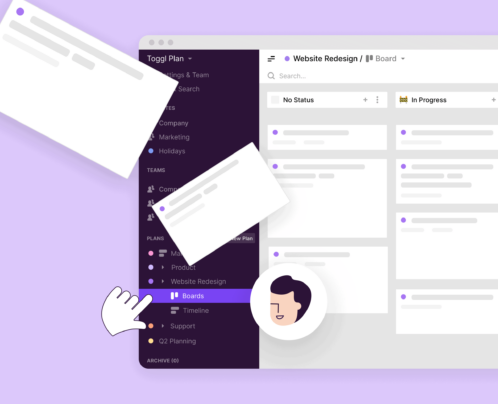
Good planning starts with knowing how long work actually takes and only works when you see what’s in motion, who’s responsible for it, when it’s happening, and where deadlines overlap.
And when multiple initiatives run in parallel, and the same people are shared across projects, scheduling can become a struggle. Without a clear timeline, teams struggle to sequence work deliberately and stay in sync.
Project timeline software helps you bring a method to this madness. However, these solutions are so many and so versatile that it’s difficult to find the right one for your needs.
Plus, many guides put all timeline tools under one category when they actually fit different teams and use cases. That’s why we’ve organized the 10 best project timeline software tools and platforms into five categories:
- Project timeline software with powerful time tracking: Toggl 2.0
- Gantt chart software for beginners and simple projects: GanttPRO and TeamGantt
- All-in-one project management suites with timeline views: ClickUp, Wrike, monday.com, and Asana
- Timeline software for developer-focused workflows: Jira
- Timeline tools for roadmap management: Aha! and Productboard
Before we dive into the specific tools, let’s cover the basics of project timeline software.
What is project timeline software?
Project timeline software answers a deceptively simple question: what’s happening when?
Instead of treating work as a loose collection of tasks, it shows how everything unfolds over time — task sequences, dependencies, deadline overlaps, and your individual or fractional contributions.
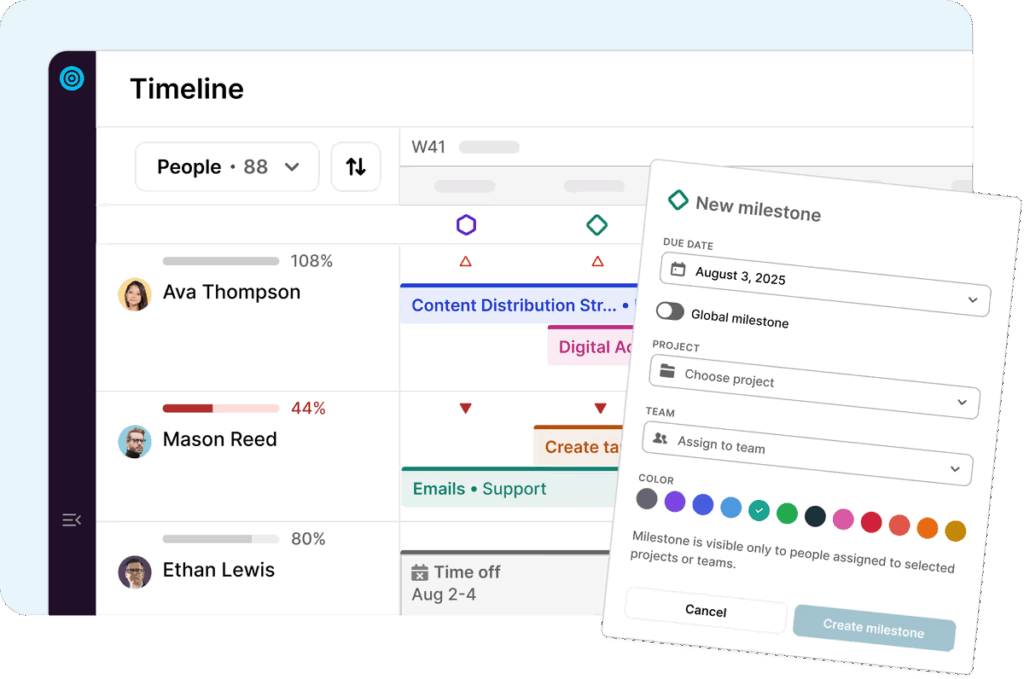
A time-based view is useful when multiple projects run in parallel and the same people are spread across them. Timelines turn planning from guesswork into something concrete — a realistic plan, based on actual capacity.
Unlike other project management tools built around task lists, boards, or cards, timeline software centers on schedules. You lay out all your planned work as daily, weekly, or monthly blocked time entries. Or as Gantt charts if you’re working on more complex projects.
What’s the difference between a Gantt chart and a timeline?
Timelines provide a high-level linear view of deadlines, events, and milestones, while Gantt charts are designed to provide a detailed view of tasks, durations, and dependencies. Here’s a quick breakdown of the main differences:
| Timeline | Gantt chart | |
| Primary information | When work happens | How work is sequenced and interconnected |
| Level of detail | High-level and flexible | Detailed and structured |
| Planning style | Lightweight, adaptable | Precise, control-oriented |
| Task dependencies | Minimal or optional | Core feature |
| Best suits | Marketing teams, agencies, and non-technical teams | PMs, operations, large delivery teams |
What’s a Gantt chart?
A Gantt chart allows you to visualize the structure of a project over time. It displays work as horizontal bars on a calendar, highlighting when tasks start and end, who owns them, and how they’re connected. Gantt charts give more detail on:
- Ownership
- Task duration
- Task dependencies
- Critical paths
- Timing risks
- Progress status
A Gantt chart is most useful when you want to see how a delay can throw everything else off. This kind of precision pays off when one delay can throw everything off.
What’s a timeline?
A timeline offers a simpler, more flexible view than a Gantt chart. Timelines focus on sequencing and deadlines without tracking every dependency. Instead of managing complex task relationships, timelines showcase work in progress, work ahead, and resourcing — basically, anything with a date in it.
Many non-tech teams use timelines for everyday planning, but reach for Gantt charts to plan out more complex, interdependent work, like software development sprints.
What are the important features for project timeline tools?
Again, timeline tools come in all shapes and sizes, so there’s no unique set of features that are right for every team. However, there are a few essentials that you should consider:
- A simple and clear time display. An intuitive interface is everything for a timeline software. The main screen should present your planned work across your preferred timeframe (hours, days, weeks, months, years, or any custom period), alongside deadlines, milestones, and tasks. Good tools support multiple layouts, such as horizontal, vertical, or Gantt-style, and also allow you to zoom between high-level and granular project views.
- Drag-and-drop timeline editing. A good tool helps you re-arrange tasks on the timeline whenever priorities shift. Check for features that allow you to drag entries on the time scale in real-time, re-assign owners, move tasks in bulk, or copy existing templates.
- Time tracking, estimates, and task durations. Good timelines are built on honest estimates, not wishful thinking. Look for tools that help with task estimation, either using actual team time tracking data or proven methodologies like Point or Bottom-Up estimation. These allow you to present accurate timelines to stakeholders and set realistic team deadlines.
- Task dependencies and sequencing. Some work can happen in parallel. Some can’t. Dependency mapping makes those relationships explicit, so team members know what needs to happen first and where delays will snowball. This is especially useful when multiple contributors are involved, and one blocked task can stall everything else.
- Milestones give structure to task management in long or complex projects. They mark key checkpoints by when certain things should happen — a deliverable sent for approval, passed to another team, or picked up for rework. Having milestones helps everyone stay focused on the key goal.
- Progress tracking and percentage of completion. Tracking progress in real time allows you to spot delays early and correct them before schedules fall out of sync. The percentage of complete work is a handy metric for a more in-depth view, showing how much work the team has already powered through and what’s left to burn.
- Resource and workload views. These two dashboards compare how planned work stacks up against actual capacity. The best tools highlight real-time availability, based on logged hours or planned workload and determine schedules like holidays and days off. They’re great for monitoring utilization and capacity across roles, projects, and time periods, and determining when to bring extra people on board.
- Collaboration tools. You know how “do great work fast” is one of your company values? That only happens when your teams are aligned. Features like shared timeline views, comments, automatic status updates, built-in file sharing, and version history keep everyone on the same page without “helicopter parenting” from the manager.
- Project planning templates. Starting from scratch is overrated. Prioritize tools that provide templatized (or easily replicable) project timelines and roadmaps, so you can slot recurring work in a beat.
- Data exports. Whipping up timelines as exported PDFs or permission-based access links saves a heap of time on stakeholder or client management. No messy screenshots or missing inputs — just one source of truth everyone can access.
- Integrations. Timeline tools need to play nice with the rest of your tech stack so planning stays in sync with how work actually happens. Pre-made or API-based integrations bring richer context to your timelines, like meetings and deadlines from Google or Microsoft calendars, product updates from dev tools like Jira, and real-time notifications or approvals from Slack.
Best timeline project management software with powerful time tracking: Toggl 2.0
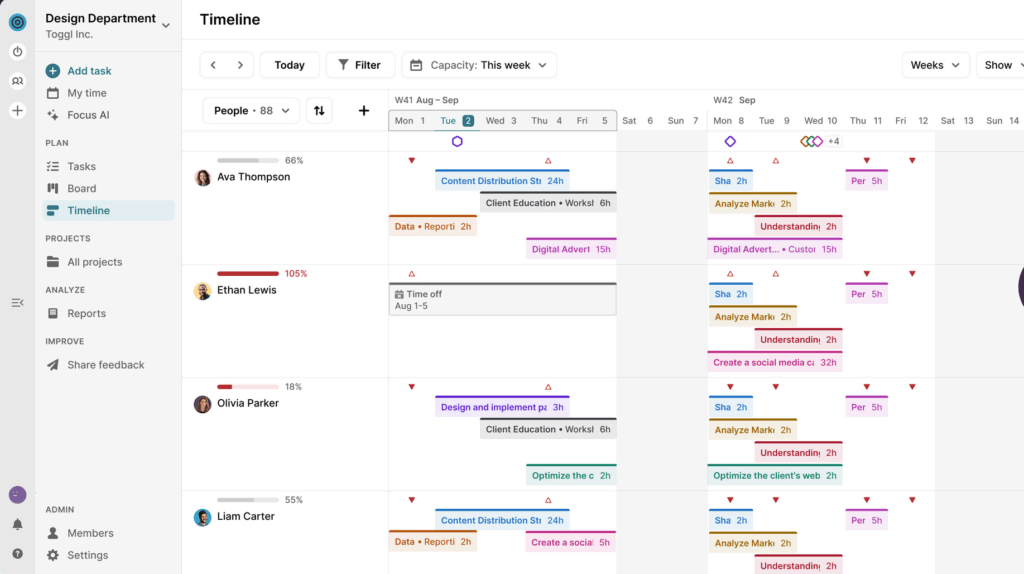
Toggl 2.0 is built on a simple but often overlooked idea: if your time data is off, your plans will be too. Many project management tools treat time tracking as a secondary feature, which usually means clunky workflows, patchy data, and workload reports you can’t really trust.
At Toggl, we took the opposite approach and made time tracking the center of our product, with everything else, from planning to capacity management, built on top of it.
Built-in time tracking removes the friction from logging billable time. You can then review time entries by client, project, task, or team member to get:
- Accurate future estimates
- Billable data for client invoicing
- Project profitability insights.
Equipped with accurate time data, you can start building your timeline.
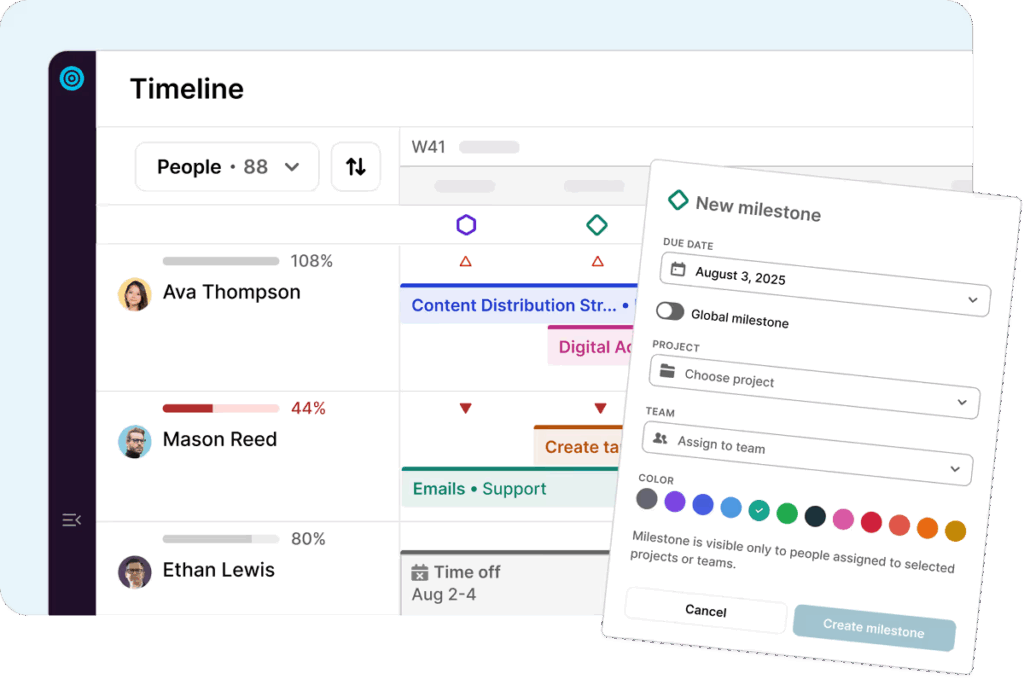
The timeline view gives you a clean, intuitive space to plan work. Drop tasks into slots when they need to get gone. Hover over each task to check the project, client, and due dates. You can also add milestones for specific projects or all tasks to prioritize work better.
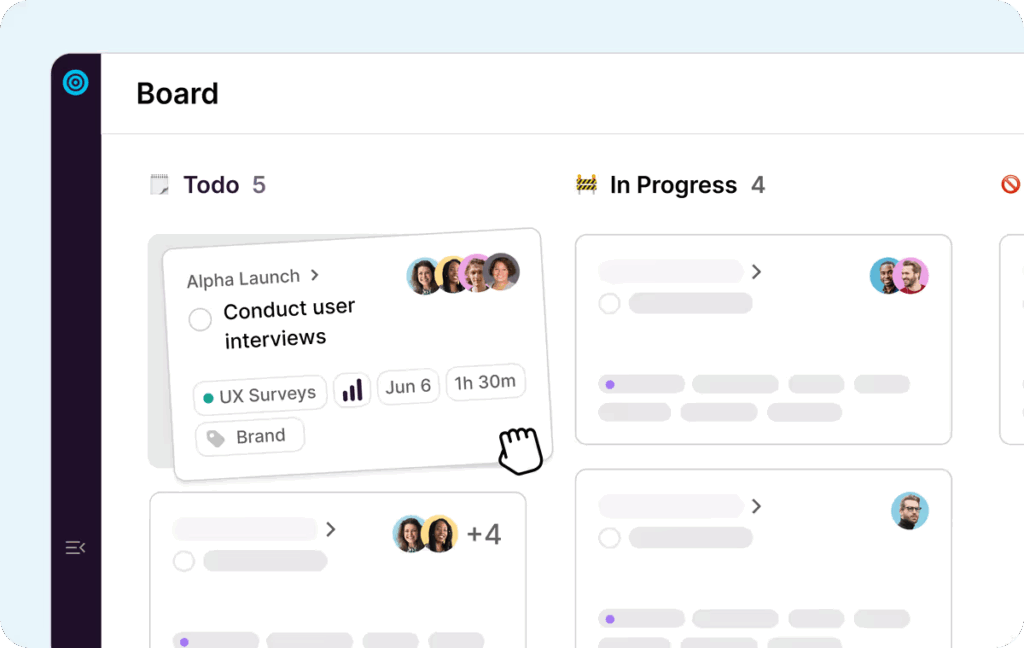
If plans change, it’s easy to reassign tasks or reschedule them with drag-and-drop actions.
You can also include time estimation for each scheduled task, so your team can time-block entries on their calendar.
For day-to-day execution, teams can switch to a Kanban board or calendar view. Both work well for managing day-to-day tasks as they come in.
Reporting features tie all your activity together:
- Capacity indicators, grounded in time data, give a more realistic picture of availability.
- Workload reports show resource utilization across roles, projects, and time periods, with clear visual signals for healthy capacity versus over- or under-allocation.
With Toggl 2.0, you can instantly see who’s busy, who’s free, and who’s over capacity to create more realistic project timelines.
Key features
- Accurate, low-friction time tracking at the core of the platform to ground planning and capacity management in real data.
- Flexible timeline views that can be grouped by project or by person to answer different planning questions quickly.
- Multiple workload views, including Kanban boards and calendars, for day-to-day task management.
- Scheduled tasks with estimated hours that appear on individual calendars as time blocks.
- Capacity management reports that visualize workload, utilization, and availability across time periods.
- Long-term workload forecasting to anticipate hiring needs and rebalance resources proactively.
Pricing
- From $9/user per month
- Free plan for up to five users

Best Gantt chart software for beginners
Small teams who want a clean-cut, easy-to-use Gantt software without any other bells and whistles should appreciate the following options:
GanttPRO
Source: G2.com
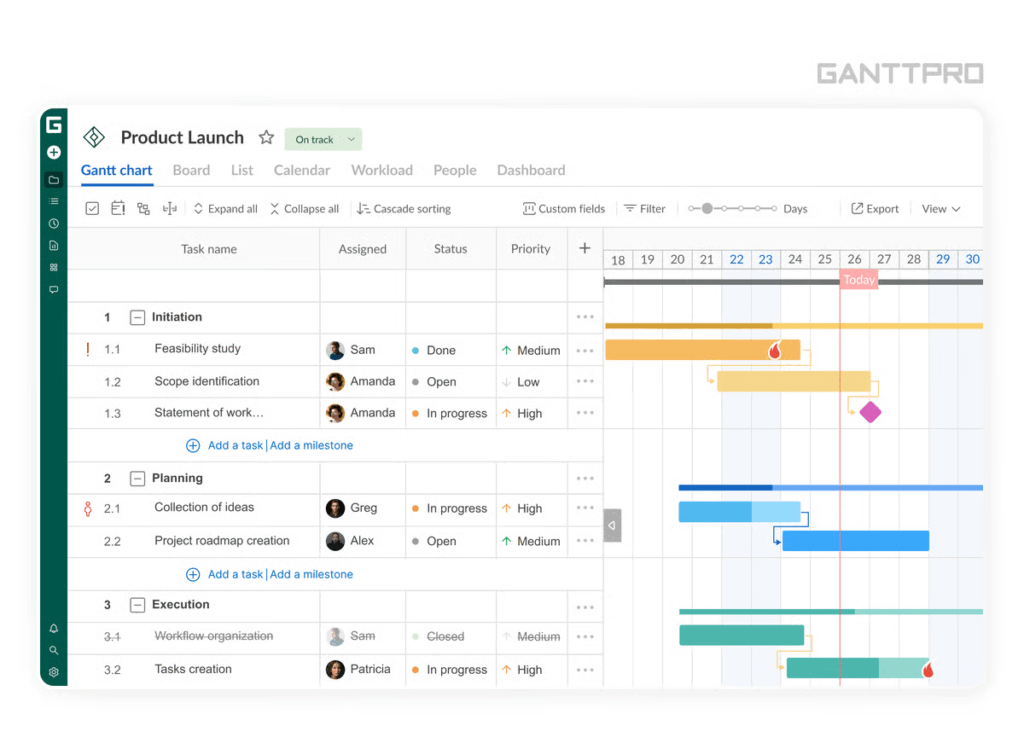
Despite being one of the first Gantt software solutions on the market, GanttPRO still feels fresh — it’s modern, clean, and smooth to work in.
Creating a project begins with the basics: start date, end date, and scope. From there, you can layer in more details, such as subtasks, milestones, dependencies, attached documents, and other details in custom fields.
As you fill in your project and map out its progress, GanttPRO automatically builds a timeline for you and keeps it in sync as work evolves. The only downside is that the overdue tasks filter is only available on more expensive plans, unlike other tools.
Where GanttPRO shines is in detail and control. Each task can include dates, progress percentages, priorities, estimations, dependencies, attachments, comments, and time logs. You can assign multiple people to a task, distribute hours, and let workloads recalculate automatically. Resource views flag overloads visually, and availability settings prevent scheduling people on days off.
But the ‘surprise’ comes in the pricing. Everyday features like calendar views, templates, bulk changes, and time tracking are reserved for higher-tier plans.
Key features:
- Modern Gantt charts with simple and more advanced features for work scheduling and project tracking.
- Task-level collaboration with inline comments and file attachments pulled directly from Google Drive or desktop.
- Resource and workload management tools that recalculates assigned hours automatically and flags overbooking visually.
- Saved project history with one-click rollbacks to previous versions when plans change, or mistakes happen.
- Multiple workload calculation modes (fixed duration, fixed estimation, or both) for more accurate resource planning.
Pricing
- From $7/user per month
- 4-day free trial, available
TeamGantt
Source: G2.com
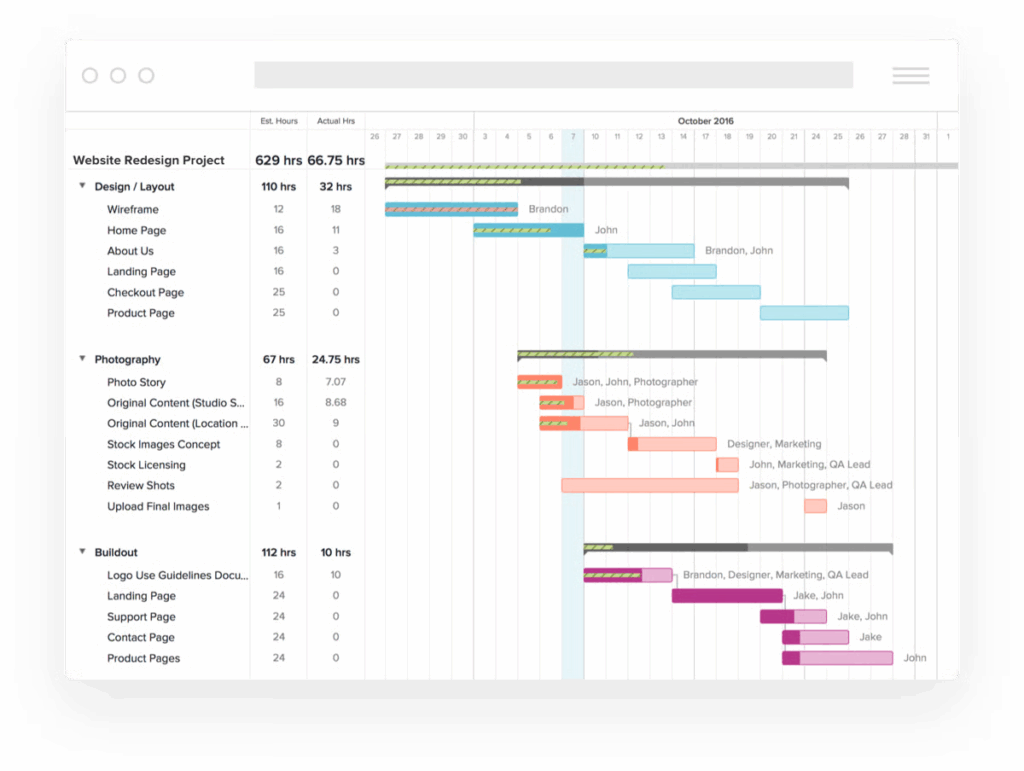
Like it says on the tin, Gantt charts are one of the things TeamGantt does exceptionally well. The tool is quick and easy to get rolling with. While it works across industries, it’s especially popular with construction and delivery-focused teams thanks to its strong asset planning features.
Group tasks, broken down, and adjusted on the timeline with straightforward drag-and-drop. Custom lead and lag times account for the inevitable curveballs. Critical path analysis shows which tasks actually determine the project finish date. While Gantt charts are the main draw, TeamGantt doesn’t lock teams into a single view. You can also see task assignments as a list, on a calendar, or on a Kanban board.
Managers can assign work to departments, manage shared equipment and spaces, and color-code resources for quick visibility. That makes it a strong fit for construction and delivery-focused teams that need to track material lead times, coordinate subcontractors, and plan installs alongside other work.
The trade-off is depth beyond planning. Communication and reporting are fairly lightweight, unless you pay extra for additional dashboards. This makes TeamGantt a bit more expensive for smaller teams.
Key features
- Simple Gantt planning with drag-and-drop work scheduling, task groups and subtasks, milestones, and critical path analysis.
- Flexible dependency management using custom lead and lag times to work around real-world limitations.
- Resource and team assignments that let you schedule departments, not just individuals, with color-coded visibility.
- Construction-ready planning tools like material lead times, asset tracking, and subcontractor schedule confirmations.
- Simple capacity planning features to spot overbooking, downtime, and workload conflicts.
Pricing
- From $49/mo per manager (up to 20 projects)
- Free plan for one manager, one project, and 40 tasks
Best all-in-one project management suites with timeline views
Moving into the territory of full-suite project management software, the following tools offer more than just a timeline. Most of them are packed with collaborative features, advanced automation for project workflows, and more robust reporting capabilities.
This makes them a good option for teams looking for a scalable platform for effective team collaboration (although they can be complex to set up and tend to have a steeper learning curve).
ClickUp
Source: ClickUp
ClickUp is a multi-purpose work management platform designed to centralize project management, documentation, and collaboration in a highly configurable workspace. The central Hierarchy feature keeps things neat as you can organize work by:
- Spaces for different departments, teams, high-level initiatives, clients, or any other parameter.
- Folders as an optional subcategory to keep nested Lists neat.
- Lists for personal and team to-dos, tied to specific goals.
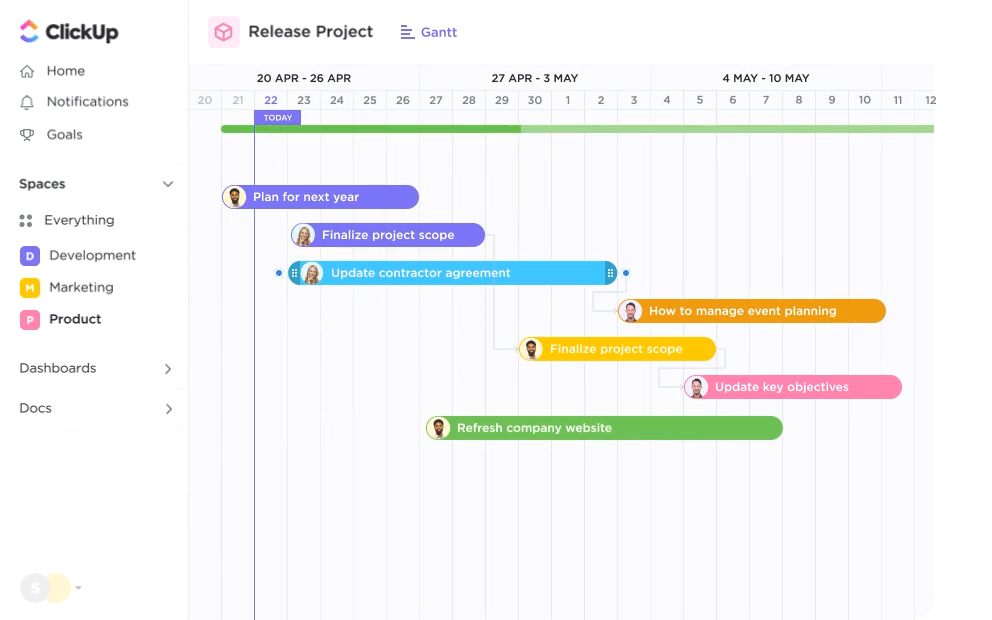
From there, take tasks from multiple Lists and organize them on a timeline (one of the many available views).
Assign tasks by setting time ranges or adding work directly on the canvas. Tasks snap into place automatically based on dates and grouping, while side panels highlight overdue or unscheduled work, so is forgotten about. Extensive customization options let you add a personal touch, from color-coding and task visibility to personalized notification preferences.
Another powerful feature is AI-driven task scheduling. Users can block focus time, and AI will reshuffle tasks accordingly. Workflow automations also trigger updates, task (re-)assignments, schedule meetings, post comments, or run a good hundred other workflows.
On the reporting side, you get detailed workload views and sprint cards to measure progress, capacity, and delivery risks. If that’s not enough, ClickUp allows building fully custom reporting dashboards.
Naturally, this great degree of flexibility comes with a steeper learning curve. So, if your main use case is simple work scheduling, ClickUp may be overkill.
Key features:
- Timeline planning across tasks from multiple lists, with drag-and-drop scheduling that auto-updates dates and groupings.
- Multiple task relationship types (dependencies, blockers, linked tasks) to model complex cross-project work.
- 100+ automation workflows to automate menial planning tasks and routine communication.
- Highly customizable reporting dashboards that combine timelines, reports, and performance metrics in one view.
- Multiple collaboration tools, including whiteboards, docs, proofing, chat, comments, and emailing, without leaving the platform.
Pricing
- From $7/user per month
- Free plan available
Wrike
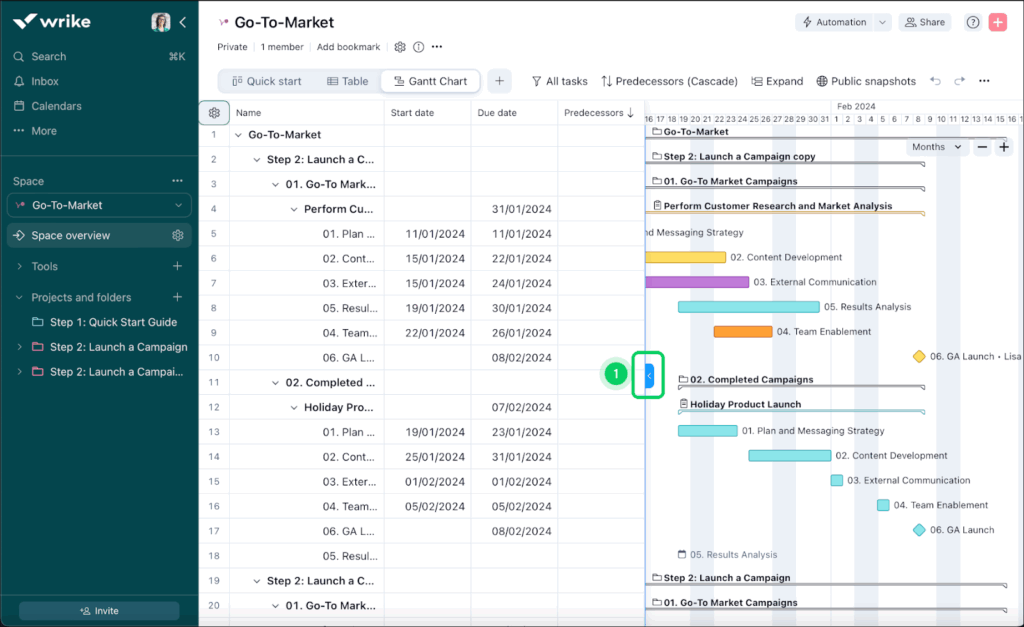
Source: Wrike
Wrike is a full-suite project management platform built for teams that need structure, scale, and flexibility in equal measure. Like ClickUp, it goes well beyond timelines, but its Gantt chart functionality is where Wrike really flexes.
Timelines are interactive and highly responsive. You can drag and drop tasks, reschedule work in bulk, and when dependencies are in play, Wrike automatically adjusts everything downstream in real time. Changes propagate instantly across the project, keeping plans and people aligned without manual clean-up. The only slight downside is you can’t schedule a deadline by a specific time, just a day.
Wrike also makes it easy to transfer your plans from other apps. You can transform Excel spreadsheets into Gantt views or import task durations, dependencies, and owners from other project management tools. From there, you can use filters to shuffle all items based on status, priority, due dates, or custom parameters.
On higher-tier plans, you also get access to:
- Collaborative whiteboards and proofing tools that take the sting out of creative reviews, making approvals clearer and version comparisons easier.
- User-friendly resource management features like workload charts, task estimates, fractional allocations, and weekly timesheets.
Overall, it’s a robust, scalable platform with strong value for money, though some users note that downsizing the plan can be a bit of a hassle.
Key features
- Automatic dependency propagation in the Gantt view that recalculates timelines instantly when upstream tasks shift.
- Custom fields and custom item types to track project-specific data without forcing work into generic task models.
- Multiple project views, including board, table, calendar, and analytical chart views, to support different working styles.
- Fractional resource allocation to assign partial capacity rather than full-time ownership to tasks.
- Collaborative whiteboards to support early ideation, planning, and campaign mapping.
Pricing
- From $10/user per month
- Free plan available
monday.com
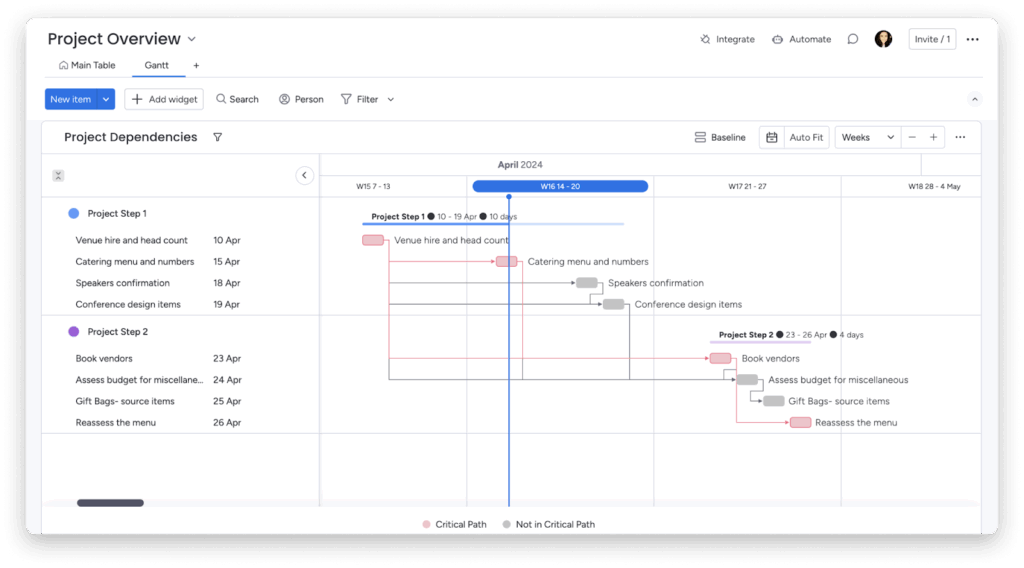
Source: monday.com
monday.com is another popular work management platform, packed to the brim with handy features for organizing teamwork. While its default view is a column-based project management canvas (convenient for day-to-day task management), you can also add a Gantt chart view from the “Board Power-Ups”.
While not as advanced as other tools, monday.com’s Gantt chart has all the essentials — intuitive visualization of tasks and subtasks, labels, color coding, custom time ranges, critical paths, and dependencies. Similar to others, it auto-updates due dates for all downstream tasks if you need to shift some deadlines. The new Baseline feature also helps you view the current project progression after applying changes, so you can proactively update stakeholders.
Beyond project management features, you also get loads of extras with the same subscription:
- Various automation scenarios to set repetitive chores like task updates, deadline assignments, or data uploads on autopilot.
- An online document management system to create, store, and exchange notes without switching screens.
- Workload reports on higher-tier plans to monitor resource allocation and capacity levels.
Similar to Wrike and ClickUp, the timeline software is just one of the many features this platform has to offer, which can be both an advantage and a drawback.
Key features:
- Variety of views, like Kanban, Gantt, calendar, and map, across unlimited dashboards for effective work management.
- Customizable dependency management controls that help you adjust buffer time between different items to avoid deadline clashes.
- Workload widget that helps with resource allocation across tasks and provides an instant view of everyone’s availability.
- Over 200 project and process templates to customize to your liking.
- Access to 72+ out-of-the-box integrations and apps to centralize data and communication (including Microsoft products, Dropbox, Trello, QuickBooks).
Pricing
- From €12/user per month
- Free plan with two seats
Asana
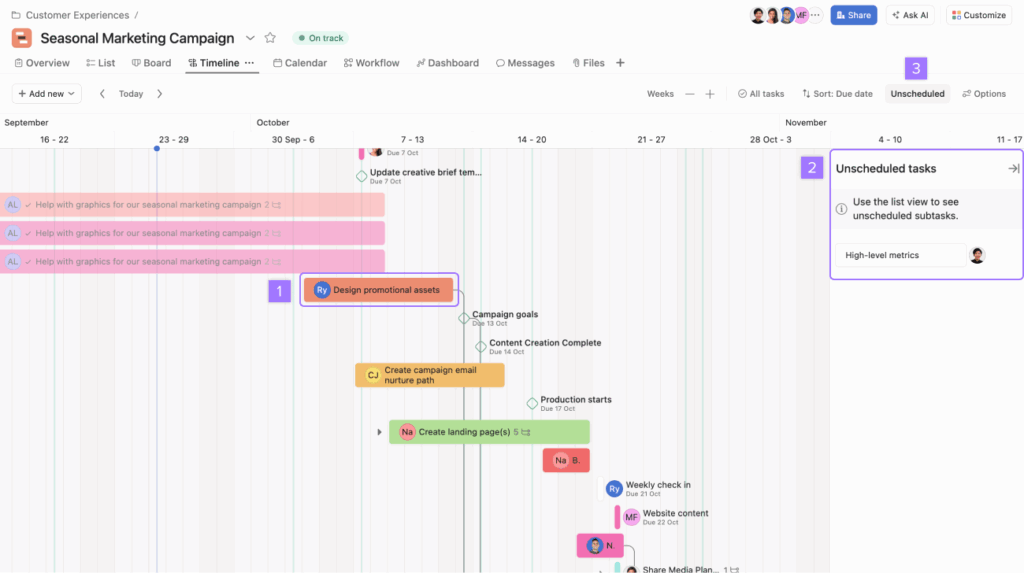
Source: Asana
Although Asana is better known for its Kanban boards, it also offers a convenient timeline view. Any tasks in the app can be added to the timeline with due dates, dependencies, and owners. Flexible color-coding helps timelines stay readable, even as projects pile on more tasks and priorities.
From there, you can refine your plans as work progresses. Tasks can be shifted in bulk. Dependencies can auto-adjust dates, and the “Maintain buffer” feature gives breathing room between dependent tasks, either across the whole project or only downstream. On higher-tier plans, the critical path mapping feature optimizes your task flow.
That said, timelines in Asana still reflect its task-first DNA. Subtasks don’t automatically inherit project context or assignees from parent tasks on the timeline. Also, you can’t create subtasks directly from the timeline view. This adds a bit of friction for teams that rely heavily on nested work. You’ll often need to jump back into task details or list views to stay on track.
Beyond timelines, Asana packs in a broad set of project management capabilities, from time tracking and automation templates to goals, custom forms, and configurable reports — available across web, desktop, and mobile apps.
Key features:
- Timeline views for any project, with drag-and-drop scheduling from unscheduled tasks or existing lists and boards.
- Dependency management with automatic date shifting to keep downstream work aligned.
- Task-level time tracking to connect plans with actual effort and wider company goals.
- Automation rules and templates to streamline routine updates, dependency management, and priority changes.
- Build your own reporting experience with an option to create custom charts and data visualizations from all available data.
Pricing
- From $10.99/user per month
- Free plan for two users
Best project timeline software for developer-focused workflows
Technical on the hunt for an enterprise-grade timeline tool with advanced features for Scrum planning, multi-dimensional data visualization options, and advanced investigative features like “reveal/ping” of related events, should like the following option.
Jira
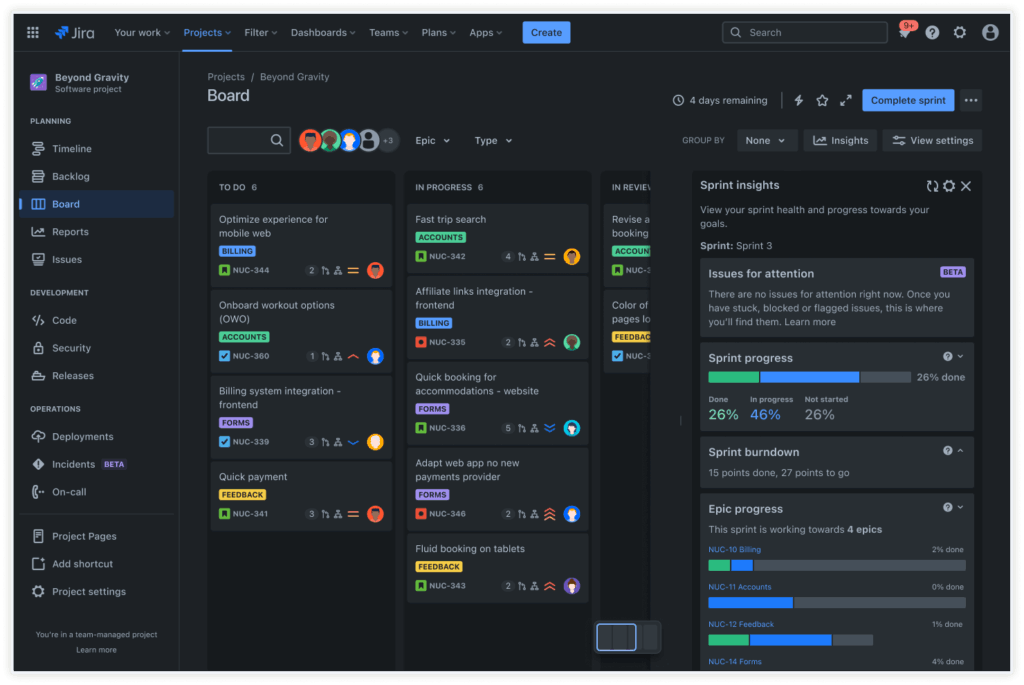
Source: Jira
Jira started life as a bug and issue tracker for software teams. But over two decades, it evolved into one of the most capable project management platforms for Agile teams shipping complex products.
While Jira has expanded into marketing, product, and operations use cases, it remains most at home with engineering teams that need strong portfolio management features. A recent UX refresh has made it more approachable, but it’s still unapologetically built for serious delivery work.
Most Jira users rely on Scrum or Kanban boards for day-to-day work, but use Jira’s Gantt view to have a cleaner, visual planning layer on top. It presents all action items hierarchically with priorities and dependencies. You can review all planned work across daily, weekly, and monthly horizons, or a custom range.
Jira really earns its keep once work spans multiple sprints or teams. The sidebar in the timeline shows Sprint and Epic progress in real time, along with percentage completion, story points, and cross-team contributions.
Dependency management is a notch ahead of other tools thanks to a dedicated Dependencies report that visually maps relationships between work items and flags risks when upstream work slips, so teams catch schedule issues early.
Advanced Roadmaps, available on higher-tier plans, scale this planning experience across multiple distributed teams. The feature provides a consistent hierarchy to track project progress, dependencies, and risks across multiple project portfolios. Naturally, setup can take longer than with lighter tools, but that upfront investment pays off for anyone dealing with complex, interdependent work.
Key features:
- Hierarchical issue organization with epics, stories, tasks, and subtasks to model complex projects.
- Backlog view to track tasks that you want to do in the future. Combine it with an epic panel to streamline work scheduling.
- Powerful filtering and JQL queries to slice, track, and report on work with precision.
- Extensive integrations with developer tools across CI/CD, version control, and incident management.
- New Rovo AI assistant that can be prompt-trained to prioritize backlog items, organize sprints, and suggest next actions.
Pricing
- From $7.91/user per month
- Free for 10 users
Best timeline tools for roadmap management
The following timeline tools focus less on day-to-day task execution and more on long-term direction. They’re built to map product development initiatives over quarters and years, connect work to strategy, and communicate what’s planned, when, and why, both internally and with stakeholders.
Aha! Roadmaps
Source: Aha!
Aha! offers a full suite of product development tools, including everything from collecting customer feedback and CRM insights to building roadmaps and facilitating Agile product delivery.
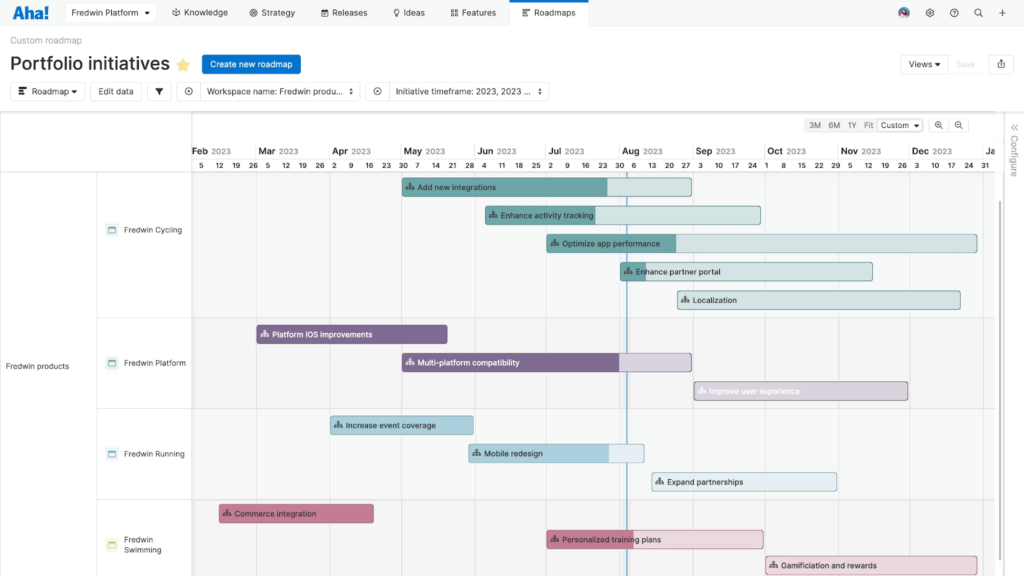
The Aha! Roadmaps module breaks down big ideas into a clear set of initiatives, releases, and features, organized on a structured timeline. Roadmapping in Aha! is visual by design, but it isn’t superficial. As you drag features onto the canvas, the tool defines relationships, links work to outcomes, and coordinates action from different business units, reflecting how work usually gets done.
The platform comes into its own at the portfolio level. Aha! Roadmaps give a top-down view of how initiatives stack up, where capacity is being stretched, and what’s at risk. Color-coding, milestones, and flexible task grouping all convey complex plans more easily.
You can also be picky about which planned or completed action to share with others. For example, you can have separate roadmap versions to communicate progress to stakeholders and a ‘lighter’ version for customer support, who want to give updates to users.
Beyond roadmaps, Aha! covers strategic planning, capacity modeling, and delivery coordination through additional modules.
Overall, it’s a good fit for teams that take product roadmapping seriously. It’s less about drawing timelines, and more about agreeing on what to build, why it matters, and whether the plan makes sense.
Key features:
- Product roadmap builder, combining user-friendly controls with depth in details and configurations.
- Audience-specific roadmap views that show only the level of detail each stakeholder needs to see.
- Built-in Gantt charts for mapping phases, milestones, dependencies, and delivery timelines.
- Scenario planning tools that compare alternative versions of a roadmap before committing to dates.
- Advanced reporting with 75+ prebuilt reports, plus custom lists, tables, and charts.
Pricing
- From $9/user per month
- Free 30-day trial available
Productboard
Source: G2.com
Productboard helps product managers collect and organize feedback from multiple sources, including customer portals, CRMs, and everyday tools like Slack or Intercom, into detailed roadmaps. You can link all inputs to feature ideas or prioritize top-requested features.
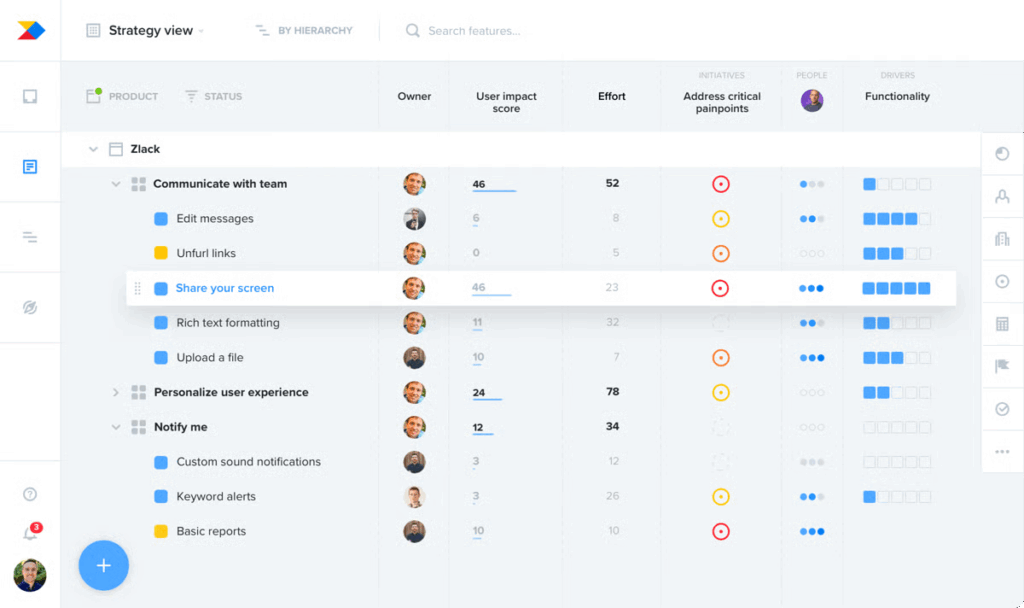
All feature ideas live in a flexible hierarchy, where teams can apply custom prioritization formulas to balance customer importance, effort, and strategic value. This creates a structured backlog, grounded in evidence.
Once you’ve set your priorities, Productboard nudges you into planning mode. You can build timeline- or column-based roadmaps, enriched with card-level details like owners, dependencies, effort estimates, progress, and customer scores.
Swimlanes help define execution paths, milestones mark key moments, and releases or timeframes add accountability around when work is expected to land. Progress is tracked automatically as work moves forward. Higher-tier plans include health indicators to flag if initiatives are on track, at risk, or off track.
Productboard isn’t a lightweight planning tool, and it won’t magically create alignment on its own. But for product organizations willing to do the work upfront, it offers a clear line of sight from customer feedback to roadmap decisions, and a shared understanding of how work is moving along.
Key features:
- Streamlined user feedback captured with a customizable portal or via integrations with other business tools.
- Custom prioritization formulas score features based on impact, effort, customer importance, or strategic value.
- Timeline- and column-based roadmaps with dependencies communicate what’s planned and when you’ll ship work.
- Swimlanes to define execution paths and group work by theme, team, or strategic focus.
- Health indicators (on track, at risk, off track) on higher-tier plans to flag delivery risks early.
Pricing
- From $19/user month
- Free plan available
How do I choose timeline software for my team?
Choosing the right project timeline software is less about finding the “best” tool and more about finding the right level of structure. When weighing your options, focus on these three areas:
- Supported use cases. Match the tool to the work. Advanced technical platforms can feel excessive for smaller teams, while lightweight Gantt tools often break down under long-term planning or cross-team dependencies. Choose software that best reflects the reality of what you do.
- Reporting and visibility. A timeline tool is only useful if it tells the truth. Look for clear views of delivery load, available capacity, and task progress over time. Check pricing carefully. In many tools, workload and resourcing reports sit behind higher-tier plans.
- Ease of use. Decide how much friction you’re willing to accept. Advanced tools offer depth, but demand setup and team buy-in. Simpler tools trade power for speed of adoption. The best option is the one your team will actually use without nagging.
Make time the core of your project planning
No project timeline tool will magically fix messy planning. But when you choose a platform with time management at its core, you’ll receive a clearer view of how work actually unfolds, where your capacity is stretched, and what needs your attention next.
Start by choosing a tool that matches your planning horizon, reporting needs, and your tolerance for complexity. From there, consistency matters more than perfection.
If you need lightweight visual planning, simple timelines or Gantt-first tools may be enough. But if you’re coordinating work across teams or portfolios, more structured platforms bring order to the complexity.
If your biggest challenge is turning plans into something teams can actually deliver, with tools grounded in real capacity and time data, try Toggl 2.0 for free.
Frequently asked questions (FAQs) about project timeline software
What is project timeline software?
Project timeline software is a digital tool that lets you map out the schedule of a project from start to finish. It typically displays tasks, milestones, and deadlines in a visual format, so you can see what happens when and how pieces of work relate to one another. It helps teams coordinate work, allocate resources, and spot potential delays before they become problems.
Why should I use timeline software instead of a spreadsheet?
Unlike static spreadsheets, project timeline software automatically updates views when dates change and shows dependencies between tasks. You get real-time visual tracking of progress, clearer communication with your team in one place, and fewer manual updates to manage. This makes it easier to stay on schedule and adjust plans when priorities shift.
What features should I look for in project timeline software?
Strong timeline tools usually include visual schedules like timelines or Gantt charts, task dependencies, and drag-and-drop editing to adjust dates quickly. Collaboration features are also important, as they allow teams to share updates and maintain a single source of truth throughout the project.

Elena is a senior content strategist and writer specializing in technology, finance, and people management. With over a decade of experience, she has helped shape the narratives of industry leaders like Xendit, UXCam, and Intellias. Her bylines appear in Tech.Co, The Next Web, and The Huffington Post, while her ghostwritten thought leadership pieces have been featured in Forbes, Smashing Magazine, and VentureBeat. As the lead writer behind HLB Global’s Annual Business Leader Survey, she translates complex data and economic trends into actionable insights for executives in 150+ countries. Armed with a Master’s in Political Science, Elena blends analytical depth with sharp storytelling to create content that matters.