Automated and manual time tracking both have real strengths. But deciding which is the best way to track your time depends almost entirely on how your work is structured, not on which method is more technically impressive.
Perhaps you’re a manual timer user wondering whether automated capture would record more of your billable hours. Or, maybe you already automate your time tracking but feel overwhelmed by the volume or data it produces and wonder if a manual approach might be cleaner. In either case, you might question if you’re leaving something on the table.
This article won’t declare a winner in the automated time tracking vs manual timer debate (because there isn’t one!) But it will give you a clear framework for making the right time tracking call for your situation.
What’s the difference between automated and manual time tracking?
The difference between automated and manual timekeeping goes deeper than you might expect. That’s because there are two approaches to automation covering very different use cases: automatic background capturing and automated surveillance.
- Manual timers require the user to consciously start and stop a timer by clicking a button on a mobile or desktop app, then categorizing the entry. It’s a fantastic way to provide precise information about what you’re tracking.
- Automated background capturing enables your software to passively record user activity such as app, document, or calendar usage. From here, the time tracking software pre-populates a privacy-first timeline of activity, which the user has full control over. The raw data remains local and is only visible to the user.
- Automated surveillance is entirely employer-controlled. In this scenario, software captures employee time using screenshots, keystroke logs, activity scores, and idle time flags, which are all visible to managers or employers in real time. Common in remote teams, this entirely different product category is about tracking employee work hours for employer oversight, not about supporting personal time management. If you feel uneasy about this type of technology, Toggl’s anti-surveillance statement is worth a read.
Note: This article isn’t about the surveillance described in this third category. What follows is a comparison of manual timers and automated background capture, which are both user-controlled approaches to solving the mystery of where time goes.
How manual timers work
Manual time tracking solutions are seriously hands-on. They put users in full control of their time tracking, which can be both a good and bad thing.
The mechanics of a manual entry approach are simple:
You start a manual timer when you begin a task and name what you’re working on.

You assign it to a relevant project or client, and stop the timer when you’re done
The act of attaching a label to your work is one of manual tracking’s biggest strengths. Categorizing your activity in context keeps the information fresh, so your data is clean, structured, and ready for invoicing or reporting without much post-processing.
Psychologically, pressing “Start” on a timer is also a glowing signal that it’s time to knuckle down and start your work. It deliberately marks the start of your focus time, which many users find reinforces concentration in the same way time blocking does.
Of course, manual data entry also requires you to remember to track your time, on time, every time. (No pressure then!) The natural risk is human error; you could miss some entries if you step away from your desk for an unplanned call, or switch tasks quickly without remembering to restart the clock. The manual method relies on consistent discipline, and even diligent users can end up with entry discrepancies over time.
Having said that, manual time tracking quickly becomes second nature. Just as you remember to put your shoes on before leaving the house, or brush your teeth before bed, pressing Start/Stop before and after each task also becomes part and parcel of your daily routine.
Important: Manual input is not the same as end-of-week spreadsheet reconstruction. A user who starts and stops a timer in real time has prospective accuracy; they’re measuring time as it passes, not estimating it after the fact.
How automated time tracking works
Automated background capture lets your software do all the heavy lifting, so you can sit back and review the results after. Automatic time tracking is certainly less “involved” than manual systems, but the data it provides is genuinely useful, too.
It runs in the background and records which apps, documents, and websites you use, and which calendar events you attend.
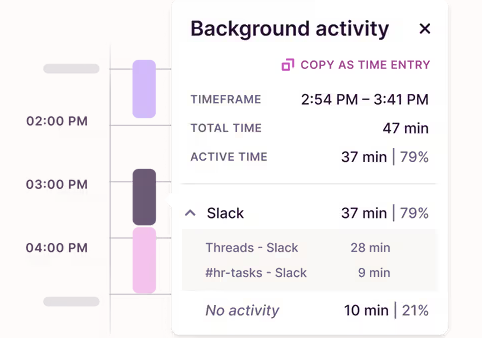
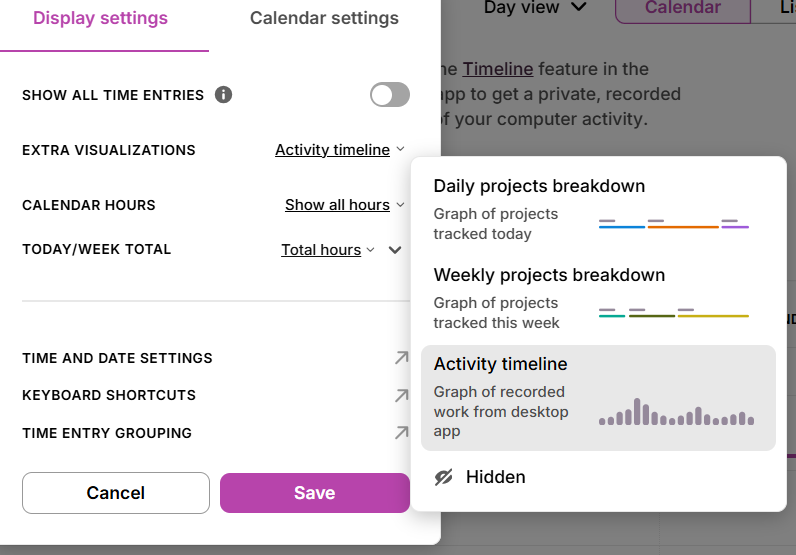
Once you’ve turned on your own personalized activity timeline via the Extra Visualizations setting, you can review the data, approve what’s relevant, and discard what isn’t.
The key strength of automated capture is it doesn’t rely on you to press a button. No matter how busy you are, your time will catch everything you do. The scope includes the kind of incidental work that manual timers could miss, like falling down a Slack message rabbit hole or getting stuck on a Zoom call that ran over.
For anyone whose day is fragmented across multiple clients or projects, automation’s extra coverage adds value by delivering an honest, uncurated picture of your time.
And crucially, many automated systems respect your privacy. Tools like Toggl, Timely, and Memtime keep your raw activity data private to you. So, rest assured the length of your toilet breaks will never appear on a random dashboard view in a team meeting. Instead, you decide what gets logged as a formal time entry, and what is discarded forever.
But automated capture has weaknesses, too. Recording every little detail means you’re handed a heap of detail that needs careful filtering, which is a time-consuming step before you can turn it into something clean and auditable. It’s also blind to anything that happens away from your phone, like an in-person meeting, or a phone conversation. The only way to track these tasks is to add them with a manual timer.
Manual vs. automated tracking: Which is more accurate?
So, the million dollar question: which approach gives you better data? The answer: it depends.
Memory has an accuracy problem
Cognitive psychology draws a useful distinction between prospective timing (measuring time as it passes) and retrospective estimation (guessing how long something took after the fact.) Psychologist Ebbinghaus’s Forgetting Curve shows that memory degrades rapidly and non-linearly after an event. In fact, recall starts deteriorating within hours, which makes retrospective logging the real enemy of accurate time tracking. This is the end-of-day or end-of-week paper timesheet reconstruction that many people still rely on.
Even when memory is fresh, a 2025 study published in PLOS ONE found that people overestimated time-on-task by around 45%, giving you a sense of how unreliable unanchored time perception is.
Automated capture certainly wins decisively against any retrospective approach. But a manual timer user logging events at the moment is already doing prospective timing. They measure time as it passes, rather than estimate it from memory. The accuracy gap between a diligent manual timer user and a well-configured automated tracker is much smaller than most vendor content suggests.
Where automated tracking wins
Where automated capture does hold a genuine edge is incidental work. Gloria Mark’s research at UC Irvine found that knowledge workers switch tasks far more frequently than they realize, sometimes every few minutes. Those micro-switches rarely justify consciously starting a new timer, which means they vanish from your manual records. Automated capture catches them by default.
Where manual timers still outperform
The flip side is data quality for structured time billing. Manual timers produce clean, labeled, client-ready entries at the moment of logging. Automated capture produces raw activity that still needs categorizing before it’s billable. The automated version is more complete, yes, but it’s not necessarily any more useful straight out of the box.
The verdict?
The biggest accuracy gains from automation go to people currently reconstructing their week from memory. If you’re already running an active timer, the gap is smaller than the automation evangelists suggest.
The hybrid time tracking approach: Why most experienced users land here
Ask someone who has been using time tracking software for a few years how they work, and they almost never rely on a single approach. Instead, they opt for a happy medium, building hybrid workflows that could look something like this:
- Open a client project and start a manual timer
- Name the task, assign it to the right client and work
- Let automated capture run in the background to track real-time data
- Reconcile the two at the end of the day; you’ll see gaps between your manual timer entries filled with raw activity data
- Discard anything unimportant
This approach gives you the best of both worlds. Manual time tracking tools produce high-quality, structured data for the work you want to log most accurately, and automated capture gives you coverage for the tasks that never quite justified hitting start on a new timer.
When they work in perfect harmony, manual and automation cover each other’s weaknesses without sacrificing either’s strengths. The manual timers anchor the most important billable blocks; the automated timeline catches what falls between them. For most people, from solo freelancers to small teams, this is the best way to optimize how they work rather than a compromise.
Who should use each time tracking approach?
Manual timers and automated capture suit different working styles, so they’re not really competing for the same type of user. Here’s where each wins.
| Working style | Profession | Best for | Why? |
| Accurate billing using small time increments | Lawyers, accountants, consultants | Manual timers | Faster to billing-ready data than automated capture No timeline to review and categorize Entry is clean and client-ready the moment you stop the timer |
| Fragmented day across multiple clients | Freelance developers, designers, copywriters | Hybrid | Automated capture catches work time you’d easily miss Manual time tracking apps anchor your main billable blocks Complete coverage without sacrificing data quality |
| Analyzing personal productivity | Knowledge workers, solopreneurs | Automated capture | Gives a more complete and honest picture of your day Captures everything, including the parts you’d rather not see No intentional labeling means no unconscious curation |
| Mixed billing and non-billing work | Agencies, professional services | Manual timers + billable flag | Structured data per project matters more than complete coverage Users categorize work in context, so entries are clean Structure is worth more than the incidental hours automated capture adds |
| Reconstructing manual timesheets from memory | Anyone still doing end-of-week logging | Either. Just change something | Memory decay is costing you billable hours Any active tracking method beats retrospective guesswork The method matters less than making the change |
Track time manually or automatically in Toggl
If you jumped into this article hoping for a definitive answer on which time tracking method is superior, you’ll have learned there’s plenty of nuance … perhaps more than you expected.
Manual timers give you control and data quality, while automated tracking offers coverage and reduced friction. For most people? The best approach is to use a combo of both.
Toggl is a user-friendly platform built for both. Our one-click manual timer has been trusted for over a decade, and now it’s paired with an automated background tracker that keeps your data private and puts you in control of what gets logged. Two approaches, one workspace, and zero surveillance (ever!)
If you’re ready to try it, sign up for a free Toggl account and start with whichever method suits you today. You can layer in the other when it makes sense.
Frequently asked questions about automated and manual time tracking
Is automated time tracking more accurate than manual timers?
Whether automation is more accurate than manual time tracking depends on what you’re replacing. Automated capture beats end-of-week memory reconstruction convincingly. But there’s a smaller gap when comparing automation to an active manual timer. That’s because manual timers have real-time accuracy for logged tasks, while automated capture adds coverage for incidental work that timers miss. The most accurate option is to use both.
Does automated time tracking mean my employer can see everything I do?
No. With privacy-respecting tools like Toggl, automated tracking keeps your raw activity data visible only to you. Instead of your manager reviewing your time logs, you decide what becomes a formal time entry. This approach is fundamentally different from surveillance tools that capture screenshots and keystroke logs for employer review.
Can I use both automated and manual time tracking at the same time?
Yes, you can combine automated and manual time tracking, which is what most experienced users do. You’ll start manual timers for intentional, billable work, then let automated capture run in the background as a safety net. Review the automated timeline at the end of the day to pull in anything worth formally logging. The two approaches complement each other well.
What is the best way to track time for client billing?
Manual timers are the best way to track time for client billing. Starting a timer when you begin a task produces clean, labeled, client-ready entries, making it easy to log hours without the categorization work that automated capture requires. For billing accuracy, the intentionality of a manual timer is a key feature; you’re recording exactly what you worked on, and for whom, in real time.
Does Toggl have automated time tracking?
Yes. Toggl includes both a one-click manual timer and an automated background tracker that records your app, website, and calendar activity. The two work together in the same workspace and you can generate detailed reports from the output.

Rebecca has 10+ years' experience producing content for HR tech and work management companies. She has a talent for breaking down complex ideas into practical advice that helps businesses and professionals thrive in the modern workplace. Rebecca's content is featured in publications like Forbes, Business Insider, and Entrepreneur, and she also partners with companies like UKG, Deel, monday.com, and Nectar, covering all aspects of the employee lifecycle. As a member of the Josh Bersin Academy, she networks with people professionals and keeps her HR skills sharp with regular courses.


