86% of leaders are confident in their ability to measure workforce productivity. Yet 39% of those same leaders admit there’s too much focus on hours worked than actual output, according to Toggl’s Productivity Index.
This inconsistency is the root cause of most workplace productivity problems. Teams look busy, calendars are full, and hours are logged. But whether any of it is moving the needle is a different question entirely.
This guide is grounded by Toggl’s research into how 466 business leaders approach productivity today. It delivers:
- A clear definition of employee productivity that applies to knowledge work
- A practical framework for measuring productivity
- 10 strategies to increase employee productivity without resorting to surveillance
What is employee productivity?
Employee productivity is the ratio of output to the time, effort, and resources invested in producing it. Instead of focusing on hours worked, it describes the value created per unit of time. A team logging long hours on low-impact work is not more productive than one delivering high-quality output in less time.
The standard formula: Employee productivity (%) = (Total output ÷ Total input) × 100
Example: A consultant delivers 32 billable hours out of 40 available hours. Productivity = (32 ÷ 40) × 100 = 80%.
In knowledge work, output isn’t always easy to quantify. A developer’s best day might produce fewer lines of code than their worst. That’s why productivity measurement requires a framework and not just a single number.
One important distinction: productivity does not equal activity. Emails sent, meetings attended, and hours logged are inputs. Delivered projects, satisfied clients, and closed deals are outputs. Most teams only measure the former and then wonder why the latter isn’t improving.
The gap between activity and output is also the gap between busy work and work that advances organizational goals.
Why employee productivity matters (and what it’s costing you)
For agencies, consultancies, and professional services teams, employee productivity is tied directly to revenue, margins, and the ability to retain the people doing the work. Here’s why it deserves more than a quarterly review.
Untracked work is unbilled work
If your team is delivering work that never gets tracked, it never gets billed. This goes beyond productivity; it’s a revenue leak. Yet, only 36% of leaders track billable vs. non-billable hours as a productivity metric, according to Toggl’s Productivity Index. Untracked hours, unbilled work, and projects that overrun scope are all money earned that you didn’t collect.
Productivity problems show up in your bottom line
Most professional services firms run on thinner margins than they realize. SPI Research’s 2025 benchmark found that profit margins had fallen to 69% as of 2024, below the ideal threshold of 75% and the lowest it had been in five years.
The culprit is a lack of time tracking, which leads to work going unbilled and capacity going to waste. Low productivity doesn’t announce itself; it shows up gradually in margins that are thinner than they should be.
Productivity directly affects employee retention
Poor work-life balance and low employee engagement are two of the most consistent predictors of turnover. Both are shaped by how work is structured and measured. When people spend their days in pointless meetings, chasing unclear briefs, or doing work that never seems to matter, they leave.
Gallup estimates it costs 1.5-2x an employee’s annual salary to replace them once you factor in hiring, onboarding, and lost productivity. Getting productivity right means giving people work that’s well-scoped, manageable, and meaningful (the kind of work that drives job satisfaction). It’s also one of the most direct employee retention levers available.
Productivity is becoming a competitive advantage
Most companies are still measuring productivity the way they did a decade ago. The ones pulling ahead are tracking what people deliver rather than how much time they’re online. That’s what separates high-performing teams from those still optimizing for visible effort.
According to Toggl’s Productivity Index, 87% of leaders agree that focusing on measurable outcomes, rather than where or when employees work, would directly improve revenue. The companies that move away from hours-based measurement will have a head start and a healthier bottom line to show for it.
Productivity tells you where to put your best people
Good resource allocation depends on knowing where your time is going. Without that, your best people end up overloaded, quieter performers go underused, and nobody has a clear picture of the team’s capacity for the next project.
36% of leaders surveyed in Toggl’s Productivity Index struggle to define what productivity looks like in different roles. When you start tracking team time and output intentionally, you get a much clearer picture — because if you can’t define productivity, you can’t allocate for it.
How to measure employee productivity
Most teams default to the easiest way to track productivity (hours worked) and stop there. Our productivity research found that 41% of leaders still rely on total hours worked as their primary productivity metric.
For knowledge workers, hours worked only tells you how long someone was at their desk. It doesn’t tell you what was produced, how they produced it, or whether the time was spent on the right things. A more reliable approach combines output, time, and quality.
Output-based measurement
The most intuitive starting point is tasks completed, project completion rate, revenue generated, and deals closed. Output metrics work well for roles with clear and tangible deliverables, like a developer shipping features, a consultant closing engagements, or a support team resolving tickets.
The drawback to output-based measures is that volume without quality context can be misleading. A team closing 10 projects at 60% client satisfaction is not more productive than a team closing one project at 95%.
Time-based measurement
The core metrics here are hours tracked, billable vs. non-billable split, utilization rate, and estimated vs. actual variance. Toggl’s Summary Report gives you the billable/non-billable breakdown automatically, filtered by team member, project, or client. And it does that without surveillance. It shows where time is going, not whether someone’s mouse is moving.
A utilization rate formula is: (Billable hours ÷ Total available hours) × 100. A healthy range for utilization rate is 75-80% for delivery roles.
Outcome and quality measurement
This one is harder to automate but essential for knowledge work. The key metrics here are error rate and revision frequency, on-time delivery rate, and client satisfaction (CSAT or NPS). They can’t be pulled from a tracking report alone; they require a feedback loop with your project management or CRM data.
Toggl’s native integrations with Asana and Jira bridge this gap, connecting time data to task completion in the tools you use.
The right productivity KPIs vary by role. Here’s a starting point for the most common ones in agencies and professional services teams.
| Role | Key employee productivity metrics |
| Agency account manager | Utilization rate Billable vs. non-billable split Client satisfaction |
| Consultant | Estimated vs. actual variance Projects delivered On-time delivery rate |
| Developer | Estimated vs. actual variance Error rate Tasks completed |
| Customer support | Tasks completed Client satisfaction On-time delivery rate |
What productivity measurement is NOT
Measuring productivity is not the same as active monitoring via screenshots, keystroke logging, and mouse movement tracking. This type of surveillance provides no information about whether they’re producing anything valuable. It also creates a work environment based on mistrust rather than accountability.
Unfortunately, leaders routinely confuse monitoring with employee productivity. Toggl’s productivity research found that 70% of leaders feel comfortable using surveillance software in a remote work setting, but 65% admit those same policies actively drive disengagement in their workforce. Employee engagement and productivity are directly linked, and surveillance is one of the fastest ways to damage both.
The goal of measuring employee productivity is gathering data that improves decision-making, not eroding employees’ trust.
10 strategies to improve employee productivity
Most employee productivity problems come from poorly structured systems, not lack of effort. More often than not, the wrong things are measured, the wrong work is protected, or the wrong signals are ignored. These 10 strategies prioritize the right work, starting with the data you’re probably already sitting on.
1. Use time tracking to understand where time goes
Most leaders assume they have a reasonable sense of where their team’s time is distributed. But the data suggests otherwise: 57% of leaders in Toggl’s Productivity Index admit they could be operating below capacity because they lack the tools to detect underperformance or overstaffing.
Time tracking provides the insights. Have your team log time with Toggl for one week across every work type, including billable time, non-billable client time, internal admin, meetings, etc. You can categorize work by clients, projects, and tags to stay organized. Then, pull Toggl’s Summary Report at the end of the week to compare billable vs. non-billable time. Filter by project, then by tag, to see what’s taking the most time. Then, pull the Workload Report to see hours logged per team member per project or client.
For guidance on how to set this up consistently across your team, our time tracking best practices guide covers the common setup mistakes and how to avoid them.
2. Set time estimates before work starts, then compare actuals
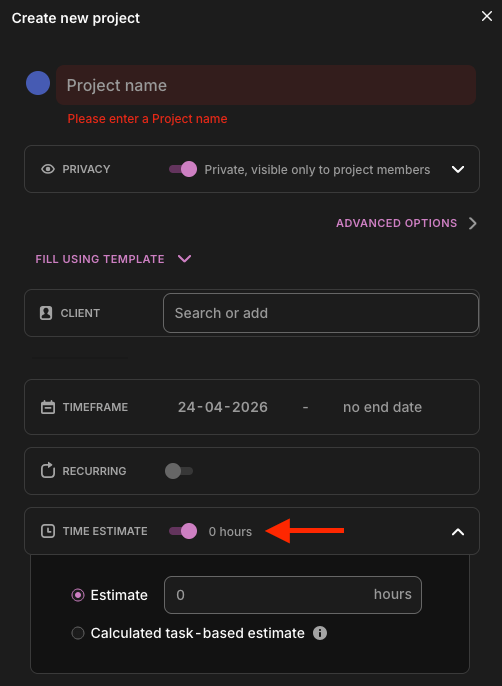
Most teams do post-mortems on projects that go badly. Fewer do them routinely, on every project, as a matter of practice. Before work begins, set an estimate on the project in Toggl. When the project finishes, compare that estimate with actual hours logged. The gap between those two can tell you:
- Whether your scoping is systematically off
- Which work types consistently overrun
- Where margin is disappearing
Over time, this estimate-vs-actual comparison becomes your most reliable input for pricing, resourcing, and capacity planning.
3. Calculate billable utilization rate every week
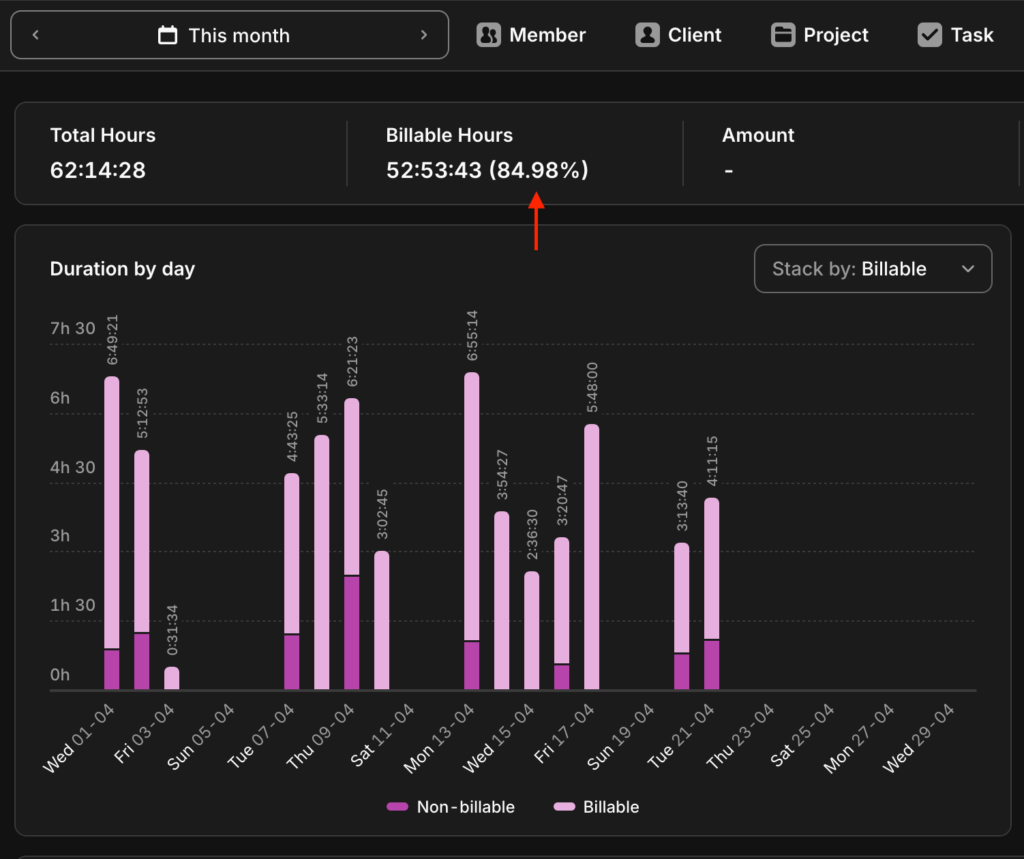
Billable utilization rate is one of the clearest signals of whether your team’s capacity is being used effectively. The formula is simple:
(Billable hours ÷ Total available hours) × 100
For delivery roles, a good target is 75-80%. If utilization sits below 65% consistently, something is off. Either admin overhead is too high, too much client work is going unbillable, or capacity is misallocated. Consistently pushing above 80% is also a warning sign. Utilization rates that stay too high are one of the most reliable early indicators of burnout. Monitoring employee well-being alongside utilization (not just as a HR metric but as a productivity signal) is how you catch that before it becomes a retention problem.
Toggl automates billable utilization rate from logged time, so the number is always available.
4. Treat meetings as a focus problem, not a scheduling problem
Three one-hour meetings don’t cost three hours. They cost the focused time around them too. Microsoft’s 2025 Work Trend Index found that employees are interrupted every two minutes during core work hours (based on data gathered from Teams), with 60% of meetings being ad-hoc rather than scheduled.
Protect time blocks for focus work at the team level. Agree on meeting-free windows and put them in the shared calendar. Most important: treat these deep focus blocks as non-negotiable. One person protecting their calendar doesn’t work if the rest of the team hasn’t agreed to the same rules.
5. Batch similar tasks to reduce context-switching costs
Every time you shift between different types of work—deep writing, then email, then a client call, then back to deep writing—there’s a cognitive cost to engaging with each one. Those costs add up, especially for repetitive tasks.
Batching similar tasks into blocks (all communication tasks in one window, all heads-down work in another) makes each block faster and less draining than if the same work were scattered across the day.
If you’re looking for software to support this, there’s a roundup of time management tools that work well alongside time tracking. The same principle applies to collaboration tools, which can consolidate communication into dedicated blocks rather than letting Slack or email interrupt focus work throughout the day.
6. Share time data with your team, not just management
When time tracking data only flows upward, it’s surveillance. When the team can see it too, it’s constructive feedback. This is the difference between a positive employee experience and a negative one.
if you want engaged employees, surveillance is the wrong lever. Toggl lets individual team members access their own reports without requiring manager involvement, so they can take charge of their productivity. That shared visibility turns time tracking into a teamwork tool, rather than just a management tool.
7. Match your team’s hardest work to their sharpest hours
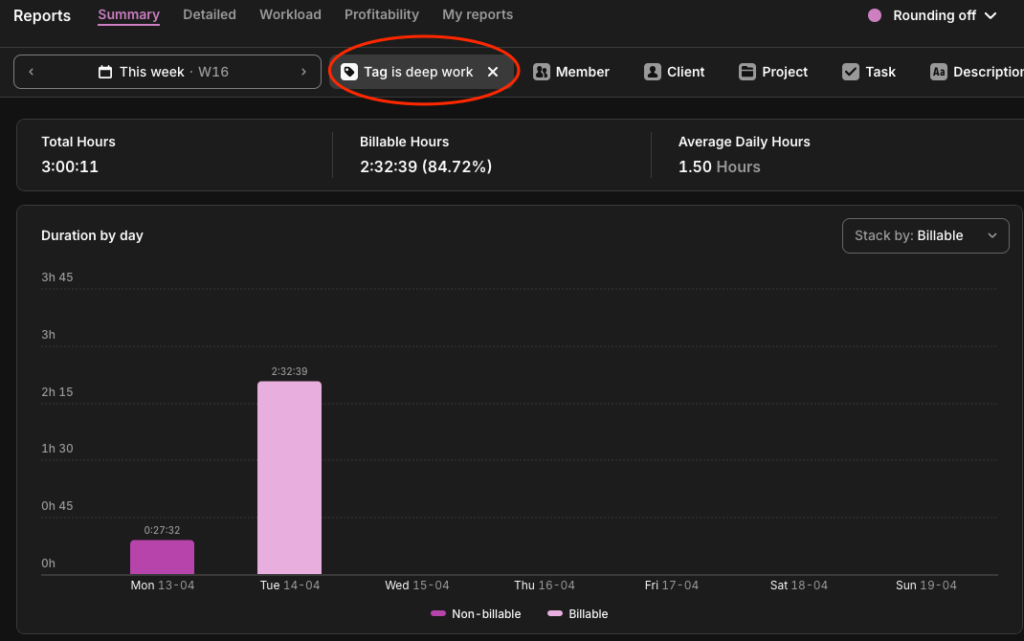
Deadlines tell you when work is due but they don’t tell you when your team does their best work. Have team members tag their entries in Toggl (“deep focus” or “writing” or “dev work” or whatever maps to high-value output in their role). Over time, the Summary Report spots the pattern: when those tagged entries cluster, how long they run, and whether they’re being protected or gradually crowded out by meetings and admin.
Secure the hours where deep work happens and schedule everything else around it. Not everyone will have the same deep work hours, of course, but try to avoid cutting into as many team members’ focus time as possible.
8. Use the planned-to-done ratio as a capacity signal
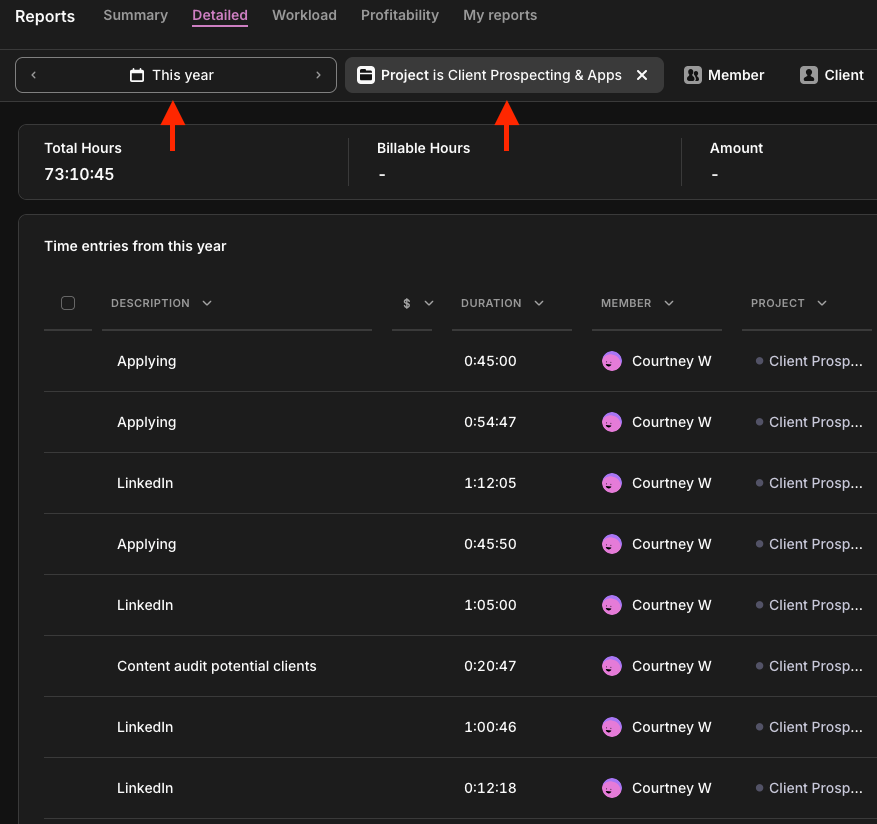
Divide tasks planned by tasks completed over a given week. A ratio that sits below 70% is usually a workload or prioritization problem, rather than a performance problem. In Toggl, use the Detailed Report filtered by project and date range to see time logged against specific tasks.
Teams on the Starter plan can mark tasks as done when complete, keeping a record of what was worked on across the period. Cross-reference that against your planned task list to calculate the planned-to-done ratio. When the number is consistently off week to week, that’s your signal to look at capacity.
9. Reduce non-billable overhead systematically
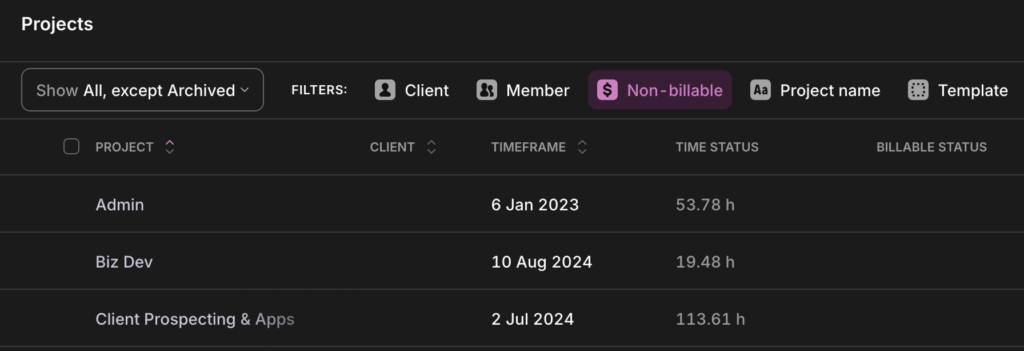
Admin, internal meetings, and repetitive tasks accumulate gradually, and most teams have no clear picture of how much of the week they’re consuming. Set up dedicated non-billable projects in Toggl for each overhead category (internal meetings, admin, training, business development, etc.) and log your time within them consistently.
Pull the Summary Report weekly to see what’s absorbing the most available hours. Then, triage: which ones can you reduce, eliminate, or streamline? You can automate some of the most time-consuming overhead categories, like expense reporting, status updates, or timesheet reminders, to free up billable capacity.
10. Run a time audit every quarter
Productivity patterns drift easily. Work expands, new admin tasks accumulate, and the billable vs non-billable split shifts gradually without anyone really noticing. A structured one-week audit every quarter, reviewing time logs as a team, pinpoints the drift before it becomes a structural problem.
Many leaders have already recognized the business case for a productivity audit like this: 80% of C-suite leaders in Toggl’s Productivity Index acknowledged that shifting their approach to productivity measurement could increase revenue by up to 20%.
Remote and hybrid team productivity
The data on remote work productivity is clearer than the debate suggests. A Stanford study published in Nature found that employees working from home two days a week were just as productive and as likely to be promoted as fully office-based colleagues, while resignation rates fell by 33%. That’s a significant retention benefit that comes without any change to output.
Notably, managers in that Stanford study predicted hybrid work would hurt productivity before it started. By the end of the study, they’d changed their minds. The gap between expectation and reality is at the heart of the remote productivity debate. Toggl’s Productivity Index found that 28% of leaders admit they have limited visibility into remote or hybrid employee activity and the default response is monitoring software rather than better measurement.
It’s worth resisting that impulse. The evidence is consistent: flexible work arrangements paired with outcomes-based measurement outperform rigid oversight on almost every metric that matters. And 68% of leaders in Toggl’s own research agree employees who have a say in their work environment produce higher quality work. Remote teams need clear goals, transparent time data, and utilization metrics that reflect actual output. Toggl gives distributed managers that visibility without tracking keystrokes or taking screenshots.
How Toggl supports employee productivity
Most productivity problems linger on because teams can’t see them clearly to act on them. Toggl gives you the three things you need to change that.
- Visibility. The Summary Report shows exactly where time is going, broken down by project, client, team member, task type, tags, and description. For most teams, the gap between where they think time is going and where it goes is surprisingly large. That’s the foundation of genuine workforce productivity measurement.
- Trust. Unlike surveillance tools, Toggl doesn’t capture anything without the employee’s involvement. Team members decide what gets logged and what doesn’t, and individual time entries stay private to individual users. People track honestly when they don’t feel watched. Honest data makes for more effective decisions, which improves the employee experience.
- Action. Adjusting pricing, justifying a new hire, redistributing a workload, or tightening estimates are all decisions that can improve productivity. But they depend on knowing where time is going; without that data, leaders make decisions on instinct. With it, they make decisions with evidence. Toggl gives you the numbers you need to anchor those conversations directly to business outcomes. That’s the foundation high-performing teams are built on.
If you want a structured starting point, a one-week productivity audit is the fastest way to get a baseline. Otherwise, you can start tracking for free today, no credit card required.
Frequently asked questions (FAQs) about employee productivity
What is a good employee productivity rate?
It depends on the role and how you’re measuring. For delivery roles in agencies and professional services, a billable utilization rate of 75-80% is generally considered healthy. For output-based roles, a planned-to-done ratio above 70% is a reasonable baseline. The more useful question is whether your current rate is improving over time, and whether the work being done is the right work.
How do you calculate employee productivity?
The standard formula is: (Total output ÷ Total input) × 100. In practice, output and input need to be defined for your context. For billable roles, output is billable hours delivered and input is total available hours. For project-based work, output might be tasks or projects completed against what was planned. The formula is straightforward; the hard part is deciding what counts as meaningful output for each role.
The right tool also depends on your team’s workflow. This comparison of productivity tracker apps covers the main options.
What factors affect employee productivity most?
The biggest factors are how time is measured, how meetings are managed, and how work is structured. Teams that track time honestly get a clearer picture of capacity. Teams that protect focus blocks produce more in less time. Teams that batch similar tasks and align demanding work with peak hours outperform those that don’t. The common thread here is productivity improves when you fix the system, not the person.
Is time tracking an invasion of privacy?
It depends entirely on how it’s implemented. Surveillance tools like screen recording, keystroke logging, and mouse movement tracking monitor behavior without employee control. Employee time tracking tools like Toggl work differently. With Toggl, employees log their own time, control what gets recorded, and can see their own data. Honest time data comes from people who aren’t being watched. The choice between surveillance and transparent time tracking is ultimately a company culture decision, as it signals to your team whether they’re trusted professionals or monitored resources.
How is employee productivity different from employee performance?
Productivity measures how much value is created per unit of time and effort. Performance is broader, including quality of work, collaboration, communication, and growth over time. Someone can be highly productive in the short term while performing poorly; or perform well by most standards while appearing unproductive if their role involves high-value work. Both matter, but they answer different questions.

Courtney is a content strategist who helps B2B SaaS companies turn complex offerings into messaging their audience actually understands. She writes about SaaS tools and productivity for the teams that use them most: agencies, consultancies, and professional service firms. She's been in this space since 2019, long enough to know which game-changing apps actually changed anything.


