Creative work can be messy. Intake requests pile up, proofing cycles get long, and before you know it, you’re rushing deliverables and hunting for lost specs.
Most design teams live in that chaos longer than they should — right up until they finally decide to adopt proper project management software.
The right system brings structure without suffocating your creativity. But choosing one can be physically and emotionally exhausting.
This guide breaks down the top tools for designers, so you can compare features, spot the real differentiators, and understand pricing without pouring hours into research.
Here are all the tools we explore:
- Toggl 2.0
- Wrike
- Asana
- monday work management
- ClickUp
- Trello
- Lytho
- Krock.io
- Linear
7 must-have features in project management software for designers
Each group of designers — graphic, product and UX, motion — works a little differently, so their project management preferences naturally vary.
Still, there’s a universal set of features that help any creative team keep requests organized, work visible, and collaboration smooth.
- Flexible workflow management. Many teams juggle a panoply of different projects. Each comes with different steps, owners, and approval loops. Your project management tool needs to bend to that reality. Look for platforms offering multiple workspace views and reusable templates for repeatable workflows. This gives you a ready-made jumpstart and a reliable path for getting work moving.
- Collaboration features. Feedback can spiral into chaos when it’s spread across email chains and private chats. Get a tool that keeps comments, assets, and conversations inside the (sub)task itself. With built-in version control and client-friendly access, you cut misfires, keep revisions tidy, and never chase the “real” final file again.
- Time, budget, and resource visibility. Design agencies (and in-house teams, too) live or die by accurate estimates. To avoid those “oops, we’re running late” situations, look for tools with time tracking and capacity views at their core. The best ones give you a top-level read of your project statuses, team workloads, and budget utilization rates, so you know how to price better, distribute workloads more effectively, and protect profit margins.
- Visual planning and clear reporting. Creative teams think in visuals, and your PM tool should, too. Timeline and Gantt views help you spot bottlenecks across campaigns. Kanban boards keep sprints moving. Calendar views make deadlines impossible to miss. Dashboards should show you exactly how many projects are in flight, what’s blocked, and where attention is needed next.
- Integrations that fit your existing stack. Design workflows span tools like Figma, Adobe Creative Cloud, Slack, and Google Drive. The right PM platform should plug into these seamlessly, reducing duplicate work and manual updates. Automations or an open API are a bonus. They eliminate repetitive tasks and keep your creative ops running smoothly without feature bloat.
- Safe, simple stakeholder visibility. Your collaborators want visibility without being buried in your internal workflow. Many PM tools allow guest or read-only access to tasks, attached documents, or approval flows. When stakeholders can track progress and leave feedback directly in the app, there are fewer status meetings, lost email threads, and other unnecessary disruptions to deep work.
- Scalability. No one likes “outgrowing” a platform they adopted a few years ago. The software you choose should work just as well for a five-person as a 30-person design team. Plenty of tools let you upgrade to get portfolio management features, stronger access control permissions, and out-of-the-box customizations. This functionality allows you to scale your ops without reworking your entire setup.
9 designer-approved project management tools
We set out to find the project management tools designers actually enjoy using, whether you’re freelancing solo, running a full creative team, or somewhere in between.
After asking for recs from design agency owners and in-house peeps (and combing through hundreds of online recs and reviews), we settled on the next nine options.
These nine project management tools are reliable and flexible enough to fit different design disciplines and planning styles.
1. Toggl 2.0
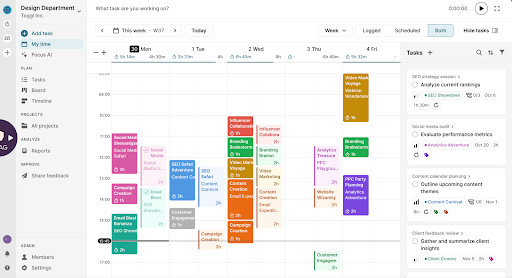
Toggl 2.0 is our project management software that blends project planning with capacity management insight, giving design teams a clear, data-backed picture of how work, time, and revenue actually connect.
Time tracking is baked into the core of the platform, so there’s no more guessing how long something will take or crossing your fingers your team can realistically take on another campaign. Using accurate time data and a clean visual planning experience, you always know exactly what’s possible.
A visual, drag-and-drop timeline (the equivalent of a simpler Gantt chart) is your main space for planning work, like assigning tasks and subtasks, or adding estimates, priorities, and deadlines.
When you want to zoom out on the big picture, simply switch to the Board (Kanban) view. And for more day-to-day planning, opt for the super familiar Calendar and Task views. In each case, you’ll have full visibility into assigned work, design project statuses, used budgets, and overall team capacity.
Want to plan even deeper? Toggl 2.0 also lets you build dashboards for utilization, workload, profitability, and overall productivity analysis. Filter by user, team, project, client, or billability to understand exactly where time is going. Export anything or share live report links so clients and stakeholders always see up-to-date numbers without any manual wrangling.
Standout features:
- Multiple workload views. Switch between Board, Calendar, or Timeline to see your team’s capacity at a glance. Drill down into individual workloads to catch overbooking early.
- Powerful time tracking. Log hours from anywhere — desktop, mobile, browser extension, or web. Offline entries sync automatically, so you don’t lose a single billable minute.
- Consistent data. Use reminders, mandatory fields, and timesheet approvals to keep your team’s time data clean. Everyone stays aligned, and estimates stay accurate.
- Budget tracking. Set hourly or fixed-fee budgets and get alerts when time entries approach your threshold, preventing over-servicing before it becomes costly.
Limitations
- No specialized templates for design workflows (yet).
Pricing
From €9/user per month. Free for up to five users.
Final verdict
Toggl 2.0 was made for design teams that want workload clarity, estimation accuracy, and calm project delivery. Unlike other platforms on this list, time tracking is front and center of the platform, so you can feel 100% certain that the real-time capacity outlook you’re viewing is actually accurate. Toss in real-time budget tracking and effortless reporting, and you have everything you need to deliver creative work without drowning in admin.

2. Wrike
Source: Wrike
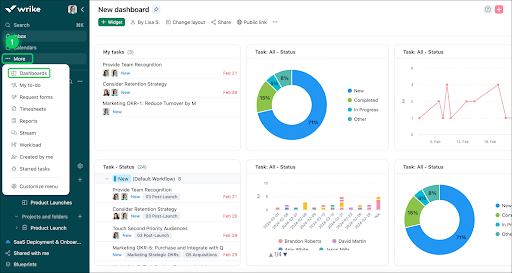
Wrike is a reliable pick for design agencies seeking a flexible, method-agnostic project management tool. Whatever your preference, Scrum, Kanban, or Critical Path, Wrike can be tuned to fit it. You’ve got all of these views to work with and some more, including calendars, tables, and whiteboards. A full suite of planning and collaboration tools are also on offer.
Time tracking isn’t core to Wrike (unlike Toggl 2.0). In fact, it’s only available from the Business plan upwards. From here, designers can log hours for specific tasks and projects, while managers can compare logged hours against planned estimates to see how capacity is distributed and forecast workloads.
Wrike also shines in the sign-off and approval stages — often the biggest source of creative slowdown. Streamlined request forms, automated routing, and in-context reviews help you collect decisions faster. Add visual proofing on top, and your team can mark up drafts, spot errors, and publish approved assets with confidence.
Standout features
- One-click task creation. Use custom item types to shape tasks around your workflow. Get progress visualizations in different chart views — pie, bar, line, column, and others.
- Work schedules. Build personal and team-wide schedules, mark vacations and PTO, and get visibility into true capacity before planning new work.
- Smart Gantt scheduling. Create task dependencies, auto-schedule follow-up tasks, drag and drop timelines, and bulk-reschedule work without breaking your project plan.
- Visual proofing. Mark up designs, images, and documents directly inside Wrike’s proofing tool. Consolidate feedback, collect approvals, and publish assets to your DAM in a few clicks.
- Extensive integrations. Connect Wrike to 400+ tools like Google Workspace, Microsoft Teams, Slack, Zoom, OneDrive, QuickBooks, Excel, and more. For other integrations, use Zapier or Make to bridge the gap.
Limitations
- Whiteboards are locked behind higher-tier plans, unlike some other tools
- The sheer volume of views, features, and customization options can overwhelm new users and slow down team onboarding
Pricing
From $10/user per month. Free plan available.
Final verdict
Wrike is ideal for teams that want power, structure, and flexibility in equal measure. Its proofing, scheduling, and smart Gantt tools make it a strong fit for design and creative workflows. But be prepared for a steep learning curve before your team gets fully comfortable.
3. Asana
Source: Asana
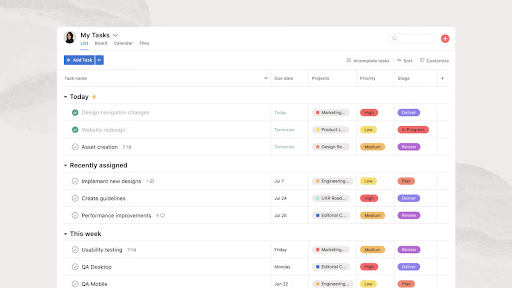
Asana provides a convenient structure to transform creative requests into done work. Everything starts with context — briefs, notes, reference files, and discussions sit directly inside tasks. This gives designers all the inputs they need to jump into creative mode. From there, clear ownership, deadlines, and priority labels keep projects moving without constant back-and-forth.
Templates are one of Asana’s biggest wins for creative workflows. You can use prebuilt project blueprints or craft your own to define how information is labeled, stored, and handed off. Auto-assign tasks, auto-set due dates based on project type, and streamline updates and approvals, all with predictable structures that help teams kick off instantly with a complete deliverable list. Nothing gets forgotten, and no one starts a project from a blank page.
The tool also plays nicely with the tools creatives already rely on. Integrations with Figma, Adobe Creative Cloud, and Google Workspace let teams embed assets directly into tasks, keep feedback in one place, and avoid juggling multiple threads. And with Workload view, managers get a weekly snapshot of everyone’s bandwidth to spot when it’s time to bring in extra hands or redistribute tasks before things get too tight.
Standout features
- Multiple project views. Organize assignable work as a list, calendar, timeline, Gantt chart, or Kanban board. Add labels and nested tasks to filter priorities and keep track of statuses.
- Goals. Connect daily tasks to bigger team goals so everyone sees the impact of their work. Track goal progress through the dashboard to know if you’re on track, at risk, or falling behind.
- Customizable dashboards. Build visual, data-rich dashboards using bar, line, donut, and number charts, among others. Pull in metrics from anywhere to understand what’s working and what’s blocking progress.
- Streamlined status updates. Drag and drop milestones, highlights, and overdue tasks into polished updates. Automate sharing with stakeholders and clients so everyone stays in the loop.
- Custom forms. Standardize creative intakes with customizable forms that capture exactly what you need. Automatically assign, organize, and schedule new work based on submissions.
Limitations
- The new time tracking flow adds friction, requiring users to manually select a project each time they start logging.
- Automation rules can feel difficult to configure, and the AI assistant often struggles to provide helpful suggestions.
Pricing
From $10.99/user per month. Free for 1-2 people, managing personal projects.
Final verdict
Asana gives you the virtual scaffolding to keep your work organized and on track. Templates, automations, and integrations also reduce the need to tab-switch. But to avoid it from getting as messy as a regular spreadsheet, you’ll need to learn all of the product’s bells and whistles — and that demands real dedication.
4. monday work management
Source: monday.com
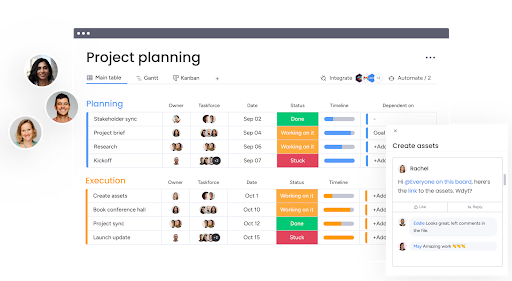
monday.com is another platform you can mold into almost anything. On top of the monday.com Work OS, standalone products exist for CRM, service management, and dev sprints, but the monday work management module is where many creative teams feel at home. Designers like its clean, color-coded visual aesthetics and convenient features for task planning, proofing, and managing client communications.
Adding a new project view is literally a “plus” click away: spin up a Calendar, Timeline, Chart, Kanban board, or Files view across the top of your board. Then, slice the same work from different angles. Next, assign task owners, set deadlines, estimate hours, set time trackers, and manage statuses. If building from scratch isn’t your thing, monday work management’s pre-made workflow templates are a good starting point.
For resourcing and collaboration, the platform also pulls its weight. Workload view shows who on your team has breathing room and who’s overloaded, so you can redistribute tasks and stave off employee burnout. And with built-in automations and an AI digital workforce to boot, you can hand off routine updates and data wrangling to the algorithm to save yourself extra sanity.
Standout features
- Automations. Create simple “if this, then that” rules to move items, update fields, or notify stakeholders to minimize constant manual nudging.
- Custom notifications. Control how many alerts battle for your attention and your preferred channels.
- Employee management tools. Assign roles, control access to specific boards and docs, set work schedules, and define custom integration permissions.
- Resource management. See who’s overloaded or underutilized at a glance, then drill into their assigned tasks and reallocate work as needed.
- AI assistant. Ask natural-language questions about your workspace, auto-categorize data by type, urgency, or sentiment, extract details from PDFs and long text, and even generate new automations from plain-English prompts.
Limitations
- Key capabilities like native time tracking and dependencies are only available on higher-priced tiers.
- Highly customizable setups can become over-engineered over time without proper “housekeeping”.
Pricing
From €9/user per month. Free for up to two seats.
Final verdict
monday work management is a flexible, polished choice for creative teams that want everything from intake to publishing under one visually clear roof. It’s especially strong if you plan to lean into automations and resource management, though you’ll want to watch for tier-based feature locks and keep your setup from turning into a labyrinth of automations.
5. ClickUp
Source: ClickUp
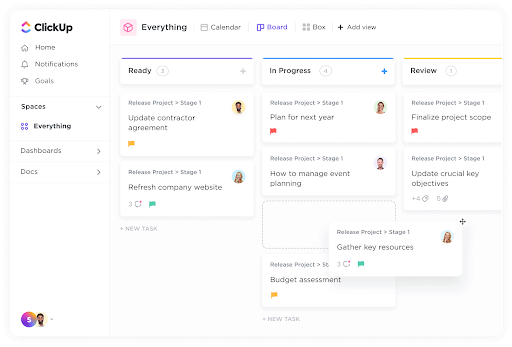
Similar to Wrike, ClickUp is the kind of project management platform you can adapt to your needs, which is exactly why many design teams love it. With views for every type of workflow (List, Board, Calendar, Timeline, Workload, Activity, you name it), you can build a workspace around your teams’ unique needs and preferences.
ClickUp gives you the level of visibility that design teams often lack. Workload and sprint views show who’s fully booked and who has room to jump in. And time tracking and built-in reporting tools help you understand where effort goes, so you can spot bottlenecks pronto. And for day-to-day work, ClickUp gives loads of extra creative collaboration tools — Whiteboards for brainstorming, Docs for briefs, Chat for async feedback, plus embedded Figma and InVision files for smooth deliverables reviews.
When it’s time to iterate, ClickUp keeps everyone moving. Annotate mockups, assign comments, invite stakeholders, and streamline the routine steps with 100+ ready-made automations or an AI automation builder. You can even share prototypes or bug reports as quick video messages that play right in the browser — perfect for cutting down meeting time.
Standout features:
- Custom workflows. Build visual workflows to map full design lifecycles, from intake to delivery. Save them as templates for repeatable client or campaign work.
- Goal tracking. Set and monitor design goals, from project milestones to revenue targets, and tie progress to task completion, numerical checklists, or monetary values.
- In-browser video sharing. Record and share prototypes, product interactions, or bug reports as video messages that play directly in the browser with a single link.
- Automation builder. Streamline routine design tasks using 100+ pre-made Automations, an AI Automation Builder, or custom webhooks to reduce admin and speed up delivery.
- Deep integrations. Connect ClickUp to your wider creative stack to sync updates, share assets, and keep cross-functional work aligned.
Limitations
- ClickUp’s flexibility comes with setup overhead. You’ll spend considerable time configuring everything before you reap the benefits
- The mobile app can feel clunky and laggy, especially on Android, according to user reviews.
Pricing
From $7/user per month. Free plan available.
Final verdict
ClickUp is ideal for design teams that aren’t afraid to fine-tune their setup. Once configured, it becomes a powerful command center for planning, collaboration, and creative delivery. But expect an upfront investment in time before it truly shines.
6. Trello
Source: Atlassian
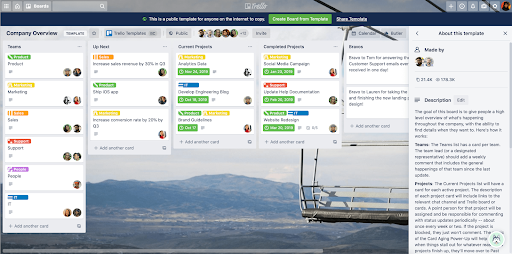
Trello offers creative teams a visual, almost tactile planning style that feels instantly natural for designers. Cards, colorful priority labels, and image-rich boards make even the most complex projects feel more approachable.
Thanks to multiple views like Board, Timeline, Table, Calendar, and more, Trello lets you shape your workspace to fit exactly how you think. The Board view is great for storing brand guidelines or user research notes, while the Timeline view offers an easy way to manage design sprints and track progress in real-time.
The drag-and-drop experience is a big draw, too. You can create new Cards using pre-made templates and pre-filled checklists, then copy them with a click. That’s an easy way to create standardized design systems, client onboarding sequences, or recurring creative workflows.
Standout features:
- Visual task creation. Create and assign tasks with owners, deadlines, checklist steps, descriptions, and attachments.
- Efficient task management. Edit or update multiple tasks across projects in one go. Set recurring tasks and prioritize to-dos with labels and deadlines.
- Built-in document and asset storage inside cards for storing all project details in one place.
- No-code automations. An add-on paid feature, allowing you to create buttons and commands to automate almost any action in Trello.
- Community-built Power-Ups extend Trello’s functionality and enable integrations with other business apps.
Limitations
- No native time tracking to estimate tasks or forecast team capacity.
- Lacks built-in task dependencies, which makes sequential workflows harder to manage.
Pricing
From $5/user per month. Free for up to 10 collaborators per Workspace.
Final verdict
Trello is easy to adopt thanks to its light learning curve and generous library of design templates, but its simplicity can become a ceiling. As workloads grow and leaders need more precision, features like dependencies, resource planning, and profitability tracking sit behind paid power-ups.
7. Lytho
Source: Capterra
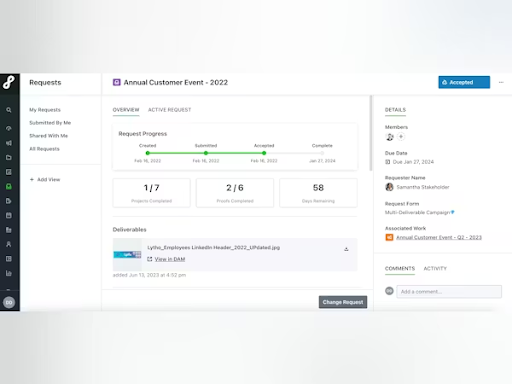
Lytho is a creative project management solution — a place where intake, briefing, routing, reviews, approvals, and asset management all live under one roof. For creative and marketing teams juggling multiple requests, scattered feedback, and endless rounds of revisions, Lytho brings much-needed structure. Intake becomes standardized, reviews stay organized, and brand compliance stops being an afterthought.
The planning experience centers around a streamlined Calendar view. You can set up
unlimited calendars and color-code them by team or channel. Then assign task owners, to-dos, and deadlines manually or automatically and watch progress happen.
Where Lytho really helps is in reducing admin and risk. Reviews happen inside a tidy approval space with version control, deadlines, audit trails, and automated compliance workflows. You can auto-enforce specific brand safety rules to avoid half-backed assets from slipping into the wild. And it’s easy to share finalized campaigns with all stakeholders via a self-service interface.
Standout features:
- Smart intake forms. Standardize data collection for new requests and automatically route them to the right owner.
- Smooth creative reviews with versioning, comment threads, deadlines, and audit trails.
- Project analytics for workload visibility, average time to first proof, cycle times, and more.
- Notifications and built-in reminders for to-dos and due dates across every stage of creative work.
- Digital asset management platform with AI-powered search and usage tracking for seamless file organization.
Limitations
- No recurring tasks or a quick way to duplicate full workflows.
- Task-level experience can feel clunky, with descriptions buried behind several clicks and limited text formatting.
Pricing
On-demand. No free trial available.
Final verdict
Lytho brings better structure to the otherwise messy (and time-consuming) creative proofing process. It streamlines the key steps like intakes, approvals, and brand safety checks. But it could do slightly better in terms of project planning by adding more flexible task management or repeatable workflows.
8. Krock.io
Source: Krock.io
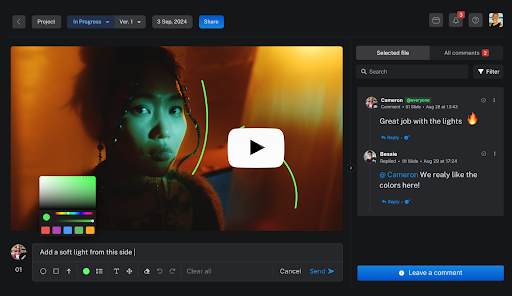
If you’re looking to rein in the creative chaos of motion design, Krock.io may be the design tool for you. It scores some serious brownie points from the video production team and animation design teams for its online storyboard tools, convenient online proofing interface, and collaborative functionality for video reviews.
Creative project managers, in turn, praise Krock.io for its project presets, which you can customize to match your production flow and then replicate ad nauseam with a click. You can also set process sequences, which prevent the next step of the design process from starting unless the previous stage is finished. This is handy for creating iterative feedback loops, where multiple stakeholders (creative directors, clients, animators) have to contribute to the deliverables.
Built-in Gantt chart and Calendar views provide a high-level view of team members’ workload. You can assign tasks, manage project statuses, and manage due dates across private, team, and collaborative workspaces.
Standout features:
- Drawing on media enables faster feedback on images, PDFs, and video files, saving heaps of time on typing out where to look for a problem.
- Ready-made design project templates, built around workflows for creating animations, explainer videos, TV ads, and more.
- User-friendly task management experience with an option to create and manage tasks directly in the comments section.
- Collaboration features like role-based workspace access and shareable private links streamline external stakeholder reviews.
- Native integrations with popular design tools (Adobe Creative Cloud, DaVinci Resolve, Final Cut Pro) and business apps like Slack, Zoom, Google Calendar, etc.
Limitations
- No analytics features to monitor trends in teamwork, run profitability analysis, or optimize resource allocation.
- The platform can sometimes lag when uploading larger media files, according to users.
Pricing
From $14 per user/month. Free plan for one user.
Final verdict
Krock.io can make the video review process less tedious for creative teams, replacing email chains and Slack ping-pong with a single source of truth screen view. While it has some project management features, they’re not as profound. Work analytics is a bit shallow, for example, so you might want to use another project management tool on the side.
9. Linear
Source: Linear
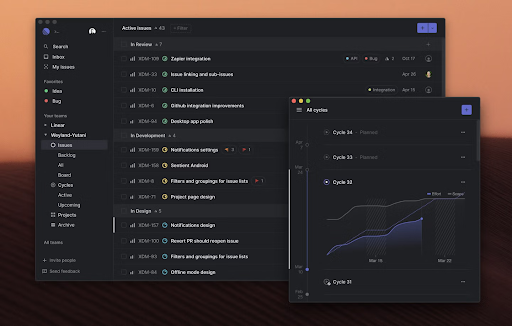
Linear started out as an issue-tracking tool helping developers coordinate troubleshooting efforts. It has since matured into a product-development system platform, supporting designers, product managers, and software engineers to collaborate on features, refine roadmaps, and triage requests.
Built to support the Agile methodology, Linear helps you set and execute the direction for your new product with features. You’ve got Gantt charts views to set project milestones, capture dependencies, assign tasks, share specs, and keep everyone in the loop with custom project statuses and auto-generated project updates. Once the project is underway, you can use a shared team inbox to effectively triage bug reports, new feature requests, and extra work.
While Linear’s feature set caters more to development teams, product designers would really appreciate greater visibility into the product roadmap, specs, and allocated tasks in the context of bigger initiatives.
Standout features
- Create custom workflows using cycles (sprints), projects (roadmaps), or issues as core starting points. Allocate resources, track project progress, distribute tasks, and monitor execution from one convenient screen.
- Multi-layered project views. Switch between product pipelines, Kanban board view, and visual timelines to better understand progress.
- Collaborative project documents workspace with inline comments, pre-made templates, and version control for keeping all important data in one place.
- Built-in analytics allows you to aggregate, segment, and visualize data across the entire workspace. Build custom dashboards to monitor issue resolution rates, bug velocity, or product development cycle times.
- AI workflows proactively suggest and apply the right assignees, teams, labels, and projects based on your team’s work patterns.
Limitations
- Doesn’t have a native time-tracker to capture work on different tasks and help with project estimation.
- Analytics features and custom dashboards are only available on the highest-tier plans.
Pricing
From $10 per user/month. Free for two teams with unlimited members.
Final verdict
Linear suits smaller product teams best. It’s less intimidating than Jira and more aligned with what product design teams need, compared to general project management tools. If you want to reduce project documentation clutter and smooth the project handover from UX to the development team, Linear does just that and more.
Design a better work system with Toggl 2.0
Here’s the truth most creative teams learn the hard way: if your project management setup is overly complex, no one will stick with it for long. You don’t need a certified PM badge or a 200-step workflow to run an effective design operation.
Start with something familiar, something every designer already touches: time.
Team time data is one of the most powerful foundations you can build on. It tells you how much work your team can take on, who can jump in on an extra request, and who’s quietly drowning. With that visibility, you can:
- Give realistic project estimates
- Assign measurable workloads
- Manage budgets without guesswork
- Forecast delivery dates you can actually stand behind
And that’s what Toggl 2.0 helps you achieve — design a work system that’s simple, sustainable, and result-oriented. Sign up for free to get a sense of how intuitive project management can be.

Elena is a senior content strategist and writer specializing in technology, finance, and people management. With over a decade of experience, she has helped shape the narratives of industry leaders like Xendit, UXCam, and Intellias. Her bylines appear in Tech.Co, The Next Web, and The Huffington Post, while her ghostwritten thought leadership pieces have been featured in Forbes, Smashing Magazine, and VentureBeat. As the lead writer behind HLB Global’s Annual Business Leader Survey, she translates complex data and economic trends into actionable insights for executives in 150+ countries. Armed with a Master’s in Political Science, Elena blends analytical depth with sharp storytelling to create content that matters.