Most modern productivity advice tells you the answer is to work harder, wake up earlier, and optimize every minute. But effective time management strategies aren’t so much about packing your day full, as getting more bang for your cognitive buck.
This guide breaks down the behavior and habits behind 10 proven time management strategies, who they work best for, and how to really make them stick in a chaotic, imperfect workday.
Quick comparison of 10 top time management strategies
Every time management strategy is effective, especially when paired with the right time management tool. Whether you’re a student juggling deadlines and a social life, or a professional managing a packed calendar, get a sense of which strategy might be best for you at a glance.
| Time management strategy | Best for |
| Prioritization frameworks | Knowledge workers drowning in competing demands |
| Advance planning | Anyone who starts the day scattered and reactive |
| Time blocking | Deep-work roles with calendar control |
| Task batching | Roles with lots of context-switching |
| No multitasking | Workers who always feel busy but never productive |
| Deadline setting | Perfectionists and chronic procrastinators |
| Reducing distractions | Focus-challenged workers drowning in notifications |
| Task delegation | Leaders stuck rowing instead of steering the ship |
| Break scheduling | Burnt-out workers convinced everything breaks without them |
| Goal setting | High achievers who’ve lost sight of the bigger picture |
Unlike time management methods, which are specific execution frameworks like Pomodoro or time-blocking, time management strategies are the behavioral habits and approaches that shape how you work day-to-day.
10 effective time management strategies for higher performance
Time management strategies require a change in behavior. And like any change, they start within and take time, meaning it’s important to select a strategy you can commit to over the long haul. We’ve compiled a deep-dive into the best ones to help you get ahead — learn what to expect, who it works best for, and some tips for success using them in your day-to-day life.
1. Prioritization frameworks
🌟Best for workers overwhelmed by competing tasks and demands
❌ Not for highly reactive roles where priorities are externally set or very fast-moving
Prioritization frameworks are structured, data-driven methods used by teams to rank their work based on consistent criteria like value, effort, and risk.
Most people start the day by opening their inbox and letting other people’s urgency set their agenda. Prioritization frameworks are the antidote. They put you back in the driver’s seat, helping you identify time-wasters and decide what deserves your time and energy.
🔑Key behavior change
Shifting your default response to incoming work from “yes” to “let me think about that.”
🪂 Deploy when
- Your to-do list never seems to get shorter, no matter how much you get done
- Everything feels urgent, and you’ve no idea what to tackle first
- You say yes to everything and wonder why you lack time for your most important work
🧪 Methods in your toolkit
- Eisenhower Matrix (a quadrant based framework for sorting what to do first)
- RICE Scoring (for weighing effort against impact)
- MoSCoW Method (for separating must-dos from nice-to-haves)
💪How to build the habit
- Start each day with a top three. Before you open your email or Slack, identify the three tasks that would make today a success if nothing else got done. Everything else is secondary.
- Do a weekly list audit. Anything sitting untouched by Friday either isn’t really a priority, or needs to be broken into a smaller first step.
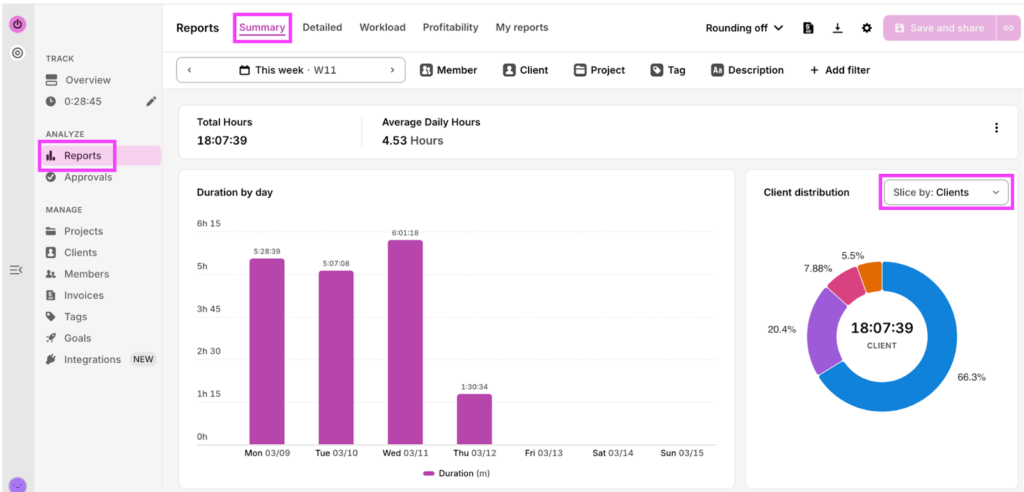
- Trust your time data to prioritize tasks. Toggl’s reports show you exactly how your hours are distributed across projects and clients — making it easy to spot where high-effort work doesn’t match high-value output.
In Reports, select Summary and slice the pie chart by Clients or Projects, to see how you split your time across different demands.
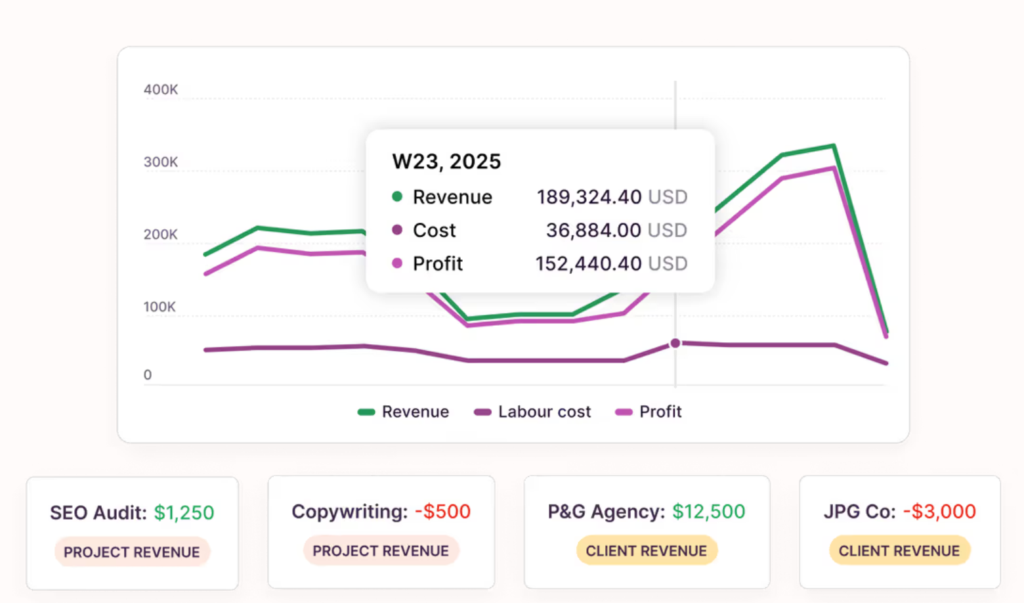
Compare it alongside revenue with Profitability reports, to keep your margins high and put your effort into your highest-value work.
2. Advance planning
🌟 Best for anyone who starts the day scattered and reactive
❌ Not for roles with unpredictable days (e.g. journalists, crisis comms managers, traders)
Planning your day in advance is a task management tactic that lets you schedule time with intention. This strategy reduces stress and increases productivity and focus by eliminating the friction brought on by decision-making in the morning.
🔑 Key behavior change
Build the habit of allocating 10-15 minutes at the end of the day to plan the next one.
🪂 Deploy when
- You regularly start the day not knowing where to begin
- You feel like you’re constantly firefighting and never in control of your time
- You finish the day feeling like you reacted to everything and initiated nothing
🧪 Methods in your toolkit
- The Rapid Planning Method (to set long-term intentions)
- The 1/3/5 Method (to set daily priorities)
- ALPEN Method (to plan the day in detail)
💪 How to build the habit
- Make it a shutdown ritual. Allocate the last 10 minutes of your workday for tomorrow, not today. Write down your top priorities, check your calendar for early commitments, and close your laptop knowing you have a plan.
- Leave room for the unexpected. Build at least a 20% buffer into your day. Meetings run over, Slack explodes, life happens. A plan with no slack isn’t a plan — it’s a countdown to stress.
3. Time blocking
🌟 Best for deep work roles with calendar control
❌ Not for roles with externally controlled calendars (e.g. SDRs, customer support reps, on-call engineers)
Time blocking is the practice of dividing your day into dedicated chunks of time, each assigned to a specific task or type of work. Instead of working reactively through a to-do list, you decide in advance what gets your attention and when. It’s a great way to get into a flow state and knock out some deep work, or get through a batch of similar tasks.
🔑 Key behavior change
Valuing your own time as much as your colleagues’. Making the blocks is one thing, following through is a whole other ball game. It requires boundaries of steel.
🪂 Deploy when
- Your day disappears into a blur of small tasks
- You never find time for your most important tasks
- You have more control over your calendar than you’re currently using
🧪 Methods in your toolkit
- Eisenhower Matrix (to identify important, non-urgent tasks for time-blocking)
- Day theming (to capitalize on deep-focus)
- Pomodoro technique (for mini-sprints within blocks)
💪 How to build the habit
- Start with one protected block a day. Don’t try to block your entire week on day one. Pick your peak energy window and protect it for deep work — build from there.
- Batch similar tasks into themed blocks. Context switching is a productivity killer. Knock out emails, phone calls, and admin in one block — creative or strategic work in another.
4. Task batching
🌟 Best for those in roles with lots of context-switching
❌ Not for roles dominated by a single type of deep work (e.g. novelists, researchers, animators)
Task batching is the practice of grouping similar tasks together and completing them in a single dedicated block of time.
This improves productivity by reducing cognitive switching — the mental equivalent of shifting gears. After every switch, it takes your brain at least 20 minutes to get back up to speed. Batching minimizes this cost, improving efficiency and productivity and keeping your brain focused on the task at hand for longer.
🔑 Key behavior change
Resist the urge to handle tasks as they come in. Instead, park them until their dedicated window arrives.
🪂 Deploy when
- Your to-do list is punctuated by a million little things
- You have several of the same kind of task to do
- You have lots of to-dos that don’t depend on anyone else
🧪 Methods in your toolkit
- Ivy Lee Method (to plan which batches take priority)
- Time blocking (to schedule your batch windows)
- Pomodoro (for focused execution within a batch)
💪 How to build the habit
- Identify and group your batchable tasks. Emails, invoices, checking Slack, leaving feedback, scheduling social content, scheduling — these can all be batched.
- Set batch windows and stick to them. Designate specific times for specific task types. For example, check emails only at 9 am and 4 pm, take calls only on Tuesday and Thursday afternoons.
5. No multitasking
🌟 Best for workers who always feel busy but never productive
❌ Not for roles that require you to monitor multiple streams simultaneously (e.g. air traffic controllers, stock traders, live event producers)
Multitasking involves trying to do several tasks at once, like answering emails during a virtual meeting, or quickly checking your marketing dashboard while waiting for your ad campaign to upload.
It may feel productive, but it actually makes you less efficient and more mentally fatigued overall, reducing performance and productivity.
🔑 Key behavior change
Choose depth of work over the illusion of progress. At first, the shift will make you feel like you’re moving at a snail’s pace. But it won’t be long before the concerted effort compounds in a big way.
🪂 Deploy when
- You’re stuck in the rut of “busywork”
- You regularly make small errors that cost you time to fix
- You finish the day exhausted but can’t point to why
🧪 Methods in your toolkit
- Pomodoro (for single-task focus sprints)
- The 1/3/5 Method (to stay on-task)
- Eat that Frog (for committing to one hard thing first)
💪 How to build the habit
- Close your tabs. When you’re working on something, close everything unrelated — they’re nothing more than temptations.
- Use pen and paper. Before starting a time-block, write down your top priority on paper — something about the physicality of it keeps you accountable.
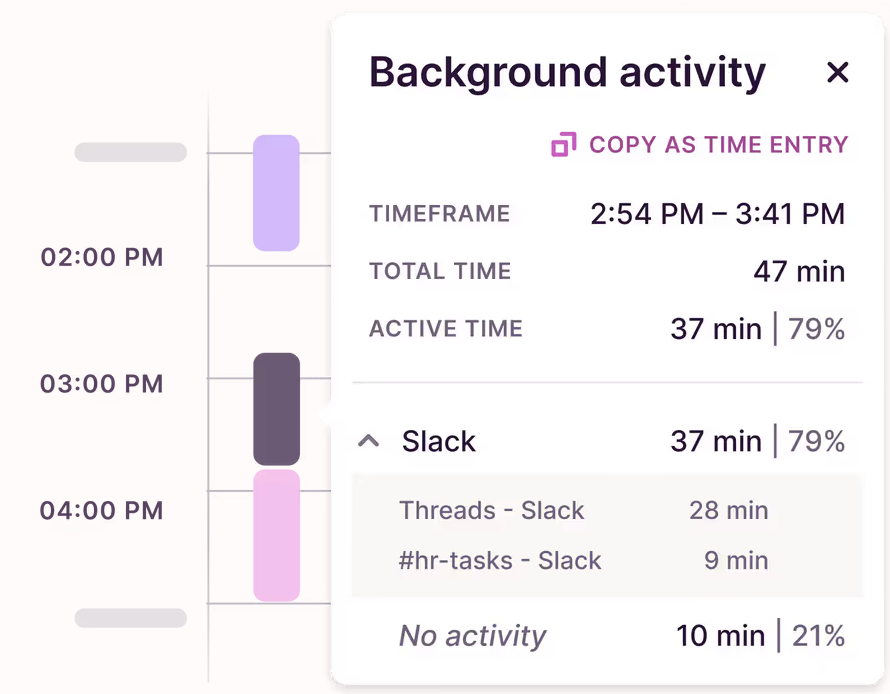
- Track your browser activity. You can use Toggl’s automatic time tracking to see the amount of time you spent on a single task without switching. You might be surprised at what the data reveals.
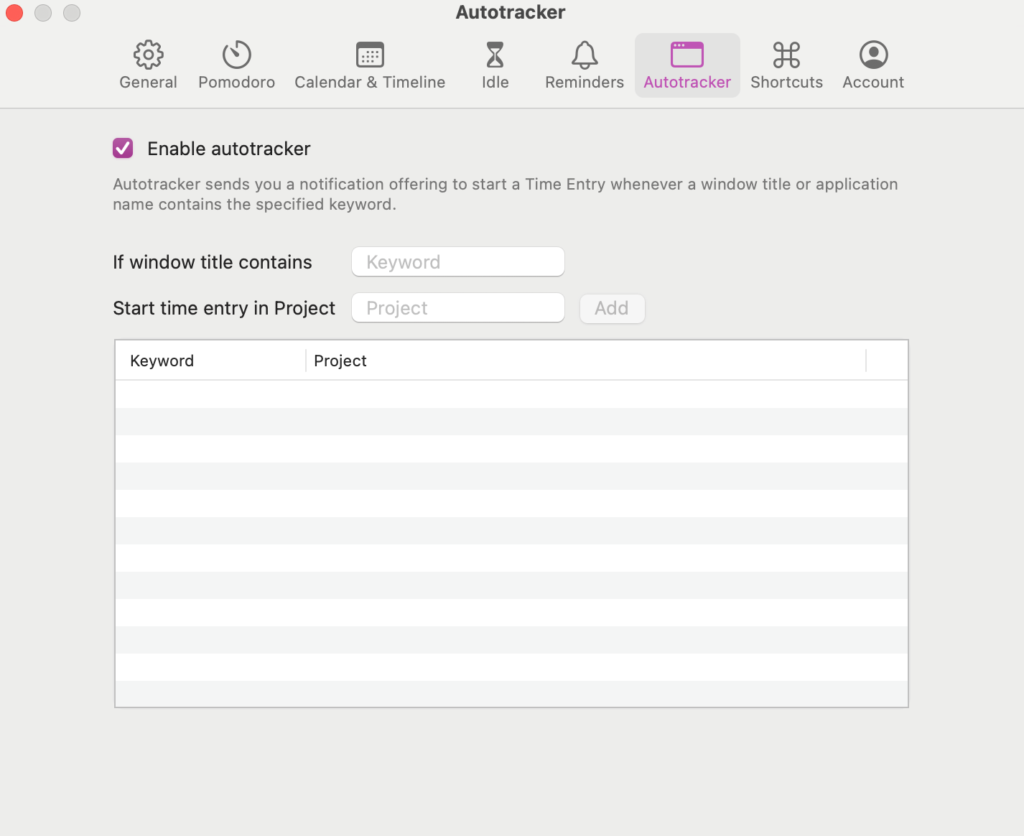
From the Toggl desktop app, go to the Calendar view and click Settings.
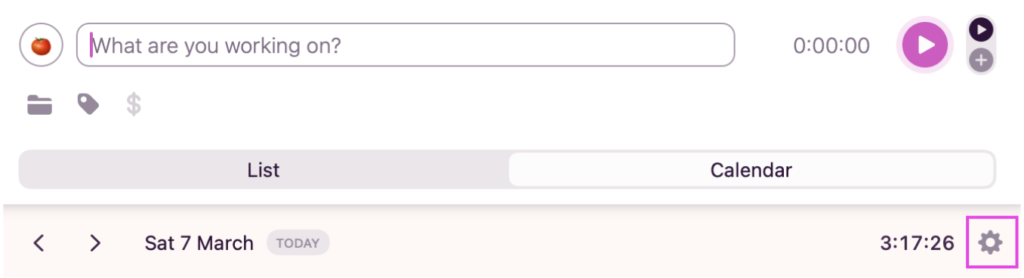
Click on the Autotracker tab, tick Enable Autotracker, and configure which webpages you want to map to which Projects.
Toggl’s automated time tracker will log your activity and turn it into a timeline, without you lifting a finger.
6. Deadline setting
🌟 Best for perfectionists and chronic procrastinators
❌ Not for those who are work with externally imposed deadlines
Setting deadlines for every task gives them a sense of urgency. Time limits create the forward momentum needed to push through a slump in motivation, and lets you get more done in less time.
🔑 Key behavior change
Learning to accept that done is better than perfect — and a deadline is what separates the two.
🪂 Deploy when
- Tasks sit on your list for days without progress
- You’re prone to over-perfecting work that was good enough three hours ago
- You work better under pressure but hate leaving things to the last minute
🧪 Methods in your toolkit
- Parkinson’s Law (for compressing time windows)
- Time blocking (for assigning hard start and end times)
- Eat that Frog (for deadline-driven prioritization)
💪 How to build the habit
- Detach your ego from your output. The quality of a piece of work is not a measure of your worth. Treat it like a deliverable, not a reflection of who you are.
- Purposefully submit things before they feel finished. If you’re a recovering perfectionist, your 70% is most people’s 100%. The discomfort of hitting send early gets smaller every time, and will eventually set you (and your calendar) free.
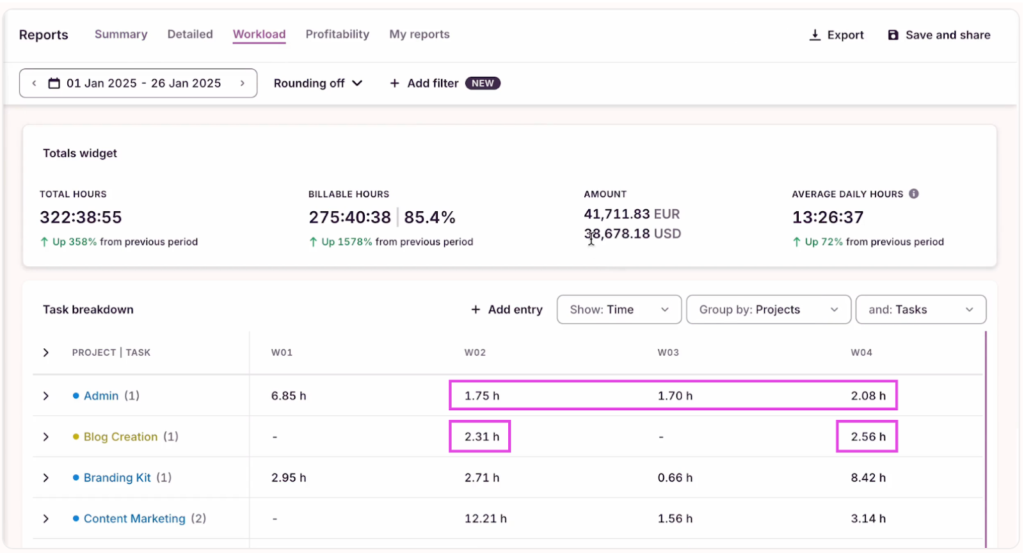
- Use historical data, not gut feel. Toggl’s reports show you how much time similar tasks have taken in the past, keeping your deadlines grounded in reality, not optimism.
From Reports, select the Workload tab, and filter by Time, Projects, and Tasks. Look for similarities across the board and use them to set future deadlines.
7. Reducing distractions
🌟 Best for focus-challenged workers drowning in notifications
❌ Not for those in reactive roles (customer success reps, social media community managers, IT support)
Good time management is fundamentally about attention. Protect yours by reducing workplace distractions like unnecessary notifications, interruptions, and context switches. You’ll get more done and actually still have some functioning brain cells left by 5 pm.
🔑 Key behavior change
Sitting comfortably in the notification-free silence, rather than constantly seeking out messages and emails to quell your low-level anxiety.
🪂 Deploy when
- You itch for a context-switch every 10 minutes
- You compulsively check Slack just in case you missed something
- Notifications feel urgent even when you know they’re not
- You’re always available to everyone but yourself
🧪 Methods in your toolkit
- Notification-blocking software (like Freedom, ColdTurkey, Forest App)
- The 80/20 Rule (to focus only on highest-impact work)
💪 How to build the habit
- Make distraction harder than focus. Willpower is unreliable — friction is not. Put your phone in another room, turn all notifications off, close unneeded browser tabs, or use a tool like Freedom to lock yourself out of certain sites entirely.
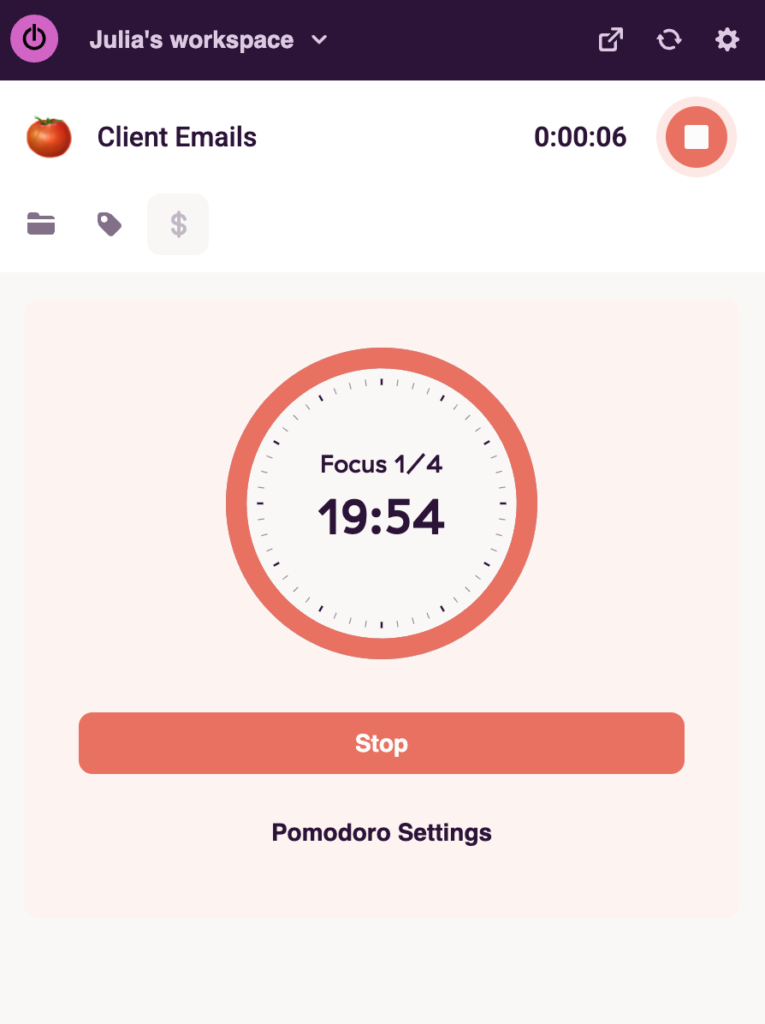
- Start small. If an uninterrupted hour feels impossible, start with 25 minutes. Use Toggl’s Pomodoro timer to build the habit gradually, and watch your focused hours stack up over time.
Open settings in the Toggl Chrome Extension.
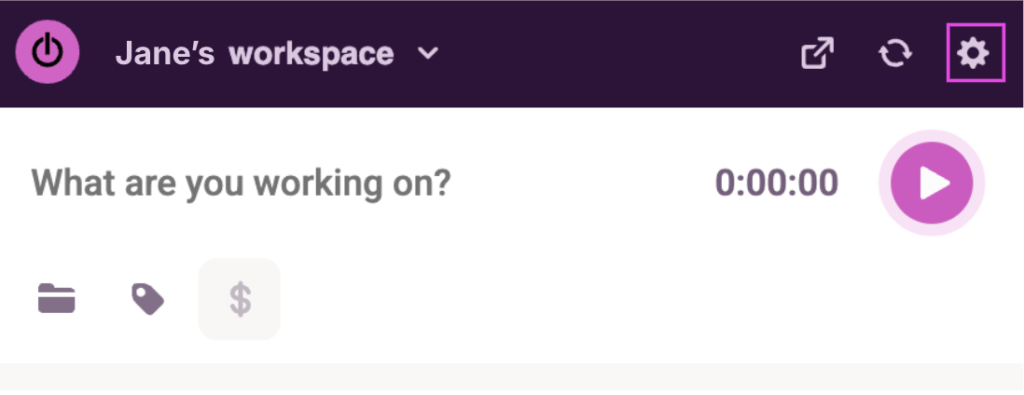
Enable Pomodoro Timer, and adjust your focus and break lengths.
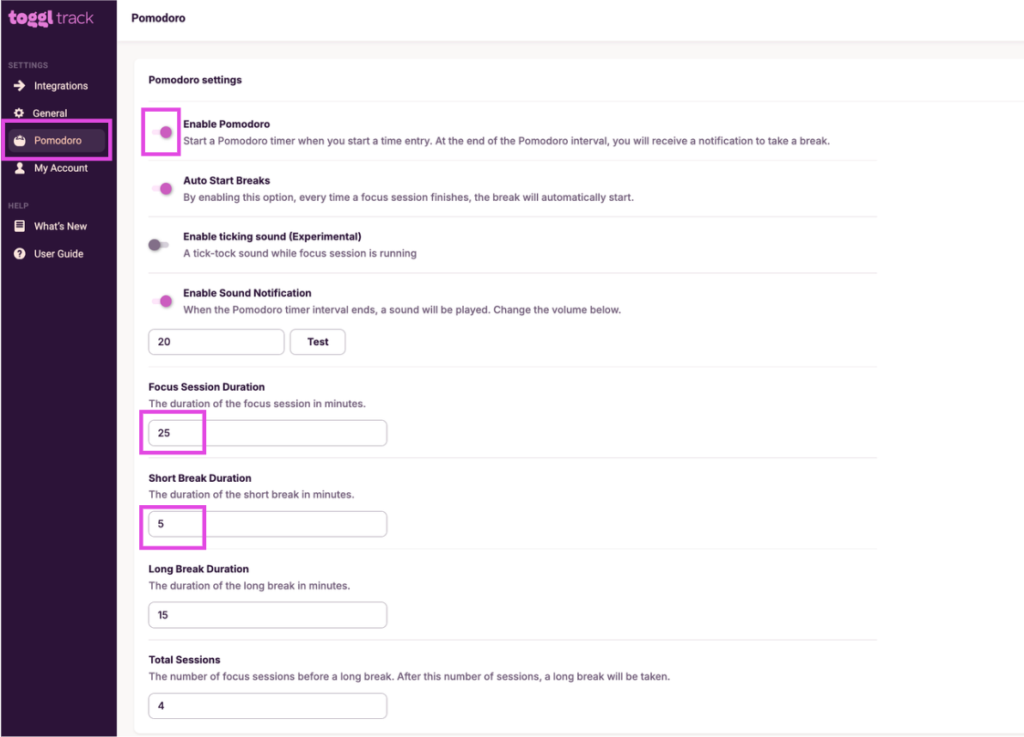
Your timer will automatically count you down for every time entry, and prompt you to take a break when it’s time.
8. Task delegation
🌟 Best for leaders stuck rowing instead of steering the ship
❌ Not for solo operators and freelancers with no one to delegate to (yet)
Delegation is the intentional practice of transferring tasks to others who are better placed to handle them, usually by skill, seniority, or availability. It’s one of the highest-leverage ways to free up your time without sacrificing impact and work quality.
Note: You can check out our guide on team time management for more details on this topic.
🔑 Key behavior change
Realize that your fear of losing control is creating a bottleneck. Start with something low-stakes — just get used to how it feels to let it go.
🪂 Deploy when
- You’re regularly doing work that someone more junior could handle
- Your team is underutilized while you’re underwater
- You’re the reason things are moving slowly
🧪 Methods in your toolkit
- Eisenhower Matrix (for identifying what to delegate)
- 80/20 Rule (for protecting your highest-value work)
💪 How to build the habit
- Delegate the outcome, not the method. Micromanaging how tasks are done defeats the purpose and signals you don’t trust your team.
- Check capacity first. Dumping work on an overworked teammate can backfire on productivity and erode morale. Make sure there’s room on their plate before you hand something over. If you can’t tell, you might need to do some capacity planning to determine the total workload your team can handle, and how best to divvy it up.
- Use Toggl’s Workload report for capacity planning. A project time management tool like Trello or a Kanban board will show you what’s assigned, but Toggl’s Workload report checks the pulse of your team in real time.
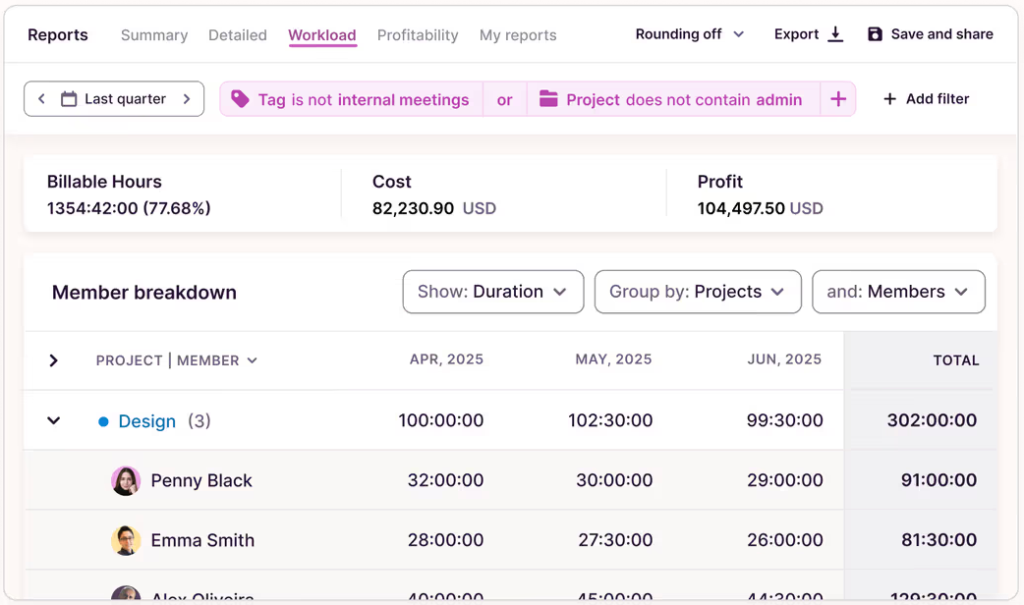
See at a glance who has bandwidth, who’s drowning in to-dos, and delegate accordingly. The Workload report also helps you optimize your workforce scheduling over time, by spreading hours evenly across the team.
9. Break scheduling
🌟 Best for burnt-out workers convinced everything breaks without them
❌ Not for roles with naturally fragmented workflows where rest is already built in
Scheduling regular breaks allows you to build recovery and free time into your day. Instead of stopping only when you can’t concentrate anymore, taking proactive breaks can help you maintain focus for longer and improve well-being.
🔑 Key behavior change
Rest isn’t a reward for finishing work, it’s a key part of doing it well.
🪂 Deploy when
- You regularly hit a wall mid-afternoon and push through anyway
- You wear “I didn’t take a lunch break” like a badge of honor
- You end the day exhausted but don’t feel like you earned it
🧪 Methods in your toolkit
- Pomodoro (for built-in 5-minute breaks every 25 minutes)
- Time blocking (for scheduling longer recovery windows)
- 1/3/5 Method (for building a manageable day that doesn’t require superhuman endurance)
💪 How to build the habit
- Schedule breaks before your day starts. Modern work doesn’t have a natural stopping point. Since there’s always more to do, taking a break “after one more thing” means your rest gets delayed again and again. Being intentional with them prevents this.
- Protect your lunch break like a meeting. Block it, name it, and don’t let it get colonized by a “quick sync.” Eating a sandwich over your keyboard is not a break.
10. Goal setting
🌟 Best for high achievers who’ve lost sight of the bigger picture
❌ Not for … well, this one’s for everyone!
Setting SMART goals (that are specific, measurable, achievable, relevant, and time-bound) connects your daily behavior to your intended impact. They turn a list of tasks into a coherent narrative about where you’re headed and how you’re going to get there. Without them, time management is just optimization in a vacuum. Plus, time-bound goals are much more likely to be achieved, because they come with a sense of urgency.
🔑 Key behavior change
Tracing every item on your to-do list back to a bigger goal, so every hour becomes meaningful.
🪂 Deploy when
- You’re productive but vaguely unfulfilled
- Your daily tasks feel disconnected from a bigger vision
- You keep saying yes to things that don’t align with where you want to go
🧪 Methods in your toolkit
- RPM (for connecting daily actions to outcomes and purpose)
- Getting things done (for organizing long-term goals into actionable next steps)
- OKRs (for aligning personal goals with team or company objectives)
💪 How to build the habit
- Work backwards. Start with your annual or quarterly goal, then break it into monthly milestones, weekly priorities, and daily tasks. Cut every to-do that doesn’t map to a clear goal.
- Review your goals weekly. Goals set and never revised are just a pipedream. Spend 15 minutes per week to review and revive them, so your work always points in the right direction.
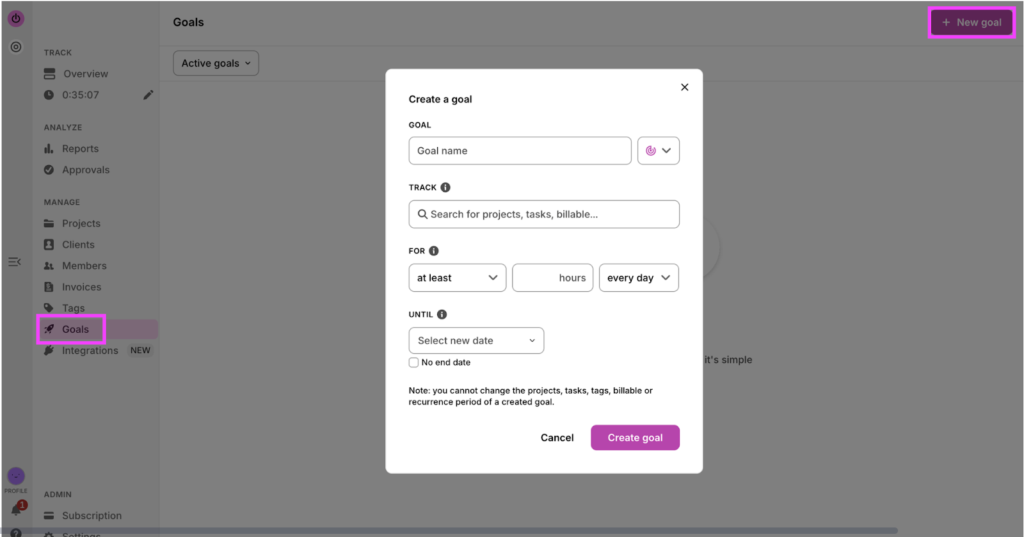
- Manage goals at scale with ease. Toggl’s employee time management goals feature lets you set time-based targets for your workers, and track progress against them. Automatic reminders trigger when they’re falling behind or not tracking time, keeping your data clean and accurate.
Create goals from within the timer page…
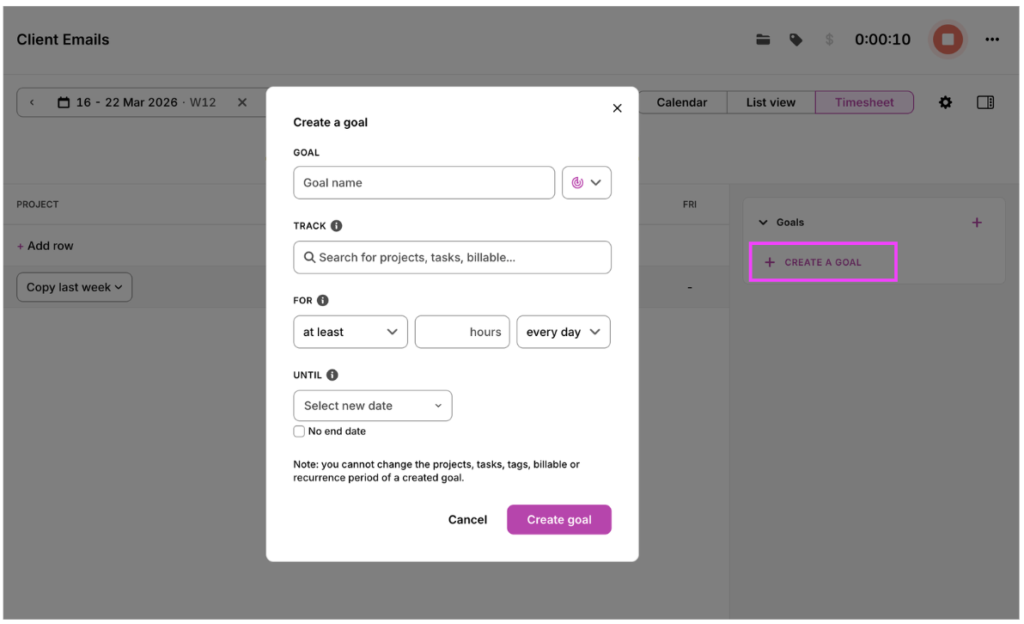
…or the Goals page.
Time management pitfalls to avoid
It’s possible to let the pendulum swing too far the other way, and turn your time strategy into overkill. Here are some poor time management skills that sound good on paper, but will set you up to fail in real life.
Scheduling every minute of your day
Packing your calendar with time blocks might make you feel on top of things, but it can quickly turn into a time-bomb! All it takes is one meeting to run over, and suddenly your beautifully structured day cascades into a source of stress rather than relief.
Top tip: Leave buffer room throughout the day to breathe and be human. A long coffee, a chat with a colleague, a bathroom break, a delayed meeting — these don’t have to blow up your whole plan when you account for them.
Over-optimizing your schedule
Refining your time management system feels like work, but at some point it just becomes a way of avoiding the actual hard stuff.
Top tip: Pick a system, run it for 30 days, and if it’s not broken, don’t fix it.
Tracking every minor activity
Time tracking is powerful, but logging every two-minute Slack reply creates noise that drowns out the signal. The goal is useful data that helps you make better decisions, not a forensic account of every minute of your day.
Top tip: Track at the project or task level, not the micro level.
Time management tips by scenario
Wouldn’t it be nice to just copy-paste a clean time management strategy into your workday and sail away on a cloud of calm? Here are several scenarios where you might run up against challenges that force you to tailor your approach.
If your calendar isn’t really yours
Common in: executives, executive assistants, project managers, middle managers
Problem: Your day is largely dictated by meetings, requests, and priorities set by other people. By the time you get a moment to focus, there’s little time left for meaningful work.
Solution:
- Shift your focus from what you can’t control to what you can. For example, carve out 90 minutes every morning to move big things forward and watch your impact snowball.
- Audit your calendar for recurring meetings that could be async or less frequent
If you work in a highly reactive job
Common in: customer success, sales, PR, operations roles
Problem: Your workload is driven by incoming requests, not a fixed plan, so your day can change direction at any moment. This makes it difficult to protect time for focused, proactive work.
Solution:
- Accept that your day will never go fully to plan, and build your system around that truth, not against it. Designate reactive windows for incoming requests, Slack, and ad-hoc asks and protect everything outside them for focused work.
- Before committing to anything new, check your actual capacity. Every yes to a reactive request is a no to something already on your list.
If you’re managing cognitive fatigue
Common in: developers, writers, analysts, designers
Problem: Cognitive fatigue is the progressive decline in mental performance that comes from sustained concentration. Over time, even simple tasks start to feel harder and the quality of your work drops.
Solution:
- Schedule your most demanding work during peak energy hours — not whenever there’s a gap in your calendar. A hard task at low energy takes twice as long and produces half the result.
- Treat recovery time as a non-negotiable line item in your day, not something you get to when everything else is done. It never will be.
If you’re overwhelmed by knowledge overload
Common in: marketers, researchers, journalists, traders
Problem: Knowledge overload is when you’re overwhelmed by an excessive amount of data, making it difficult to process, analyze, and use that information effectively. Instead of gaining clarity, you end up constantly consuming, switching contexts, and struggling to turn information into action.
Solution:
- Batch your information consumption into dedicated windows. Email, Slack, industry news, meeting notes — none of it needs to be processed in real time, all day long.
- Unsubscribe aggressively and mute liberally. Your peak energy hours are valuable time, don’t spend them on other people’s updates.
How to pick the right time management strategy
There’s no universal answer here — the best strategy is the one that addresses your biggest friction point and that you’ll actually stick to.
Your needs will change over the course of your career. What works for someone junior might not support a senior leader managing several team members and a packed calendar. Build your stack accordingly, and revisit it when your role or workload shifts significantly.
We’ve made a nifty summary table to help you get started, no matter where you’re at today.
| If you… | Start here |
| Have too many tasks and no set priorities | Use prioritization frameworks, set goals |
| Start the day scattered | Plan your day in advance |
| Never find time for deep work | Block your time, reduce distractions, set deadlines |
| Constantly context-switch | Batch similar tasks, limit multitasking |
| Procrastinate and over-perfect work | Set deadlines |
| Are burning out and running on empty | Schedule breaks, delegate |
| Feel busy but like you’re getting nowhere | Set goals, use prioritization frameworks |
Stack your strategies for a complete system
The most effective time managers run a small stack of complementary strategies that each serve a different function. Pick one for each layer, run them consistently, and adjust as your needs evolve.
- Get clarity → Know what matters and why before you touch your calendar
- Use prioritization frameworks
- Set goals
- Make a plan → Translate your priorities into a realistic schedule with protected focus time
- Plan your day in advance
- Block your time
- Execute efficiently → Remove the friction between you and the work that matters
- Batch similar tasks
- Limit multitasking
- Reduce distractions
- Recover frequently → Protect the energy that makes everything else possible
- Schedule breaks
Improve your time management with Toggl
The hardest part of any time management strategy is staying consistent long enough to see results.
Toggl helps you build that consistency by showing you exactly where your time is going, how your estimates compare to reality, and where your highest-value work lives — so you can do more of it, and less of the rest.
Join over 5 million users reclaiming their time and try Toggl for free.
Frequently asked questions (FAQs) about time management strategies
What are the most effective time management strategies?
The most effective time management strategies are the ones that target your biggest friction point, and that you’ll actually stick to. That said, the highest-leverage habits for most people are planning your day in advance, blocking your time, and using a prioritization framework to protect the work that actually matters.
How do time management strategies differ from time management methods?
Time management techniques and strategies differ from time management methods in that strategies are the behavioral habits you build to manage your time, whereas methods are the specific execution frameworks you use to implement them. Strategies are the what and why, the methods are the how.
Which time management strategies help reduce stress and burnout?
Scheduling short breaks, delegating, and setting realistic deadlines are the best time management strategies for reducing stress and burnout. They address the three most common causes of burnout — running on empty, carrying too much, and chronic overcommitment.
How do I stick to time management strategies long term?
Sticking to time management strategies long term comes down to picking the one best-suited to your workflow and role. Start with one strategy, run it for 30 days, and only adjust or add complexity when you have evidence something isn’t working.
What time management strategies work best in busy or unpredictable jobs?
The best time management strategies for busy or unpredictable jobs flex with your day rather than fight against it. Use a prioritization framework for fast triage, batching to contain reactive work, and loose advance planning so you start each day intentionally rather than reactively.

Julia Masselos is a remote work expert and digital nomad with 5 years experience as a B2B SaaS writer. She holds two science degrees Edinburgh and Newcastle universities, and loves writing about STEM, productivity, and the future of work. When she's not working, you'll find her out with friends, solo in nature, or hanging out in a coffee shop.