Time management methods are frameworks that help you decide what to work on, when to work on it, and how to actually get things done. There are dozens of them out there, each promising to fix your productivity, but they’re not one-size-fits-all. Instead, you’ll need to pick the one that best suits your brain, job role, and workflow.
| Method | Best for | Difficulty | Works well with |
| Pomodoro technique | Focus-challenged workers, students, anyone prone to distraction | Beginner | Time blocking, Ivy Lee |
| Time blocking | Deep work, creative and technical roles, freelancers | Beginner | Pomodoro, Eisenhower |
| Eisenhower Matrix | Managers, overwhelmed generalists, anyone drowning in tasks | Intermediate | Time blocking, 80/20 Rule |
| 80/20 Rule | Entrepreneurs, freelancers, anyone optimizing for output over effort | Intermediate | Eisenhower, time blocking |
| Getting things done (GTD) | High-volume knowledge workers, managers, anyone with a chaotic inbox | Advanced | Time blocking, Pomodoro |
| Eat that frog | Chronic procrastinators, anyone who avoids high-stakes tasks | Beginner | Pomodoro, Ivy Lee |
| Parkinson’s Law | Perfectionists, deadline-avoiders, anyone who lets tasks expand endlessly | Intermediate | Time blocking, Pomodoro |
| Rapid Planning Method (RPM) | Goal-driven workers, entrepreneurs, strategic thinkers | Advanced | GTD, Time blocking |
| Ivy Lee Method | Overthinkers, people who struggle to end their workday, beginners | Beginner | Eat that frog, Pomodoro |
| The 1/3/5 Method | Anyone with ADHD-like focus challenges, people who struggle to get started | Beginner | Time blocking, Pomodoro |
10 proven time management methods for peak productivity
The methods below can fit individuals and teams for both personal and professional use cases. While some are a bit more advanced, the majority can be easily implemented regardless of your time management skills and experience.
1. The Pomodoro Technique
The Pomodoro technique structures work into timed 25-minute intervals called Pomodoros, which are separated by short breaks. The fixed duration creates urgency, while the breaks prevent mental fatigue from building up over long sessions.
Italian student Francesco Cirillo developed the technique in the late 1980s while struggling to focus during university. He challenged himself to concentrate for just ten minutes, using a tomato-shaped kitchen timer to keep himself accountable. Pomodoro is Italian for tomato. He refined the intervals over time — landing on 25 minutes as the sweet spot — and published the formal method in 2006.
🔧 How it works
Set a timer for 25 minutes and work on one task until it goes off. Take a 5-minute break. After four Pomodoro cycles, take a longer break of 15-30 minutes.
👷 Best use cases
- Batching short tasks, like weekly social media copy or tackling your inbox
- Writers, developers, designers, or anyone doing focused solo work
- Students studying for exams
- Anyone who struggles with distraction or loses track of time easily
🎨Example scenario
You have a report due EOD that you’ve been avoiding since Monday. Instead of staring at a blank document and melting into a puddle of overwhelm, you set your first Pomodoro. By lunchtime, you’ve logged four Pomodoros and the morning dread is a distant memory; the draft is done in less time than expected and you feel deeply satisfied.
👎 Downsides
Pomodoro’s rigid break schedule can disrupt your “flow state” — the mental space where you’re fully absorbed, time disappears, and work feels effortless. Flow state is fragile; it takes time to enter, and over 23 minutes to recover once broken. A timer going off every 25 minutes might do more harm than good.
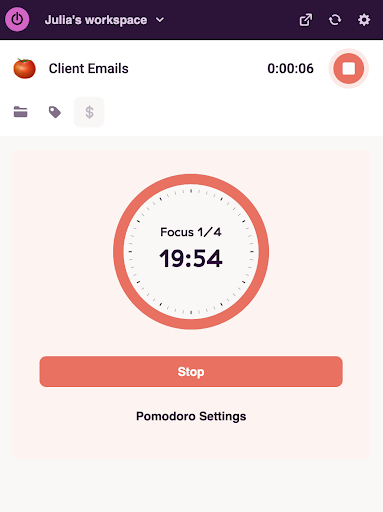
🍅 Set up a Pomodoro timer in Toggl
From the Toggl Chrome Extension, head to settings. Enable Pomodoro and customize your work and break intervals.
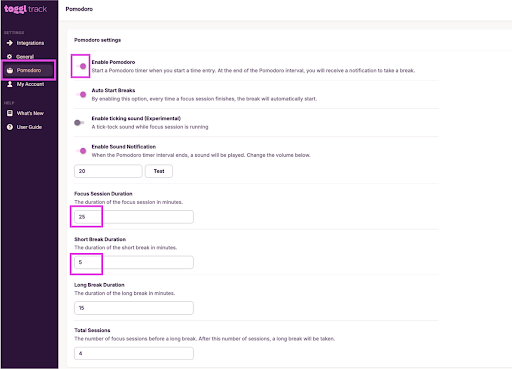
Every entry automatically counts down your focus time and alerts you at break-time.
2. Time blocking
Time blocking is a time management method where you divide your day into dedicated blocks of time, such as 30 minutes to a few hours. After dividing up your time, you’ll assign a specific task or type of work to each. Instead of reactively working your way through a to-do list, you decide upfront what gets your attention and when, then treat each block like an unmovable meeting with yourself.
🔧 How it works
Identify your most important tasks for the day or week and assign each a dedicated block in your calendar. Protect peak energy hours for deep work, and batch similar tasks (answering emails, completing admin, taking phone calls) into lower-energy windows. This approach is great for discouraging multitasking and focusing on the task at hand.
👷 Best use cases
- Knowledge workers managing multiple projects
- Freelancers and remote workers who control their own schedules
- Managers carving out focused work time between meetings
🎨Example scenario
Instead of walking into Monday stressed and scattered, you spend 15 minutes on Sunday night blocking your week:
→ Deep work from 9-11am every day
→ Client calls batched on Tuesday and Thursday afternoons
→ Friday morning reserved for planning
When Monday arrives, you turn off your brain and follow the plan. By Thursday, you’ve done more meaningful work than the entire previous week.
👎 Downsides
- Assumes calendar control not everyone has e.g. reactive roles like support, sales, and ops, where unexpected disruptions can derail the rest of your carefully planned day.
- Requires honest self-knowledge to build blocks that actually reflect how long things actually take. Luckily, Toggl can help with this.
⏰ Get realistic time estimates with Toggl
Set custom time estimates for your projects and tasks inside Toggl, then monitor actual time spent vs. estimates.
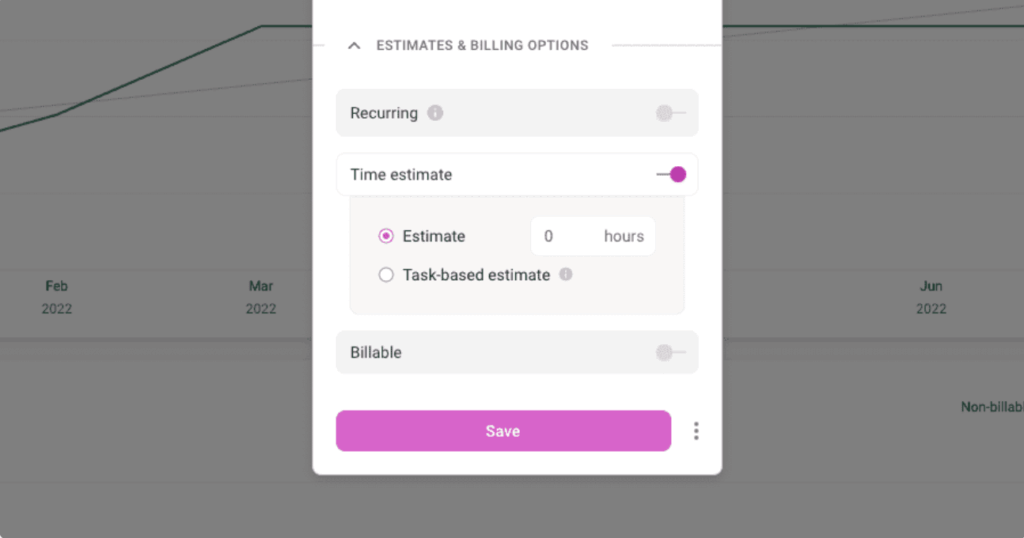
Project Time Estimates shows whether you’re on target or running over. If you’ve exceeded your estimate, the tracked time turns red.
3. Eisenhower Matrix
The Eisenhower Matrix is a prioritization framework that determines whether your tasks are urgent, important, both, or neither, to help you decide where to direct your attention first. Mapping everything you need to do against these two criteria gives you an instant sense of what deserves your focus today, and what can wait.
🔧 How it works
Draw a 2 x 2 grid and organize your to-do list into four categories:
- Urgent + important → Do it now
- Important, not urgent → Schedule it later at a specific time
- Urgent, not important → Delegate it to someone else
- Not urgent, not important → Delete it
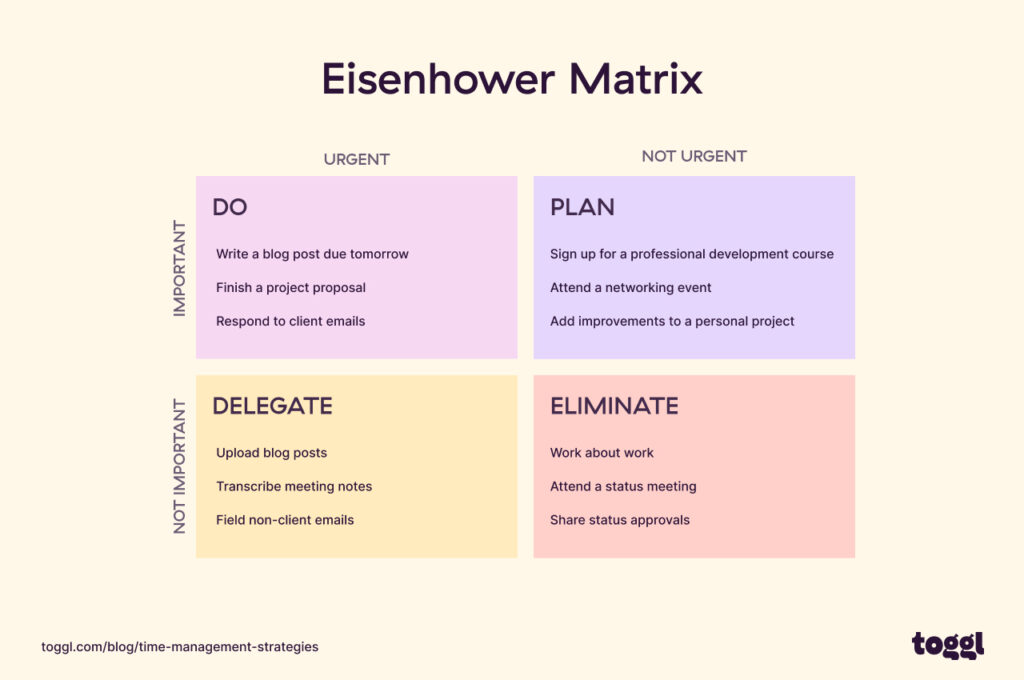
If you feel constantly busy, but rarely productive, you might be living in the “urgent but not important” box (it’s ok, most of us do). This matrix drags that pattern into the light.
👷 Best use cases
- Managers and team leads drowning in competing priorities
- Anyone who ends the day busy but unsatisfied
- Reducing busywork and protecting time for high-value tasks
🎨Example scenario
You start Monday with 23 tasks and no idea where to begin. Running them through the matrix, you realize half are urgent but not important. You schedule 12 tasks, delegate four, and delete the rest. By 10 am, you have a clear plan instead of a panic attack.
👎 Downsides
- The matrix is for planning rather than execution. So, it won’t help you focus or manage time during the day
- It’s easy to overestimate the urgency of everything
Further reading: The Covey Time Management Matrix.
4. The 80/20 Rule (The Pareto Principle)
The Pareto Principle, better known as the 80/20 Rule, is a productivity framework based on the observations of Italian economist Vilfredo Pareto. He noticed that 80% of outcomes usually come from 20% of inputs. Applied to time management, it means a small number of tasks are responsible for the majority of your results. Your job is to identify and protect them with your life.
🔧 How it works
This method works like a filter for prioritizing tasks. If your to-do list has 20 things on it, the 80/20 rule says only four are real priorities. Switch your default answer when offered new work from “yes” to “no.” Remember every bullet point needs to earn its spot in your agenda.
👷 Best use cases
- Entrepreneurs and freelancers optimizing for output over hours
- Anyone overwhelmed by a long task list with no set priorities
- Teams identifying which activities are actually driving results
🎨Example scenario
You have 15 tasks on your plate, but only three of them are truly high-stakes: a client proposal, a product demo, and one key hire. The other 12 are admin, low-stakes meetings, and busywork. You protect the top three, and batch or delegate the rest.
👎 Downsides
The 80/20 Rule doesn’t tell you what the actual high-value work is, or how to do it. Instead, you’ll need to pair it with an execution method for best results.
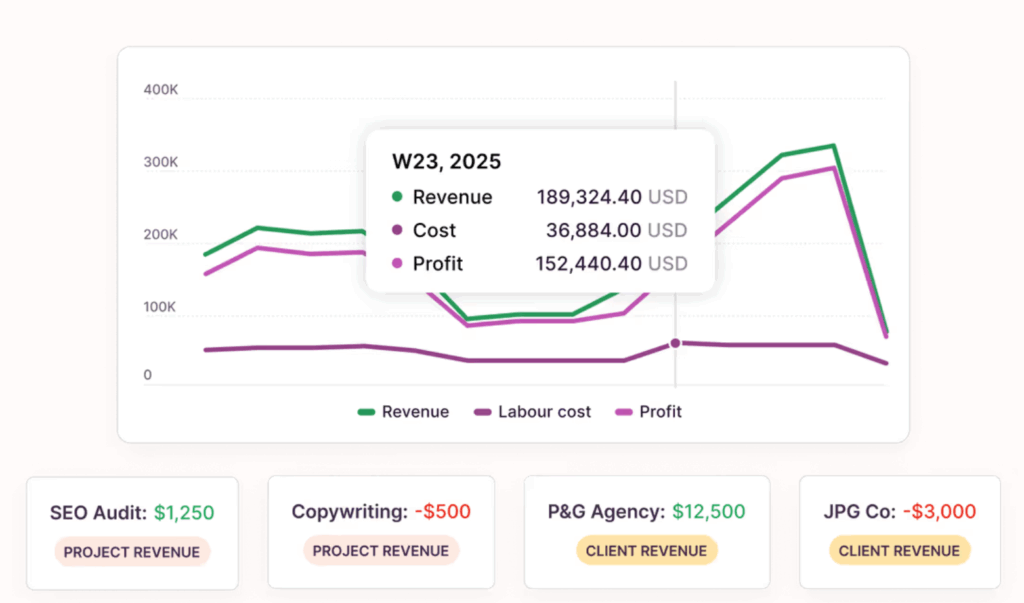
💰 Toggl highlights your most profitable Projects and Clients
Toggl’s Profitability Report shows you exactly where your largest profit margins come from, so you can double down on those relationships and adjust pricing or allocated time on the rest.
5. Getting Things Done (GTD)
The Getting Things Done productivity system by David Allen is built around a simple concept: your brain is for having ideas, not storing them. The mental load of tracking every task means spending time on admin rather than action, and this commitment creates a low-level anxiety that never fully disappears. But GTD eliminates it by moving everything into a trusted external system. It ties in especially well with project management tools like Trello or other Kanban boards that make task management easy.
🔧 How it works
GTD organizes every task into a neat filing system across five steps:
- Capture. Write down every task, idea, and commitment
- Clarify. Check if it’s actionable. Can it be completed in a single step, or does it rely on a third party?
- Organize. Sort items according to the diagram below
- Reflect. Review your lists regularly to keep them current
- Engage. Pick your next action based on context, energy, time, and priority — then do it.
👷 Best use cases
- Knowledge workers managing high volumes of tasks and information
- Roles with a lot of incoming requests, emails, and competing demands
🎨Example scenario
An agency project manager does a Monday morning brain dump into the GTD system. Out of 51 items, 11 get trashed, eight go to “waiting on client,” and six into “someday/maybe.” The remaining 26 become next actions — 10 scheduled into the calendar, the rest into a condensed to-do list. By mid-morning, the noise is gone and they’re feeling calm and confident for the week ahead.
👎 Downsides
- GTD has a steep learning curve and a demanding setup
- Rewards consistency, but is easy to over-engineer and abandon
6. Eat That Frog
Eat That Frog is a productivity method built around tackling your biggest, most important task first thing in the morning, before anything else competes for your attention. The name is attributed to Mark Twain, who famously said “If you eat a live frog first thing in the morning, nothing worse can happen to you for the rest of the day!” Your “frog” is the task you’re most likely to avoid.
🔧 How it works
Identify your most important and dreaded task the night before. When you sit down to work, do it before anything else — yup, before email, before Slack, even before coffee if you’re hardcore like that.
🧠Top time management tip!
If your phone is an issue, turn on Airplane mode before going to sleep and don’t turn it off until you’ve eaten your frog.
👷 Best use cases
- Chronic procrastinators who default to busywork
- Anyone who keeps pushing the most important task to the next day
- High-stakes roles where one key deliverable drives most of the value
🎨 Example scenario
You need to write a difficult performance review, and have been pushing it across your calendar for days. Today, you open the doc before anything else. You’re sick of the knot in your stomach. Forty minutes later it’s done, and the rest of the day feels lighter.
👎 Downsides
- Not every role has a clear “most important task”
- Reactive, high-interruption jobs don’t offer as much control over your schedule
- Assumes peak energy is in the morning, which isn’t true for everyone
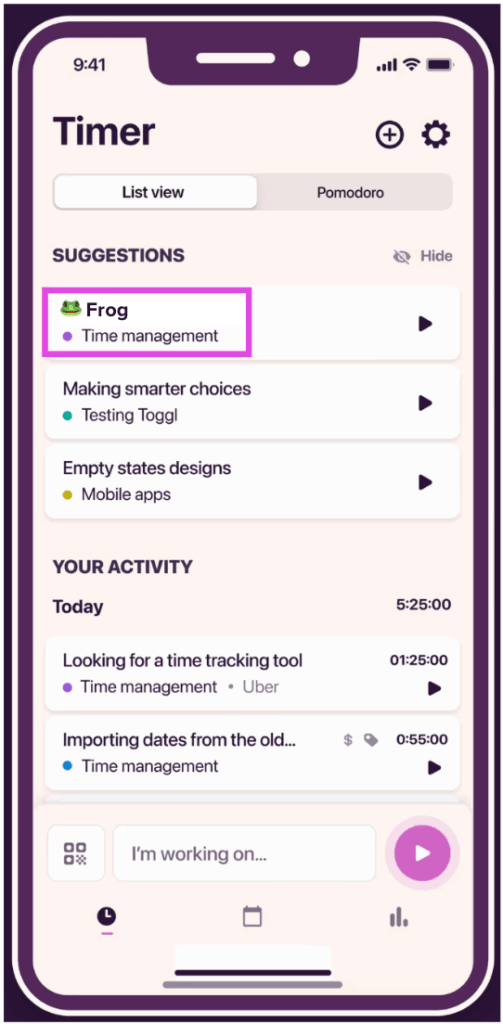
🐸 Create a standing date with your frog
Open the Toggl mobile app before doing anything else. Start a timer tagged “frog” and get to work. At the end of the week, your time reports will show how often you’re eating the frog first, and how it doesn’t take nearly as long as you imagined!
7. Parkinson’s Law
Parkinson’s Law states that work expands to fill the time available for its completion. Give yourself a week to write a report and it’ll take a week. Give yourself three hours and it’ll take three hours. By recognizing our tendency to procrastinate, we can implement strategies to get ahead of it. Setting shorter deadlines, writing down goals, breaking tasks into smaller steps, and prioritizing ruthlessly can stop work from ballooning and help you complete tasks in a fraction of the time you’d otherwise allocate them.
🔧 How it works
Deliberately set shorter deadlines than you think you need. Compress your time windows and work expands less. Pair it with time blocking to assign firm end times to tasks, not just start times.
👷 Best use cases
- Perfectionists who over-refine work long past the point of diminishing returns
- Anyone who works better under pressure
- Tasks that tend to balloon without a hard stop
🎨Example scenario
You have a slide deck and quarterly report both due on Friday. You know you’ll leave them both until Thursday morning and have a panic attack by lunch. So, you try a different approach and tell your manager the deck will be done by 11am tomorrow. Suddenly, you have three full days to focus on the report.
👎 Downsides
- Artificially short deadlines can backfire on complex, creative, or collaborative work where quality requires enough time to get right
- Used recklessly, it produces rushed output
- Easy to leave things to the last minute, creating unnecessary stress
📈 Use real data to set smarter deadlines
Instead of guessing what’s realistic, set your compressed deadline based on historical data (e.g., you can see blog creation takes between 2h20min to 2h40min, so don’t allocate 1h30min to it).
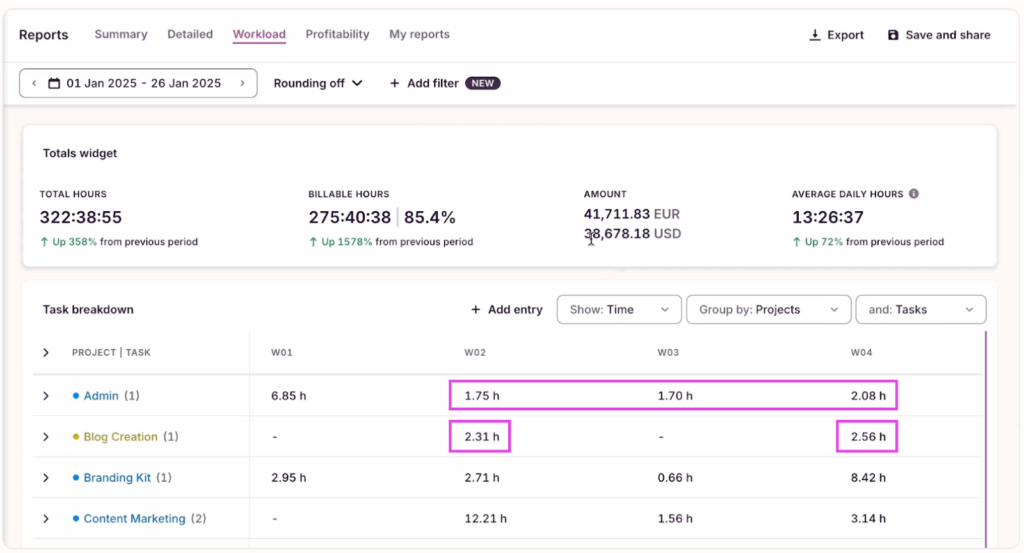
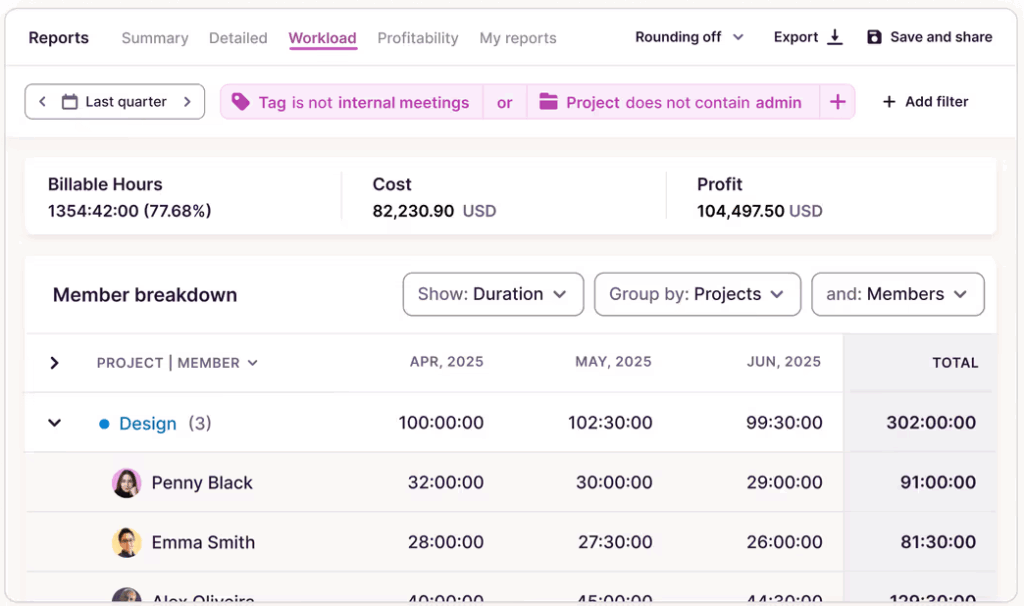
On a team-wide level, the Workload report helps managers keep workforce scheduling fair, protecting team members’ well-being and preventing burnout. It’s also useful for improving team time management as a whole.
8. Rapid Planning Method (RPM)
The Rapid Planning Method (RPM) is a results-oriented planning system that shifts your focus away from tasks and toward outcomes. It was established by author and business coach Tony Robbins when he found traditional to-do lists left him feeling busy but unfulfilled. Essentially, RPM flips the script from what you’re doing to why you’re doing it.
🔧 How it works
For each project or goal, answer three questions:
- Result. What specific outcome do you want?
- Purpose. Why does it matter? What’s the emotional reason behind it?
- Massive Action Plan (MAP). What are all the actions required to achieve the result?
The MAP replaces your to-do list with an outcome-focused action plan.
👷 Best use cases
- Quarterly planning sessions to align shorter-term actions to bigger vision
- Motivating goal-driven workers who need a strong “why” to stay motivated
🎨Example scenario
Instead of writing “update website copy” on your to-do list, you run it through RPM.
→ Result: a website that converts 20% better
→ Purpose: land two new retainer clients this quarter
→ MAP: audit current copy, brief a designer, write three new landing pages.
The task hasn’t changed, but now it has clear action steps you can tie to a purpose, timeline, and expected outcomes.
👎 Downsides
RPM works best for long-term goals and projects. Applying it to everything quickly becomes exhausting, so reserve it for high-value work that actually requires strategic clarity.
Further reading: Project Time Management: Definitions, Steps, and Tips
9. Ivy Lee Method
The Ivy Lee Method is a simple daily productivity strategy that dates back to 1918. It focuses on limiting tasks to improve focus and remove decision paralysis.
🔧 How it works
The method works by capping your daily task list at six items, ranked in order of importance. You work through them sequentially, never moving to the next until the current one is done. This approach forces you to prioritize the decisions most people avoid; it also eliminates the decision fatigue that comes from a sprawling, unstructured to-do list.
👷 Best use cases
- Overthinkers who spend more time planning than doing
- Anyone who can’t switch off at the end of the day
- Beginners looking for a simple, low-friction place to start
🎨Example scenario
It’s 5:30 pm. Instead of leaving your brain on an anxiety loop of unfinished business, you write and rank your six tasks for tomorrow. You close your laptop with a sense of reassurance — you have a plan for the morning. The next day, there are no decisions to make. You get started on your list, and by 10 am you’re in a flow state, checking off items like a boss.
👎 Downsides
- Doesn’t account for tasks or projects you can’t complete in a single day
- Six tasks will be more or less realistic for certain job functions than others
10. The 1/3/5 Method for improved focus
The 1/3/5 Method is a daily task management framework where you limit yourself to nine tasks per day — one big, three medium, and five small. This brings structure and focus to your day without the overwhelm.
🔧 How it works
Each day, write down nine tasks across three categories:
- 1 big task, serves as your anchor for the day
- 3 medium tasks, which are meaningful but manageable
- 5 smaller tasks, quick wins that take under five minutes each
Start with the small tasks. The dopamine from ticking them off warms up your mental engine for the heavier work ahead.
👷 Best use cases
- People with ADHD or focus challenges
- Anyone who struggles to find the momentum to start the day
🎨Example scenario
Instead of launching into a client rebrand first thing in the morning, you knock five small tasks off your list first — reply to two emails, book a meeting, update a doc, and send a quick Slack to your assistant. Ten minutes later, you feel like you’ve done half a day’s work. The mental engine is warm. And when you open the Figma page, you actually get to work.
👎 Downsides
Nine daily tasks can be a lot to sustain over time. ADHD brains are notoriously energy-variable. You might have an amazing hyperfocus day, followed by a period of fatigue where the bare-minimum feels like a mountain. On these days, scale back the list, so it doesn’t become a source of pressure.
6 common time management mistakes and how to avoid them
Set yourself up for success by avoiding these common time management traps:
Mistake 1. Ignoring your natural energy patterns
Everyone has a time of day where they feel the most energized and efficient. These energy cycles are tied to our circadian rhythms — the sleep-wake cycle that regulates energy levels throughout the day. This rhythm varies across the population, so while some people get their best work done at 6 am, others don’t hit their stride until after lunch or early evening.
Scheduling your most demanding work during your lowest-energy hours is simply poor time management. It’ll take twice as long and feel twice as hard. Whatever time management method you choose, make sure it capitalizes on your peak hours by aligning them with your deep work blocks.
Mistake 2. Confusing planning with doing
Working “on” time management isn’t the same as managing your time. If you’ve just spent two hours color-coding your calendar, and it feels like work, we’re here to tell you it’s really Procrastination in a Productivity costume. And it’s burning mental fuel you’ll need later on.
The best time management system is one that’s easy to use. So long as you regularly maintain and trust in your time management approach, it’ll always outperform a beautiful schedule you spend more time building than using.
Mistake 3. Planning your day as you go
Every decision you make draws from the same finite tank of mental energy. As the day goes on, you get less rational and more impulsive — it’s why judges are more likely to deny parole in the afternoon than the morning, and why you order pizza instead of cooking after a long day.
Deciding what to work on next in the middle of your workday costs you the same mental energy you need to actually do the work. Plan the night before, or first thing in the morning, so when it’s time to work — you just work.
Mistake 4. Collecting data you never act on
Tracking your time and tasks is great — but it’s only half the battle. The real breakthroughs come from reviewing your time data and adjusting your behavior based on these insights. Not setting time aside to review and implement better time habits is just another way to avoid doing the hard stuff.
Mistake 5. Ignoring the reality of daily interruptions
Your time management system needs to be flexible enough to adapt to spontaneous interruptions. We are interrupted every 2 minutes by emails, notifications, and meetings. Account for these so your method bends and doesn’t break when something comes up.
Mistake 6. Mismatching method to job type
A time management method designed for deep, creative work (like writing a novel) won’t work in a reactive, high-interruption role (like a customer support rep). Picking a time management method without thinking about how it fits in with the demands of your job is like wearing stilettos on a hiking trail.
How to pick the right time management method for you
Still not sure which is the best time management technique for you? There are two main approaches you can take, depending on what your biggest pain point is right now.
Solving for a specific struggle
Remove your largest friction to make your day instantly better.
If your calendar isn’t fully under your control
- Eisenhower Matrix will reduce the amount of time on non-essential activity
- 1/3/5 method builds momentum around whatever the day throws at you
- Parkinson’s Law compresses the time you do have
If you have ADHD-like focus challenges
- 1/3/5 method sets you up with quick wins and builds momentum
- Pomodoro forces focus on a single task, within constrained time limits and offers short breaks as a reward
- Eat the Frog tackles avoidance before it takes root
If your role is reactive
- Eisenhower Matrix forces a distinction between urgent and important (easy to conflate)
- Ivy Lee method ends each day with a clear plan for tomorrow
- Time blocking carves out at least one protected focus window daily
Choosing based on experience level
Be realistic about how much structure you’re ready to commit to.
Beginner
If you’re just getting started with time management, keep it simple. Prove the method works for you before adding complexity.
- Pomodoro timer → builds focus habits
- A basic priority list → to decide what to work on
Intermediate
If you’re consistent but need more structure, permission to kick it up a notch — granted.
- Time blocking → protects your most important work
- The Eisenhower Matrix → ensures you fill those blocks with the right tasks
Advanced
Comfortable with the basics? When managing high volumes across multiple projects, a full time system can alleviate pressure.
- GTD → great for clearing and organizing your mental load
- RPM → keeps you strategic and intentional
The best time management system is a combination of methods
You might have noticed that the 10 methods above don’t all do the same thing. Some help you decide what to work on. Others help you schedule and others help you actually do it. Picking just one only gets you part of the way there, which is why the best time management strategies are a combination of three methods that all serve different functions — prioritization, planning, and execution.
| Method | Function |
| Pomodoro | Execution |
| Time blocking | Planning |
| Eisenhower matrix | Prioritization |
| The 80/20 rule | Prioritization |
| GTD | Execution |
| Eat that frog | Execution |
| Parkinson’s law | Planning |
| RPM | Prioritization |
| Ivy Lee method | Planning |
| The 1/3/5 method | Execution |
So, how might this look in practice?
Imagine it’s Monday morning. You have 34 things to do today, and a pit in your stomach that won’t quit. So, you run your tasks through your new time management system.
Step 1. Prioritize with the Eisenhower Matrix
You sort your 34 tasks into the four quadrants:
- 6 are urgent and important → you keep them on your to-do list
- 8 are important but not urgent → you schedule them for later in the week
- 12 are urgent but not important → you delegate them to your junior/AI (or plan to batch them in one slot in your daily schedule)
- 8 are not urgent or important → you delete them from your list
You’re down to six tasks that actually need your attention today.
Step 2. Plan with Time Blocking
Now you have clarity on today’s priorities, you assign each of the six tasks a dedicated block in your calendar, matching the hardest work to your peak energy hours.
Step 3. Execute with Pomodoro
When each block arrives, you start Toggl’s Pomodoro timer and focus on nothing else for 25 minutes. After three or four cycles, you’re through most of the toughest work, and feel relieved and in control of your week.
Start small with a simple time tracker
The hardest part of time management is getting started. Our recommendation? Pick one method that speaks to your biggest frustration. If you’re struggling, try the 1/3/5 rule. Does your brain keep spinning after the work day ends? Use the Ivy Lee method. The goal isn’t to build a groundbreaking system, but to make every week a little better than the last. Every system in this guide works if you stay consistent with it.
Toggl builds that consistency by showing you exactly where your time is going, how your estimates compare to reality, and where your highest-value work lives so you can do more of it, and less of the rest.
Ready for a lighter life? Try Toggl for free and rediscover what a work day can feel like.
Frequently asked questions (FAQs) about time management methods and techniques
What is the most effective time management method overall?
The most effective time management method depends on your role, work style, and how your brain operates. That said, the two biggest pain points for most people are knowing what to work on and protecting time to do it. Combining time blocking with the Eisenhower Matrix is a great starting point.
How do I choose the right time management method for my work style?
Start by identifying your biggest problem. Can’t prioritize? Try the Eisenhower Matrix or Pareto Principle. Can’t focus once you’ve started? Try Pomodoro or Eat That Frog. Can’t switch off at the end of the day? Try the Ivy Lee Method.
Can you combine multiple time management methods successfully?
Yes, you can combine multiple time management methods successfully — in fact, many high-performers do. Avoid stacking methods that serve the same purpose. Use the 80/20 Rule and Eisenhower to decide what to work on, time blocking to schedule it, and Pomodoro to execute it.
Which time management techniques are best for people who struggle with focus?
The best time management techniques for people who struggle with focus are the Pomodoro technique and the 1/3/5 method. Pomodoro timers constrain focus into short, defined bursts. The 1/3/5 rule builds momentum through quick wins before tackling heavier work, which is especially helpful for ADHD brains that need those dopamine hits to warm up.
How long does it take for a time management method to start working?
It can take a few days for a time management method to start working. Simpler methods like Ivy Lee or Eat That Frog can create noticeable shifts in less than a week. More complex systems like GTD require a longer runway to set up and stick to. It takes 21 to 66 days to build a habit, so if something isn’t clicking after that time, it’s likely a problem of fit rather than willpower.

Julia Masselos is a remote work expert and digital nomad with 5 years experience as a B2B SaaS writer. She holds two science degrees Edinburgh and Newcastle universities, and loves writing about STEM, productivity, and the future of work. When she's not working, you'll find her out with friends, solo in nature, or hanging out in a coffee shop.