Most developers don’t go looking for new project management software because they want to. Often, they’re sick of flicking around different issue trackers and sprint boards, trying to figure out what’s blocked or what they need to work on next.
Project management tools should make work easier yet many are cluttered, complex, and designed for generic project planning rather than modern software development. And while you don’t necessarily need a tool built solely for dev teams, you do need one that can handle your workflows and collaboration needs without slowing you down.
The problem is most project management solutions look identical at first glance. To help you find the best fit for your dev team, we’ve dug into dozens of platforms, read hundreds of real user reviews, and compared them across dev-centric features, pricing, and overall usability.
Nine tools consistently stood out, as presented here in our list of best project management software for developers:
- Toggl
- Zenhub
- Jira
- GitHub Projects
- monday dev
- Wrike
- Backlog
- Linear
- ClickUp
What should developers look for in project management software?
The project management software industry is huge, making it a challenge to find a solution that’s a perfect fit for your dev team — a job made easier when you know what you’re looking for. Consider these key features below when comparing different platforms.
Built-in time tracking for capacity and resource management
Project management systems have traditionally treated time tracking as an afterthought. Here at Toggl, we believe time is the secret ingredient behind every successful development plan.
When dev teams have full visibility into how long their sprints take, and how this impacts their scheduling, they’ll hit their milestones and project deadlines with ease. The best tools use tracked hours as the foundation for understanding how much each developer can deliver (and deliver well!), not just how much work has been assigned to them.
Task, issue, and bug tracking
Task, bug, and issue tracking are the engine behind your project workflows. Your tool of choice needs to handle the whole spectrum: ticketing, prioritization, bug queues, dependencies, story points (for teams who love them), and clean sprint views.
Strong collaboration tools
Whether handing work over to QA, syncing with product and design or fielding requests from clients, you need a shared workspace that encourages teamwork and keeps everyone connected without relying on endless meetings and status updates.
Reporting and dashboards for metrics and KPIs
The best PM tools turn all your tasks, tickets, time entries, and sprint updates into clear dashboards that make sense at a glance. With the right insights, you can spot bottlenecks and burned budgets, so you can plan smarter.
Change, release, and version management
Look for features that map work all the way through to release: clear version history, deployment tracking, change approvals, and the ability to link tasks to commits to PRs without jumping through hoops. With the right setup, you can catch risks early and avoid the detective work nobody has time for.
Seamless integrations with dev tools
Developers live inside their tools, making use of version control, IDEs, CI pipelines, release dashboards, you name it. If your PM software doesn’t integrate with them, you’re asking devs to work twice: once in their code tools, and once to update the PM tool.
Instead, choose software that syncs issues directly with GitHub/GitLab. With the right integrations, linking tasks to commits and pull requests should feel effortless, auto-updating statuses and keeping everything in sync in real time.
9 best project management software for dev teams
Now that you know what your dev team needs from a PM tool, here are nine tools that deserve a spot on your shortlist.
1. Toggl
Best for: Time-centric planning for dev teams
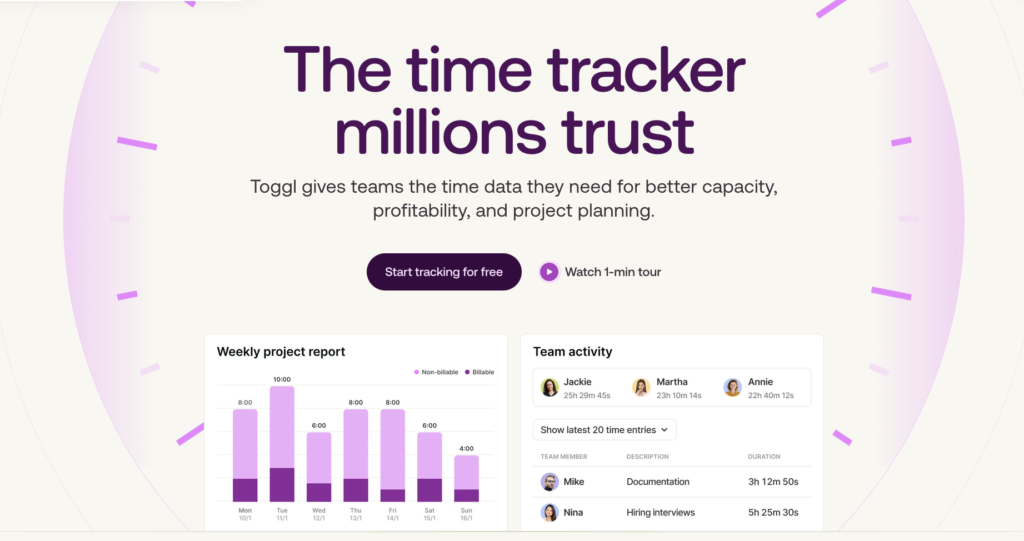
Toggl is built on the idea of using reliable time data for planning and capacity management, so you can deliver high-quality work and within budget (without the constant burnout).
There are plenty of PM tools that list time tracking as a feature. But often, these are bolted on as an afterthought, or delivered via an integration with a third-party time tracking software.
Toggl has flipped that model on its head. We base all of our project management and capacity planning functionality around Toggl’s signature time-tracking experience, available in one single, central, and super powerful workspace, so every sprint or plan is based on reality instead of optimism.
For developers, this leads to fewer overloaded sprints, clearer priorities, and less context switching. And because Toggl takes minutes (not days) to set up, even small teams and freelancers get immediate visibility into their workload and project timelines.
Key features
- Reality-based planning: Compare planned vs. actual time to see where estimates drift, then use drag-and-drop functionality to tighten your plans over future sprints.
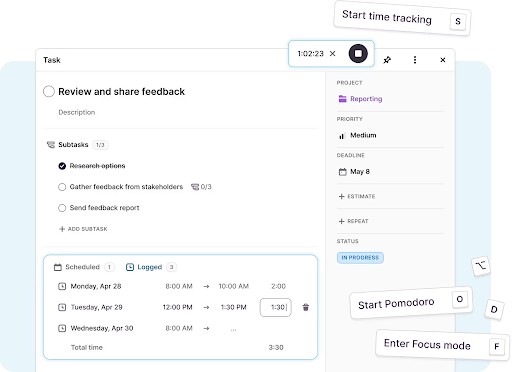
- Built-in time tracking for developers: Track time via timer, manual entry, calendar events, or Pomodoro, whichever you prefer.
- Capacity management: See which of your dev team is at risk of overload (or under-utilization) in a single view, factoring in PTO, holidays, and real working hours.
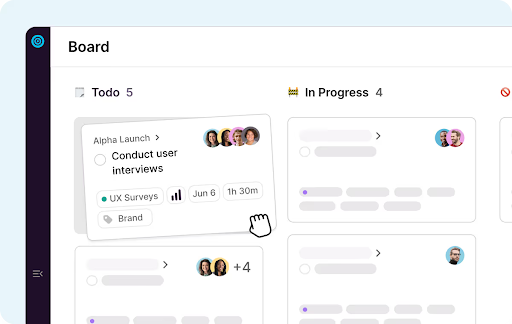
- Visual project planning: Use Timeline, Calendar, or Board views to map projects and milestones while keeping priorities crystal clear.
- Workload reports: Instantly understand workload, profitability, and delivery health. Slice by project, client, team member, status, or priority.
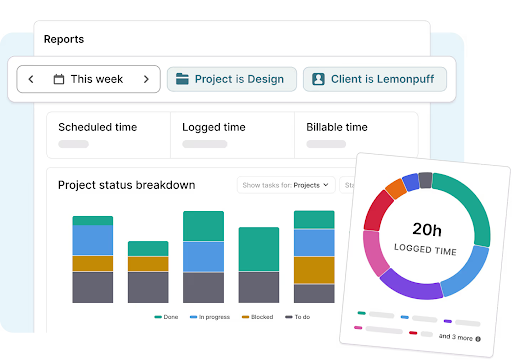
Time billing and budget control: Set budgets, track billable hours, get alerts before overruns, and more.
Team-wide data consistency: Use reminders, required fields, timesheet approvals, and audit logs to keep your time data clean and reliable.
User reviews
“Toggl is amazing. The UX is perfect and matches my workflow in a shocking way!” — Toggl Community feedback
“I’m super excited. I love how you’ve combined Toggl Plan and Toggl Track. And the Calendar View is fantastic!” — Toggl Community feedback
“This is an amazing app!It has neatly consolidated my old workflow of juggling Google Tasks and Toggl” — Toggl Community feedback
Pricing
- Free: For up to five users. Includes core time tracking, task management, board views, planning basics, and calendar integrations.
- Starter: $9 per user/mo. Adds Timeline view, recurring tasks, multiple assignees, AI task creation, CSV exports, and team-level reporting — all ideal for small teams who want more structure in their planning.
- Premium: $20 per user/mo. Unlocks full capacity management, including utilization and workload reporting.
- Enterprise: Custom pricing is available for larger organizations needing personalized onboarding, dedicated customer success, custom integrations, priority support, and multi-workspace management.

2. Zenhub
Best for: GitHub-native teams that want deeper PM features
(Source: Zenhub)
Zenhub is built for engineering teams who prefer to manage projects inside GitHub rather than jumping between multiple apps. It adds structure, planning tools, and real-time visibility on top of your existing repos, so teams can stay in a familiar environment without picking up an entirely new system.
So, why not just use GitHub Projects? (If you have a keen eye, you’ll have spotted this tool further down our list.)
While they’re both great contenders, Zenhub offers a free forever plan, which might appeal to smaller dev teams, or those with tighter budgets. Zenhub’s slightly fuller project management and built-in AI features might also be a better fit for your team.
Key features
- AI-powered issue creation: Generate descriptions, labels, and acceptance criteria automatically.
- Automated sprints: Assemble sprint candidates based on backlog priorities.
- Workflow automation: Auto-update issue statuses as work moves through pipelines.
- Real-time roadmaps: See what’s on track or drifting behind.
- Team feed: Receive a daily overview of who’s working on what (and where they’re blocked).
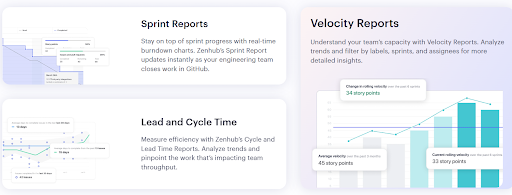
- Reporting suite: Access release reports, sprint burndowns, velocity charts, lead/cycle time analysis.
- GitHub + Slack integrations: Create, update, and sync issues directly from the tools developers already use.
User reviews
“I like the design of the ticketing channel for bug tickets to move through to completion. It has helped our team streamline the process for resolving bug/development tickets.” — Small business IT user
“Zenhub is simple to use, overlays directly on top of GitHub (which you need anyway for source control), and has the basic features you need to manage and track work over sprints. I most enjoy the ease of use, but it has also turned into my entry portal when searching for information in GitHub.” — David B., a software developer
Pricing
- Free guided demo available
- Free plan available
- 2 paid plans: Team and Enterprise
- Paid plans start at $8.33 per user/mo
3. Jira
Best for: large engineering orgs with complex, customizable workflows
(Source: Jira)
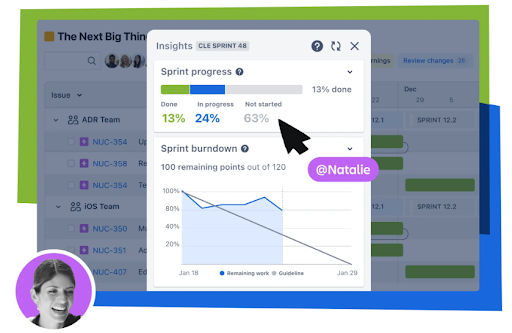
Jira has long been known for its flexibility and depth. But instead of acting as a traditional project management tool, Jira now leans heavily on Rovo, Atlassian’s agentic AI, to remove a lot of the admin and busywork that typically slows software teams down.
For developers, Rovo Dev is the standout addition. It brings AI directly into your terminal and IDE, turning Jira work items into code, analyzing pull requests, and suggesting improvements based on acceptance criteria. Instead of breaking focus to bounce between tools, developers get an AI assistant that understands both their codebase and their Jira context.
Key features
- Rovo AI planning: Break down big ideas and create relevant resource plans automatically.
- Goal alignment: Connect strategic objectives to day-to-day work so teams understand impact.
- AI-driven updates: View status changes, trend detection, risk alerts, and context summaries automatically.
- Automation: Update work, pull data from integrations, and let agents handle repetitive tasks.
- Multi-tool integrations: Connect Jira to Toggl, Slack, Zoom, GitHub, and Miro, along with Atlassian team tools like Loom and Confluence.
User reviews
“The best part about Jira is its depth and flexibility. You can customize everything: workflows, issue types, fields, automations, permissions, and boards. This means a team can design Jira exactly the way their process works. The Agile boards are especially helpful for teams to plan sprints, track progress in real time, and manage backlogs with full visibility.” — Shubham P., a software developer
“I like how Jira keeps everything organized in one place. The boards and workflow make it easy to see what’s pending, in progress and completed. The interface can be slow at times when dealing with project tickets with larger descriptions which have diagrams.” — Shruti S., a backend developer
Pricing
- Free plan available for up to 10 users
- Paid plans from $7.91 per user/mo
- 3 paid plans available: Standard, Premium, and Enterprise
4. GitHub Projects
Best for: dev teams that want to plan directly inside GitHub
(Source: GitHub)
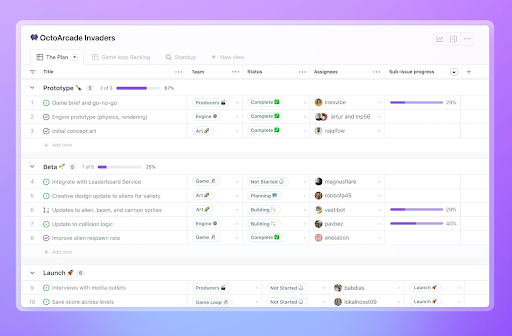
GitHub Projects is GitHub’s built-in planning and project tracking tool, designed for teams who want to manage their work as close to the code as possible. Instead of forcing you into a specific methodology, Projects gives you a flexible workspace where issues and pull requests become the foundation of your planning. You can shape your workflow however you like: high-density tables, roadmap-style timelines, or Kanban boards if you like the type of visualization delivered by tools like Trello.
Because Projects is tightly connected to GitHub, updates flow both ways. Change an assignee or priority from your project view, and the issue reflects it instantly. Add a pull request to a project, and every related chart, field, and dashboard updates automatically. For teams who already treat GitHub as their central hub, this makes Projects an easy way to manage backlogs or run simple sprint cycles without introducing another tool.
Key features
- Multiple layouts: Switch between table, board, or timeline views depending on what you’re planning.
- Custom fields: Add metadata like target ship dates, complexity scores, notes, or priority levels.
- Flexible views: Filter, group, and sort issues or pull requests to create tailored backlogs and multi-team overviews.
- Two-way syncing: Update issues or PRs directly from Projects, with instant changes across GitHub.
- Iteration support: Plan work week-by-week using customizable iteration fields.
- Built-in automation: Auto-set fields, archive completed work, and add items to a project based on criteria.
- Charts and insights: Create configurable charts to track progress, throughput, or project health.
- Project templates: Share pre-configured setups across your organization for consistent planning.
- Status updates: Communicate progress with “On track,” “At risk,” and custom messages that appear across the project.
User reviews
“GitHub delivers a user-friendly experience with an intuitive interface that makes version control and collaboration straightforward, even for newcomers. Its comprehensive feature set covers everything from pull requests and code reviews to CI/CD integrations and project boards, meeting nearly all the needs a developer could have.” — Gaurang A., a full-stack developer
“GitHub provides an exceptional platform for collaboration, version control, and CI/CD integration. Its clean UI, powerful integrations (especially with GitHub Actions), and support for both individual and team workflows make it a core part of our development process. Features like pull requests with code reviews, branch protection rules, and discussions make team collaboration efficient and transparent. The recent improvements in Copilot and Codespaces show a strong push toward developer productivity.” — Thimo B., CEO of a computer software organization
Pricing
- Free trial for 30 days
- Paid plans from $4 per user/mo
- 2 paid plans available: Team, and Enterprise
Note: If your team is experimenting with GitHub Copilot, keep in mind it’s available as an add-on service on top of GitHub’s normal pricing (with limited free monthly usage.)
5. monday dev
Best for: cross-functional teams that need a visual, flexible dev workflow
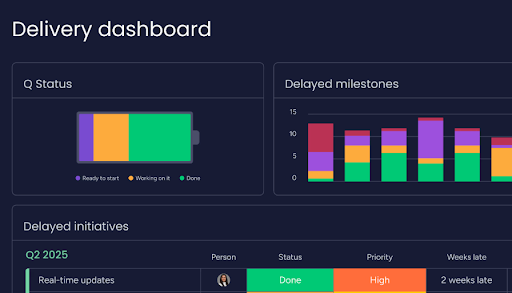
(Source: monday.com)
monday dev is designed for teams who want to run the entire product development lifecycle in one place. Built on top of the monday.com work OS, it’s a great option for everything from capturing feature requests to managing sprints to releasing updates without the need for multiple tools.
Where monday dev stands out is how practical it feels. It’s flexible enough for teams who swear by Scrum, Kanban, or something entirely homemade, and the interface is visual enough that product, engineering, design, and leadership can actually understand each other. It also excels at bringing these teams together with strong cross-functional collaboration.
Key features
- Roadmap planning: Prioritize customer requests, visualize timelines, and build feature hierarchies so everyone knows what’s coming next.
- Sprint management: Run fast-paced sprints with Scrum or Kanban boards, CI/CD integrations (GitHub, GitLab, CircleCI), and helpful sprint automations.
- Bug and incident tracking: Capture, categorize, and resolve issues quickly with dedicated bug flows, monitoring tools, and automated triage.
- AI productivity tools: Auto-categorize bug reports, summarize PRDs, and assign new tasks to the right teams as they come in.
- Release management: Coordinate launches across engineering, product, and client-facing teams with shareable release plans and roadmap trackers.
- Engineering analytics: Use burndown charts, velocity charts, retrospectives, and AI-generated sprint summaries to spot bottlenecks and optimize planning.
- Collaborative documentation: Create wikis and searchable product docs directly inside monday dev to keep your team aligned and reduce context switching.
User reviews
“What stands out most about monday dev is how seamlessly it brings every stage of the development lifecycle into one visual workspace. I love that I can manage product roadmaps, sprint planning, bug tracking, and release workflows all in one place, without needing to jump between multiple tools.” — Harrison T., a web designer
“What I really appreciate about monday dev is that it feels like a blend of Google Docs with a wide array of project management and tracking tools. Its collaborative features are especially valuable for managers and anyone involved in cross-functional work. Using it has taught me a great deal about the fundamentals of project management, making it a tool I truly value.” — A biotechnology user
Pricing
- Free trial for 14 days
- Free forever plan for up to 2 seats
- Paid plans from $9 seat/mo
- 4 paid plans available: Basic, Standard, Pro, and Enterprise
6. Wrike
Best for: multi-team organizations with heavy handoffs and approvals
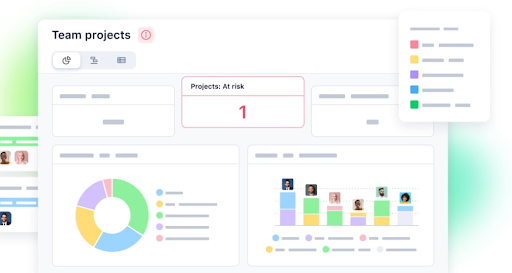
(Source: Wrike)
Wrike gives each team a flexible space to plan and collaborate without slowing each other down. What makes Wrike appealing for dev teams is how well it handles “handoff-heavy” workflows. Developers can break down work, attach designs or specs, @mention whole groups, and push tasks forward with minimal friction. Meanwhile, other key teams, like marketing, design, or leadership get the context they need without pinging developers for updates.
Add Wrike’s growing AI layer, from risk prediction to smart automations, and you get a workspace that cuts down on busywork and keeps your complex projects moving.
Key features
- Shared dashboards: Build shared views so everyone who needs to be in the know can see priorities and task progress at a glance.
- Subtasks and cross-team linking: Break down work and connect tasks across departments. Great for feature releases where dev and marketing need to stay in sync.
- @Mention user groups: Enable entire teams or departments to receive immediate notifications when something changes, delays, or needs review.
- Custom workflows: Set up processes that match how your teams actually work, from initial development to launch handoffs.
- Wrike AI: Get summaries, risk predictions, and smarter suggestions baked directly into your workspace.
- Automated workflows: Reduce repetitive admin by auto-assigning, updating, and organizing work as it moves through stages.
- Multiple project views: Switch between online Gantt charts, board, table, or chart views depending on the project and team preference.
User reviews
“Clear interface, simple to use from a developer standpoint. Tickets can support a lot of different media types, make it easy to share mockups, videos, and other material.” — An IT user
“What I like the most about Wrike is the high level of customization it offers for each project. You can easily set the level of communication and collaboration with co-workers or team members, which makes it adaptable for small, medium, and large projects. The recent addition of AI capabilities makes the tool even more powerful and forward-looking.” — IT project leader
Pricing
- Free trial for 14 days
- Free plan available
- Paid plans from $10/user/mo
- 4 paid plans available: Team, Business, Enterprise, and Pinnacle
7. Backlog
Best for: smaller engineering teams that want an affordable, all-in-one development hub
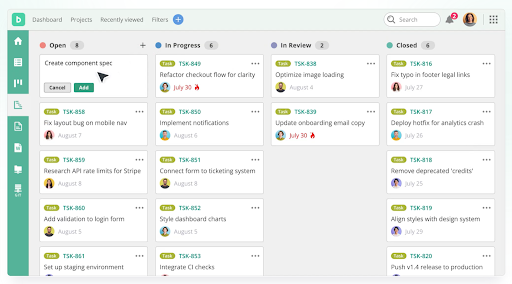
(Source: Nulab)
Backlog might not be the most well-known name on this list, but it’s a bit of a hidden gem for dev teams. Built by Nulab, what makes Backlog especially appealing is how it handles the full development workflow, from sprint planning to bug tracking to release prep. And with its flat-rate pricing (up to 30 users on the Starter plan), it’s also one of the more affordable options for small teams or growing startups that want predictable costs without sacrificing features.
Key features
- Task management: Organize work, assign tasks, and map out deadlines so the entire team stays aligned.
- Agile workflows: Run sprints, manage backlogs, and track velocity with built-in Agile tools.
- Bug tracking: Capture, prioritize, and resolve issues quickly with workflows that keep dev and QA teams in sync.
- Project overviews: View timelines, Gantt charts, and burndown charts to keep stakeholders aligned at every stage.
- Built-in Git and SVN repos: Manage code, review pull requests, and link commits to tasks, without switching tools.
- Wikis and docs: Create internal documentation, meeting notes, and project plans inside your workspace.
- Integrations and API: Connect Backlog to the tools your team already uses, or build custom workflows with the API.
User reviews
“The simple interface and useful features make my development process faster and reduce my stress. Once you start using Backlog you will fully depend on Backlog. You don’t need any other git tool; you can comment on tasks and don’t need to give daily updates to your senior.” — Tejashree P., a software developer
“I am a QA testing daily on project and mobile apps and handling many bugs. This tool makes the work less stressful and more smooth. I can easily assign bugs to developers and comment and attach screenshots. It is now part of my daily testing routine.” — Shivprakash S., an enterprise QA
Pricing
- Free trial available
- Free plan available for up to 10 users
- Paid plans from $35/mo
- 4 paid plans available: Starter, Standard, Premium, and Enterprise
8. Linear
Best for: fast-moving product teams that want ultra-speedy issue tracking and planning
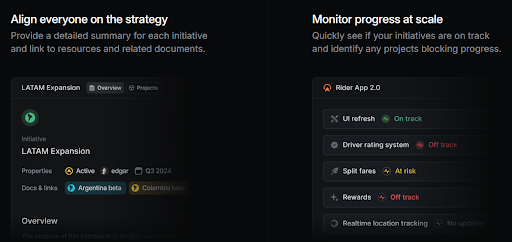
(Source: Linear)
Linear has become the go-to tool for teams who want a workflow that doesn’t fight them. It’s famous for its minimal UI and blisteringly fast performance, and honestly, that reputation is deserved. Linear feels less like “using a project management tool” and more like operating a lightweight command center for your product roadmap.
While many people know Linear for its clean issue tracking, its real strength is how well it supports planning and product development. You can map out projects and break ideas into milestones to keep execution tightly connected to your strategy.
Key features
- Rapid issue tracking: A clean, keyboard-driven interface that lets developers create and update issues in seconds.
- Project planning: Map product ideas, add specs, break work into milestones, and track dependencies, in one unified workspace.
- Multi-view roadmapping: Switch between lists, boards, and timeline layouts to plan releases and visualize long-term direction.
- Triage inbox: A shared space to sort incoming bug reports, feature requests, and unplanned work before it hits your active workflow.
- Automations and backlog hygiene: Auto-close stale tasks, streamline workflows, and keep your backlog neat without babysitting it.
- Deep integrations: Connect Slack, GitHub, Intercom, Zendesk, and more to keep customer feedback, discussions, and code activity synced.
- Initiatives (portfolio-level planning): Group projects under broader company goals to track strategic progress at a higher level.
User reviews
“As a Sr. Product Manager, I use Linear every single day to manage sprints, prioritize tasks, and keep the team aligned. What I love most is the clean, minimal UI and how effortless it feels to plan and track work. The speed is unmatched compared to other tools — no lag, no clutter, just a smooth experience.” — Sumeet S., a product manager
“It gives us all the features that we need for project management and full visibility to track the project. It is easy to use.” — David Santhosh K., a junior software engineer
Pricing
- Trial available on request
- Free plan available for unlimited members
- Paid plans from $10 per user/mo
- 3 paid plans available: Basic, Business, and Enterprise
9. ClickUp
Best for: teams requiring a highly customizable, all-in-one workspace
(Source: ClickUp)
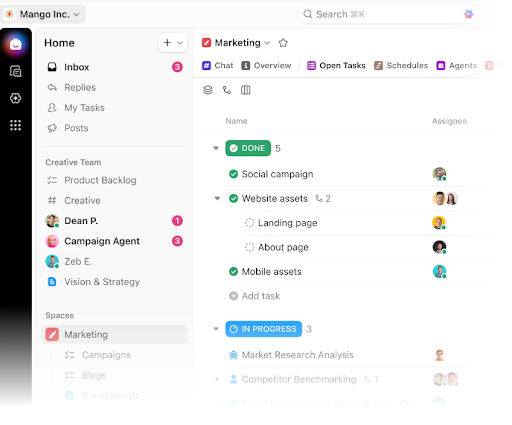
ClickUp markets itself as “one app to replace them all,” which sounds pretty tempting for engineering teams working with an entire constellation of dev tools. Instead of spreading your work across five different apps, ClickUp gives you one integrated workspace where tasks, conversations, docs, dashboards, and even Git activity live side by side.
Despite being packed with features, it’s surprisingly friendly. And its no-code customization allows you to tweak workflows without being the unofficial “ClickUp administrator.”
Key features
- Agile dashboards: Build burndown, burnup, velocity, and cumulative flow charts that help teams monitor sprint health and delivery pace.
- Customizable sprint tools: Set sprint points, automate rollover of unfinished work, and track real-time performance with sprint widgets.
- Bug tracking workflows: Capture bugs directly through embedded ClickUp Forms, route them into custom statuses, and keep your QA to dev handoffs clean.
- Code collaboration: Use syntax-highlighted code blocks, link tasks to commits, and pinpoint Git activity (merges, diffs, branches, PRs) inside ClickUp.
- Product launch management: Assign story points, track capacity, and use re-usable launch checklists to keep releases predictable.
- Advanced docs and knowledge sharing: Create project wikis, embed tables or code snippets, assign comments, and turn doc items into tasks without losing context.
- Triage and work intake: Bring unplanned requests into a single inbox where teams can sort, prioritize, and convert them into structured work.
- Integrations: Choose from 1,000+ other tools, including Toggl
User reviews
“ClickUp brings together task management, documentation, and collaboration in one place. As a developer, I really like how customizable it is — I can set up sprints, track bugs, and manage backlogs easily. The integration with Github, Slack, and other dev tools help keep everything connected. Dashboard and reporting features give a clear view of progress without extra overhead.” — Dileepsingh R., a senior software engineer
“ClickUp brings everything — tasks, docs, checklists, and communication — into one place. As a QA, I love the flexibility to create detailed bug tickets, attach screenshots or Loom videos, and link them directly with developer tasks. The customizable workflows and dashboards make it easy to track progress without switching tools.” — Dhara H., a quality analyst
Pricing
- Free forever plan available
- Paid plans from $10/user/mo
- 3 paid plans available: Unlimited, Business, and Enterprise
5 key considerations before you commit to a project management software for developers
Before you hit “Start free trial,” it’s worth stepping back and sanity-checking whether the tool fits your real-world team, not the idealized version in the sales demo. These questions help you avoid buying software your developers will revolt against.
- Does it play nicely with the stack we already have? If your team runs on GitHub/GitLab, VS Code, Slack, and CI pipelines, the PM tool should plug straight in with the ease you buckle your seatbelt. The less manual updating your devs do, the more likely they’ll actually use it.
- Is it easy enough for the whole team to adopt? A powerful PM tool is useless if only two people know how to navigate it. Look for clean UI, minimal configuration to get started, and strong onboarding support so you’re not stuck becoming the internal “tool trainer.”
- Can it grow with the team? What works for a five-person startup may completely crumble once you hit 20 engineers or spin up a second product line. Make sure the tool can handle more users, more projects, and more complexity without becoming a maintenance job.
- How expensive is the “true” cost? The sticker price is one thing, but what about feature add-ons or extra seats? Small teams can often get away with free tiers, but scaling teams usually need to factor in the full ecosystem cost.
- Will it help developers stay focused or just add to their overwhelm? PM tools should reduce context switching, not multiply it. If a tool sends too many notifications or adds steps to simple workflows, it becomes a tax on engineering time.
Gain project clarity you can trust with Toggl
You’ve done your research. You know what good dev-focused project management should look like. Now it’s time to try a tool that brings that clarity into your everyday work.
Toggl shines a light on your development work, using trusted time tracking to power simple visual planning. If you’re ready to start building clear, capacity-based plans you can stand behind, it all starts here. Sign up to Toggl for free.

Rebecca has 10+ years' experience producing content for HR tech and work management companies. She has a talent for breaking down complex ideas into practical advice that helps businesses and professionals thrive in the modern workplace. Rebecca's content is featured in publications like Forbes, Business Insider, and Entrepreneur, and she also partners with companies like UKG, Deel, monday.com, and Nectar, covering all aspects of the employee lifecycle. As a member of the Josh Bersin Academy, she networks with people professionals and keeps her HR skills sharp with regular courses.