You’ve just spent eight hours at your desk, with fifteen tabs open and constant chat back and forth. But despite plenty of effort, almost nothing is finished from your to-do list.
This work pattern has a name: context switching. It chips away at your ability to make progress and turns activity into a proxy for work rather than the work itself.
In this post, you’ll learn the science behind why context switching is so destructive, how to spot context switching patterns in your workflows, and what fixes should help.
What is context switching?
Context switching is the cognitive cost of shifting your attention from one task to another before completing the first. The act of switching is quick, while the cognitive reset that follows unfolds over a much longer stretch.
Knowing the definition matters because context switching often gets confused with multitasking or distraction.
- Multitasking means attempting tasks simultaneously.
- Distraction refers to unwanted interruptions.
Context switching sits underneath both as the mechanism that makes either of these taxing for your brain.
What’s interesting is how much of it is self-initiated, for example, checking a project management tool mid-task and then jumping tabs when our focus dips. External triggers play a role too, but a large share comes from how we move through our own workflows.
The science behind why context switching is so expensive
Every switch you make forces your brain to reload context, and that reload comes with a “tax”. Research by Dr. Sophie Leroy describes this as “attention residue.” Even when you leave a task, part of your attention stays behind. The harder the task, the stronger that residue becomes. Switching from deep work to something lightweight creates a disproportionate drag on your mental bandwidth.
A simple way to think about the impact of context switching:
Your brain behaves like an operating system running multiple processes. Each task you open keeps consuming resources in the background (as if you’ve just minimized the app view, not shut it down). As more tabs accumulate, your performance drops.
Now, layer in how often switching happens.
The average knowledge worker receives a notification every two minutes. Following an interruption, our brain needs 23 minutes to fully regain focus after a disruption, as measured by Dr. Gloria Mark’s 2008 study (It’s likely more than this now, as human focus has become further impaired by shorter attention spans and social media algorithms!)
Add the volume of interruptions and the required recovery time together, and full focus recovery seems mathematically impossible in a standard workday.
Even if you assume partial recovery, there’s still cognitive load accumulation. You’re constantly reloading context from the previous task while already being nudged into the next one. That’s how a day fills up with activity but struggles to produce depth.
How to tell if you have a context switching problem
The best way to find out how much context switching impacts you (or your team members) is with Toggl time reports.
Summary Report: Look at average session length. It shows how long you stay on a task before switching. If your average work sesh length is less than 20 minutes, that’s a strong signal of fragmented work. You’re not staying in one context long enough for focus to compound.
Detailed Report: Look at how your day is split. Check how many work time entries you log per day and how many projects you touch. A full layout of your day makes switching patterns obvious. Some warning signs:
- 25+ time entries may point to a multi-tasking issue
- Over 5 projects logged in a single day is worth examining
- A high share of 5-15 minute entries suggests you’re spending more time switching than progressing
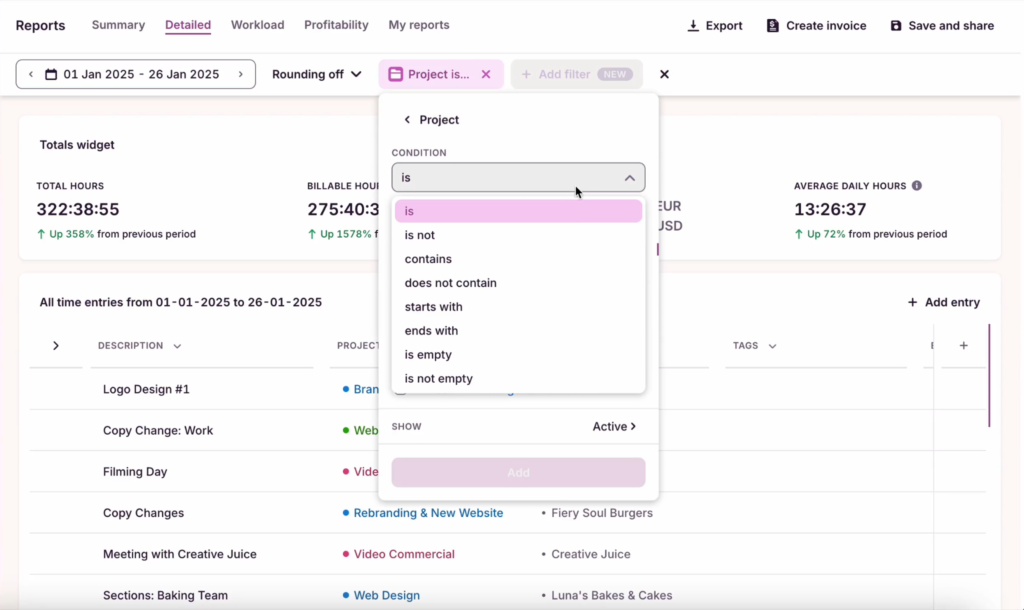
Detailed Reports let you zoom in on any user, task, project, or client to understand how work unfolds.
Once you see the structure of your day, the pattern becomes hard to ignore. High activity with little continuity usually means you’re in a constant state of context reload, which may soon manifest as employee burnout.
Toggl reports also highlight when you’re switching. Most people have predictable windows where switching spikes and session lengths drop — aka your late morning coffee break and mid-afternoon productivity slump.
Knowing when your focus dips can help you prioritize different types of work. For example, batching emails or meetings in those low-productivity windows can protect your energy for deep work sessions.
Interested in revealing more about your personal work patterns? Learn how to do a structured productivity audit.
3 main causes of context switching (and how to overcome them)
Most context switching doesn’t come from a single source. It’s usually a mix of habits, team dynamics, and how your work is structured. Separate those drivers, and the fixes become clearer and easier to implement.
Self-initiated switching
A lot of switching comes from our own behavior. How many times have you been guilty of scrolling LinkedIn when reading a boring document or checking Slack before finishing a thought?
Gloria Mark did the counting over the last two decades and found that we’re now averaging just 47 seconds on any screen. That’s barely enough time for the brain to acknowledge a new task, let alone start producing decent outputs.
To an extent, these behaviors are driven by the often false pretence of “optimizing our time” by multitasking, which has been proven detrimental to our memory and our productivity levels because of the switching costs.
There’s also the question of convenience. A 2023 study into app switching found that people often move between tools because they prefer sticking to workflows that feel comfortable, avoiding the effort of learning a better feature, defaulting to “I know how to do it here.”
The problem? Familiarity lowers friction in the moment. Yet, over time, it fragments the work.
Your tools worsen the behavior. Multiple tabs, constant notifications, or overlapping workflows all create an environment where switching feels natural, even efficient. But it rarely is.
How to fix self-initiated switching
The solution sits in two places: your environment and your habits.
- Remove the cues that trigger switching. Close tabs that aren’t relevant and put “do not disturb mode” in your chat app. Make it slightly harder to leave the task than to stay in it. These aren’t magic hacks, but simple discipline that removes the visual cues sucking your attention away.
- Try Toggl as an accountability mechanism. Launch a work timer for every new task, and treat stopping it as an active choice to switch. This gives you guardrails and greater acknowledgement of your behaviors.
- Know your patterns. Your time tracking data can tell you when and why you start task switching. Sometimes, this can be due to natural slumps in your productivity levels during the day — a great cue to schedule some lower cognitive work. Or other factors like a poor toolkit, which you can fix with automation. Knowing the “why” helps you find a better “how” to solve the problem.
External interruption
Plenty of distractions come from the outside — a Slack ping, a meeting, a colleague with a “quick question.” Individually, these interruptions seem harmless, but together, they can tank team productivity hard.
A study among German office workers suggests the cost of interruption scales with task complexity. The harder the task, the more expensive it becomes to leave and return. Each interruption forces a mental rebuild: where you were, what you were holding in mind, what still matters.
But interruption is only part of the load; there’s also a decision layer that comes with it. You need to evaluate the message and prioritize it against your current task. Both contexts are partially active in your head while deciding what to do next, resulting in cognitive overhead.
As interruptions stack, your perception of work changes. Tasks feel heavier, progress slows, and error rates creep up. None of this comes from a single interruption, but from the constant reconfiguration of attention.
Effectively: Deep work + interruptions = exponential cost of context switching.
How to fix external interruptions
Addressing how your team communicates and collaborates is the best approach.
- Shift team communication to async-first. Switching happens when people feel forced to demonstrate real-time responsiveness (e.g., reply to every Slack message in 2 minutes, and every email in half an hour tops). In many cases, slower responses won’t stall progress, so define response-time expectations for different tasks to reduce some comms pressure.
- Consolidate meetings into blocks. A 9 am and a 2 pm meeting don’t cost 2 hours — they cost those 2 hours plus the fragmented attention in the windows around them. Time blocking both to the same half-day frees an intact focus block elsewhere.
- Use a ‘parking lot’ for incoming requests during focus work sessions. Encourage people to capture their to-dos, but not process them immediately, for example, with a simple note or inbox message. This way, to-dos get listed and addressed in the next interruption window without as much impact on focus.
- Optimize for the right metrics. Don’t chase vanity numbers like hours logged or activity volume. Instead, use more reliable metrics for measuring employee performance, like task completion rate, revenue per employee, or output-to-input ratio. These capture real progress, not visible busyness. Custom reporting at Toggl connects time data to specific business outcomes like revenue, profitability, or labor costs.
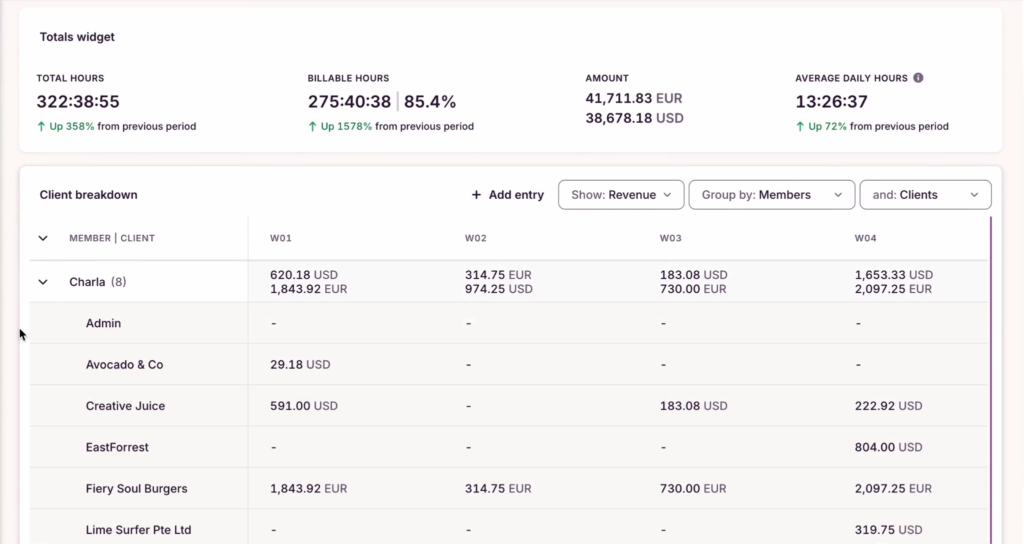
Example of a workload report, showing billed hours per client, project, and more.
Structural fragmentation
Sometimes, the roots of context switching hide in how work is structured. Too many parallel projects, multiple tasks with tight deadlines, or too many dependencies each drive constant switching because the project setup demands it.
Research found that collaboration can be one of the biggest drivers of context switching. People often switch processes depending on who they’re working with. One study participant put it bluntly: “I am for adding a new tool… My colleagues don’t want to make such changes. We end up staying with the challenging workflow.” Another pointed to a deeper issue: “The biggest challenge is the perception of integration, not the actual technology… people don’t believe one tool can do everything, so they keep switching.”
In other words, work fragmentation is often behavioral.
How to fix structural fragmentation
Audit your workload design using time tracking data, but pay particular attention to concurrent projects. Do people log data for 5+ projects in a single week? This can be a sign of overcommitment or issues with task ownership. Likewise, tasks that stretch over many days with small time logs in-between usually indicate dependency bottlenecks or divided attention.
This data is easy to collect with an automated timer running in the background, which captures all desktop activity and lets you sort out the entries later on.
Try implementing the following changes to your current processes.
- Stress-test your plans before the week starts. Use time and task estimates to map demand against capacity. If 7 projects each need 8 hours and you only have 40 hours, your initial planning isn’t working.
- Reduce parallel work where possible. Prioritize fewer active projects at a time. Batch similar tasks if possible. Progress accelerates when work can move end-to-end without constant handoffs and interruptions.
- Design for dependencies, not around them. Identify tasks that rely on inputs from others and thus block the next process. Timeline view in Toggl makes these overlaps really visible. Better dependency management means fewer blocked tasks, which means fewer forced switches.
- Build recovery time into high-switch roles. PMs or team leads have context as part of their job description. Add buffers between their meetings and give them room to schedule deep work. Treat recovery as part of the workload, not a luxury.
How Toggl supports your productivity
Most productivity advice is great at raising awareness, but doesn’t necessarily move the needle on changing habits. Toggl does both. It effectively highlights context switching, and helps do something about it using three simple methods:
- Use the timer as a focus anchor. A running timer forces you to understand if switching right now is really worth it. Instead of drifting between tasks, you make intentional choices about where your time goes, which reduces a surprising amount of self-initiated switching.
- Check the Detailed Report to spot interruption patterns. This intelligence shows how often you switch tasks, how long you stay on them, and where your day gets fragmented. When you know the problem, you can think about the fixes, e.g., building a new personal process to support deep work or changing your approach to project management to avoid overly optimistic commitments.
- Rely on time estimates to prevent fragmentation upfront. Task fragmentation often starts before the work begins. Time estimates make gaps in planning visible early. If planned work exceeds available capacity, you can rebalance before the week turns reactive. It’s the difference between managing work and constantly catching up
With Toggl, you get all the data you need to design your work better and stay productive. Create a free account to learn what’s fragmenting your day.
Frequently asked questions (FAQs) about context switching
What is the difference between context switching and multitasking?
Context switching is when you stop one task and shift your attention to another, forcing your brain to reload context each time you switch.
Multitasking is the attempt to handle multiple to-dos at the same time, even though the brain often ends up rapidly switching between them instead of processing both simultaneously.
On paper, multitasking sounds efficient, but much of it is disguised context switching, with the same cognitive costs showing up underneath.
How long does it take to recover from a context switch?
Research by Gloria Mark suggests it takes about 23 minutes to fully regain focus after context switching. The exact recovery time varies depending on how deep you were in the work before the interruption. Even shorter switches carry a high recovery cost if you were doing a complex task.
Is context switching always bad?
Context switching isn’t inherently bad. Some switching is necessary to move work forward, especially when tasks depend on each other or require input from different tools or people. But switching becomes problematic when it’s constant and unstructured, breaking focus before it has time to compound.
How do I know how much context switching I’m doing?
The most reliable way to understand the amount of context switching you do is to track your average workday. Try Toggl’s automated timer to capture all your work activity and then scan for patterns.
Over 20 time entries per day, short session lengths, or frequent project/task changes point to high switching. Once you see those patterns, you can quantify how fragmented your day is instead of relying on guesswork.
What’s the best way to reduce context switching for a team?
The best way to reduce context switching at a team level is to reshape how work flows and how communication is handled day to day. Consider the following adjustments:
- Shift to async-first communication to reduce the number of forced interruptions throughout the day.
- Consolidate meetings into defined blocks to leave more space for focused work.
- Define what requires interruption vs what can wait. Clarify urgency levels and expected response times for different types of inquiries.
- Use time data to identify other problems. Tools like Toggl can reveal interruption patterns such as poor handoff processes or suboptimal work allocation levels.

Elena is a senior content strategist and writer specializing in technology, finance, and people management. With over a decade of experience, she has helped shape the narratives of industry leaders like Xendit, UXCam, and Intellias. Her bylines appear in Tech.Co, The Next Web, and The Huffington Post, while her ghostwritten thought leadership pieces have been featured in Forbes, Smashing Magazine, and VentureBeat. As the lead writer behind HLB Global’s Annual Business Leader Survey, she translates complex data and economic trends into actionable insights for executives in 150+ countries. Armed with a Master’s in Political Science, Elena blends analytical depth with sharp storytelling to create content that matters.