If you’re exploring QuickBooks Time and Clockify, there’s a good chance QuickBooks is already part of your workflow, and you’re trying to figure out how time tracking fits in there too.
Maybe you’re questioning whether QuickBooks Time is worth the extra subscription cost on top of what you’re already paying Intuit (because no, it’s not an all-inclusive situation). Or maybe you’ve been logging your hours on Clockify’s free plan and want to know if it connects to your QuickBooks account to save you time and energy.
The truth: these two tools serve very different purposes, so the right choice depends on who you are and what you need.
- QuickBooks Time is the natural fit if you manage field or hourly teams and run payroll through Intuit.
- Clockify is a good shout if you’re a small team looking for free time logging and your QuickBooks setup is minimal.
Beyond these use cases, it’s not nearly as straightforward for the consultants, agencies, and freelancers who bill clients by the hour and want their time to flow cleanly into QuickBooks for invoicing. The bad news is neither tool is really built for that — sorry!
This guide will help you grasp the key differences between QuickBooks Time and Clockify, and understand if a billing-focused alternative could be a better fit.
QuickBooks Time vs Clockify: at a glance comparison
| QuickBooks Time | Clockify | |
| Primary use case | Payroll and workforce management for field and hourly teams | Flexible time logging for individuals and project-based teams |
| QuickBooks integration | Native, bidirectional sync with QuickBooks Online (QBO) and QuickBooks Payroll | Built-in QBO integration for billing and time sync — incompatible with QuickBooks Payroll |
| Time tracking methods | Manual, mobile app, web, kiosk, GPS | Manual timer, timesheet, calendar, auto tracker, kiosk (paid) |
| Payroll integration | Native sync with QuickBooks Payroll — work hours flow directly into payroll processing | No payroll sync — billing and invoicing only |
| Billing rates and invoicing | Basic invoicing via QBO sync; limited billing rate management | Invoicing from Standard ($5.49/user/month); billing rates from Basic ($3.99/user/month) |
| Reporting depth | Payroll-focused reports; limited export formats and filtering | Summary and detailed time reports; no project profitability view or margin analysis |
| Surveillance features | GPS tracking on both plans; geofencing on Elite only | GPS and screenshots on Pro plan ($7.99/user/month) and above |
| Customer support channels | Phone and chat on all paid plans | Email, chat, and phone support available |
| Pricing | Premium: $20/month base + $8/user Elite: $40/month base + $10/user Requires active QBO subscription from $38/month 30-day free trial No free plan | Free plan for up to 5 users Basic $3.99/user/month Standard $5.49/user/month Pro $7.99/user/month Enterprise $11.99/user/month (all annual billing; monthly rates are higher). No base fee. |
| Best for | Construction, field service, and hourly teams running payroll through Intuit | Freelancers and small teams that need free or low-cost time logging without deep reporting |
QuickBooks Time vs. Clockify: Core features comparison
QuickBooks Time is a workforce management tool built for payroll.
Clockify is a time tracker built for simplicity and cost efficiency.
Both do time tracking, but they’re solving different problems, which is pretty clear in how each tool is put together.
Time tracking methods
QuickBooks Time and Clockify cover the same baseline. Each provider offers manual time entry, a running timer, timesheets, and offline tracking across web, mobile, and desktop. Beyond that, they part ways.
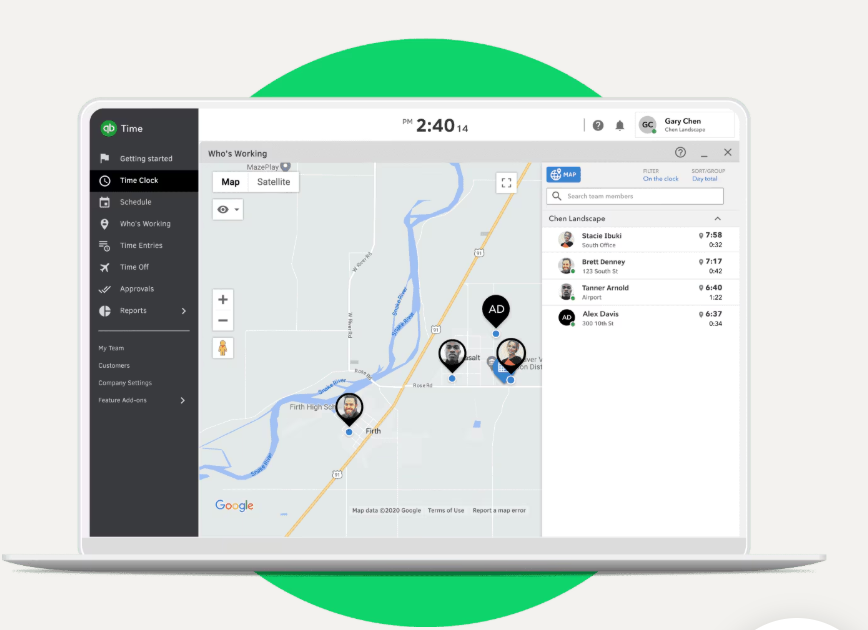
QuickBooks Time is built around field team visibility. The Who’s Working view gives managers a real-time picture of who’s clocked in, what job they’re on, and where they are. Key field-facing features include:
- GPS tracking on both paid plans via the Workforce app
- Geofencing, which reminds employees to clock in or out when they enter or leave a job site (on Elite only)
- Time Kiosk for shared tablet clock-ins on-site, available on both plans
- Offline clock-in via the Workforce mobile app for areas with poor signal
(Source: Intuit)
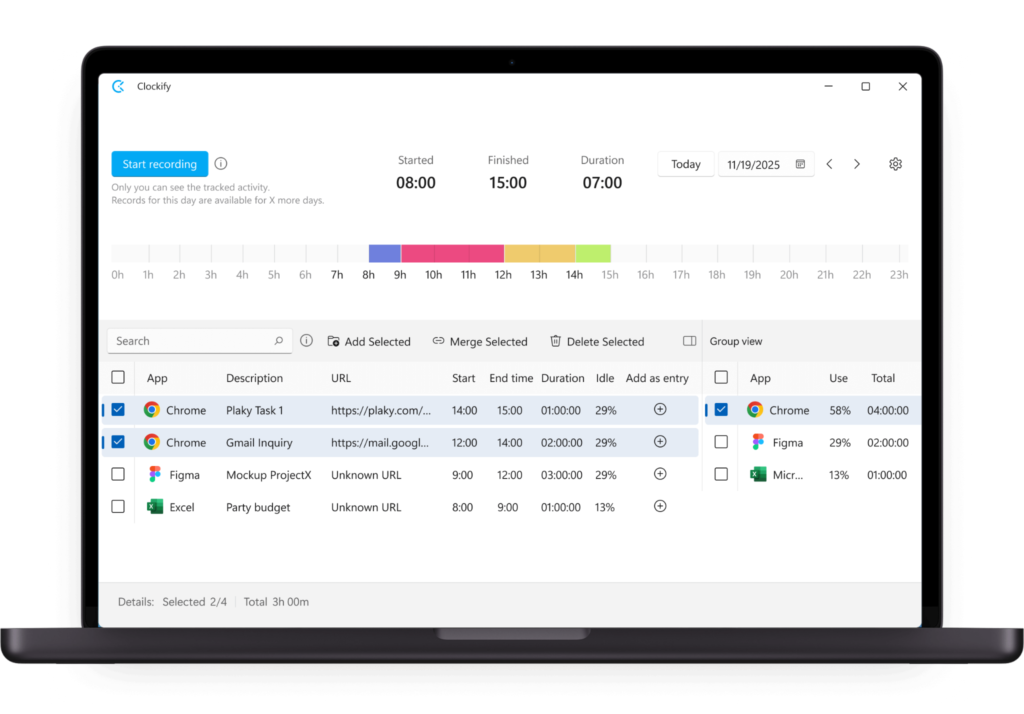
Clockify is more flexible and employee-led. Its Auto tracker records desktop app and website activity, but the data stays locally on the user’s device, so nothing reaches managers unless the user actively chooses to log it as a time entry.
(Source: Clockify)
Other tracking options include:
- Calendar view for visualizing and editing time entries, with Google Calendar and Outlook sync
- Kiosk mode for shared device clock-ins from the Basic plan
- GPS tracking and Screenshots from the Pro plan
- Offline mode on all plans, including free
One notable change: Clockify capped its free plan at five users in early 2026, ending the previously unlimited free tier.
Project and task management
Neither Quickbooks Time or Clockify replaces project management software, but they handle project organization differently.
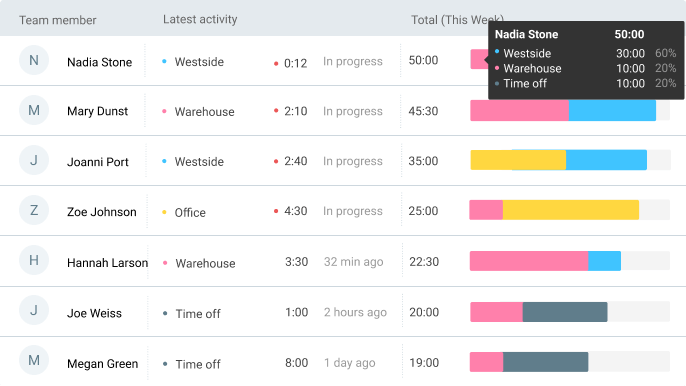
Every Clockify plan includes unlimited projects, tasks, and clients. You can track billable hours, create projects from templates, and see team and workload capacity at a glance.
(Source: Clockify)
The Pro plan adds more financial control:
- Project budgets and estimates tracked against real hours
- Expenses with receipt uploads, tied to specific projects
- Budget alerts that flag before a project goes over
- Multi-currency support for fixed-fee work
QuickBooks Time’s project features are more limited. Both its Premium and Elite plans support job-based time entry and Employee Scheduling for shifts and crews. But the Project estimates vs. actuals report and Project activity feed (which lets teams share photos and updates against a job) are only available for Elite users. And there’s no project profitability view on either plan.
Reporting
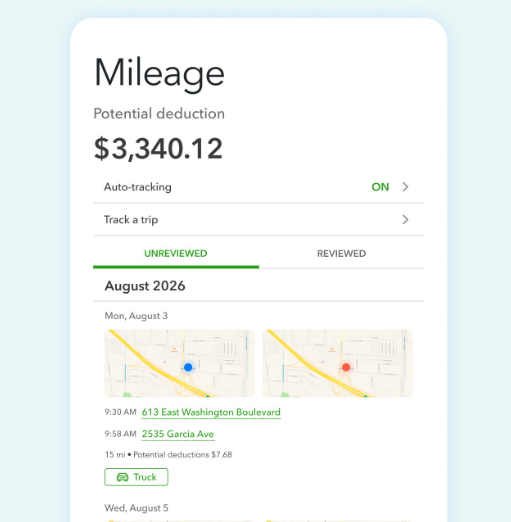
QuickBooks Time’s customizable reports focus on payroll and job costing. They do their job well for teams running payroll through Intuit, but offer limited filtering and only a few export formats. What you get:
- Hours worked per employee broken down by job and client, showing clock-in and clock-out times and any overtime
- Pay rate calculations based on tracked hours, ready to feed directly into QuickBooks Payroll
- Mileage tracking on Elite, for teams logging travel for reimbursement
(Source: Intuit)
Clockify’s Summary report and Detailed report cover more ground, with filters by client, project, team member, task, and date. What you get:
- A Summary report showing total hours by person, project, client, and task, with billable vs. non-billable breakdowns and estimated earnings
- A Detailed report with a full line-by-line breakdown of every time entry
- The Attendance report showing daily start and end times, breaks, overtime, and time off (Standard and above)
- The Expense report pulling together submitted receipts filtered by billability and approval status (Pro and above)
- PDF exports on the free plan; CSV and Excel from Basic
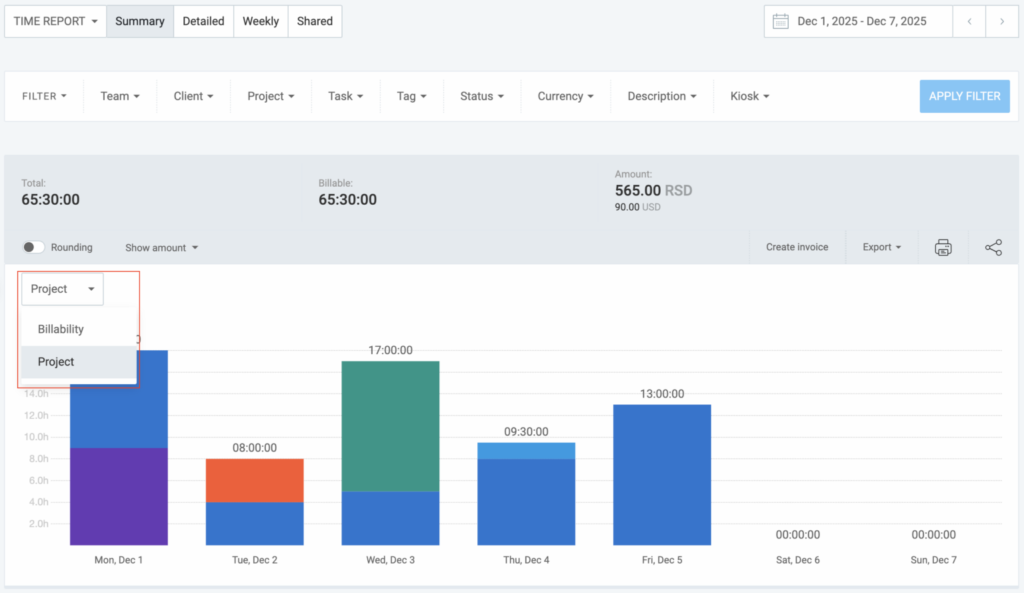
(Source: Clockify)
The consistent gap across both tools: neither connects time data to project margins. Clockify’s Summary report can tell you a project took 40 hours, but can’t infer if those 40 hours made any money.
QuickBooks Time vs Clockify: what you’ll pay
Clockify is cheaper than QuickBooks Time at every tier. It’s also worth knowing that QuickBooks Time’s sticker price isn’t the only cost you’ll pay.
QuickBooks Time pricing overview
QuickBooks Time has no free plan, only a 30-day trial. Both paid plans require an active QuickBooks Online subscription, which is where the real cost of ownership announces itself pretty loudly. The paid tiers are:
- Premium ($20/month base + $8/user/month): Time tracking, GPS, scheduling, kiosk, and payroll sync with QuickBooks.
- Elite ($40/month base + $10/user/month): Adds geofencing, project tracking, estimates vs. actuals, and timesheet signatures.
The base fee structure means small teams pay disproportionately more.
- A two-person team on Premium pays $36/month for QuickBooks Time alone ($20 base plus $16 for two users)
- A 10-person team pays $100/month ($20 base plus $80 for 10 users)
QuickBooks Time also requires a QBO subscription — be warned that it’s eye-wateringly expensive.
- Simple Start ($38/month) only supports one user, so any team using QuickBooks Time will need Essentials at $75/month or Plus at $115/month.
- A 10-person team running QuickBooks Time at $175/month combined ($100 for Quickbooks Time plus $75 for QBO) before payroll add-ons.
Overall, the combination of subscriptions makes QuickBooks significantly pricier than any other time tracking and invoicing solution on the market, including Clockify, Toggl, Track, or even Harvest.
Clockify pricing overview
Clockify’s free plan covers up to five users with unlimited time tracking and basic reporting. Paid plans are priced per user with no base fee. Its paid tiers start at:
- Basic ($3.99/user/month): Adds billable rates, kiosk, CSV/Excel exports, and admin controls.
- Standard ($5.49/user/month): Adds invoicing, timesheet approvals, the QuickBooks integration, time off, and attendance tracking.
- Pro ($7.99/user/month): Adds GPS tracking, screenshots, scheduling, expenses, and project budgets.
- Enterprise ($11.99/user/month): Adds SSO, SCIM provisioning, and audit logs.
It’s worth considering features closely before you pick a tier. If you need invoicing and the QuickBooks integration, you’re on Standard at $5.49/user. If you want GPS and screenshots too, you’ll need to pay for Pro at $7.99/user.
- For a 10-person team, the Pro plan costs $79.90/month, compared to $175/month minimum for QuickBooks Time Premium plus a QBO Essentials subscription.
Our verdict: Whichever Clockify tier you land on, QuickBooks Time plus the required QBO subscription costs significantly more. The only thing that might justify paying more for the Quickbooks ensemble is native payroll sync — only you can gauge whether the integration is worth the premium for your business.
Integrations: How QuickBooks Time and Clockify connect to your tech stack
Both tools have a built-in QuickBooks Online integration, and the good news is neither requires a third-party connector like Zapier or Make to stitch your tools together. The difference between our two tools is what the integration does.
QuickBooks Time and QuickBooks
QuickBooks Time’s QBO integration is bidirectional and works with QuickBooks Payroll, which is a no-brainer as they’re part of the same ecosystem. Hours tracked flow directly into payroll processing, employee data stays in sync across both platforms, and approved timesheets feed into payroll runs without manual re-entry. For teams that run payroll through Intuit, this is the integration’s selling point.
Clockify and QuickBooks
Clockify’s QBO integration is built-in and handles the sync between time and billing. You can generate invoices from tracked time and push them straight to QuickBooks Online in a few simple steps. If payroll sync is your goal, know that Clockify doesn’t sync with QuickBooks Payroll. But if all you’re looking for is billing and invoice sync, then Clockify’s integration works just fine.
Beyond QuickBooks
Clockify connects with over 100 apps via browser extension, including Asana, Jira, Trello, Slack, Google Calendar, HubSpot, and GitHub. QuickBooks Time integrates primarily within the Intuit ecosystem, with a more limited set of third-party connections outside it.
For teams that run their business across multiple tools, Clockify’s broader integration library is certainly an advantage. But it won’t be relevant for teams already committed to the Intuit stack.
User experience and adoption: What can you expect from QuickBooks Time and Clockify?
Among G2’s software review community, QuickBooks Time and Clockify are even-stevens, both scoring 4.5 out of 5 overall, and each showcasing different strengths. Clockify is the easier of the two tools to set up, but QuickBooks Time has the stronger mobile experience for field teams.
Clockify
Clockify deploys fast with minimal configuration. Users consistently praise how easily teams get up and running, making it slightly more user-friendly than QuickBooks Time. Surya J., a senior financial analyst, describes: “It has a very easy-to-use interface which makes time tracking very easy and its mobile app allows quick clock-ins from anywhere.”
The mobile app is indeed clean and reliable for straightforward time logging, though it lacks the GPS depth and field-team features that QuickBooks Time offers. On G2, Clockify achieves the following scores out of 10:
- 9.2 for ease of use (0.2 higher than QuickBooks Time)
- 9.3 for ease of setup (0.4 higher than QuickBooks Time)
- 9.3 for ease of admin (0.3 higher than QuickBooks Time)
- 9.0 for quality of support (0.3 lower than QuickBooks Time)
One consideration for knowledge worker teams: Clockify’s Pro plan includes screenshots and activity monitoring. These features are optional, but they still make some teams feel hesitant about adopting this type of tool.
Of course, there are legitimate use cases for monitoring in some regulated industries, but outside of these we take a firm anti-surveillance stance. We prefer to give our workers trust and autonomy rather than the digital equivalent of looking over their shoulder every couple of minutes.
Beyond surveillance, another consistent day-to-day frustration reported by Clockify users is reporting depth. Clockify’s reports are adequate for basic needs but are limited for teams wanting project profitability or margin analysis. Imlisunep L. a small business owner explains, “I wish the reporting features had more customization options. With a few tweaks it can be much better for the user experience.”
QuickBooks Time
QuickBooks Time requires more upfront configuration, particularly for teams new to the Intuit ecosystem. Once set up, the mobile experience is particularly appealing for field and hourly teams.
The QuickBooks Workforce app is available on both iOS and Android, and gives managers real visibility into where their teams are and when they clocked in; GPS tracking, offline clock-in, and geofencing all do the heavy lifting.
Merlyn M., a small business intake specialist, noted on G2:
“What stands out most about QuickBooks Time is how seamlessly it connects time tracking with payroll and accounting, eliminating duplicate work and reducing errors. It offers accurate, real-time tracking with GPS support, a strong mobile app for teams on the go, and useful reporting for labor costs and productivity.”
On G2, QuickBooks Time scores:
- 9.0 for ease of use (0.2 lower than Clockify)
- 8.9 for ease of setup (0.4 lower than Clockify)
- 9.0 for ease of admin (0.3 lower than Clockify)
- 9.3 for quality of support (0.3 higher than Clockify)
Billing and profitability: Where QuickBooks Time and Clockify tend to fall short
If your goal is to go beyond logging hours and understand how your time influences your project margins, neither QuickBooks Time nor Clockify delivers. That’s not a criticism of either tool exactly; it’s just honestly not what they’re built for.
QuickBooks Time’s reporting is oriented around payroll: who worked, when, and for how long. That’s useful for field teams and hourly workers, but it doesn’t tell you whether a project was profitable or whether a client relationship is worth keeping.
Clockify’s reporting goes a little further. You can see billable vs. non-billable time and track hours against project estimates on higher tiers. But there’s no margin analysis or project profitability view, and you’ll find billing rate management limited.
If you’re tracking time as a consultant, agency, or professional services firm and need to bill clients by the hour, you’ll definitely notice this lack of functionality.
Does it matter? Definitely. Because if you can’t connect tracked time to billing rates and project costs, you’re flying blind on profitability. And that’s no good for any business.
Where Toggl fits in
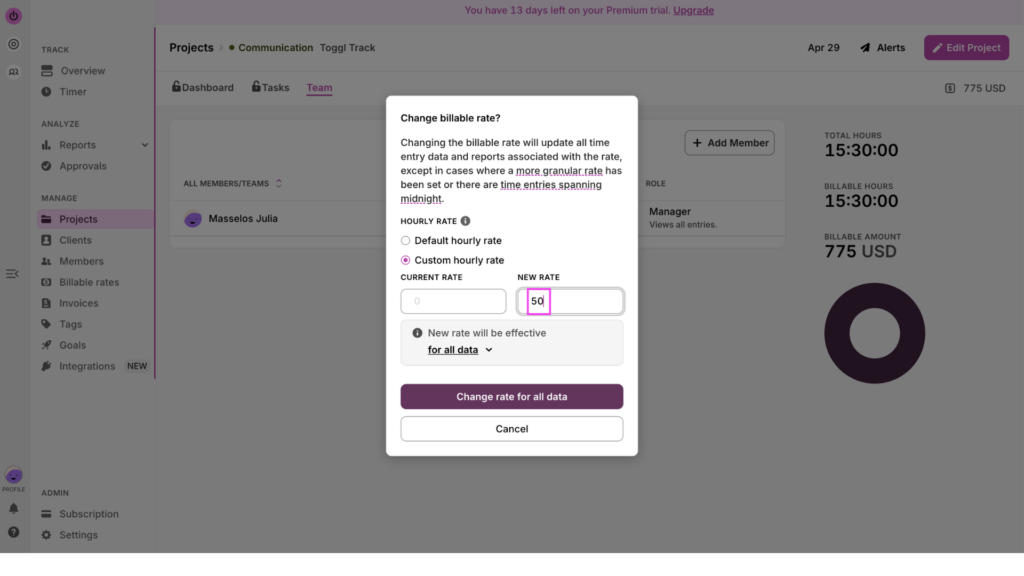
Toggl is an undeniable fit for teams that bill clients by the hour and need time data to connect to real revenue. You can set billing rates at the workspace, team, project, or task level, so every hour tracked is automatically tied to what it’s worth.
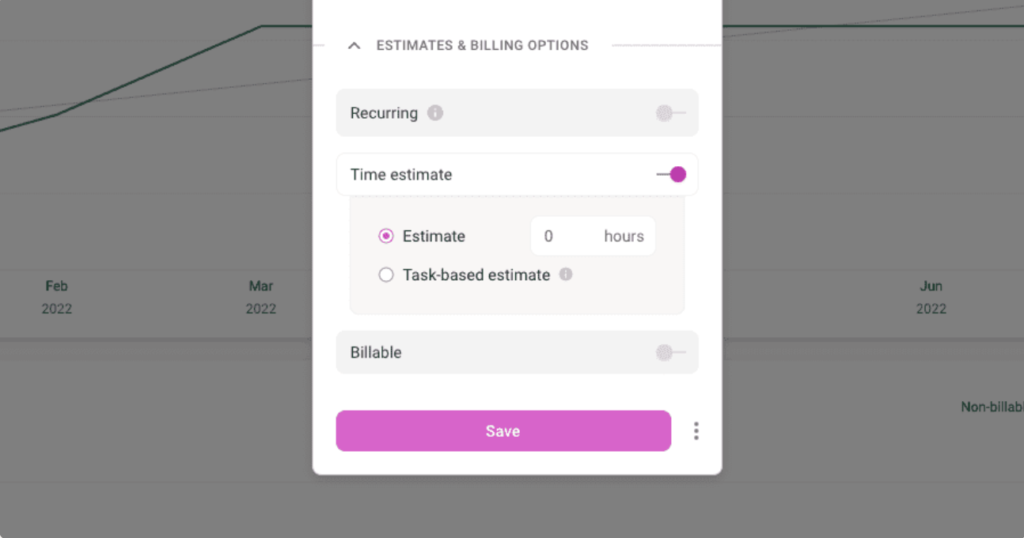
You can also track your estimated hours against your actual hours in real time. This gives you insight into how your project budget may be impacted by a missed deadline or any extra labor hours you booked to get the project over the line.
Harvey Esquire, a Los Angeles legal services firm, switched to Toggl after their previous tool failed them on exactly this problem.
“The legal industry in general faces a problem — they struggle to find an accurate solution to time-billing. Lawyers typically round up in six-minute increments, which led to a lot of inaccurate billing over time,” said Chris Harvey, CEO and Managing Partner.
After switching to Toggl, Harvey Esquire recaptured 25% of billable hours that had previously been lost to chaotic time management and inaccurate rounding.
If billing accuracy and project profitability are also central to how your business works, explore Toggl’s time reporting features in more details
QuickBooks Time, Clockify, or Toggl: Which tool should you use?
We’re not here to crown a time tracking software champion. The right choice depends entirely on what you need employee time tracking to do for you and your business.
- Choose QuickBooks Time if you run payroll through Intuit and manage field, construction, or shift-based teams. The native payroll sync is the clearest reason to pay the premium — it removes a data-entry step that no other tool on this list replicates.
- Choose Clockify if you need free or low-cost time logging and your QuickBooks workflow is minimal. It deploys fast, the free plan covers up to five users, and basic reporting covers straightforward needs.
- Choose Toggl if you need time data to connect to projects and billing rates, make accurate capacity decisions based on work hours and time-off data, and easily manage tasks with Kanban boards, Gantt charts, and more.
If Toggl sounds like it could be the right fit, Candybox Marketing is a good example of what’s possible. This 40-person agency won a $120k contract against competitors quoting $45k and $50k, because their time data let them quote accurately and prove their value. As their CEO put it: “If we didn’t have the data that Toggl provided, we might still be doing unprofitable projects today.”
See for yourself: sign up for a free Toggl account or start a 30-day free trial on a paid plan.
Frequently asked questions (FAQs about QuickBooks Time vs Clockify)
Is QuickBooks Time the same as TSheets?
Yes. TSheets was a standalone time tracking app that Intuit acquired in 2018 and rebranded as QuickBooks Time in 2019. The core functionality is largely the same, though the rebranding brought several price increases and made a QuickBooks Online subscription mandatory.
Does Clockify integrate with QuickBooks?
Yes, Clockify has a built-in QuickBooks Online integration that syncs time and generates invoices, without requiring a third-party connector. However, Clockify doesn’t work with QuickBooks Payroll.
Is QuickBooks Time free?
No. QuickBooks Time doesn’t have a free plan, only a 30-day trial. Its Premium plan starts at $20/month base plus $8/user/month, with a mandatory, active QuickBooks Online subscription on top.
Does QuickBooks have built-in time tracking?
Time tracking in the QuickBooks ecosystem requires a separate QuickBooks Time subscription, starting at $20/month base plus $8/user, on top of your existing QuickBooks Online plan.
Can I use Toggl with QuickBooks?
Yes. Toggl has a native QuickBooks Online integration that generates invoices from Summary Reports in one click and sends them directly to QBO. This integration is available from Toggl’s Starter plan and above, not on the free plan.
Which is better for freelancers: QuickBooks Time or Clockify?
Clockify is a better fit for freelancers than QuickBooks Time. That’s because QuickBooks Time requires a QuickBooks Online subscription that most freelancers don’t need, making it an expensive option for solo users. Clockify’s free plan covers up to five users with unlimited time tracking. For freelancers who invoice through QuickBooks, Toggl’s Starter plan is also worth considering, as it offers a one-way native integration.

Rebecca has 10+ years' experience producing content for HR tech and work management companies. She has a talent for breaking down complex ideas into practical advice that helps businesses and professionals thrive in the modern workplace. Rebecca's content is featured in publications like Forbes, Business Insider, and Entrepreneur, and she also partners with companies like UKG, Deel, monday.com, and Nectar, covering all aspects of the employee lifecycle. As a member of the Josh Bersin Academy, she networks with people professionals and keeps her HR skills sharp with regular courses.