You can plan your day to perfection with all your meetings lined up and your time blocked out. But what happens when you need to react to an incoming task?
Most of us end up pausing mid-task to answer that Slack ping or respond to a Google Doc comment. This context-switching happens all the time and it steals our mental energy and derails progress.
In this guide, we explore task batching as the solution, including:
- How it works.
- The science behind it.
- How to build a batching system you can measure, backed by data not gut feeling.
What is task batching (and how does it differ from time blocking)?
Task batching is the practice of grouping similar tasks together and completing them in one focused session, rather than intermittently throughout your workday or week. This approach works best when you group similar types of work together. For example, you might handle all your emails in one block, take all your calls in another, and complete some deep focus work in a third.
Task batching isn’t time blocking, though the two are closely related.
Time blocking is about organizing your time (scheduling the container of when work happens), whereas task batching is about organizing your tasks (filling the containers with specific work). For example, you can put a 30-minute block of time in your calendar dedicated to batching email replies every morning. The two workflows are best used together, but they’re not the same thing.
Why task batching works, according to science
Every time you switch between different tasks, your brain pays a tax. Over time, this context switching drains your mental energy, impairing your focus, decision-making, and productivity.
UC Irvine’s research paper on “The cost of interrupted work: More speed and stress” finds it takes an average of 23 minutes and 15 seconds for your brain to slide back into focus time after each interruption. And that adds up fast, leading to huge losses in productivity and burnout.
Similarly, the American Psychological Association found that multitasking and task-switching can eat up to 40% of productive time, not because the tasks themselves take longer, but because of the incredibly high cost of constantly switching attention from one task to another.
But it’s not just the time lost to switching. It’s the fact that even when we move on to something else, our brain lingers on the previous unfinished task. This is known as attention residue, and it creates friction throughout your workday that accumulates across weeks and months.
Effective task batching attacks this at the root. By keeping your brain in the same cognitive mode for longer periods of time, you eliminate most of those re-entry costs. You get into a rhythm that Cal Newport calls Deep Work, which you might recognize as that rare, productive flow state where time disappears and everything pours out of you like an unstoppable fountain.
Which tasks batch well?
If any of the following types of work are on your to-do list, you’ll find them easy to group into batches.
Deep work
Deep work requires sustained concentration, so benefits enormously from batching because it takes time and energy to reach your flow state. The longer you can stay in that mode without breaking, the better the output.
Examples: Writing, design, code, analysis, brainstorming, strategy.
Email and async communication
Try responding to email messages in two dedicated windows per day, such as mid-morning and then before signing off for the day. Task batching your responses to notifications helps you streamline your workflow. You’ll minimize interruptions throughout the day and experience more flow as you design a less reactive work life.
Examples: Emails, Slack messages, LinkedIn notification, Discord, Teams, etc.
Admin tasks
Admin can include low-intensity, process-driven, tasks that fall outside of regular communication. Done together, they take less time than the same tasks scattered across different days. Since they’re rarely important or urgent, they’re also the most prone to procrastination. Batch them into one low-energy slot at the end of the day.
Examples: Invoicing, expenses, scheduling, data entry, form-filling.
Research tasks
Research is typically a time-intensive activity that requires plenty of brain power and creativity as you look for new angles. Batching research together prevents the trap of falling into it later when you’re supposed to be focused on producing the deliverable.
Examples: Background reading, information gathering, competitive analysis.
Social media tasks
The algorithm is a hungry, unrelenting hamster wheel that demands daily posts. This can easily demolish your productivity if you’re trying to make one post a day, which is what makes social a great contender for batching. Lean on automation as much as possible to remove repetitive tasks. Otherwise, it’s death by a thousand context switches.
Examples: Creating content, scheduling posts, responding to comments, monitoring mentions.
Meetings
Clustering meetings into specific days and protecting the rest for focused work is game-changing. A meeting doesn’t just cost the amount of time it takes. It also costs you the opportunity cost of the deep work you’re losing on either side of that meeting.
Examples: Client check-ins, project kickoffs, internal standups, one-to-ones, feedback calls, discovery calls, retrospectives.
Which tasks aren’t a great match for batching?
Before you start grouping your tasks and assigning them to certain time blocks, weed out the following types of work that aren’t a great fit for batching.
Genuine emergencies
Unpredictable, urgent tasks that require immediate attention are impossible to batch. The trick is distinguishing between what’s actually urgent and what just feels urgent.
Examples: A tech bug takes down your site, a client system is down, an urgent deliverable, a delivery gone wrong.
Highly collaborative, real-time work
Tasks that depend on another person’s live input don’t batch well because you’re not the only variable. You can batch your preparation for these, but the work itself is inherently reactive, and usually can only be done collaboratively. The same goes for project management tasks that have a lot of dependencies.
Examples: Anything that requires feedback or approval from multiple stakeholders.
A final, practical note: Some tasks look similar on paper but require a completely different headspace. If the required thinking is different, forcing them into the same batch doesn’t eliminate the switching cost.
Example: Writing a creative brief and a marketing report could both be considered “writing,” but one requires a strategic, forward-thinking mindset, and the other is retrospective and analytical.
How to build your batching system in 5 steps
Building your system on actual data rather than guesswork lets you reap the full benefits of task batching. Here’s how.
Step 1: Track a baseline week
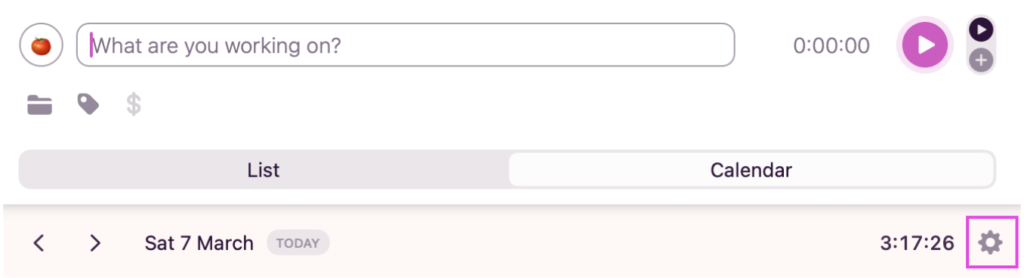
Start by tracking all your time over a typical week. You can do this through the one-click timer in Toggl using the mobile, desktop, web app or Chrome extension. Alternatively, you can set up the automated time tracker, which passively records how much time you spend on pre-defined web pages and apps. To set it up, head to the Toggl desktop app, switch to Calendar view, and click on settings.
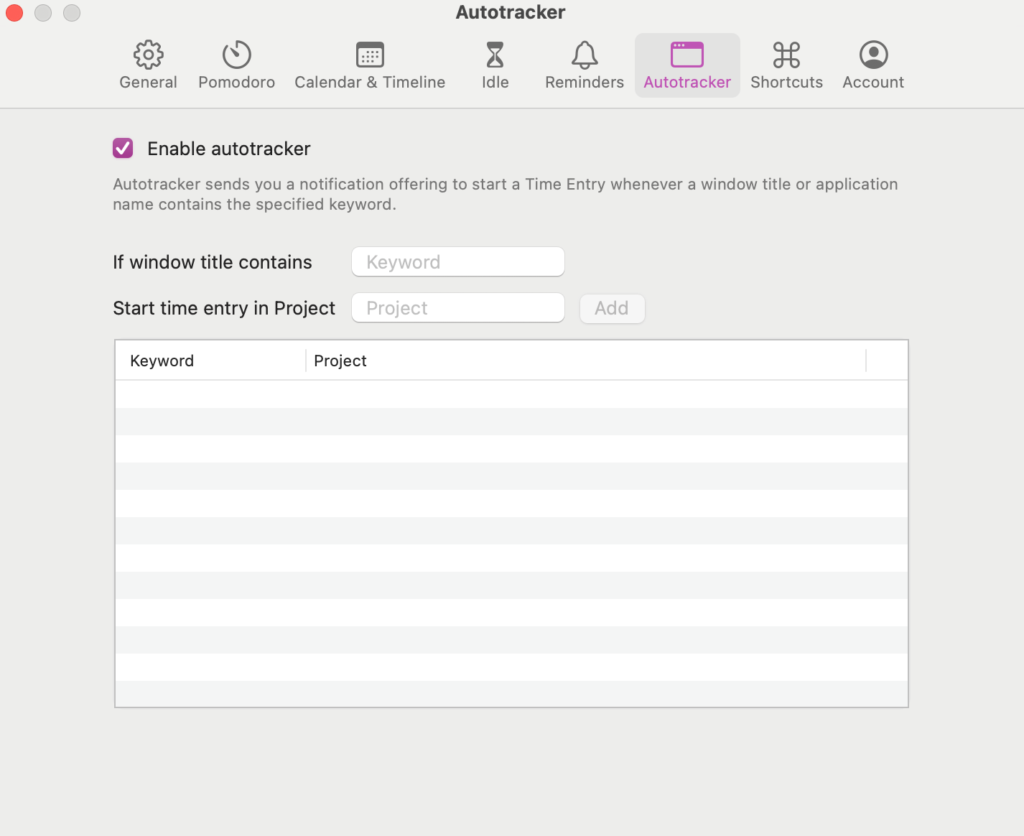
Then, select Autotracker, enable it, and add all the most relevant web pages and apps you use in your workday. Now, the timer will run in the background each time you’re on one of those pages — you don’t need to lift a finger.
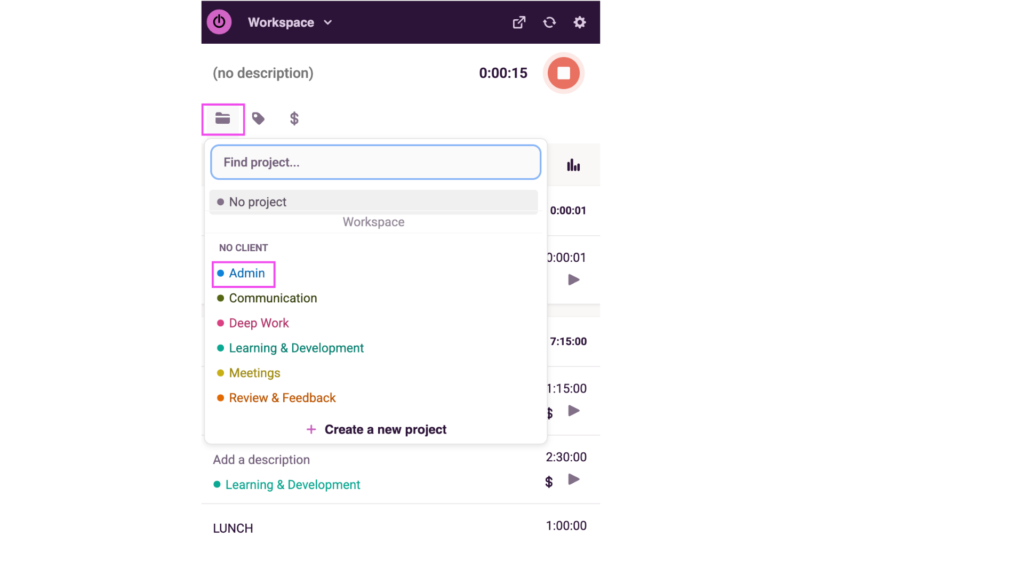
Even though you’re not batching your tasks yet, make sure they’re still all tagged to a relevant Project. This will keep your time entries organized and make pulling insights from your time data infinitely easier when the time comes.
At the end of the week, you’ll have a clean calendar of all your activities…
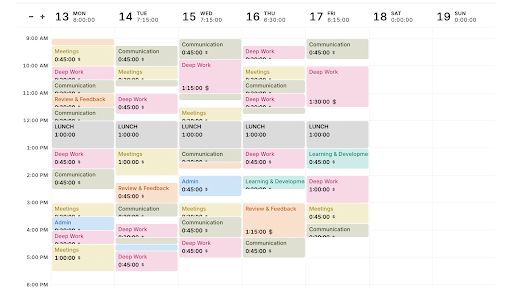
…and a Summary Report that looks like this.
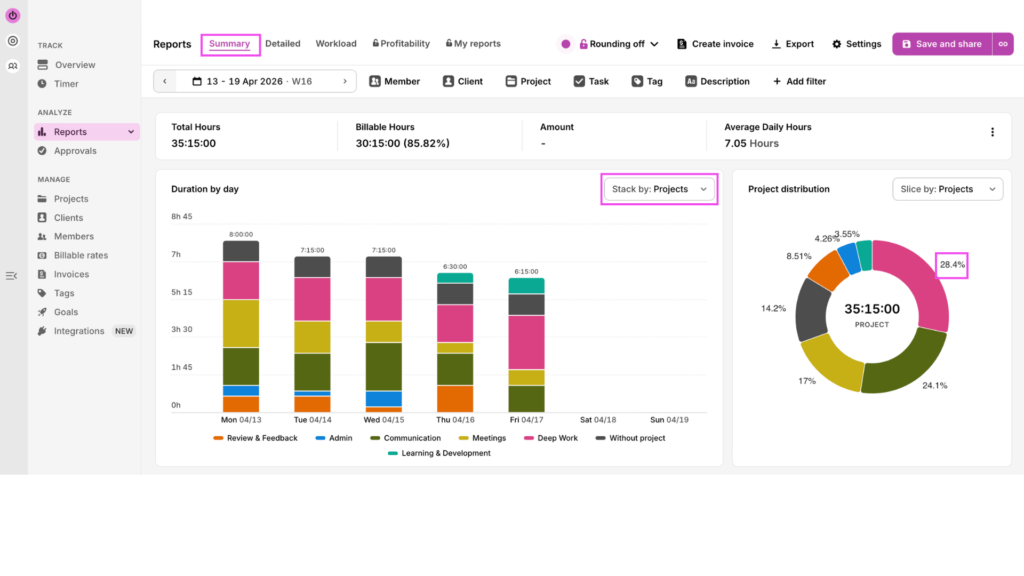
You’ll see how fragmented your workday is, how many times you switch between tasks, and how long your deep work blocks last before you need a break.
Without this step, you’ll be flying blind down the road — and nothing you do later will be measurable in a meaningful way.
Step 2: Define your batching groups
With your baseline under your belt, it’s time to consider your task list, whether it’s in a project management tool like Asana, or good old pen and paper. Sort everything you do into groups, organized by cognitive mode. For most knowledge workers, this framework is a good starting point:
- Deep Work — writing, design, code, analysis, strategy
- Communication — email, Slack, client calls, internal check-ins
- Admin — invoicing, scheduling, expenses, data entry, internal reporting
- Review & Feedback — reading deliverables, commenting, approving
- Learning & Development — research, courses, reading
Stick to five or six groups maximum. If you need more detail, we have a whole guide on time tracking categories.
Step 3: Assign each category a time slot based on energy levels
Start assigning task batches to time blocks in your calendar. Ideally, you match your batching groups to your natural energy levels throughout the day. This is how this might look:
- Deep work gets the highest-energy windows — for most people (but not everyone!), that’s the first few hours of the morning.
- Communication gets two time slots — one in the morning, one in the afternoon — to stay on top of things without getting reactive.
- Admin gets a single low-energy slot — post-lunch is a natural fit, when concentration dips and process-driven tasks are easier to power through.
- Meetings are ideally clustered into specific time blocks on designated days. Constraining the hours you’re available to be booked for a meeting can help this greatly.
- Learning & development could be scheduled for a few hours every Friday afternoon, to upskill and stay ahead of the latest updates
Once you’ve decided how these blocks are arranged on your calendar, block them so no one else can fill them.
Step 4: Track your batching week
Track your time the same way you did in the baseline week, with the one-click timer or the automated tracker.
If you’re using the one-click timer, it’s incredibly important you switch task and Project labels every time you change what you’re doing — an interruption, a personal errand, a notification, a doom scroll… anything. This is vital to getting real, representative data.
Then, make sure each entry is tied to a Project so that your data is super easy to analyze afterwards. It’s best to get into the habit to label the entries as you start them — or at the very least, take 5min at the end of the day to do so to keep your data clean.
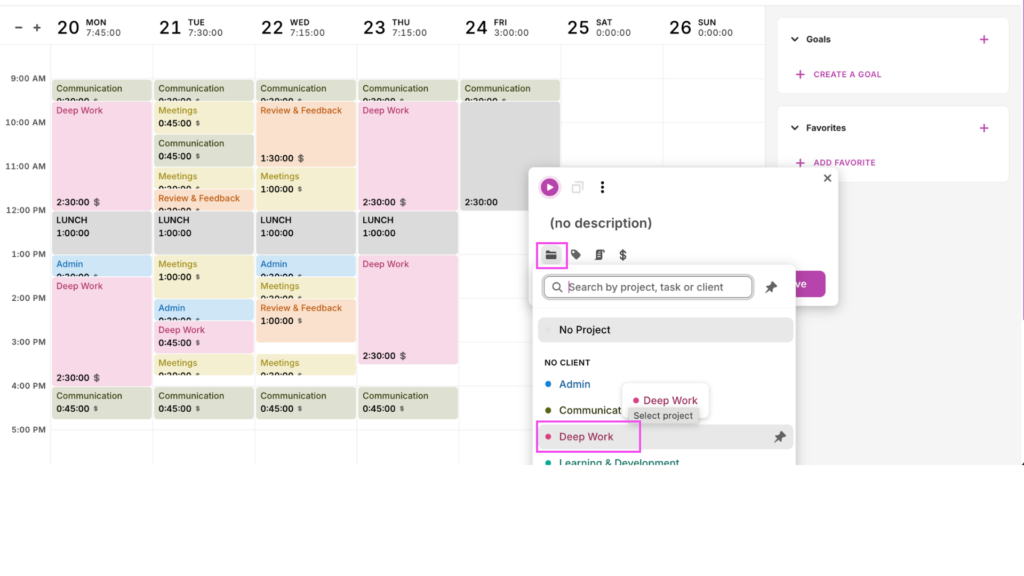
At the end of the week, pull the Summary Report.
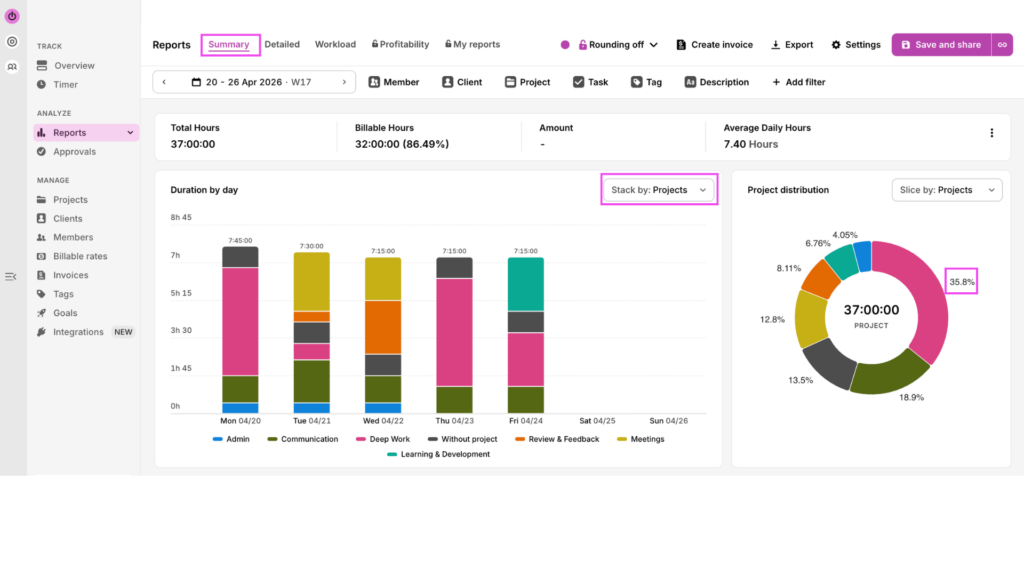
Compare it to your baseline week to see what benefits came from batching your tasks. For example, Deep Work time went up from 28.4% to 35.8% while time spent on Communication tasks dropped from 24.1% to 18.9%.
Step 5: Adjust based on what you find
Use the Summary Report to look for the following things.
Deep work hours vs reactive work hours
To see how many hours you spent in deep work, filter your time entries by Projects, and select Deep Work.
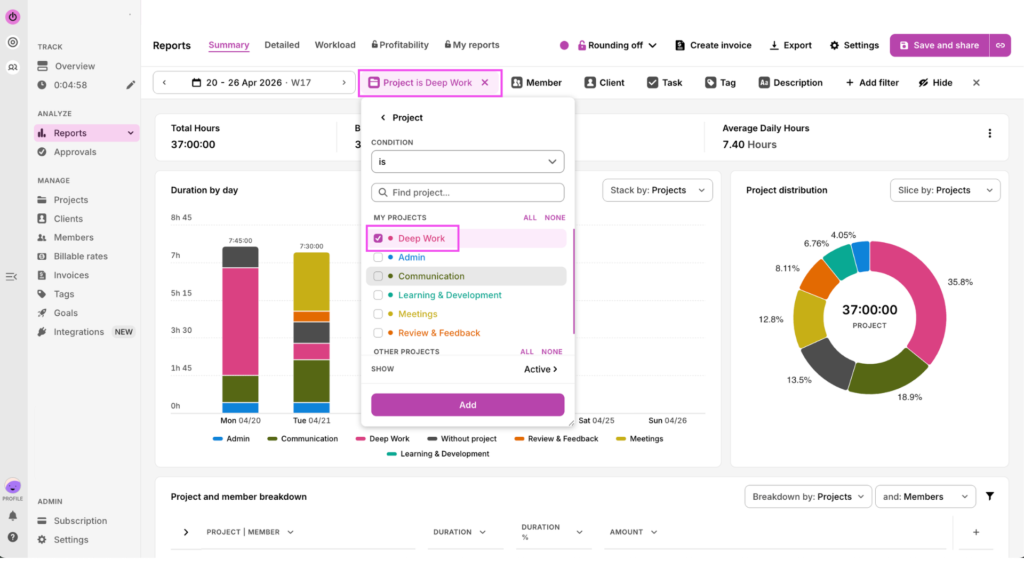
You’ll view granular details about how long you spent per day and per week on this task type. During your batched week, you spent 13 hours and 15 minutes on Deep Work, compared to just 10 hours in your baseline week.
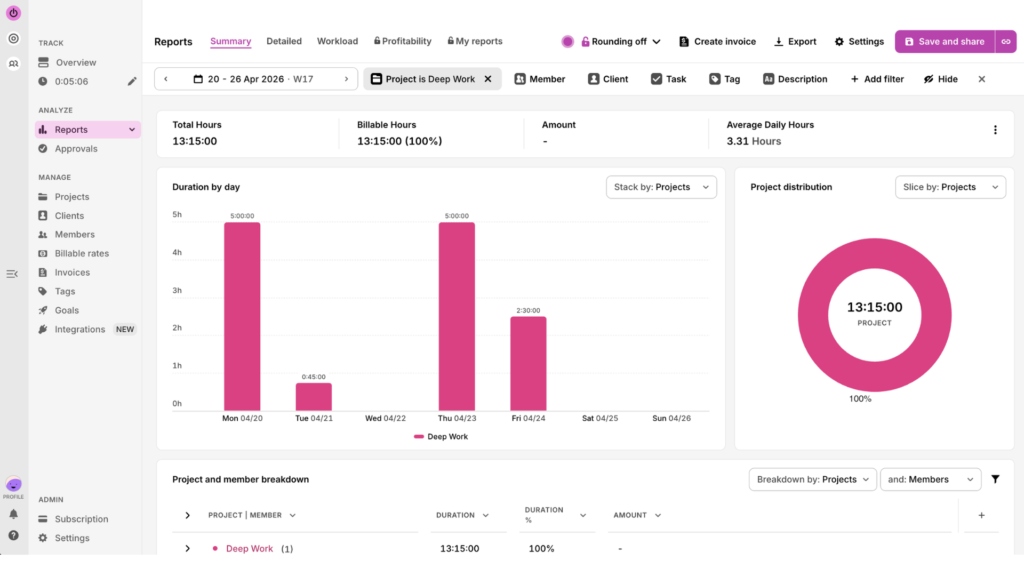
(Batched week)
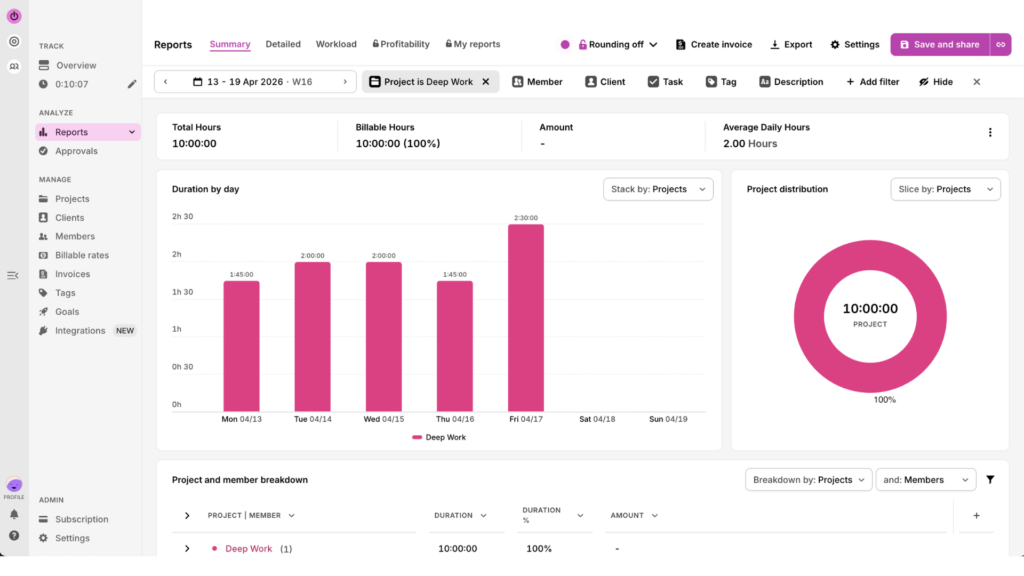
(Baseline Week)
Whether the total time in each category matches your intentions
In step 3, you assigned each category a time block, for example, 2.5 hours per week for Deep Work on Thursday afternoons.
If you integrate Toggl with your calendar, you’ll see how your actual tracked time compares to your time blocks.
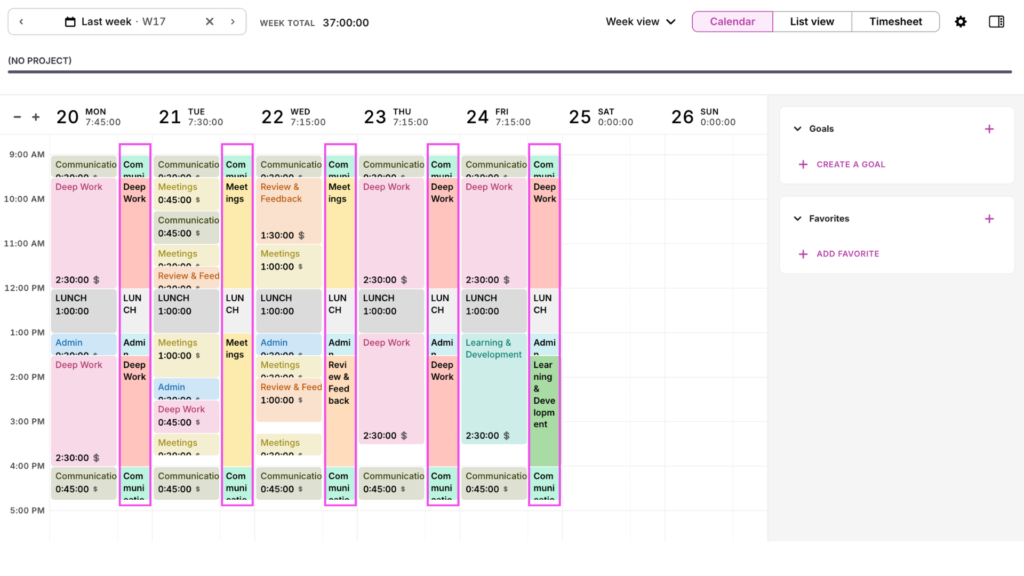
How closely does your actual hour breakdown reflect your intentions? Were you too aspirational? Do you need longer breaks between time blocks? Was there a certain task you always slipped on?
For example, maybe you’re good at staying in deep work, but your communication tasks take longer than expected, or you always run out of time to get to admin at the end of the day. Take stock of any patterns you see here and adjust your time blocks accordingly.
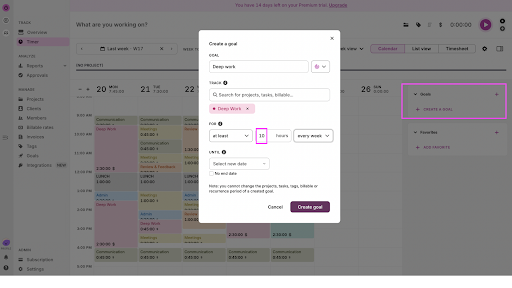
Use Goals to keep you on track. Say you want to track 10 hours of deep work per week. Set that up in your dashboard, and Toggl will send you automated reminders to hit your goal.
How many times you switched between categories in a single day
Line up your baseline and batch week calendars side by side. You’ll easily see which days have the most context switches, based on how stripy the output is.
(Baseline Week)
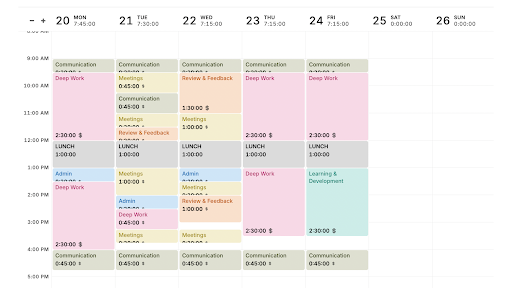
(Batched Week)
If you want a detailed breakdown, you can see that in the Detailed Report. Comparing the baseline and batched weeks, you see that the baseline week has 53 different entries, whereas the batched week only has 36. This means you’ve reduced context-switching by 32%.
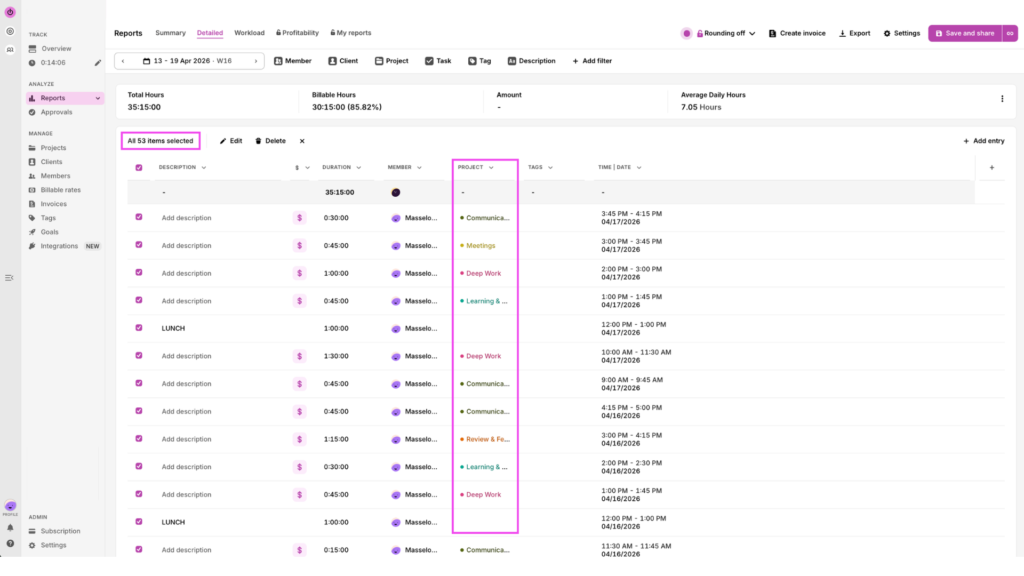
(Baseline Week)
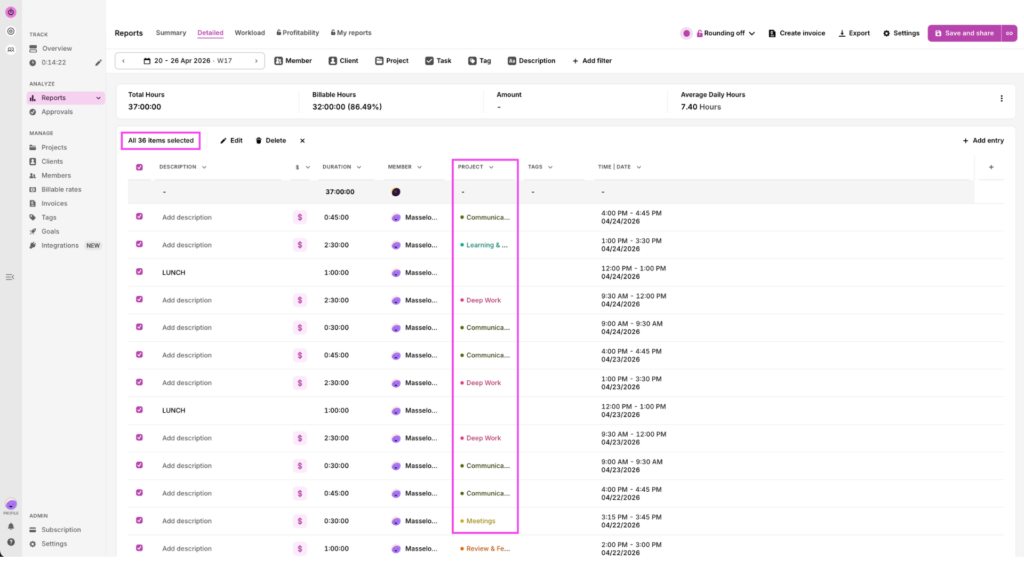
(Batched Week)
We’ll bet with all that context switching, you felt far more exhausted in the baseline week even though you got less deep work done and worked fewer hours overall. Makes you think, doesn’t it?
Your North Star ⭐
Ultimately, you want to make sure you have:
- Fewer, longer deep work blocks. 2 x 90-minute sessions are better than 6 x 20-minute sessions
- A better ratio of deep vs reactive work — this is your overall productivity signal.
- Fewer category switches per day
TL;DR: If a batch is consistently overrunning, it’s too large. Split it or reduce the scope. If your deep work blocks are still getting interrupted, something is breaking through that shouldn’t be. Identify it, and fix your system rather than blaming your focus — that’s what the data is for.
When batching breaks down (and what to do about it)
Task batching can go awry when the unexpected happens, forcing you back into a reactive state. Here’s what to be aware of, and how to protect yourself against these common workday issues .
The urgent request during a focus block
The problem: You’re 40 minutes into a deep work batch, finally in a flow state, when a message arrives that feels urgent. Your first instinct is to drop everything and tend to this emergency right now. But you must fight this urge, as it’s rarely the best move.
What to do instead: Build a capture and defer habit. When something arrives during a focus batch that isn’t genuinely on fire, write it down and assign it to the appropriate batch later. Getting good at distinguishing between actually urgent and feels urgent is the skill that makes task batching sustainable. Remember that your notifications are engineered to feel urgent. But they rarely are.
Meeting creep
The problem: You started off strong, protecting your Tuesdays for deep work. But then an invite for a standing meeting arrives. A few weeks later, another. You don’t want to see ‘difficult,’ so you swallow your pride and accept them. Within a month, your protected days look like everyone else’s calendar.
What to do instead: This can be tricky depending on how junior you are or how much control you have over your own calendar. Decline or reschedule non-urgent meetings that land on protected days. Set those time blocks as busy in your calendar, and communicate why to your team. If you’re transparent about why, you’re more likely to get buy-in especially from superiors. This feels awkward the first time, but more often than not, people adjust quickly without a second thought.
The perfectionism trap
The problem: Some people batch their communication window and then spend three hours on four emails. Batching communication doesn’t mean doing it more slowly. It means compressing it all into one time slot, rather than switching back and forth between email and literally everything else 5724 times per day.
What to do instead: If replying to your emails gets 45 minutes of your time block, it gets 45 minutes regardless of how many messages you have to get to. Combining task batching with a technique like Pomodoro (covered in our time management methods guide) works well here — set a timer inside the batch, work until it goes off, and then move on. The goal isn’t perfection within the batch, it’s increased productivity across the whole day.
Team adoption
The problem: If you’re trying to improve team time management, it can be frustrating if your people aren’t following your workflow policy.
What to do instead: Batching is harder to impose than to model. So, share your own batching schedule, explain why you’re only checking Slack at specific times, and let people watch the results over a few weeks. Ideally, task batching will make the case for itself. If you’re capturing time intelligence with Toggl, sharing your before/after Summary Reports gives the team something concrete to point to, not just a productivity philosophy to take on faith.
Elevate your task batching with Toggl
Fragmented workdays aren’t a life sentence. With the right insights, you can transform your approach to work in a way that feels lighter and more sustainable.
Task batching with Toggl gives you real data, using categorized time entries, Summary Reports, and Calendar views. You’ll optimize deep work hours within your day and protect them from interruptions at all costs. Get started with task batching and sign up for a free Toggl account.
Frequently asked questions (FAQs) about task batching
What is the difference between task batching and time blocking?
Task batching and time blocking are different but complementary time management techniques. Time blocking schedules when you’ll do a type of work; task batching decides what goes in that block by grouping similar tasks of the same cognitive type. They are different but work best together.
How many batches should I have in a day?
You should have anywhere from three to four batches per day. A typical split could be starting your day with communication (replying to emails), followed by deep work in the morning, another communication window after lunch, and an admin slot to end the day. More than four and you’re reintroducing the context switching you were trying to eliminate.
Does task batching work for teams or just individuals?
Task batching works for both teams and individuals, but team adoption requires a different approach. Model this by sharing your schedule, explaining the logic behind your set up, and letting the results make the case over a few weeks.
How do I know if task batching is actually improving my productivity?
You’ll know task batching is improving your productivity if you track it. Record how you spend your time in a typical week using Toggl. Then, record your time entries during a batching week using the same categories, and compare Summary Reports. Keep your eye on the total deep work hours per week. If it’s going up, the system is working.
Should you batch tasks by category?
No, you don’t always need to group daily tasks by category. Instead, focus on staying in the same cognitive mode for stretches of time, which may not always involve related tasks. For example, handling emails and Slack messages both fall under “communication,” drafting three proposals back to back require the same type of strategic thinking, and sending off invoices to your clients in one go keeps you in “admin” mode. Batch by what your brain is actually doing, rather than powering through your to-do list.

Julia Masselos is a remote work expert and digital nomad with 5 years experience as a B2B SaaS writer. She holds two science degrees Edinburgh and Newcastle universities, and loves writing about STEM, productivity, and the future of work. When she's not working, you'll find her out with friends, solo in nature, or hanging out in a coffee shop.