If you’ve ever organized a 10-day vacation or hosted a birthday party, you understand the importance of project planning. Do it wrong and you risk missing your flight or serving a birthday cake with the wrong candles. And when it comes to business, project planning carries even greater risk.
There are many stakeholders, team members, milestones, and dependencies to track. And even with the best system in place, things can easily get out of hand.
Put your worries aside, though, because this guide gives you everything you need to know about project planning, including:
- What it is and why it matters.
- Frameworks for doing it right.
- Tips and best practices to make project planning a breeze.
We’ll also include examples of how Toggl — our time tracking and project management software — can help you plan your projects, execute them successfully, and analyze key insights for time, capacity, and resource management.
TL;DR: The most important points about project planning
- A project plan provides structure by defining what needs to be done, by whom, and when, preventing confusion and missed deadlines.
- Planning without time tracking is guesswork; tools like Toggl help teams compare estimates vs. actual time, manage budgets, and avoid scope creep.
- Follow these six steps: define scope, break down tasks, estimate time and budget, assign responsibilities, track progress, and keep stakeholders informed.
- Use proven frameworks like Waterfall, Agile, Scrum, Kanban, CPM, and OKRs, depending on your project’s complexity.
- Avoid common pitfalls by managing scope, identifying task dependencies, building realistic timelines, and aligning with stakeholders early.
- Successful planning connects strategy with execution, using live data to adapt as projects evolve rather than relying on static documents.
What is a project plan?
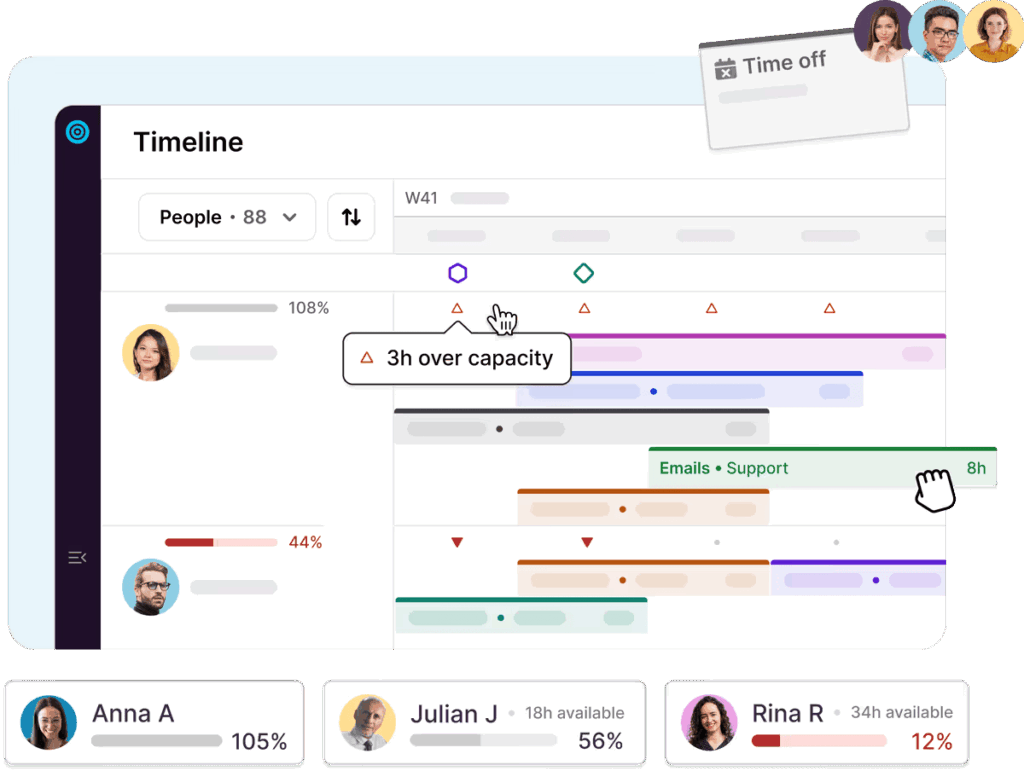
A project plan is a clear outline of what you need to do, who’s responsible, and when to complete certain project tasks. It brings structure to a project by breaking down goals into manageable steps, assigning timelines, and tracking progress.
A project plan is important because it gives your team clarity, direction, and accountability from start to finish. Without it, tasks can fall through the cracks, deadlines get missed, and confusion builds up.
Here’s why a project plan matters:
- It sets clear goals. Everyone on your team knows the baseline for success and what they’re working toward.
- It improves time management. With a timeline in place, it’s easier to prioritize and meet deadlines.
- It avoids scope creep. 39% of projects experience pushed boundaries, like extra revisions and added tasks. A project plan clearly defines what’s within and outside of scope.
- It allocates and utilizes resources. You can identify what you need early on to meet deadlines and complete deliverables, whether people, project management tools, or budget.
- It reduces miscommunication. You’ll define roles and responsibilities in your project team up front, so no one’s left guessing.
- It makes tracking progress easier. You can monitor what’s already complete, what’s delayed, and what you need to adjust.
What a project plan is not
Let’s get the misconceptions out of the way. A project plan is ….
- Not just a list of tasks. A project plan includes deadlines, responsibilities, and dependencies, and not just what needs to be done.
- Not a one-time document. Project plans go stale fast. An effective plan is a living guide you update as the project evolves.
- Not a vague goal. “Launch the website” is a goal, not a plan. The plan is the roadmap that gets you to your goal.
- Not only for large projects. Even small efforts need structure to run smoothly.
- Not a micromanagement tool. It supports collaboration and accountability, not control.
If it doesn’t explain what, who, when, and how, it’s not a project plan.
How to create a project plan, step by step
You won’t struggle to find resources, tools, and project plan templates promising to kickstart your planning efforts. But if you’ve never done this before, it’s best to follow a step-by-step approach, like the following.
Step 1: Define the goal and scope
Start by clearly stating what you want your project to achieve. Break it down into deliverables and define what’s in scope and what’s not. This keeps your team focused and prevents side quests from derailing the project.
Example:
- Goal: Redesign the marketing website to improve lead conversion by 20%
- In scope: Homepage, pricing page, lead capture forms
- Out of scope: Blog migration, backend system changes
Step 2: Break the work into tasks and key milestones
Next, turn your goal into actionable tasks. Group them by phase or category and attach milestones where needed.
Example task list:
- Discovery phase: Run user interviews, audit current site, gather analytics
- Design phase: Create wireframes, mockups, get stakeholder feedback
- Build phase: Develop frontend, integrate forms, run QA
- Launch phase: Deploy site, monitor performance, fix post-launch bugs
- Milestone example: “Mockups approved” or “Homepage deployed to staging”
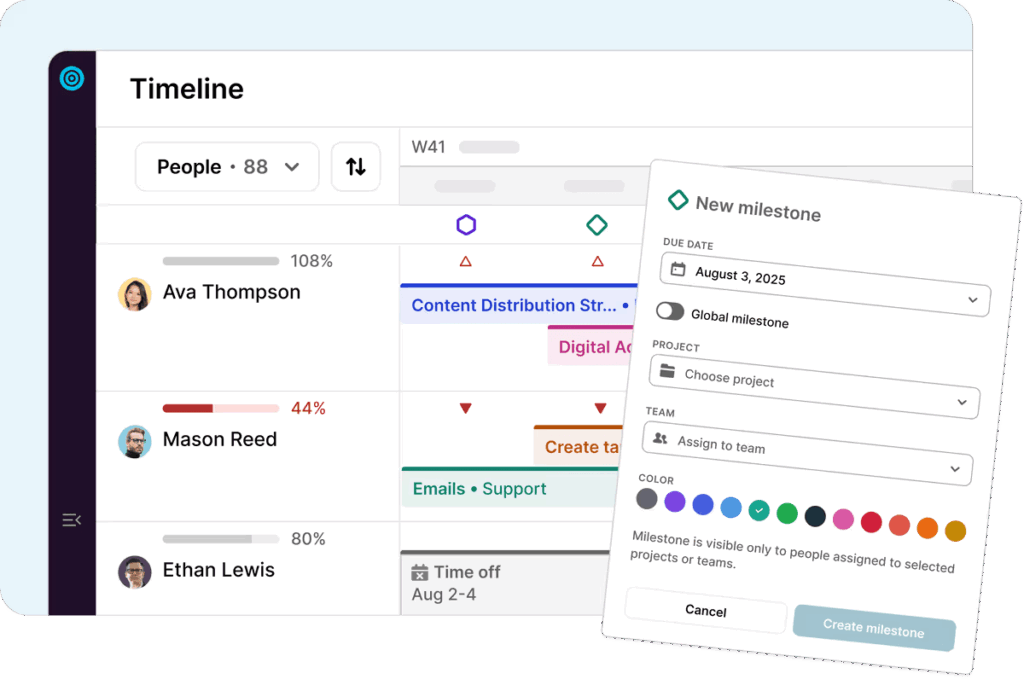
In Toggl, you can plot this visually using the Gantt-style timeline. You’ll see how tasks connect, where milestones fall, and how long each phase should take.
Step 3: Estimate time and project budget
Don’t just guess how long each task will take. Use past project data or input from your team to create time estimates. Then translate that into a project budget if you’re billing hourly or working on a fixed-fee contract.
Example:
- User interviews: 10 hours
- Mockups: 20 hours
- Development: 60 hours
- QA: 8 hours
- Budget: 98 hours x $100/hour = $9,800
Toggl offers the functionality to set the project budget and track time against it. Even better, it alerts you when you’re approaching limits, so you can catch overages before they happen.
Step 4: Assign responsibilities and check capacity
Assign each task to a team member, but also check if they have the time to complete it … aka one of the most overlooked parts of project planning.
Example:
- Alice (designer) is handling mockups and UI feedback
- Ben (developer) is building the frontend
- Carla (PM) is managing QA and launch
Before assigning tasks, check Toggl’s team workload view. If you notice Alice is already booked on another project, consider shifting deadlines or assigning part of the work to another designer. This helps you prevent burnout before it starts and streamline resource management.
Step 5: Track actual progress vs. the plan
Even the best project plan will go off track if you don’t measure progress. This is the “missing link” in most planning tools: they help you create the plan, but not adjust it when reality hits.
Example:
You estimated 20 hours for mockups. After tracking time, you see it took 28 hours due to additional revisions. Now you know the project is trending over budget and may need replanning.
Toggl makes this easy. It connects estimates, actual time, and budget tracking in one place, so you can respond quickly instead of flying blind.
Step 6: Keep stakeholders informed
Use the data you’re collecting to communicate clearly. Whether a quick project status update or a timeline adjustment, time tracking gives you the transparency stakeholders expect.
Example:
In your weekly status update, you report:
- “Discovery phase completed.”
- “Design phase 50% complete, four hours over original estimate due to feedback round.”
- “Budget remaining: $3,100 out of $9,800”
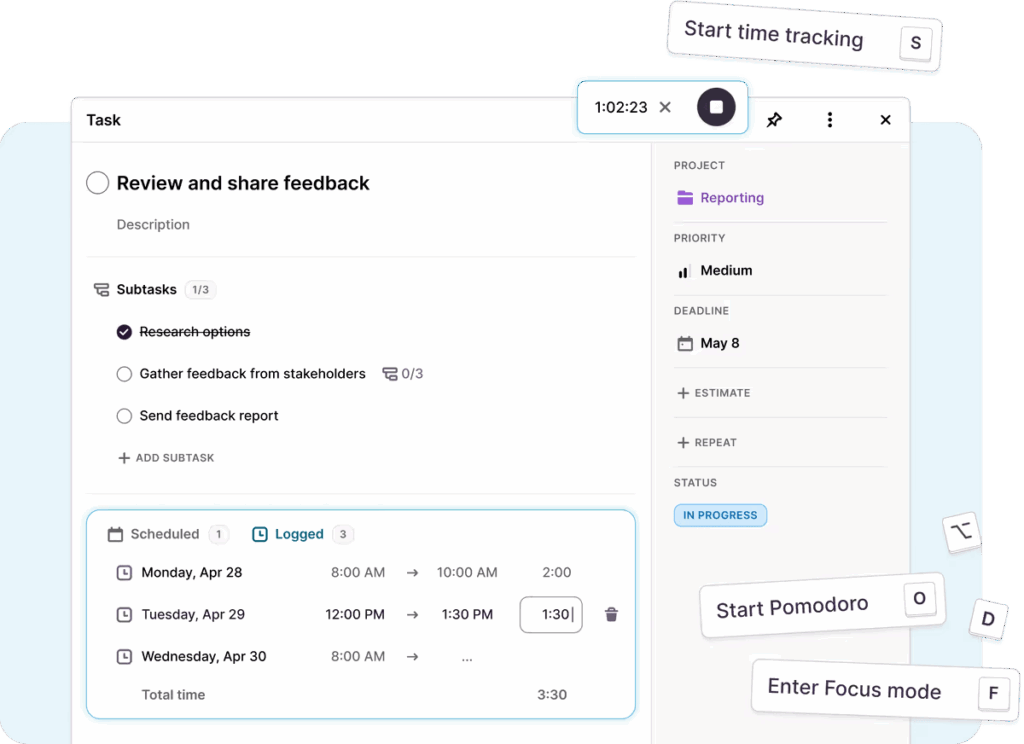
Because you’re tracking time and progress in Toggl, this update takes five minutes.
Popular project planning frameworks
You can build out each project plan from scratch with your unique requirements. But sometimes, it makes more sense to try a proven methodology that millions of people use daily to create an effective project plan. Consider these common frameworks.
Waterfall
Waterfall is a traditional, linear project planning method. You complete one phase at a time (requirements, design, implementation, testing, and delivery) before moving to the next. It’s highly structured and works well when the entire scope of the project is fixed from the start.
Best for: Projects with well-defined requirements, such as construction, manufacturing, or compliance-heavy work.
Not good for: Projects that may change mid-way or need flexibility in scope or timeline.
Agile
Agile breaks work into smaller chunks and delivers them in short, repeatable cycles called iterations or sprints. It focuses on flexibility, team collaboration, and regular feedback. Agile helps teams adjust quickly when priorities shift.
Best for: Software development, product design, and fast-paced environments.
Not good for: Projects where scope, budget, and timeline must stay fixed.
Scrum
Scrum is a structured Agile framework with defined roles (Product Owner, Scrum Master, Developers) and ceremonies like sprint planning and retrospectives. Work is organized in 1-4 week sprints with a focus on delivering a working product one increment at a time.
Best for: Cross-functional teams building complex products with evolving requirements.
Not good for: Small projects or teams without the capacity to hold frequent meetings or follow strict routines.
Kanban
Kanban is a visual system for managing workflows. Tasks are represented on cards and moved across columns (e.g., To Do, In Progress, Done) as they progress. There are no fixed-length sprints, making it a great fit for ongoing work or tasks that come in continuously.
Best for: Support teams, content creation, and operations with continuous delivery needs.
Not good for: Projects with strict deadlines, large scope, or complex dependencies.
Critical path method (CPM)
CPM focuses on identifying the longest chain of dependent tasks, known as the critical path. This helps project managers understand which tasks cannot be delayed without affecting the overall deadline.
Best for: Large projects with strict deadlines and many interdependent tasks, such as event planning or engineering.
Not good for: Flexible or creative projects where the order of tasks is more fluid in each phase of the project.
OKRs (Objectives and Key Results)
OKRs is a goal-setting method that helps teams align their work to company-wide objectives. While not a project plan on its own, the OKR model is useful alongside other frameworks to give purpose and direction.
Best for: Strategy-driven organizations and teams managing multiple initiatives.
Not good for: Tracking detailed task execution or managing day-to-day workflows.
5 Proven best practices for project planning
You’ve set your project budget, and you’ve chosen the framework that best matches your goals. But before creating your next project plan, the following tips and best practices will save you time and money.
1. Define and control project scope early
Scope creep happens when you agree on project elements like deliverables, project goals, and end dates. But the situation starts to look a bit different once the work begins. All of a sudden, a three-week project turns into a three-month ordeal.
There are a few ways to avoid this pitfall.
- Track your time diligently to determine exactly how much time it takes to complete certain tasks and hit project milestones. This helps you create more accurate forecasts.
- Write a clear scope statement and review it with your team and stakeholders before kickoff. Align with everyone on the project objectives, due dates, task dependencies, and other crucial details.
- Be specific. List what’s included in the project timeline and just as importantly, what isn’t.
2. Engage stakeholders from day one
If you’re responsible for project success, you’ll need a team around you to bring your plans to life. And you’ll need to bring them into the loop early. Imagine building a website but forgetting to tell the developer at the start date that they need to build 50 pages instead of the seven they knew about. Dodge this bullet by:
- Involving key stakeholders from day one. Identify who they are and map out their level of influence and interest. The higher their importance, the higher the involvement.
- Holding meetings early. Align on project goals, success criteria, and any red flags upfront.
- Setting expectations for them. Define how and when they’ll receive updates or provide feedback
3. Create realistic timelines for your project management plan
If you know how long a successful project takes, you’ll be able to create an excellent project schedule. Creating a realistic timeline for the project lifecycle is quite simple when you:
- Track your time, all the time. Understanding how long a task or process takes helps you better understand your team and how they work. Tools like Toggl allow all project stakeholders to track time (in real time) without ruining their flow of work.
- Involve the team doing the work in the estimating and project planning process. You may know the exact project tasks to include, but only a designer knows the time and complexity involved in an individual design task.
- Add buffers. Build in some breathing room for unexpected issues or review rounds. If you complete ahead of time, you have space for more uncertainties, and you look good in front of the client. If things don’t go according to plan, you’ll still be fine.
4. Identify your task dependencies early
You can’t build a house without solid foundations. The more complex the project, the easier it becomes to lose track of dependencies in each planning phase. A single mistake could mean the entire project suffers.
- Map out dependencies between tasks when building your timeline. You can use project management software for this, or a simple idea board. The more you practice, the easier it becomes to learn dependencies and plan for them.
- Use visual tools. Even if you don’t have a dedicated project planning tool, you can use visualizations such as Gantt charts or Work Breakdown Structures (WBS) to map out dependencies and understand project progress. You’ll even find them in tools like Microsoft Excel.
- Anticipate blockers. Identify where delays are most likely to happen and have a plan B to continue with project execution.
5. Set up strong communication strategies
Sometimes, you can do everything right and still miss deadlines and go out of scope. The reason is simple: you haven’t communicated the right things to the right people. Clear, consistent updates avoid misunderstandings and keep everyone aligned.
Here’s how to do that.
- Define how updates will be shared and how often. For example, weekly stand-ups, progress reports, and notes in your task management app.
- Centralize your information. Use a shared workspace or project dashboard so nothing gets lost in email threads. You can use a simple project management app to get started.
- Keep it role-specific. Send only the most important status reports to executives, while giving actionable task info (e.g. around workloads) to team members.
Your completed project plan is closer than you think
With the right set of templates, tools, and best practices, even first-time project managers and leaders can create a detailed, accurate, and valuable project plan.
Tools like Toggl are there to connect the dots and take you seamlessly from planning to execution. With Toggl, a plan is not just a completed document. It’s a living, breathing structure that helps you track time and capacity against goals to adapt in real-time.
Frequently asked questions (FAQs) about project planning
What is a project plan?
A project plan is a working document that explains what you’re trying to achieve, how you’ll do it, who’s responsible for what, and when the work needs to be completed. It acts as a shared reference point so everyone involved understands the goal, the scope, and the path forward.
What should be included in a project plan?
A solid project plan includes the project goal, scope, key tasks, timeline, milestones, assigned roles, required resources, risks, and how progress will be communicated. If it doesn’t help someone understand what needs to happen next, it probably doesn’t belong in the plan.
How do you create a project plan step by step?
Start by defining the goal and success criteria. Break the work into tasks, estimate timelines, and assign ownership. Identify dependencies, risks, and milestones, then document how progress will be tracked and communicated. Keep it practical and adjust as the project evolves.
Are there project plan templates or examples?
Yes. Most project plans follow the same basic structure and can be created using simple documents, spreadsheets, or project management tools. Templates are useful starting points, but the best plan is one tailored to your team, timeline, and complexity level.
What’s the difference between a project plan and other project documents?
A project plan explains how the work will be done, while documents like a project charter define why the project exists and the scope outlines what is and isn’t included. The project plan pulls everything together into an actionable roadmap.

Elizabeth is an experienced entrepreneur, writer, and content marketer. She has nine years of experience helping grow businesses, including two of her own, and shares Toggl's mission of challenging traditional beliefs about what building a successful business looks like.

![How To Calculate ROI For A Project [Steps, Formula, Example]](https://toggl.com/blog/wp-content/uploads/2024/04/calculate-project-roi-673x404.jpg)