No project manager wants to hear that “we all have the same 24 hours in a day.” Or that “your budget will stretch if you’re creative enough.” Resources are finite and maximizing their value is a seriously tough game.
Between shifting stakeholder demands, unpredictable budgets, and the ever-present risk of team burnout, you might even say that managing resources is like trying to solve a puzzle while the pieces keep moving.
Honestly, there’s no magic formula to erase that uncertainty. But a clear resource planning process gives you a clear structure to build from.
This guide covers everything you need to know about resource planning — from what it is, to the step-by-step process for creating your own plan, to the tools and best practices that keep it working in the real world.
TL;DR – The highlights on resource planning
- Resource planning is the process of identifying and allocating the resources needed to complete a project or task.
- Resources can include people, equipment, facilities, and finances.
- Effective resource planning leads to significant benefits, including improved project outcomes, increased efficiency, and better budget management.
- A resource plan is a key output of the resource planning process, and it should include details like resource requirements, timelines, and costs.
- A resource planning process gives you a comprehensive resource plan you can put into action across your entire project lifecycle.
What is resource planning?
Resource planning is the process of identifying, scheduling, and allocating the resources you need to complete a project or task. More than that, it’s about putting the right resources, in the right place, at the right time.
Resources come in many forms, including:
- Human resources: The most common type of resource, including your internal team members and any external contractors or consultants.
- Equipment: Anything from laptops and software to heavy machinery and specialized tools.
- Facilities: The physical space required to complete your project, such as office space, meeting rooms, or a manufacturing plant.
- Financial resources: Your available project budget, including salaries, equipment costs, and any other expenses.
In real life? Here are several examples of resource planning in action.
Project management resource planning
A software development team is planning to launch a new app. The PM works to identify the required number of developers, designers, and other key team members, and the specific skills and experience needed for each role.
Manufacturing resource planning
A car manufacturer is planning to launch a new model. They need the necessary raw materials, equipment, and assembly line workers to produce the new car.
Financial audit resource planning
An accounting firm is planning to conduct an audit of a large corporation. They assemble a team of auditors with the right mix of skills and experience to complete the audit on time and within budget.
Higher education resource planning
A university is launching a new program. They identify the number of professors, teaching assistants, and technical support staff they need, along with materials such as textbooks and stationery, and facilities such as lecture halls.
Construction resource planning
A construction company is planning to build a new office block. They calculate the necessary equipment, materials, and skilled labor to complete the project on time and within budget.
The benefits of resource planning
Resource planning is an essential skill for every successful organization, regardless of size, sector, or industry. Don’t believe us? PMI studies indicate that resource constraints are the second biggest obstacle to project and product team success, so it pays to upskill your team in resource planning.
Do that well, and there are many great benefits on offer, including:
- Increased efficiency: Resource planning enables you to make the most of your available resources, leading to increased productivity and lower costs.
- Better budget management: Forecasting your resource needs with precision gives you a more realistic budget, so you can avoid any nasty surprises down the line.
- Enhanced stakeholder satisfaction: Well-planned projects executed with the right resources means stakeholders are more likely to be satisfied with the outcome.
- Improved team morale: Team members with clear roles and responsibilities, who aren’t overworked or underutilized are likelier to be engaged and motivated.
- Improved project outcomes: The right resources increase your chances of completing your projects on time, on budget, and to the required quality standards.
…. and what happens if you skip resource planning
Of course, the opposite is also true. Here are four of the biggest downsides you might experience if you skip proper resource planning:
- Project delays: Without a clear plan, it’s easy for projects to fall behind schedule, which can have a knock-on effect on your entire project plan and any dependent initiatives.
- Budget overruns: Poor resource planning leads to unexpected costs, such as having to hire additional staff or pay for overtime.
- Reduced quality: When you’re rushing to complete a project or missing the right people, the quality of your work is likely to suffer.
- Decreased team morale: When team members are constantly firefighting or they don’t have the resources they need to do their jobs effectively, it can lead to frustration and burnout.
The importance of a resource plan
The output of the resource planning process is a resource plan (no surprises there!) This is a formal document outlining all the resources required to complete a task or project, and how exactly you expect to acquire and manage those resources — also known as the tricky bit!
Here are some of the key components every resource plan should contain:
- Resource requirements: A detailed breakdown of every single resource you require. Think paper clips, laptop chargers, meal vouchers for anyone working late, etc. Absolutely everything in granular detail.
- Timelines: A clear timeline for when each resource will be required and for how long. Spoiler: “all at once and immediately” is not a timeline.
- Costs: A cost breakdown for each resource and a total cost. Based on research, not your closest guess-timate.
- Roles and responsibilities: A clear definition of what you expect from each team member, so you can avoid any instances of “well no one said it was my job.”
- Assumptions and constraints: The guardrails and guesses you’re making upfront. Call them out now so they don’t bite you later.
- Risk management plan: Your “what if” playbook for when things go sideways — because they will.
- Action plan: The steps you’ll take to assign (or reassign) resources when reality doesn’t match the first draft.
Why bother writing it all down? A couple of good reasons — one, it gives stakeholders confidence you’ve got a handle on things. And two, it keeps your team members aligned on what’s expected … and what’s realistic.
Go deeper and learn more about resource plans in our ‘How To Create A Resource Plan’ guide. As a juicy bonus, it also includes some free resource planning templates.
Putting resource planning into action: 5 steps to get started
Now we all know the basics about the importance of resource planning (hint: very important!) — it’s time to start putting theory into practice. Like many things in business, the best results come when you follow a consistent framework.
Let’s walk through the steps of resource planning, using a case study from a fictional company called MarketingHeroes to bring it to life.
#1 – Assess your current resourcing situation
Before you can start planning for the future, you need to get to grips with your current reality — warning: this might not be entirely comfortable. This means taking a close look at your current resource profile, including people, materials, facilities, and budget, and the current roadmap of work or projects.
Action to take: Make sure you have a clear view of your current resource profile. For people, this includes a view of their strengths, weaknesses, skills, and experience.
Best practice: Partner with your key stakeholders to fully understand your business environment. After all, how can you expect to plan or allocate resources correctly if you don’t know what’s in your business strategy, pipeline, and roadmap?
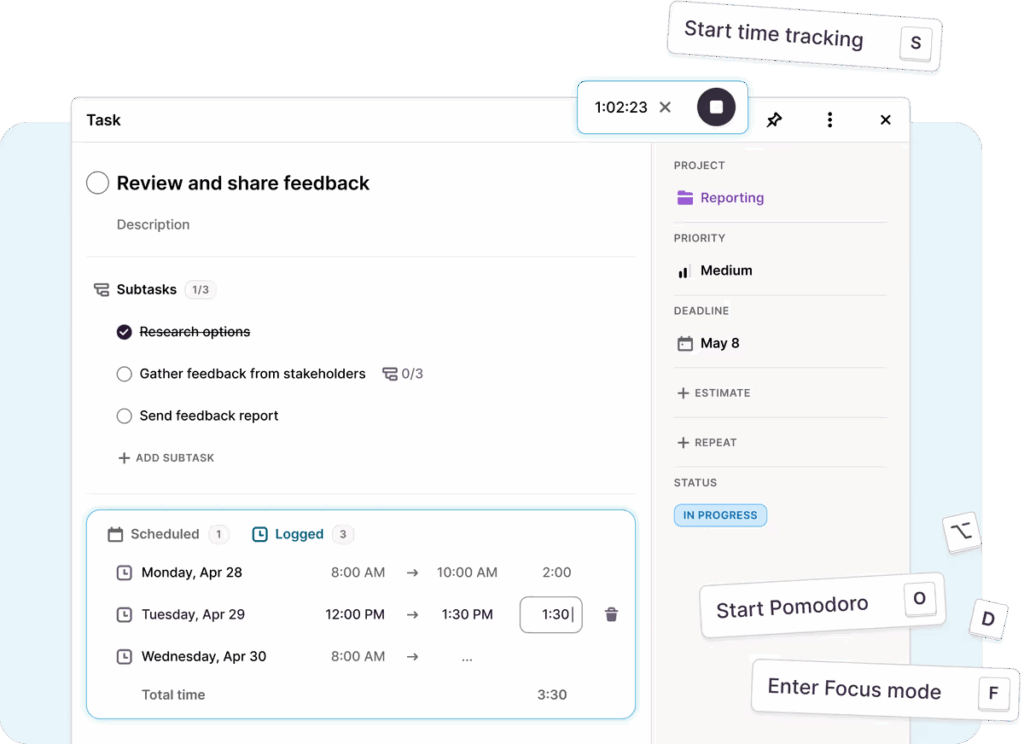
Pitfall to avoid: You’ll probably find gaps straight away, but don’t get bogged down by the negatives. Understand where you have superstar project team members, surplus materials, or spare budget that you can draw upon later on.
Case study: MarketingHeroes has just won a new website build client. To prepare, they complete an assessment of their current team, creating a clear view of team capacity and who’s working on what with existing clients.
#2 – Understand your future resource needs
Once you understand the current situation, plan for the future by working with stakeholders to identify upcoming resource needs and getting more detail by asking key questions, such as:
- What specific skills and experience do we need?
- What is the required seniority level for each role?
- What materials or equipment do we need?
- Do we have the physical space to take on more work?
- What is the desired quality level for the final deliverable?
Action to take: Create a list of all the resources you require, including people, equipment, and facilities. At first, this might be high-level, but you can build in more detail as you progress.
Best practice: As your resource planning matures, estimate how long your people will work on specific tasks. Always include a buffer in your estimates, so you don’t get stuck if things overrun.
Pitfall to avoid: Don’t just focus on the immediate needs. It’s also important to think about your long-term resource requirements to set yourself up for success. For example, keep future projects in mind as you craft your long-term roadmap.
Case study: For the new website build, MarketingHeroes spends time identifying the project needs. They expect to need a project manager for 12 weeks, two software developers for eight weeks, a graphic designer for six weeks, and a copywriter for four weeks.
#3 – Complete a gap analysis to identify the right resources
Once you understand the balance of what you have vs what you need, complete a gap analysis to see where the two line up and where they don’t. Be specific during this exercise, matching the correct quality and specification of resources rather than trying to fit square pegs in round holes.
Action to take: Create a shortlist of potential resources that could meet the demand. Include internal (things you already have) and external (things you need to buy in) strategies when completing your gap analysis.
Best practice: Look for people with the skills, experience, and cultural fit for your project or company. While specific people might look great on paper, if they don’t gel into the new team, you’ll find yourself back at square one.
Pitfall to avoid: When resourcing gets panicked, people default to the quickest or cheapest option. This might seem like a smart move in the short term, but it can cause quality issues down the line, leaving you in a worse position than when you started.
Case study: MarketingHeroes starts to create a team for their upcoming project. They identify a project manager and a copywriter in-house with the right skills and experience. They also have access to a graphic designer with the perfect expertise, although they have planned leave coming up. But they’re struggling to find any developers with resource availability.
#4 – Take action to (re)assign resources
With the gap analysis complete, take action and assign the resources to the work or project. Depending on your analysis, this may involve a range of activities, such as
- Reallocating resources from existing projects if this work is a higher priority
- Buying new resources, such as purchasing new equipment or software
- Recruiting temporary or permanent staff
- Re-juggling resources using resource leveling and smoothing techniques
In many resource planning scenarios, you’ll likely make some tough decisions on which resources to reallocate, juggling impacts to other work or projects as a result.
Action to take: Create a formal resource plan outlining who’s working on which piece of the puzzle, along with who’s responsible for what, and when. This gives a visual representation of your actions, making it easier to communicate and make decisions.
Best practice: When making tough priority calls, it’s important to make the decision-making as objective as possible. In many organizations, this will be based on time criticality and business value, moving resources to work that has hard deadlines or delivers the greatest benefits.
Pitfall to avoid: You can’t keep everyone happy with your resource plan. It’s important to get buy-in from all stakeholders for a smooth and successful reallocation, requiring skills such as communication, influence, and stakeholder management.
Case study: MarketingHeroes take several actions to resource the new project. They assign the in-house project manager and copywriter to the new project straight away, while beginning recruitment for two developers. They have also find a freelance graphic designer with the right skill sets who they plan to bring in for a short period until the other designer returns from leave.
#5 – Forecast, monitor, and adjust
Resource planning isn’t a one-time activity. It’s an ongoing process that requires you to constantly track, monitor, and adjust your plans as old work ends and new work starts.
This is where long-term stakeholder relationships are super valuable, allowing you to plan your roadmap three, six, or even nine months in advance. As you assign resources, keep an eye on their capacity and manage their allocation accordingly.
A great way to do this is by using planning and time tracking tools like Toggl 2.0. Here you can plan projects in advance, detailing the resources you need, throughout the year, before tracking your team’s time as they work through different tasks.
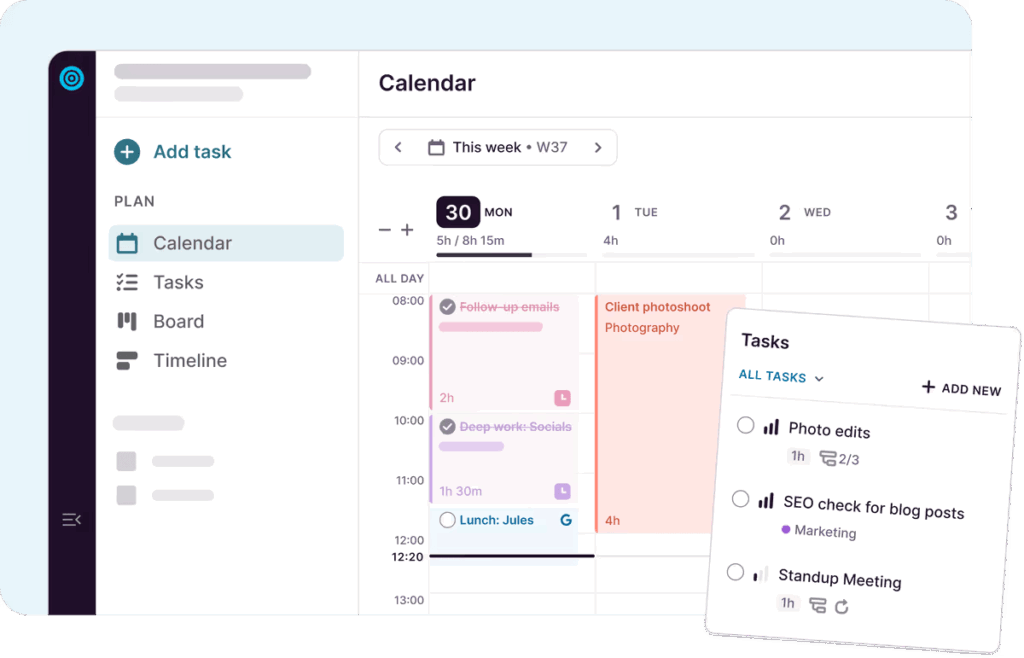
This gives you a clear picture of how your resources are being allocated, giving you the insight you need to make adjustments and maximize your efficiency.
Case study:MarketingHeroes uses Toggl 2.0 to track project goals, key milestones, and get insights into the time spent on the new website build project. After four weeks, they notice the project manager seems to have around two days a week spare for other work, so they utilize their capacity to cover another PM’s annual leave.
The top 3 tools to master resource planning
Like all things in business, software tools make resource planning and management easier. In fact, a recent study found that 77% of high-performing projects use project management software, which often includes resource planning features.
There are many tools on the market, but before you jump in, it’s important to look for specific features such as:
- Visual resource dashboards: These allow you to visualize your resource requirements to see at a glance who is working on what and how their capacity planning is looking.
- Time and cost tracking: This allows you to compare your actual costs with your forecasts, helping you stay within budget and make adjustments as needed.
- Integration with project management tools: This avoids the need to re-key data and ensures that all your project information is in one place.
- Reports for updating stakeholders on progress: These help to keep everyone informed on your resource plans, as well as track other metrics such as resource costs, profitability, and other project success KPIs.
- Automatic workflows (such as alerts and notifications): These help to streamline and automate the resource planning process and ensure that nothing falls through the cracks.
Now that you know what to look for, here’s our pick of three great resource planning tools on the market:
1. Toggl 2.0
Toggl 2.0 is an easy-to-use and beautifully designed visual resource management tool that’s perfect for managing your team’s capacity and availability to allocate the right resources to the right projects.
What we like
- Toggl 2.0’s Workload view enables you to balance allocations to get a clear picture of team bandwidth in real time. This helps you avoid overbooking or by redistributing tasks when someone’s capacity is maxed out.
- Accurate and automatic time tracking for resource accuracy captures how long tasks actually take across your team. Teams use the data to adjust future allocations and create more accurate plans and project cost forecasts.
- Utilization and time reports break down how you use resources across projects or clients, so you can spot underused team members or inefficiencies in how time is being spent.
What’s missing
- Toggl 2.0 is brand new, so the only thing missing is customer reviews to guide your switch.
Best for
- Toggl 2.0 is best for teams and knowledge-based agencies prioritizing visual planning and wanting a simple resource management solution.
Top features
- Drag-and-drop planning: Easily move tasks and adjust schedules with a simple drag-and-drop function.
- Visual overviews: Color-coded tasks, team timelines, and overview panels clearly show everyone’s schedule and capacity.
- Flexible workload management: Adjust tasks based on team workload to ensure no one is overloaded. The project timeline shows a team member’s daily workload and the availability overview panel shows the cumulative workload between any two dates.
- Collaboration: Tag team members, add comments, and share plans to turbocharge project progress.
- Scheduling conflict alerts: Stay ahead of overlapping tasks and time off. Prevent double bookings and avoid schedule mishaps.
Pricing
Starts at $9/user/month. There’s also a Free Forever plan for up to 3 users.
2. ResourceGuru
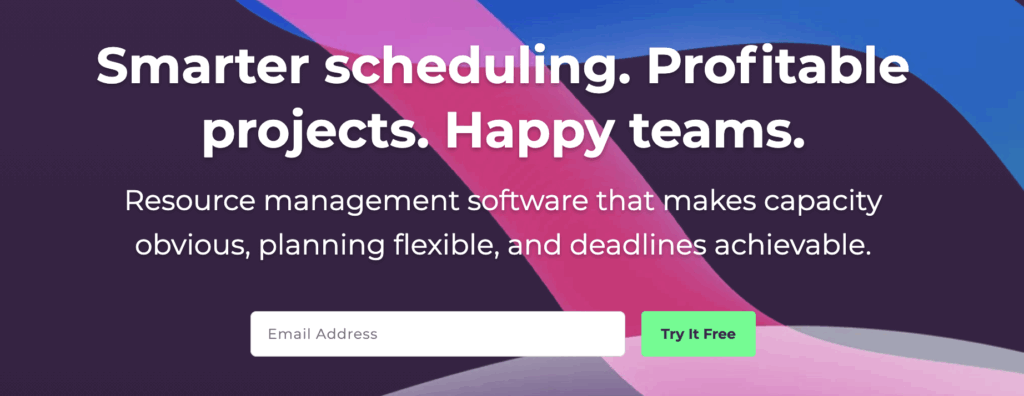
ResourceGuru is a dedicated project resource management tool that helps you efficiently schedule teams and non-people resources such as equipment and spaces. It provides a clear view of resource allocation to optimize project resources more accurately.
What we like
- ResourceGuru has an intuitive drag-and-drop scheduler helping you easily create a resource management plan and assign resources efficiently.
What’s missing
- The platform has limited integration capabilities with other popular project management tools.
Best for
- ResourceGuru is best for teams of all sizes who want a focused solution for resource scheduling and availability tracking.
Top features
- Clash management: ResourceGuru detects scheduling conflicts to prevent double bookings, over-allocations, excessive resource usage.
- Leave management: Track team absences and adjust project schedules accordingly.
- Customizable fields: Personalize data by adding specific details to find the right resources.
- Utilization reports: Get a clear picture of how you use resources and plan strategically.
- Availability bars: At a glance, see who’s available and who’s not. That way, you easily assign tasks to available team members.
Pricing
ResourceGuru has three tiers ranging from $4.16 to $10 per user/mo, with basic features for resourcing all the way up to advanced approval flows and custom fields.
3. Float
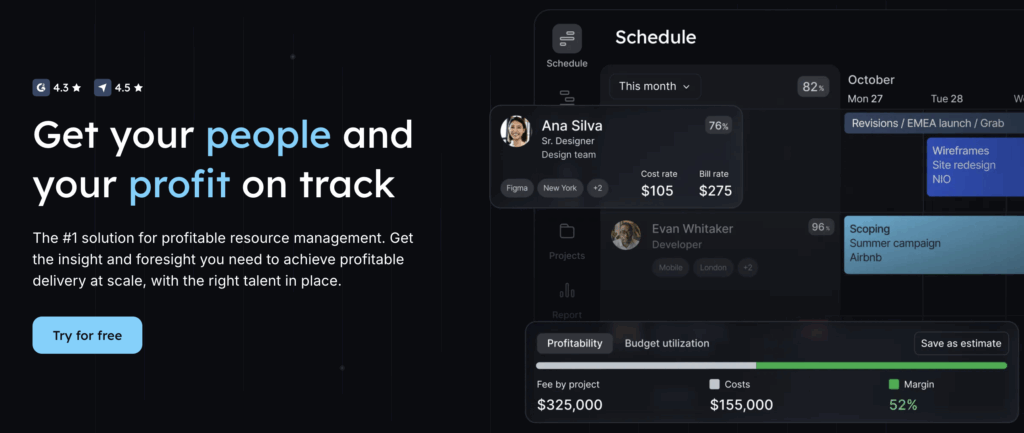
Float is a resource scheduling and resource capacity tool that helps you track projects, time, and people. With Float, you can easily visualize and manage project resources to solve bottlenecks and avoid burnout.
What we like
- Float provides an overview of the projects and each team member’s capacity via its advanced reporting and dashboards, making it easy to get the insights needed to make big decisions.
What’s missing
- Float isn’t quite as customizable as other providers, making it harder to fit into complex workflows.
Best for
- Float targets companies completing billable client-based work, such as consultancies and agencies.
Top features
- Capacity management: Float helps manage team workloads to ensure no one is overloaded or underutilized.
- Project budgeting: Align tasks with project budget allocations so your projects remain financially on track.
- Time off tracking: Easily account for leave or holidays and schedule specific tasks around non-working days.
- Multiple views: Switch between project, team, or calendar views, perfect for large portfolio management teams.
- Integration capability: Float can sync with popular tools like Slack or Google Calendar.
Pricing
Float has a Starter tier (priced at $7 per user/mo) and a Pro tier (priced at £12 per user/mo) with an Enterprise level solution on a quote-only basis for large companies.
If you’re ready to ditch the Excel spreadsheets and invest in a resource planning tool, have a read of our 11 Best Resource Management Software Tools guide for all the best options!
Get started with resource planning
Resource planning is the process of identifying, scheduling, and allocating all the resources required to complete a project or task. By taking a strategic approach to resource planning, you can improve your project outcomes, reduce staffing shortages, and better manage your budgets.
One of the biggest pitfalls of resource planning is not having a clear plan in place. However, this can be easily avoided by using a resource planning software tool — and we’ve got some exciting news…
Toggl 2.0, our new all-in-one planning and time management tool, is launching soon, and we’re very excited. It gives you an accurate, real-time view of your resources, empowering you to make informed decisions that keep your projects on track and your stakeholders happy.
Click here to learn more and sign up for free.
Frequently asked questions (FAQs) about resource planning
What is resource planning?
Resource planning is the process of identifying, scheduling, and allocating people, time, budget, and tools to ensure work is completed efficiently. Its goal is to match available resources with project demands so nothing is overused or left idle.
Why is resource planning important?
Resource planning helps teams avoid burnout, missed deadlines, and budget overruns. It ensures workloads are balanced, priorities are clear, and projects can move forward without last-minute scrambling or delays.
What are the key components of effective resource planning?
Effective resource planning includes understanding project requirements, assessing resource availability and capacity, assigning resources to tasks, setting timelines, monitoring usage, and adjusting plans as conditions change.
How do you create a resource plan?
To create a resource plan, list the resources needed, check availability and skill levels, assign resources to tasks and timelines, account for risks or constraints, and review the plan regularly as the project progresses.
What are common resource planning challenges and how can they be solved?
Common challenges include limited visibility, overallocated team members, shifting priorities, and inaccurate estimates. These issues can be reduced by forecasting early, updating plans often, and maintaining clear communication across teams.

Elizabeth is an experienced entrepreneur, writer, and content marketer. She has nine years of experience helping grow businesses, including two of her own, and shares Toggl's mission of challenging traditional beliefs about what building a successful business looks like.