TimeCamp and Clockify are two popular time tracking solutions with freelancers and small teams.
TimeCamp gives you more room to grow before the bill starts biting. Its free plan supports unlimited projects, while lower tiers cover useful team basics like attendance, time off, invoicing, budgeting, and geofencing. Move up to Enterprise, and TimeCamp starts looking less like a simple timer and more like a deployment, analytics, and workforce visibility package.
Clockify takes a different route. It gives teams more control earlier, especially if the goal is cleaner admin over timesheets. Basic through Pro plans add kiosk tracking, visual project scheduling, activity monitoring, expense management, and budget forecasting.
If you’re trying to decide between TimeCamp and Clockify, consider your goals:
- TimeCamp is stronger when you want automation and financial insights.
- Clockify is stronger when you want clean timesheets and enforceable time tracking policies.
The rest of this guide explores these differences in more detail.
TimeCamp vs Clockify: at a glance comparison
| TimeCamp | Clockify | |
| Free plan users | Unlimited | 5 max |
| Starting price | From $3.99/mo per seat | From $3.99/mo per seat |
| Free trial | 14-days | 7-days |
| Supported platforms | Web via browser extension Desktop Mobile (Android and iOS) | Web via browser extension Desktop Mobile (Android and iOS) |
| Time tracking features | Manual, automatic, calendar-based, and offline time entries Kiosk-based time tracking software on the Enterprise plan Idle time detection and tracking reminders Keyword-based automatic tracking | Manual, automatic, calendar-based, and offline time entries Kiosk-based time tracking on Standard plan and higher Idle time detection and tracking reminders Force timer for persistent background tracking |
| Activity tracking features | Desktop screenshots App and URL tracking Window title tracking Remote work detection | Desktop screenshots App and URL tracking |
| GPS tracking | ✅Yes with geofencing | ✅Yes, without geofencing |
| Timesheets approvals | From Ultimate plan | From Basic plan |
| Project planning and budgeting | Project budgets and estimates Budget and expense reports Revenue tracking, cost tracking, and margin reporting | Project budgets with estimates Recurring budgets Expense tracking Task scheduling on a timeline |
| Invoicing | From Starter plan | From Standard plan |
| GDPR compliance | ✅Yes | ✅Yes |
| Total number of integrations | 80+ | 100+ |
| Customer support channels | Email and live chat | 24/7 support via email, phone, and chat |
| Best for | Teams that need advanced location tracking, proactive attendance management, revenue and profitability reporting. | Teams that want tight timesheet entries, visual workload scheduling, and more control over data residency. |
Clockify vs Timecamp: Core functionality comparison
Clockify and Timecamp share a lot of similar features. Many are locked at different tiers; each app also brings a few “extras” missing from the other.
TimeCamp helps teams turn everyday work activity into a clearer view of client profitability, budget burn, attendance patterns, and field-team movement.
Clockify is better for teams that want time tracking to stay simple, but enforceable. It offers more admin controls for timesheets to reduce messy admin before billing or payroll starts getting creative.
Time tracking
TimeCamp is the stronger choice for teams that prefer automatic time tracking. Teams with complex client work or location-based operations will find keyword-based tracking, geofencing, and remote work detection features rather useful.
Clockify is the better fit for teams that want flexible time entry, but tighter timesheet controls. Required fields, Force timer, split-time entries, low-cost kiosk tracking, and a simpler interface help teams get usable time data without spending weeks tuning the system.
TimeCamp and Clockify cover the basics with:
- Browser and in-app-based timers
- Manual time entry
- Automated time tracking across web, desktop, and mobile
- Idle time detection and tracking reminders
You can connect time entries to projects, tasks, clients, and billable rates, and edit time and activity entries before submitting for approval.
Where the tools part ways is automation depth.
TimeCamp’s approach to automated time tracking
TimeCamp’s keyword-based tracking is the more distinctive approach — teams define keywords tied to projects or tasks, and the desktop app triggers tracking automatically when it detects those words in documents or open applications. The app also switches tasks when a new keyword appears and stops tracking entirely if no keyword is detected.
This feature is super handy for document-heavy teams that juggle different client files, project materials, and named documents all day.
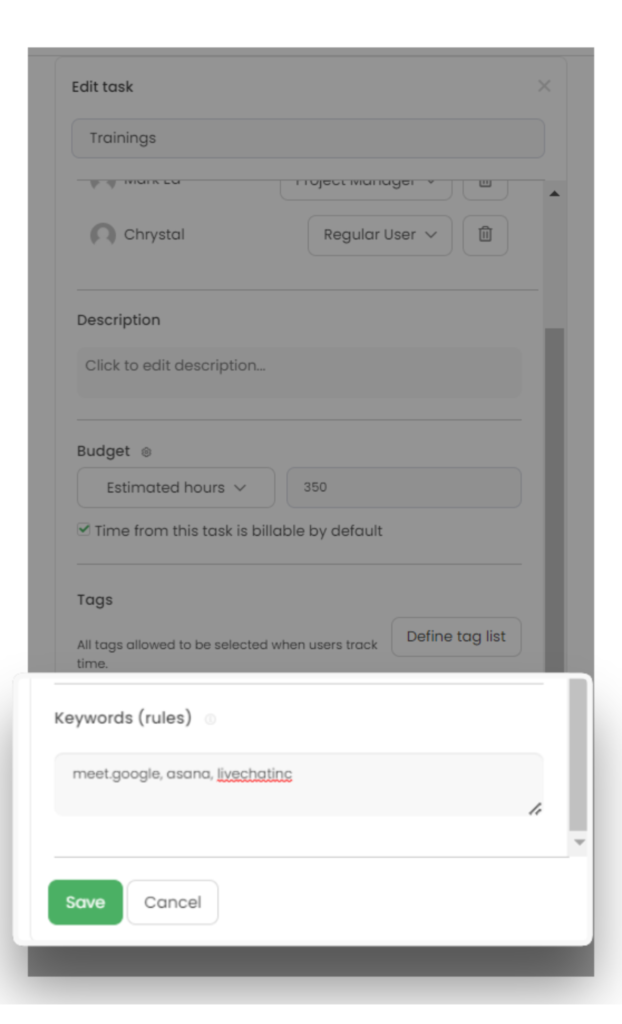
Keyword-based tracking controls on TimeCamp.
Clockify’s approach to automated time tracking
Clockify’s automation focuses more on what’s open in your browser. It shows which apps and URLs you used during the workday and for how long.
Timesheets
Both time tracking solutions convert logged work hours into crisp timesheets for review, editing, approval, billing, payroll, or reporting. Clockify handles timesheet management better, while TimeCamp links time entries directly to revenue and operating costs.
Clockify’s approach to timesheets
On Clockify, employees can add entries by day, week, project, client, or task, and edit these accordingly before submission. Admins then review the data before it moves into reporting or invoicing.
Handy timesheet management controls include:
- Required fields, preventing users from submitting incomplete or vague entries
- Force timer, which disables manual entries and requires active timer tracking
- Split-time entries, so long tracked blocks can be broken into cleaner segments
- Kiosk tracking is useful for shared devices, shift workers, or central clock-in setups
TimeCamp’s approach to timesheets
TimeCamp also supports timesheets, approvals, attendance, time-off, and overtime management. But its timesheet layer connects more closely to billing, budgets, and profitability reporting, especially on higher tiers.
The catch is access: timesheet approvals sit on TimeCamp’s Ultimate plan ($9.99/user/mo) versus the Basic $3.99 plan on Clockify. But TimeCamp does a better job at using billable hours to estimate revenue, monitor project budgets, and enforce more cost controls. It gives a sharper view into billable vs unbillable work percentages and total invoiced time per client or project, among other metrics.
Activity monitoring
Both TimeCamp and Clockify include employee monitoring features on paid plans, including screenshots and activity tracking.
TimeCamp’s approach to activity monitoring
TimeCamp’s activity tracking is broader than Clockify, because it includes window title tracking and geofencing. The following features in TimeCamp give managers context:
- Desktop screenshots
- App and URL tracking
- Window title tracking
- GPS location tracking
- Geofencing for location-based automation
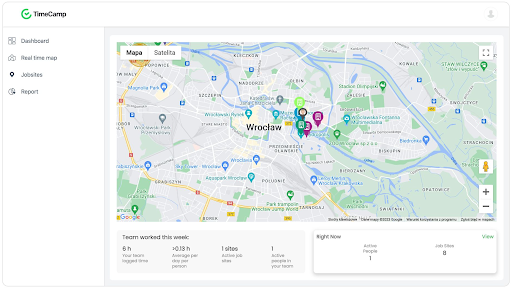
Geofencing view on TimeCamp.
Clockify’s approach to activity monitoring
Clockify’s monitoring features are simple and easier to understand than TimeCamp’s. The platform offers:
- Desktop screenshots
- App and URL tracking
- GPS tracking from Pro and higher
- Activity visibility through apps, websites, and time entries
Note that screenshots become available at a lower paid tier (Pro, $7.99) than TimeCamp’s equivalent screenshot access (Ultimate, $9.99).
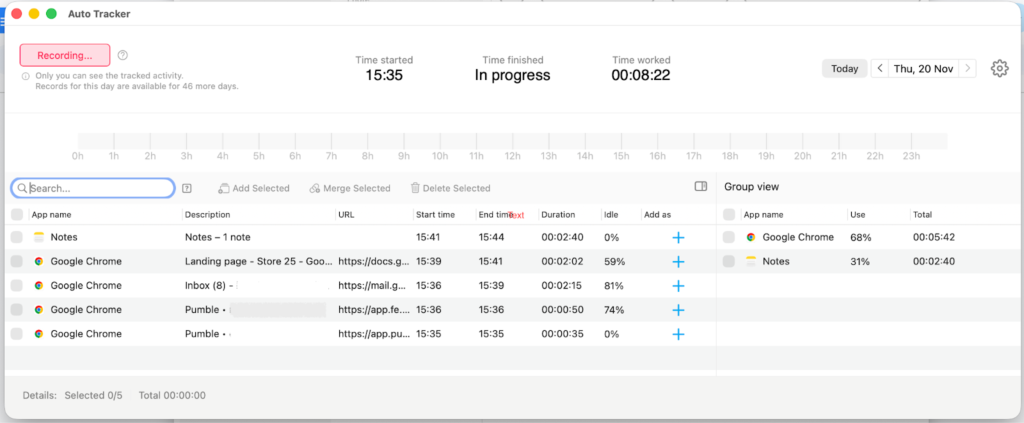
Sample activity monitoring view on Clockify.
GPS location tracking and geofencing
Both time tracking apps support GPS tracking on mobile, which is helpful if you manage field employees, distributed crews, or client-site work.
TimeCamp’s approach to GPS and location tracking
TimeCamp has a stronger location-tracking setup than Clockify. GPS tracking is available across its subscription plans, along with geofencing. Managers can define a work location, then have the app notify employees or automatically start tracking when they enter that area.
TimeCamp also includes remote work detection. It uses office IP addresses to classify whether someone is logging time from the office or remotely, which can help hybrid teams separate location context without asking employees to label every entry manually.
Clockify’s approach to GPS and location tracking
Clockify supports GPS tracking, too, but with two limits:
- GPS tracking starts from the Pro plan and higher
- Geofencing isn’t currently available
Most office-based knowledge teams won’t miss this functionality. But for field teams, geofencing can reduce missed entries and time-sucking manual admin.
Project planning features
Neither TimeCamp nor Clockify qualifies as a specialized project management tool. But both have some controls for project planning and budgeting.
TimeCamp better links project progress to revenue so teams can see whether the work actually made commercial sense after the hours are logged.
Clockify is stronger when the priority is delivery coordination. Its project timeline, recurring budgets, and task scheduling make it easier to plan workloads before the calendar starts looking haunted.
Project budgets and estimates
Both tools let you set project budgets and compare tracked time against those limits. So you know if you’re burning through the allocated cash faster than expected.
On Clockify, you can set estimates in time or money, then track progress as work gets logged. For fixed-fee projects, that helps teams see how much budget you’ve used and how much room remains. Your team can also do expense tracking in the same view.
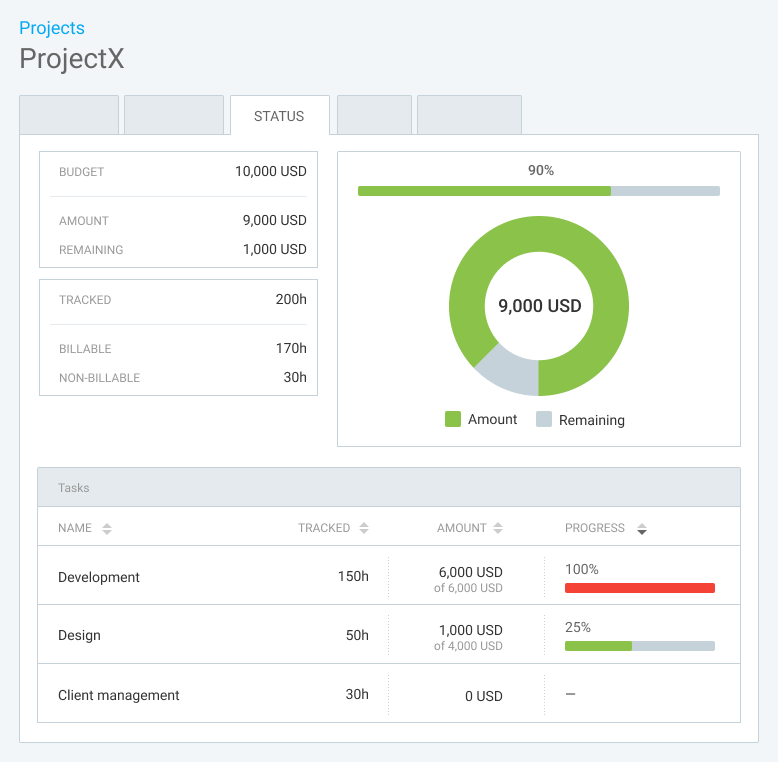
Sample budget and progress view on Clockify.
Budgets can be one-off or recurring (e.g., reset weekly, monthly, or yearly). That streamlines data entry for agencies and service teams, who do repeat work often.
TimeCamp also supports project budgets and estimates, but it goes further into financial analysis. The reporting dashboard can show budgeted time, tracked time, cumulative tracked time, and remaining budget. More importantly, TimeCamp provides detailed reporting on revenue, costs, and margin.
TimeCamp’s profitability features help teams analyze:
- Billable vs. unbillable time
- Invoiced vs. uninvoiced work
- Revenue by employee, task, or project
- Internal cost of tracked work
- Margin between revenue and cost
Clockify also supports labor cost and profit features, but does a better job of showing whether the team is staying within budget. TimeCamp gives a broader view of whether the project made financial sense.
Project scheduling and workload planning
Clockify pulls ahead when the conversation shifts from financial analysis to work scheduling.
The project scheduling view lets you drop tasks directly on a user’s timeline. Your team can see planned work, allocated time, cost, and billable amounts tied to each scheduled project or task.
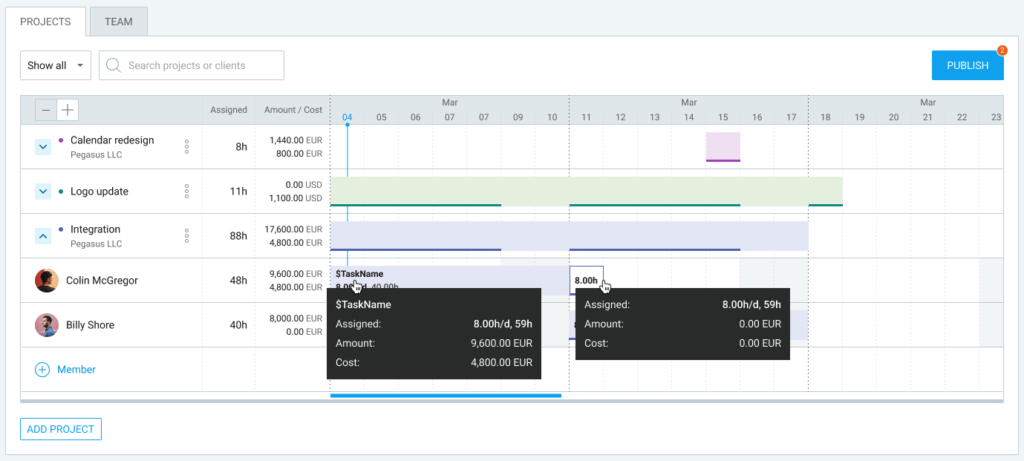
Sample project management view on Clockify.
Clockify is useful when teams need to answer:
- Who’s scheduled for this project?
- What tasks are coming up?
- How much planned work is allocated?
- Do any workload conflicts exist?
This makes Clockify a helpful assistant for day-to-day resource planning.
TimeCamp offers planning support through project budgets, attendance tracking, and overtime management, but scheduling isn’t part of the feature list.
Attendance and overtime management
Both products can support attendance-style workflows, though TimeCamp leans more naturally into this area when paired with its location and remote-work features.
TimeCamp includes attendance tracking and overtime team management from a Starter plan at $3.99/mo. Remote work detection, available from the Ultimate plan upwards, adds another layer of oversight for hybrid teams.
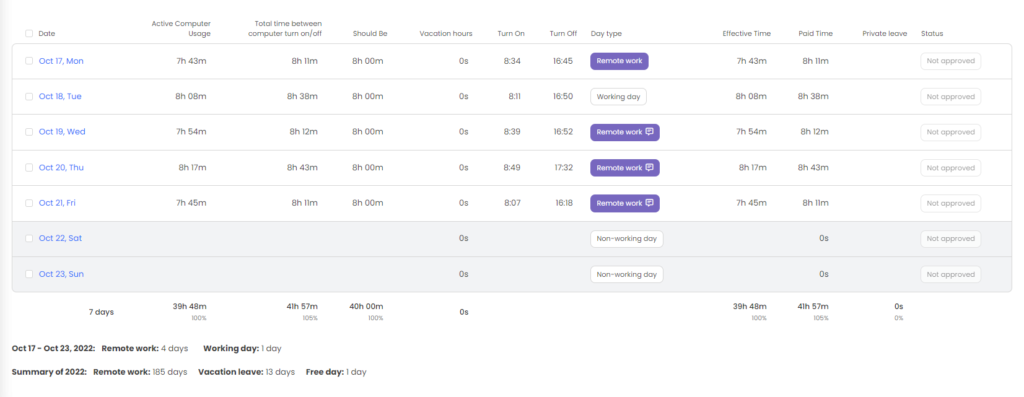
Sample attendance report on TimeCamp.
Clockify has overtime features on a Standard plan ($5.49), but complements these with timesheet controls and project scheduling on higher tiers. Its strength sits in the admin workflow: planned time, submitted time, approved time, and expenses are easier to manage in a simpler interface.
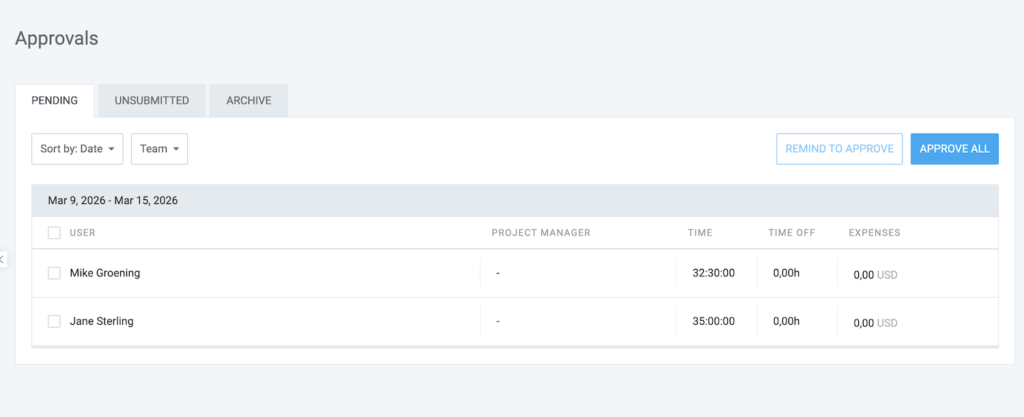
Sample time and expense approval view on Clockify.
TimeCamp gives managers more contextual data. Clockify gives them a cleaner way to operationalize the schedule.
Invoicing flows
TimeCamp and Clockify have similar invoicing workflows. Both convert tracked billable time into customizable invoices and support billing data exports to popular accounting apps like QuickBooks or Xero. Neither has built-in payment processing, though.
TimeCamp makes invoicing available for less, starting on the Starter plan at $3.99/user/month. This gives small businesses a cheaper route from tracked time to client billing. Clockify adds invoicing from the Standard plan at $5.49/user/month.
With TimeCamp, you also get more financial context. Its invoicing flow sits closer to reports for billable and non-billable hours, plus invoiced time, which makes it easier to track what has already been billed and what still needs attention.
Reporting features
Clockify offers user-friendly, customizable reports on project statuses, team activity, and logged timesheet data.
TimeCamp reporting goes deeper into billing trends, budget, cost, revenue, and margin analysis.
Clockify reporting
Clockify’s reporting looks cleaner and easier to navigate. Team members can review time entries by project, client, task, user, tag, or date range without needing much setup first.
Key reporting features include:
- Summary, detailed, and weekly reports
- Filters by project, client, task, user, tag, and date
- Shared reports for clients or internal stakeholders
- Export options for billing, payroll, or analysis
- Custom reports on paid plans
- Budget and estimate visibility inside project reports
- Budget usage and project completion forecast
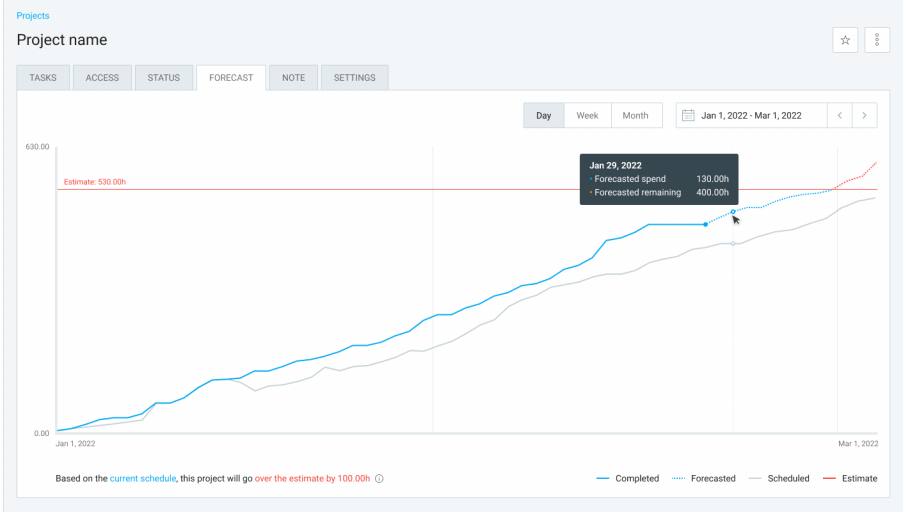
Sample forecast chart of Clockify. Source
Clockify reporting is stronger for delivery visibility. It shows you if your project is on schedule and within budget, if you’ve logged all your time accurately, and how much billable work you’ve completed.
TimeCamp reporting
TimeCamp’s reporting caters more to teams that care about profitability. Alongside standard time reports, it includes finance-focused views that connect tracked time to revenue, cost, and margin.
Key reporting features include:
- Time reports by project, task, user, and date
- Billable, unbillable, and invoiced time reports
- Budget and estimate reports
- Real-time revenue reporting based on billing rates
- Cost reporting based on labor rates
- Margin reports comparing revenue and cost
- Exportable multi-format reports and scheduled email reports on supported plans
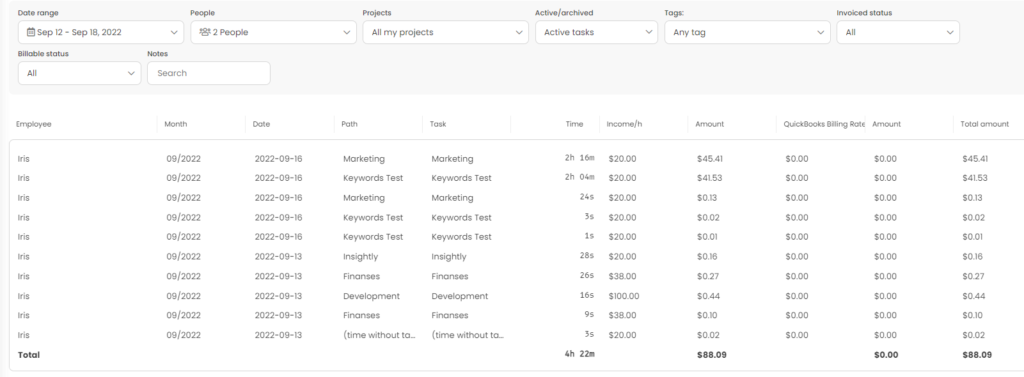
Sample revenue report on TimeCamp. Source
TimeCamp’s biggest reporting advantage is margin visibility. You can see exactly which projects made money, which clients absorbed too much unbillable work, and where delivery costs started chipping away at profitability.
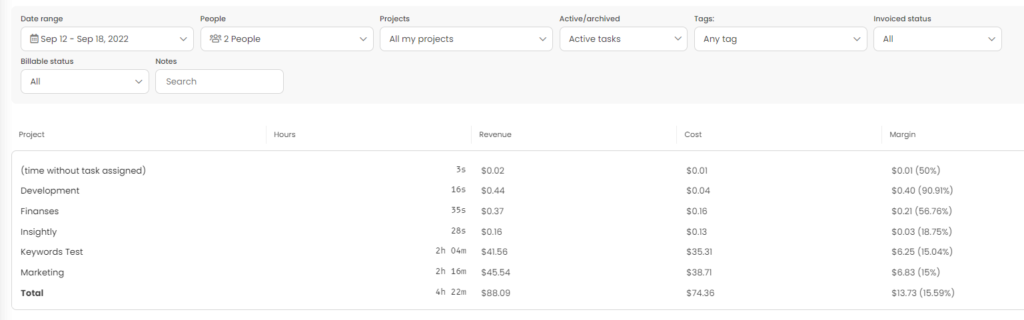
Sample margin report on TimeCamp. Source
TimeCamp vs Clockify pricing
TimeCamp offers a better value for money with unlimited free users, plus earlier access to attendance management, geofencing, and advanced reporting features. Its Premium plan at $6.99/user/month is also cheaper for teams that need budgets and estimates, while Clockify requires the Pro plan at $7.99/user/month.
Clockify is more financially compelling if you want tighter admin controls earlier: required fields, kiosk tracking, split time, screenshots, expenses, custom fields, GPS, and resource scheduling.
Here’s a side-by-side comparison of TimeCamp vs Clockify pricing:
| Plan | TimeCamp | Plan | Clockify |
| Free | $0 for unlimited users | Free | $0 for up to 5 users |
| Starter | From $3.99/user/month | Basic | From $3.99/user/month |
| Premium | From $6.99/user/month | Standard | From $5.49/user/month |
| Ultimate | From $9.99/user/month | Pro | From $7.99/user/month |
| Enterprise | On request | Enterprise | From $11.99/user/month |
At the low end, the paid entry point is the same for TimeCamp and Clockify. But in the middle, Clockify’s Standard plan costs less than TimeCamp Premium. At the top, TimeCamp Ultimate is cheaper than Clockify Enterprise, but the feature sets are arranged differently enough that a straight price comparison can mislead.
TimeCamp’s biggest pricing advantage is that several key features arrive before Clockify’s equivalent tier, like:
- Unlimited users on the free plan
- Invoicing from Starter
- Attendance from Starter
- Time off from Starter
- Overtime tracking from Starter
- Project templates from Starter
Clockify does the reverse for several important advanced features across reporting and admin:
- Required timesheet fields from Basic
- Custom reports from Basic
- Billable and historical rates from Basic
- Kiosk tracking from Standard
- Screenshots from Pro
- Expenses from Pro
- Custom fields from Pro
- Labor costs and profit analysis from Pro
The bottom line? TimeCamp is cheaper when billing, attendance, and budget depth matter earlier. Clockify is cheaper if timesheet management, scheduling, employee monitoring, and admin cleanup matter more.
UX, onboarding, and customer support
Both TimeCamp and Clockify score high on user experience, according to G2 ratings. Users generally find both tools easy to adopt, with Clockify holding a slight advantage for simplicity and speed.
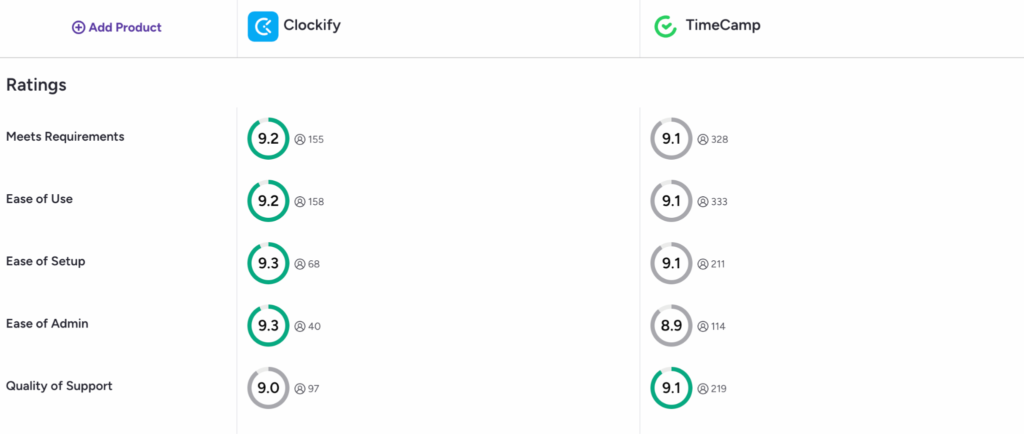
Source: G2
Still, both products have a couple of recurring complaints.
Some Clockify users find the mobile app “a little cumbersome,” while others note that “mobile can occasionally feel slower than the desktop version”. Reporting is another friction point for larger teams. “Filtering can feel limited when you start needing more advanced breakdowns or more customized dashboards,” a user shared.
TimeCamp has the opposite pattern. It gives teams more configuration depth, but that can make onboarding feel heavier. Users can customize fields and build more detailed data structures, but some beginners say that “data structure and buildup can sometimes be overwhelming”. Invoice setup can also feel tedious, as prompts and tutorials do not do enough explaining.
TimeCamp’s mobile UX also drew some companies. Some “on-the-go” features can feel less polished, with users pointing to timers hanging, geofencing behaving unpredictably, or offline entries causing friction. That’s a bit of a deal-breaker for field teams.
On customer support, both companies are generally proactive. TimeCamp offers support through email and live chat, but doesn’t offer phone support. Clockify advertises 24/7 availability across email, phone, and chat.
For teams that want a human support route beyond tickets and chat windows, Clockify has the edge.
Clockify and TimeCamp integrations overview
Both TimeCamp and Clockify connect with plenty of popular business apps through native integrations, browser extensions, Zapier, and APIs.
Both tools also offer:
- Browser extensions for tracking time inside work apps
- Zapier support for connecting with non-native tools
- APIs for custom integrations
TimeCamp advertises 80+ integrations and Clockify – 100+. There’s good coverage across project management software, accounting tools, calendar apps, and sales platforms with both.
Remember: the total count matters less than fit. Checking if either tool integrates with the apps your on-site or remote team already uses every day is the most important factor.
To find out, look for a native integration. If not, review Zapier connectors and API costs before committing.
Security and compliance
Both TimeCamp and Clockify claim GDPR compliance and cover the expected security basics, such as data encryption, access controls, and SSO on higher-tier plans.
Yet, both also include employee monitoring features, like screenshots, app activity tracking, and GPS tracking that can raise some compliance questions.
These features can be useful for some teams and may even be a requirement in regulated industries. But they also create obligations around transparency, employee consent, internal policy, and local employment laws. Switching on screenshots or location tracking and hoping legal has a relaxed week is rarely the strongest governance strategy.
Data residency is another point of difference. Clockify lets you set your data hosting region, the EU, UK, US, or Australia, on the Pro plan and higher. This is a strong attractor for companies with regional data requirements or clients who care where operational data is stored.
TimeCamp doesn’t offer an equivalent option. But it supports private SaaS or self-hosted deployment on the Enterprise plan to give you direct control over the infrastructure.
On account security, both tools offer SSO on higher plan tiers. TimeCamp also supports two-factor authentication, giving teams another layer of login protection. For most teams, both tools meet the standard security bar.
The real differentiators are Clockify’s clearer data residency controls and TimeCamp’s Enterprise deployment options.
What if neither TimeCamp nor Clockify feels quite right?
If you like TimeCamp’s project depth and Clockify’s usability, Toggl is a solid contender without employee monitoring features.
Our company has a firm anti-surveillance stance. We’ll never collect desktop screenshots, covertly calculate mouse movements, or track your GPS location. All automated time tracking entries are kept private on employee devices until they choose to turn that data into a time entry.
Teams still get accurate time data without building a small surveillance state in the corner of the ops stack. Take it from Newlogic — a 50-person distributed consultancy that achieved 100% time tracking adoption.
“Even for people who have never used time tracking software before, [Toggl] is extremely easy and intuitive, as well as non-invasive. That’s why there was no resistance when we introduced the tool to our team.”
For time keeping, Toggl covers the same core ground with less friction:
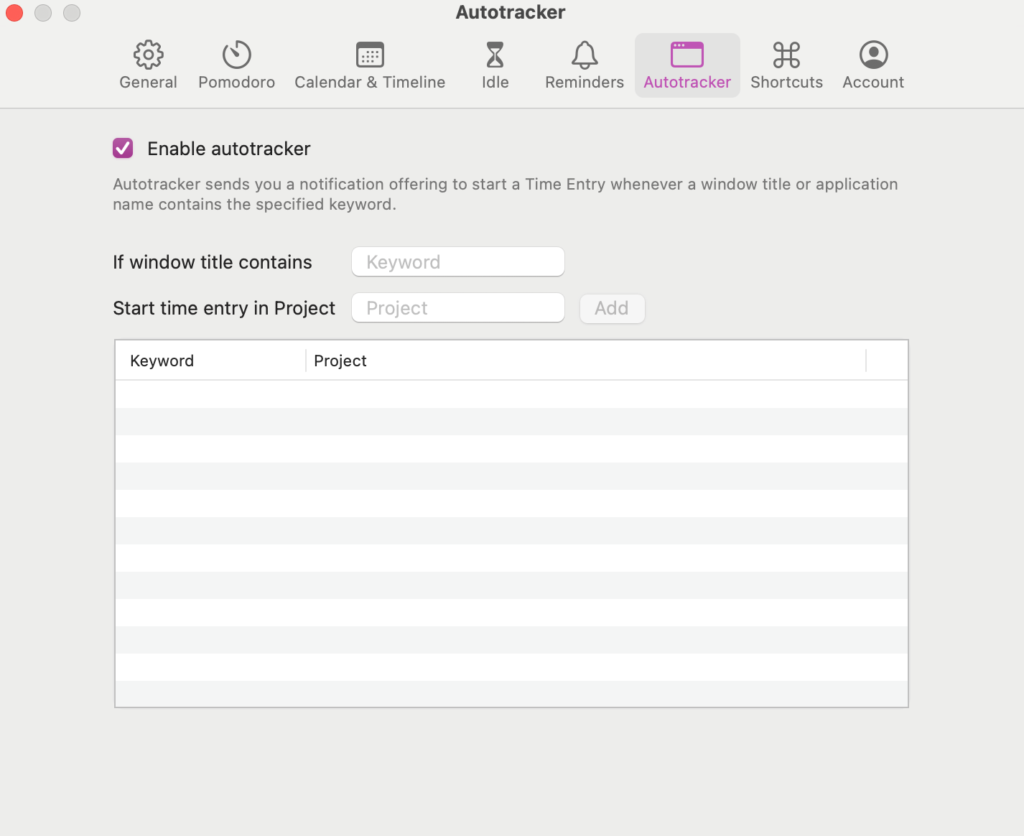
- Automated tracking with keywords, available on the free plan for up to 5 users
- Time logging in calendar, list, and timesheet views, and with a Pomodoro timer
- One-click timers across your everyday tools via native integrations and browser extensions
- Google and Outlook Calendar integrations for automatic event into time entries
Our reporting layer combines ease of use with reporting depth.
Starter plan already supports team productivity analysis via personal and team time tracking goals. It also includes Workload reports that help managers optimize time and resource allocation across tasks and clients.
Profitability and Utilization reports (from Premium plan) give extra commercial intelligence.
Utilization reports compare billable and non-billable time against benchmarks. Profitability reports go deeper, breaking down revenue, labor costs, and profitability by members, projects, clients, tasks, tags, and more.
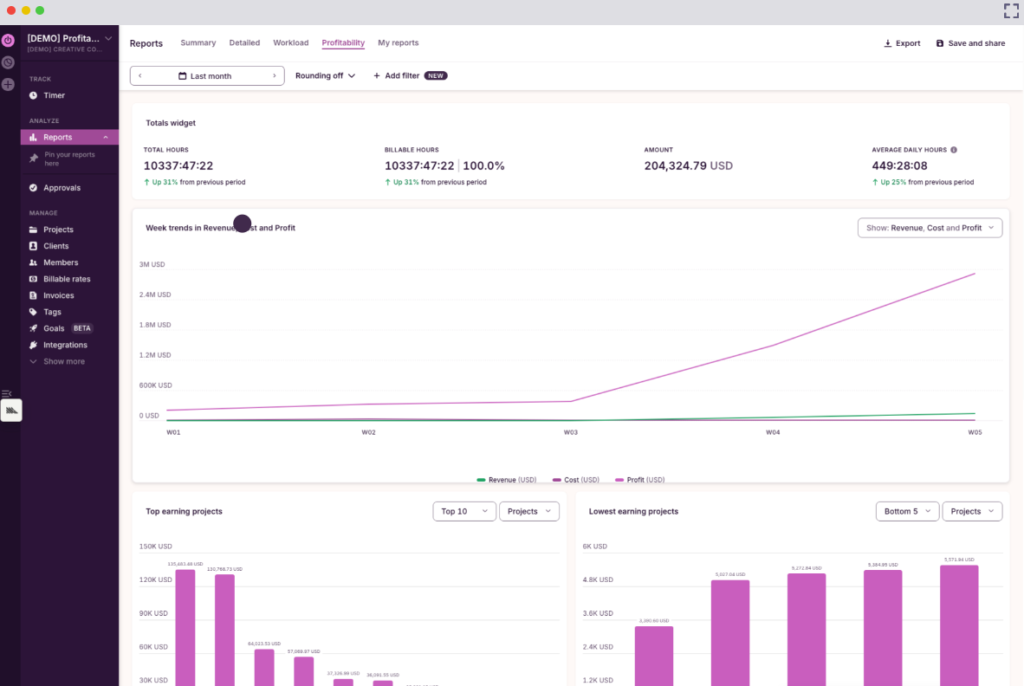
Talk Shop Media now spends 50% less time on time tracking and profitability analysis with Toggl’s user-friendly interface. One dashboard provides data on how much Talk Shop Media employees billed, how they are compensated, and how this translates to overall business health.
“Instantly, we can see which accounts are profitable and which aren’t. If profitability is low, we can dig deeper into the data and take the necessary steps,” Hannah McClenaghan, Operations Manager, explains.
With Toggl, you get a seamless automated time tracking tool with profitability analysis and operational visibility reporting without a trust-eroding admin theater.
So, which tool should you choose: TimeCamp or Clockify?
To sum up:
- Choose TimeCamp if you want automation with commercial depth. Its keyword tracking, geofencing, attendance tools, and margin reporting make sense for teams that need time data to feed budgets, billing, and profitability decisions.
- Choose Clockify if you want cleaner admin and faster adoption. Required fields, Force timer, kiosk tracking, split entries, and scheduling tools help teams keep timesheets usable without making time tracking feel like a second job.
- Switch to Toggl if you want accurate time tracking without the surveillance subplot. You still get automated tracking with keywords, calendar-based logging, timesheets, workload visibility, and profitability reporting. You skip monitoring features, which keep trust intact and compliance admin lighter.
Still need time to decide? You can check our TimeCamp alternatives and Clockify alternatives guides for more options.
FAQs about TimeCamp vs Clockify
Is TimeCamp better than Clockify?
TimeCamp is better than Clockify if you need geofencing and more in-depth profitability reporting. It connects tracked time more closely to revenue, costs, budgets, and margins, which makes it a better fit for agencies, consultancies, and field teams.
Clockify is a better option if you want tighter timesheet controls, work scheduling tools, and the option to choose in which geo-region your data is stored.
Is Clockify really free?
Clockify is only free for 5 users (previously it was free for unlimited users.) If your team is larger than this, or you want more advanced features, Clockify costs $3.99 per month per user. For a small team of six people, expect to pay at least $23.94 per month.
Does TimeCamp have a free plan?
Yes, TimeCamp has a free plan with unlimited users and unlimited free projects. It includes manual and automated multi-platform time tracking (web, desktop, mobile) and 10+ time tracking reports with PDF exports.
What is the difference between TimeCamp and Clockify?
The difference between TimeCamp and Clockify is that TimeCamp is stronger for automation, location tracking, and profitability analysis, while Clockify is stronger for cleaner time entry, scheduling, and admin control. Other key differences are:
- TimeCamp offers keyword-based automatic tracking that can start, switch, or stop tracking based on detected work activity. Clockify doesn’t support this.
- Clockify supports more time tracking methods on lower-tier plans, such as the persistent Force timer (not available with TimeCamp) and kiosk tracking (locked on TimeCamp Enterprise plan).
- Clockify has more time sheet admin controls like locked entries, required fields, and split-time entries.
- Both apps include GPS tracking, but TimeCamp also offers a geofencing feature.
- TimeCamp goes deeper on profitability, with views for billable time, invoiced work, revenue, costs, and margin.
- Clockify is better for scheduling tasks, assigning work, and checking team capacity.
Does TimeCamp track attendance?
Yes, TimeCamp offers attendance tracking on Starter ($3.99/user/mo) and higher plans. The feature also includes overtime and time-off management.

Elena is a senior content strategist and writer specializing in technology, finance, and people management. With over a decade of experience, she has helped shape the narratives of industry leaders like Xendit, UXCam, and Intellias. Her bylines appear in Tech.Co, The Next Web, and The Huffington Post, while her ghostwritten thought leadership pieces have been featured in Forbes, Smashing Magazine, and VentureBeat. As the lead writer behind HLB Global’s Annual Business Leader Survey, she translates complex data and economic trends into actionable insights for executives in 150+ countries. Armed with a Master’s in Political Science, Elena blends analytical depth with sharp storytelling to create content that matters.