Hubstaff and Clockify both sit in the time tracking and employee monitoring software categories.
Hubstaff speaks more to teams that need time tracking to double as workforce control — think field crews, contractors, logistics teams, delivery businesses, and other location-dependent operations. Monitoring features like GPS tracking and geofenced job sites are essential to keep the business running and even compliant.
Clockify is for teams that want a cheaper, lighter way to track time across projects, people, and clients. Monitoring features like screenshots and GPS are available on paid plans, but they lack Hubstaff’s heavier workforce management layer.
Overall? Hubstaff is built for tight oversight and in-depth workforce analytics. Clockify is built for flexible timekeeping and basic productivity insights.
If you’re struggling to choose, this post stacks Hubstaff vs Clockify using the following criteria:
- Time tracking
- Employee monitoring
- Task management
- Invoicing
- Reporting
- Integrations
- User experience
- Compliance and security
We’ll explore when each tool makes the most (or least) sense for your team.
Hubstaff vs Clockify: at a glance comparison
| Functionality | Hubstaff | Clockify |
| Primary purpose | Workforce management and employee monitoring platform with GPS tracking for field teams | Flexible time tracker with optional light employee monitoring |
| Time tracking features | Manual, automatic, and offline time entries. Persistent, employer-controlled background timer. GPS time tracking on mobile with geofencing | Manual, automatic, calendar-based, and offline time entries Kiosk-based time tracking software GPS time tracking on mobile without geofencing |
| Activity tracking features | Desktop screenshot App and URL tracking GPS and location tracking on mobile | Desktop screenshot App and URL tracking GPS and location tracking on mobile |
| Project management features | Unlimited projects and tasks Project, work order, and client budgets Shift scheduling Hubstaff Tasks add-on for Kanban boards, sprint planning, and task management | Unlimited projects and tasks Estimates and budgets for higher plans Planky available as a separate PM app |
| Payroll integrations | Strong payroll workflows with PayPal, Wise, Payoneer, Bitwage, Deel, Gusto, and manual payroll exports | Can export time for payroll and connect via integrations to popular platforms |
| GDPR compliance | ✅ Yes | ✅Yes |
| Total number of integrations | 30+ | 100+ |
| Mobile apps | Android, iOS | Android, iOS |
| Desktop apps | Windows, macOS, Linux | Windows, macOS, Linux |
| Starting price | From $4.99/mo per seat | From $3.99/mo per seat |
| Free plan | ❌ No | ✅ Yes |
| Free trial | 14 days | 7 days |
| Best for | Field teams, contractors, logistics, construction, delivery, and other businesses needing GPS, geofencing, payroll, and tighter oversight. | Freelancers, small teams, and businesses that want affordable time tracking with optional light monitoring |
Clockify vs Hubstaff: Core features comparison
Hubstaff and Clockify have strong feature overlap. Time tracking, screenshots, GPS, invoicing, expenses, and reporting all show up in both products.
The difference is in how they’re “packaged”.
Purpose
Hubstaff leans manager-led. The product is built around oversight, approvals, billing control, monitoring, and policy enforcement. It’s useful for teams that need structure and location clarity, but less appealing to anyone allergic to workplace surveillance.
Clockify feels more employee-led. Calendar-based tracking, kiosk clock-ins, project estimates, expenses, and timesheets are all there, but time logging is very flexible. Screenshots and GPS exist as paid extras, which keeps oversight available, but secondary.
Time tracking methods
Hubstaff and Clockify cover the time-tracking baseline: manual, automatic, and offline tracking are available across web, mobile, and desktop apps, with idle detection, reminders, and timesheets. Both also support required fields, locked edits, approvals, custom billable rates in different currencies, client invoicing, and payroll integrations.
Three differences are worth calling out.
Automatic time tracking
Hubstaff offers an always-on time tracking Silent App, which captures employee activity continuously on the device for an extra $2.50 per seat per month. Clockify doesn’t go as far in monitoring.
GPS and location tracking
Hubstaff offers GPS tracking as a paid add-on, while Clockify includes it on Pro and Enterprise mobile plans. In both cases, managers can see employee locations during tracked time, including current position, previous routes, and timestamps.
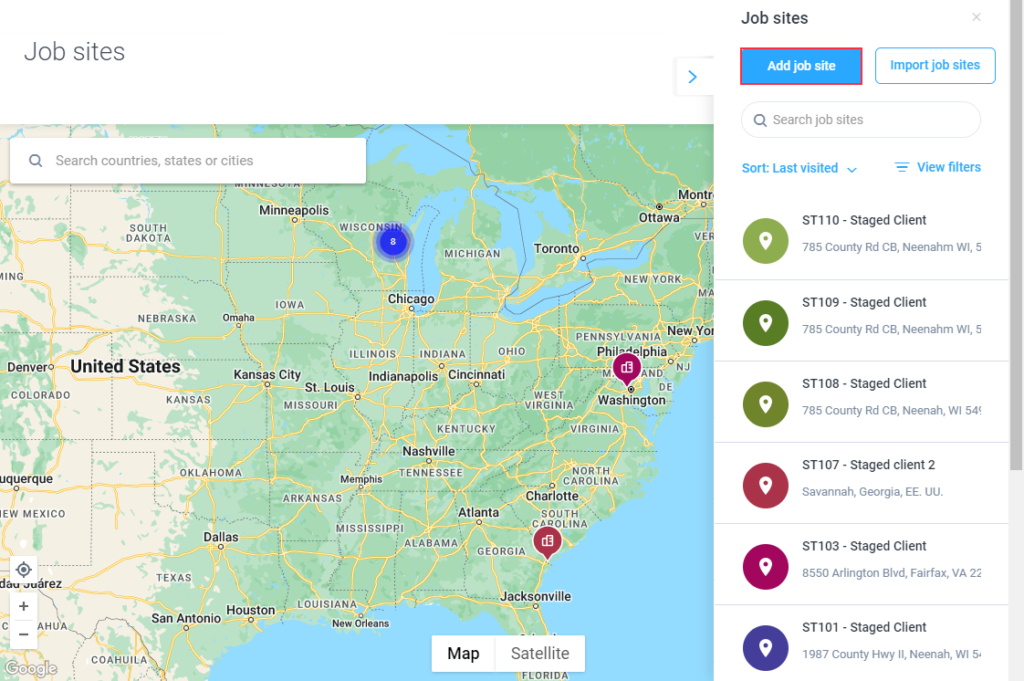
Hubstaff also includes a Job Sites feature, allowing managers to set geofences around worksites, so the app automatically tracks when someone arrives or leaves. Clockify currently doesn’t support this.
(Source: Hubstaff)
Who controls the clock?
This is where the two tools feel most different day to day.
- Hubstaff leans more into enforcing tight time entry policies with limited employee editing and a higher degree of managerial oversight via detailed reports. Its timeline view is oriented around manager-led shift planning.
- Clockify offers a more flexible employee-led experience, where your people can review and organize their time entries themselves before submitting timesheets.
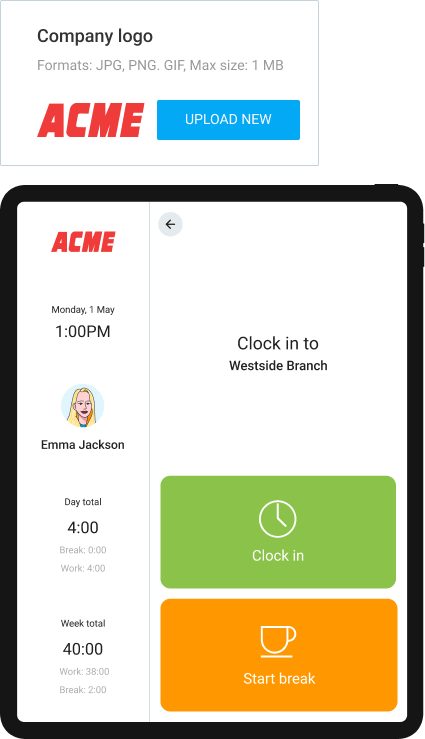
- Clockify supports flexible logging options, like calendar-based tracking that lets team members turn scheduled work hours into time entries. Clockify also offers kiosk tracking for an extra fee, so employees can clock in and out from a shared device using a PIN or QR code.
(Source: Clockify)
Project and task management
Clockify is enough if you need lightweight project organization around time entries. Hubstaff is stronger if you want budgets, client costs, and staffing controls tied tightly to tracked work.
Neither product tries to replace full project management software. Both tools allow you to follow a simple workflow: create projects, add tasks, assign time entries, and use that data for reporting, billing, and budgeting.
If you need heavier planning, Clockify offers a companion PM app, Planky, while Hubstaff has Hubstaff Tasks.
Where Clockify does better
Clockify gives teams a clean way to organize tracked time across tasks and clients. Every plan includes:
- Unlimited projects and tasks
- Project cloning and templates
- Billable time logging against clients, projects, and tasks
Managers can also create timeboxed assignments and review scheduled work in Team view. The reporting view shows:
- Assigned hours
- Daily and weekly schedules
- Available team capacity
- Overbooking and double-scheduled slots
(Source: Clockify)
The main limitation of Clockify is access control. On a free plan, all projects are public. Paid plans let admins restrict access to projects, reports, team members, and time entries.
Clockify’s Pro and Enterprise plans also add more financial control, like:
- Project budgets and estimates across time or cost
- Multi-currency support for fixed-fee work
- Expense tracking with receipt uploads
- Budget alerts before projects go over
- Recurring budgets or estimates
- Estimate reporting alongside tracked time
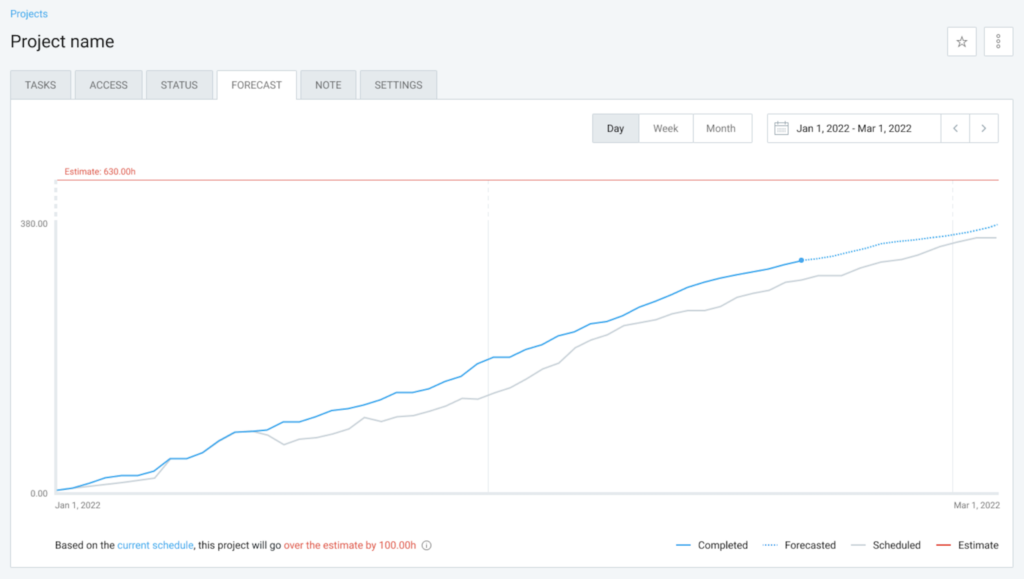
(Source: Clockify)
Where Hubstaff does better
Hubstaff also supports unlimited projects and tasks, but its project controls sit closer to cost management. Managers can:
- Set project budgets in hours or cost
- Receive alerts as projects approach limits
- Review spending by user, project, or work order
- Track employee-submitted expenses against project budgets
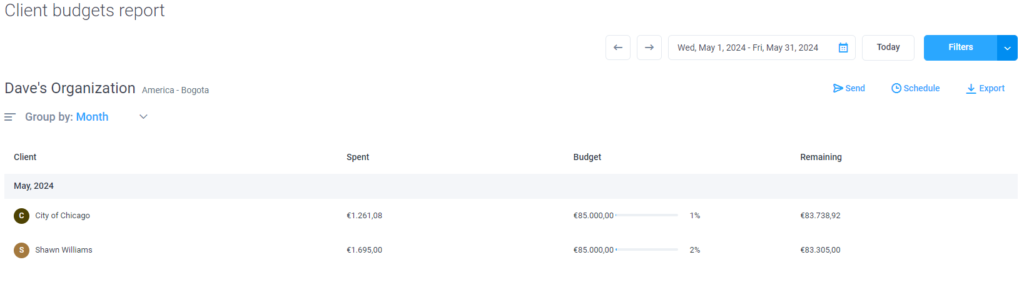
(Source: Hubstaff)
Unlike Clockify, Hubstaff enforces financial controls. Clockify warns you when budgets are at risk. Hubstaff restricts manual time entry once a project budget is reached, and a manager will receive a notification. For teams managing billable work, that changes the budget from a warning light into a guardrail.
Hubstaff’s reporting also goes deeper with:
- Project and Work Order Budget reports: Review budgets used by hours, costs, and employee-submitted expenses.
- Client Budget reports: Check resource usage across projects for each client.
- Profitability tracking: Monitor project and client profitability based on labor costs and tracked time.
- Shift scheduling: Control labor distribution and costs with workload-based scheduling from the Team plan.
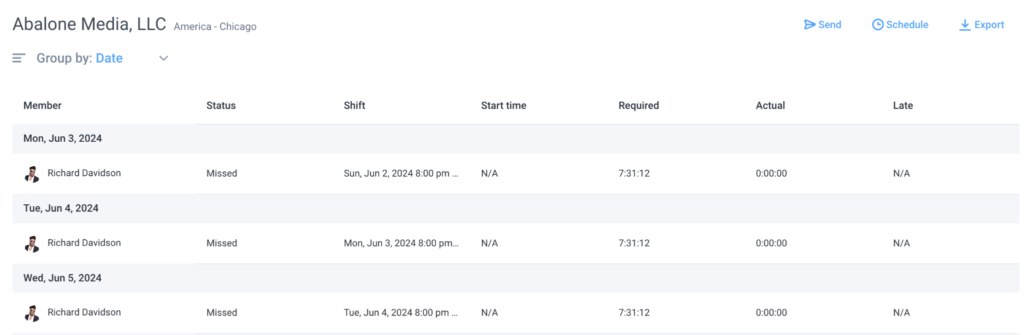
(Source: Hubstaff)
For more task management features, you can purchase Hubstaff Tasks for an extra $2.50/seat per month. It provides a PM layer with Kanban boards, sprints, epics, roadmaps, timelines, automated workflows, auto-assignment, followers, and automated stand-ups.
Invoicing
Clockify covers PDF invoice generation from tracked time. Hubstaff supports integrated client invoicing, contractor payments, and payroll workflows.
Both products can convert tracked hours into client invoices. Clockify lets you import tracked time and expenses, add manual invoice items, apply tax rules, schedule automatic invoice emails, and track invoice status, including viewed, paid, and overdue. But payments happen outside Clockify.
Hubstaff includes the same core invoicing workflow, then adds a stronger payments layer. Teams can create recurring client invoices for ongoing work, while employees and contractors can send invoices back to the business to be paid via PayPal, Wise, Stripe, Payoneer, Deel, or another supported payroll management platform.
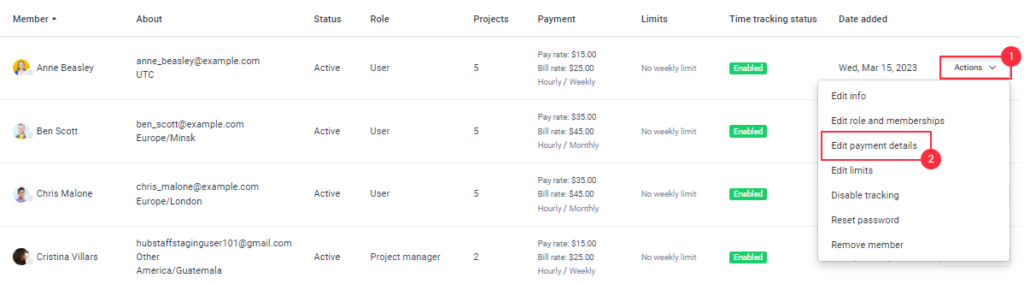
(Source: Hubstaff)
Hubstaff also supports more payment scenarios:
- Manual payroll exports to a connected payroll app
- Automatic payroll schedules on a fixed date
- One-time payments to contractors
- Direct team invoice payments through payment gateways
That makes Hubstaff more of a lightweight payment operations layer for contractor-dependent teams.
Reporting
Clockify gives teams a practical view of tracked time, attendance, expenses, and billable hours.
Hubstaff goes much deeper into workforce management, covering activity levels, app and URL use, payments, job sites, utilization, and productivity benchmarks. It’s useful, but also sits closer to surveillance territory.
Clockify reports
Clockify provides a layer of visibility into where team time goes. Personal and team dashboards show:
- Current activity: what each person is working on while their timer is running, or their most recent logged activity if the timer is off.
- Tracked time by person: total hours for every workspace member, including people with no logged time in the selected period.
- Billable vs. non-billable time: how much work is revenue-generating, plus estimated earnings.
- Project breakdowns: tracked time by client, project, and task.
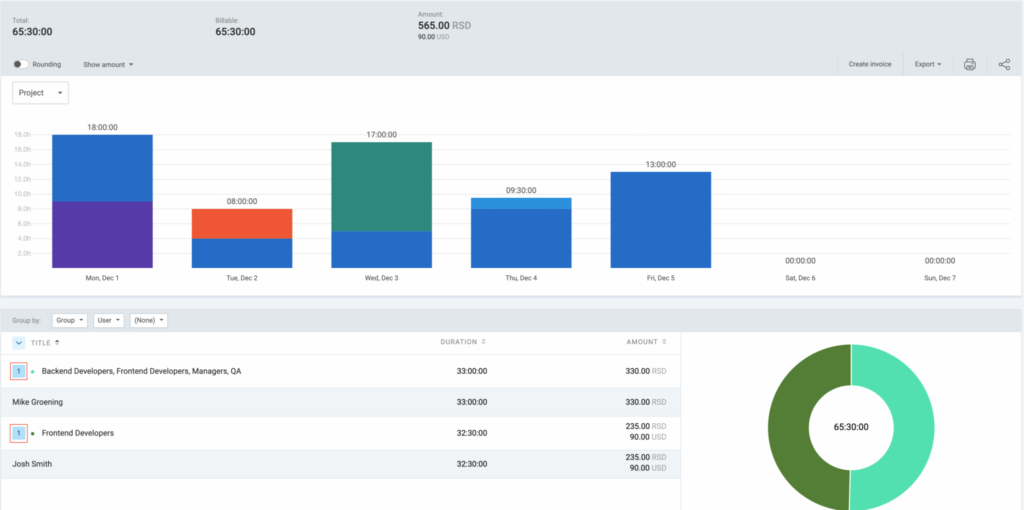
(Source: Clockify)
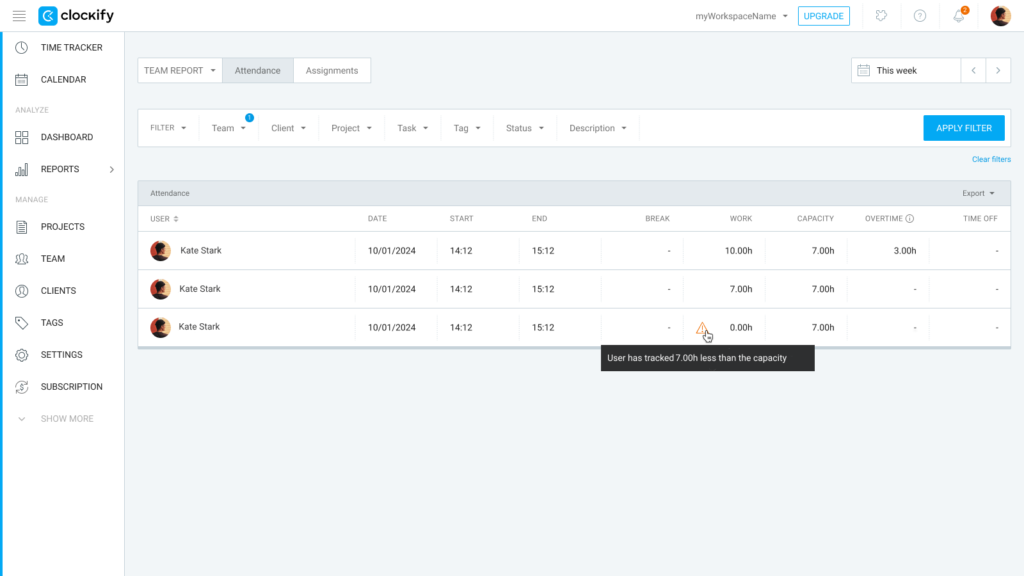
Clockify also includes two useful add-on views. The Attendance report shows presence, absence, breaks, available capacity, overtime, and time off. The Expense report pulls together submitted expenses, with filters for billability, entry type, approval status, and invoicing status.

(Source: Clockify)
Data exports are user-friendly. You can download PDF reports on the free plan, export CSV or Excel files on Basic and higher plans, or share a private report link.
The catch? Clockify reporting has limited depth. It shows time, attendance, and expenses. But it doesn’t use this data for profitability, resource planning, or margin analysis dashboards.
Hubstaff reports
Where Clockify focuses on tracked time, Hubstaff turns the data into a broader workforce management dashboard covering activity, productivity, payroll, invoices, job sites, and team performance.
Work Session reports show timer start and stop times, session duration, manual time, clients, projects, jobs, and activity levels. The Hubstaff Time and Activity report expands that view with:
- Total hours, manual hours, and overtime
- Billable and non-billable time
- Free time and idle time
- Activity percentage
- Pay rates, billed amounts, and total spend
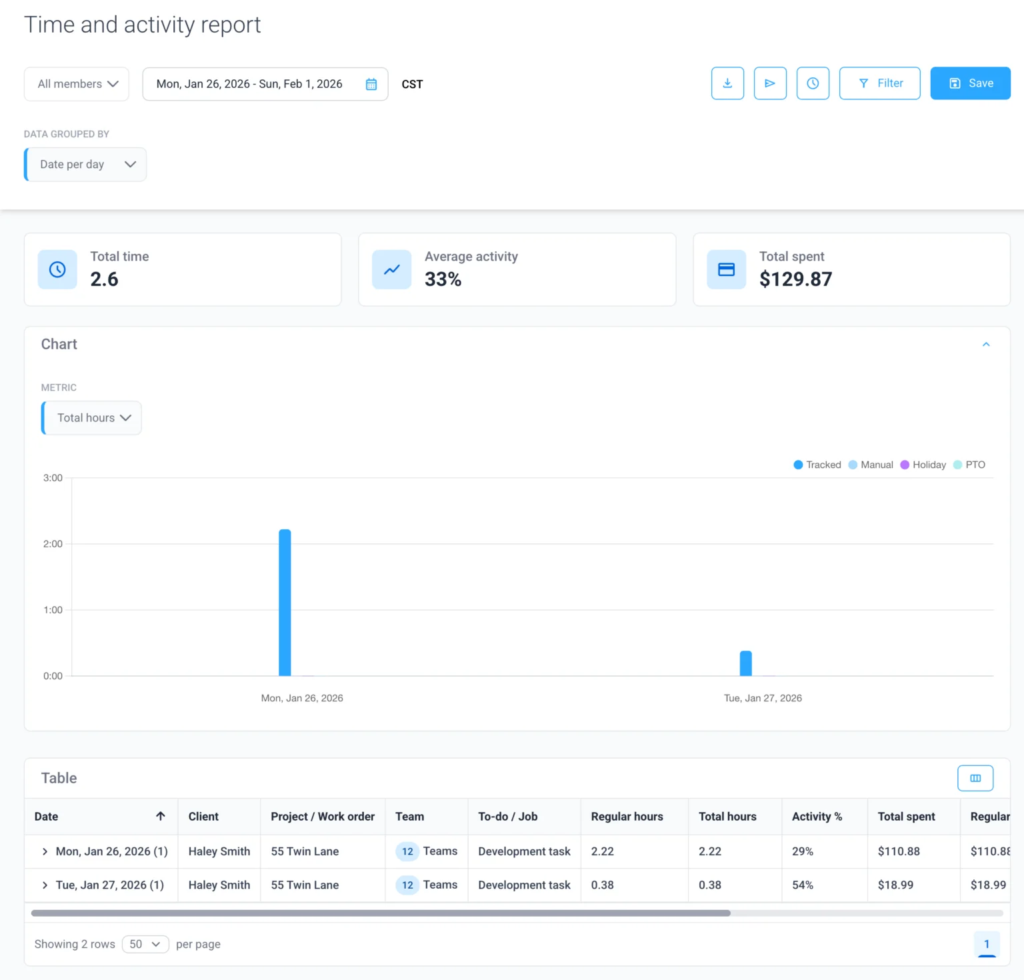
(Source: Hubstaff)
Then Hubstaff gets more intense.
Its App and URL report shows which websites and applications employees use while tracking time. If you also get the Insights add-on, Hubstaff will generate employee engagement scores based on activity levels, plus productivity benchmarks by industry, organization, or job type. There’s even a Remote vs. Office view, which uses network data to compare productivity metrics across in-office and remote sessions.
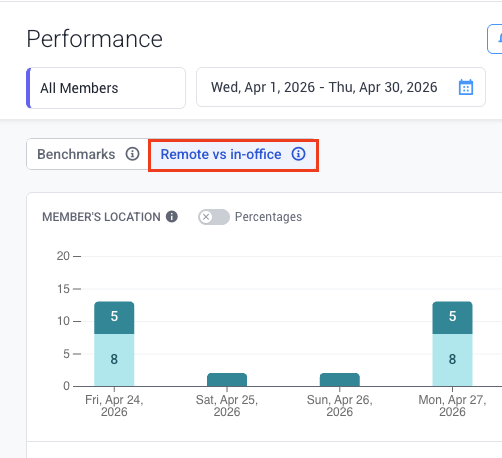
(Source: Hubstaff)
The Insights add-on also includes more specialized reporting widgets:
- Utilization: Shows whether people are under or over expected work limits.
- Work time classification: Breaks down time spent on core productive apps and URLs.
- Activity: Compares keyboard and mouse activity with total tracked time.
- Meetings: shows meeting load, recurring meetings, distracted meeting time, and meeting cost.
- Top Apps and URLs: Highlights the most-used tools and websites.
- Leaderboard: ranks team members by time tracked, activity, productivity, and achievements.
Managers receive this data in real time, which can feel invasive for some workers. For field teams, Hubstaff adds another useful layer. The Job Site Visits report shows when employees entered or exited a geofenced worksite, as long as the GPS tracking add-on is enabled.
Compared to Clockify, Hubstaff is stronger on financial reporting, too. Expense, Invoice, Payments, and Amounts Owed reports make it easier to track what clients owe and what team members should be paid.
Activity monitoring: What each tool captures
Hubstaff gives managers a deeper productivity monitoring system. It can capture app usage, visited URLs, desktop screenshots, keyboard and mouse activity, unusual activity patterns, and GPS location with mobile routes.
Clockify’s approach to monitoring
Clockify also monitors employee productivity (and their whereabouts based on GPS data), but these controls are less intrusive. Screenshots can be disabled or set to a custom frequency. By default, they’re blurred, and employees can choose to exclude them. App and website activity monitoring is optional, and users can review which activity logs they want to include.
Hubstaff’s approach to monitoring
Hubstaff puts employee monitoring much closer to the center of the product. Its key features include:
- App and URL tracking: Shows time spent in specific apps and websites while tracking time. App records include sessions, total time, app name, time of day, and project. URL records include sites visited, time spent, project association, and page-level detail. Usage caps depend on the pricing plan.
- Activity levels: Logs keyboard and mouse activity in 10-minute segments. Hubstaff calculates activity as active seconds divided by 600, then turns that into a percentage score.
- Screenshots: The app can capture up to three screenshots every 10 minutes of tracked time. Employees can view screenshots but cannot delete them. Optional blurring is available on employee devices. Usage caps also apply by plan.
- Unusual activity alerts: The paid Insights add-on flags patterns that may suggest simulated activity, including unusually high activity, highly consistent activity, heavy mouse-only or keyboard-only usage, breakless work, or long stretches of high-focus time.
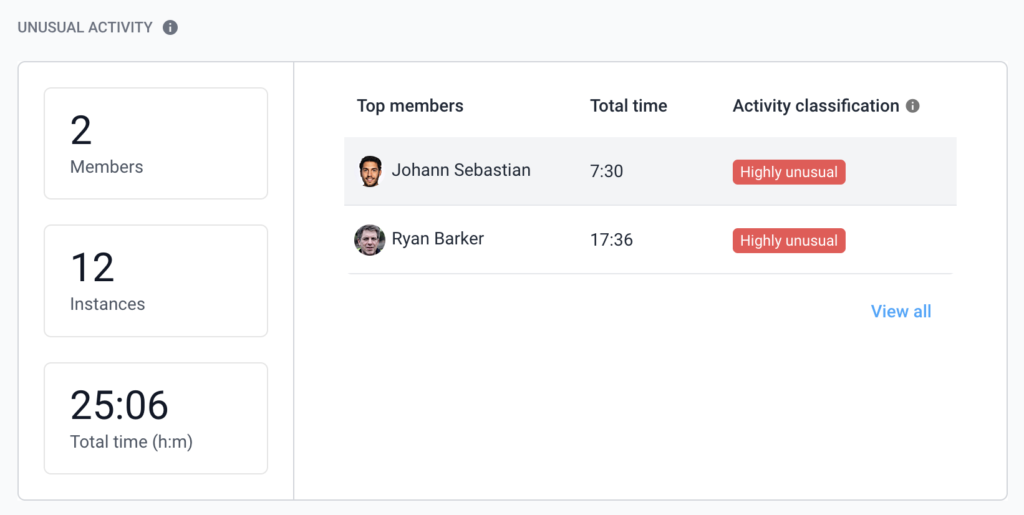
(Source: Hubstaff)
These productivity features may be useful for heavily compliance-driven teams. But for remote teams, doing knowledge work, it can quickly feel like the software equivalent of someone standing behind your chair with a clipboard.
Clockify’s monitoring is more restrained. The desktop app supports optional screenshot capture during active tracking. Screenshots are low-resolution and blurred by default, although admins can increase resolution at the workspace level.
Clockify can also detect app and website usage through its auto tracker, but that data stays private to the user and isn’t immediately shared with workspace admins, unlike with Hubstaff. Mouse movement or keystrokes only get tracked for idle time detection, which the user can choose to keep or remove.
Hubstaff vs Clockify pricing
Clockify is much cheaper than Hubstaff at every comparable tier, but Hubstaff’s extra features may justify the price tag for larger teams.
Hubstaff pricing overview
Hubstaff paid plans start at $4.99/seat/month on Starter, with a two-user minimum. That makes the minimum monthly spend $10/month. There’s no free plan, only a 14-day trial.
The paid tiers are:
- Starter ($4.99/seat/month): Basic time tracking and core features.
- Grow ($7.50/seat/month): Adds tasks, expense tracking, project budgets, more screenshots, and activity tracking.
- Team ($10/seat/month): Adds timesheet approvals, automatic tracking policy, scheduling, and attendance.
- Enterprise ($25/seat/month): Adds all add-ons, HIPAA, and SOC 2 Type II compliance.
The sticker price needs a second look. Several useful features cost extra on lower tiers:
- GPS tracking: $3.33/seat/month
- Silent background timer: $2.50/seat/month
- Insights analytics: $2.50/seat/month
- Extra screenshot volume: from $2.50/seat/month
- Extended data retention up to six years: $1.67/seat/month
Hubstaff can get expensive quickly. If you need GPS tracking or richer analytics, you’ll be paying for add-ons or moving up plans sooner than expected.
Enterprise includes the add-ons, but at $25/user/month, it’s a much larger commitment.
Clockify pricing overview
Clockify is the lower-cost option by a wide margin. It has a free plan for up to five users, covering basic time tracking. Paid plans start at $3.99/user/month for Basic, with a 7-day free trial available.
The paid tiers are:
- Basic ($3.99/user/month): Adds unlimited users, kiosk time entry, and breaks.
- Standard ($5.49/user/month): Adds screenshots, overtime, and time off management.
- Pro ($7.99/user/month): Adds GPS tracking, work scheduling, and expenses.
- Enterprise ($11.99/user/month): Adds SSO, SCIM user provisioning, and audit logs.
- Cake.com bundle ($12.99/user/month): Includes Clockify Enterprise plus extra team communication and project management apps.
The most useful comparison is for teams that want both GPS and screenshots. Clockify Pro costs $7.99/user/month, while Hubstaff Team plus GPS comes to roughly $13.33/user/month.
At that point, Hubstaff’s premium makes sense if you need stronger geofencing, payroll workflows, field-team oversight, or stricter workforce controls. For lighter time tracking with some monitoring, Clockify is the cheaper choice.
Integrations: How each tool connects to your stack
Hubstaff natively integrates with 34 tools, including Asana, Jira, Trello, ClickUp, Slack, QuickBooks, and Payoneer. It also supports Zapier automation, so you can connect Hubstaff to workflows living in other apps.
Clockify connects with 100+ apps via a browser extension, including:
- Popular project management tools: Asana, Basecamp, Wrike, Jira, and Linear.
- Calendars and task managers: Google Calendar, Outlook, TickTick, Microsoft To Do, and Todoist.
- Development tools: Azure, GitHub, Bitbucket, Sentry, and Visual Studio.
- CRM and sales software: HubSpot, Pipedrive, Salesforce Lightning, Zoho Desk.
You can also connect Clockify to 2,900+ apps through Zapier.
Clockify and Hubstaff both offer documented APIs, but the use cases differ. Hubstaff’s API is useful if you want to build its time tracking and GPS functionality into other software. That makes sense for workforce management, field operations, and custom internal systems where location or activity data matters.
Clockify’s API supports a wider set of workflow automations, like:
- Starting, stopping, editing, and approving time entries in third-party apps
- Managing users, workspaces, roles, costs, and hourly rates
- Creating clients, projects, tasks, templates, and assignments
- Creating time off policies, holidays, and approval flows
- Generating reports, exports, and audit logs
- Connecting Clockify data to CRMs, payroll tools, project management systems, and internal dashboards
This is where Hubstaff shows a real weakness. Its native integration count is limited for teams with complex tool chains, especially if your work depends on specific systems like SAP, HubSpot, Bitbucket, Xero, or Google Calendar.
This difference is worth calling out because it’s one of the reasons teams start looking for Hubstaff alternatives. So always double-check available integrations before you commit.
User experience and onboarding
Clockify is faster to set up, has cleaner navigation, and less feature bloat. Hubstaff is more powerful but has a steeper learning curve and reported UI issues.
G2 users rank Clockify higher than Hubstaff on “ease of use” and “ease of admin.” Some rate the app as a “straight out of the box turnkey solution,” and they love how a short onboarding video “makes it easy to quickly get the hang of the tool.”
Hubstaff asks more from admins upfront, and that’s partly because it does more. Monitoring policies, screenshots, GPS rules, payroll settings, permissions, budgets, and approvals all need configuration. The extra depth is certainly useful, but it also makes the product heavier to roll out.
Some Hubstaff users point to the usual tradeoff: more features = more friction.
One small business owner said PTO setup can take “5+ steps” to accrue correctly, and that the app “almost forces you to pay employees within the app” for tracking hours and PTO to work smoothly. Others mention occasional syncing or session issues, especially when internet connections are unstable, and timers need to be checked manually.
On mobile, the split is similar:
- Hubstaff: Stronger for field workers, especially with GPS tracking, routes, geofenced job sites, and offline tracking.
- Clockify: Better for on-the-go time logging, without as much admin weight behind it.
Support is solid on both sides. Hubstaff offers chat and email support, with faster VIP support available as a paid option. Clockify advertises 24/7 support by email, chat, and phone on all plans, though response time can vary by tier and request type.
Security, compliance, and data privacy
Both Hubstaff and Clockify have secure data encryption.
Hubstaff uses AES-256 encryption for screenshots and other tracked data, plus TLS 1.2+ for data in transit. Clockify says its data is hosted on AWS, with connections protected by 256-bit SSL encryption. Both also claim in public materials that they’re EU GDPR-compliant.
But the bigger issue is less about encryption. It’s more about what the tool can be configured to collect. This includes sensitive workplace data, like screenshots, GPS routes, app logs, URL history, mouse movement, and keyboard clicks.
Depending on your location, this data collection may be covered by other local compliance and employee privacy rules. The Portuguese government explicitly prohibits the use of software that logs web page visits or mouse movements. In other countries like the UK, Canada, Australia, and Belgium, among others, invasive or covert monitoring is only allowed in exceptional cases, authorized by a court.
Before adopting a tool, understand its compliance implications. Check what data the software captures, where it’s stored, who can access it, how it’s protected, and whether all of these factors fit with your employment law obligations and internal privacy standards.
What if you don’t want employee monitoring at all?
Hubstaff watches more, Clockify watches less, but both keep their foot firmly on the surveillance pedal. If employee monitoring gives you pause for thought, the answer is simple: skip both of these tools and consider an alternative.
Toggl is an accountability-first alternative to Hubstaff and Clockify. Instead of reporting on vanity metrics like mouse clicks or daily activity percentages, Toggl delivers real business and productivity insights you can use in your business. You can:
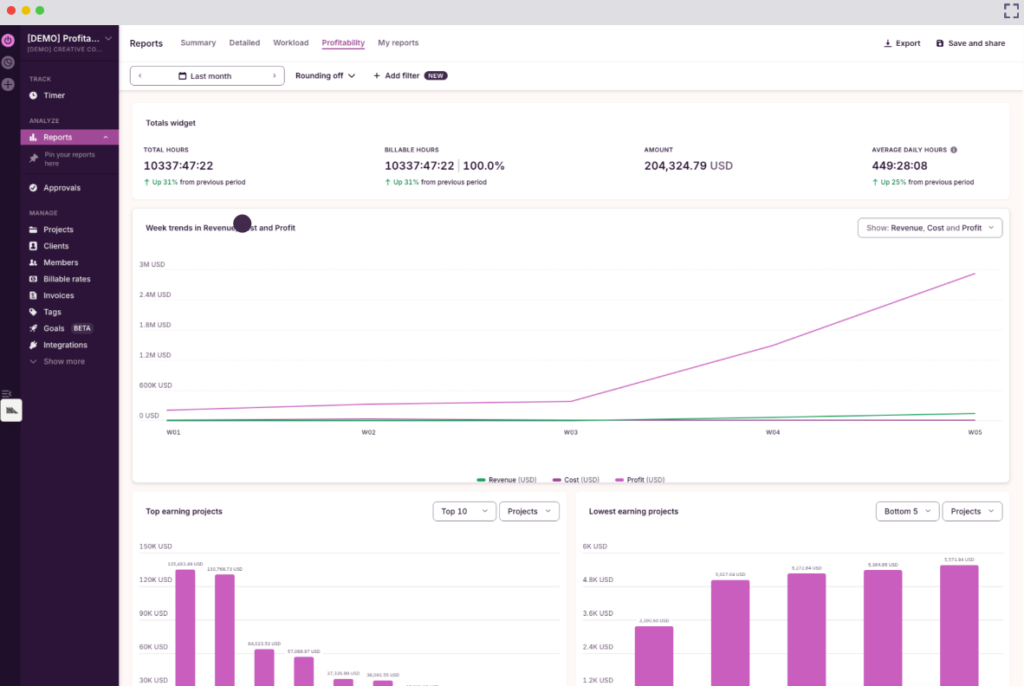
- Track profitability by project, task, client, and team to understand how different factors contribute to your revenue.
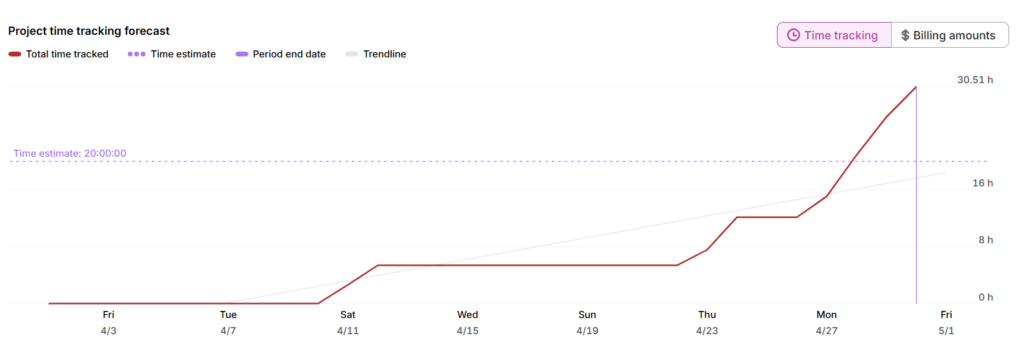
- Monitor project progress and forecast budget usage to understand the costs and timelines behind different types of work.
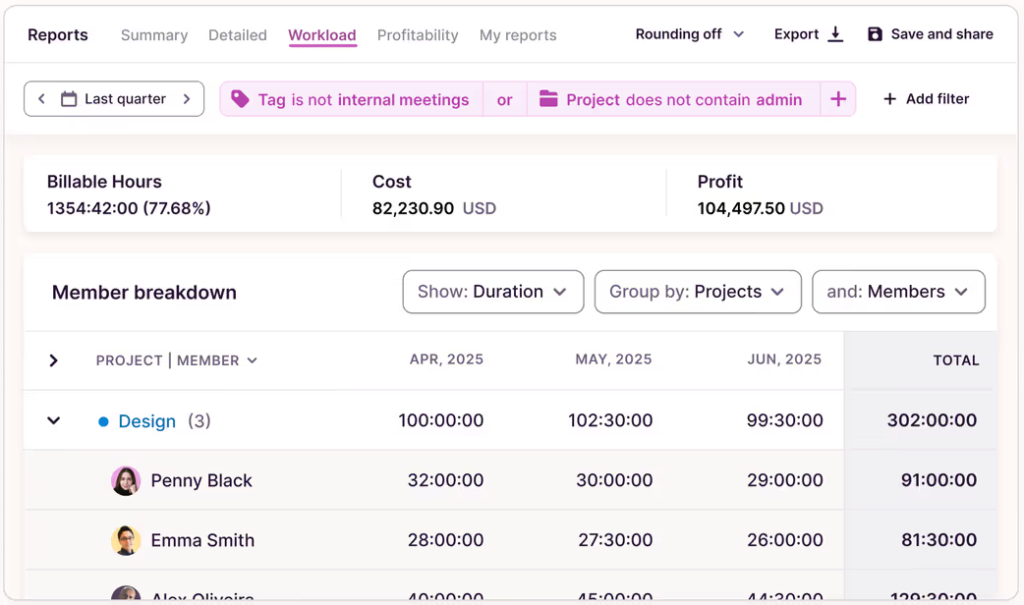
- Compare estimated vs. actual hours to improve project cost forecasts, sharpen your pricing, and streamline scope control.
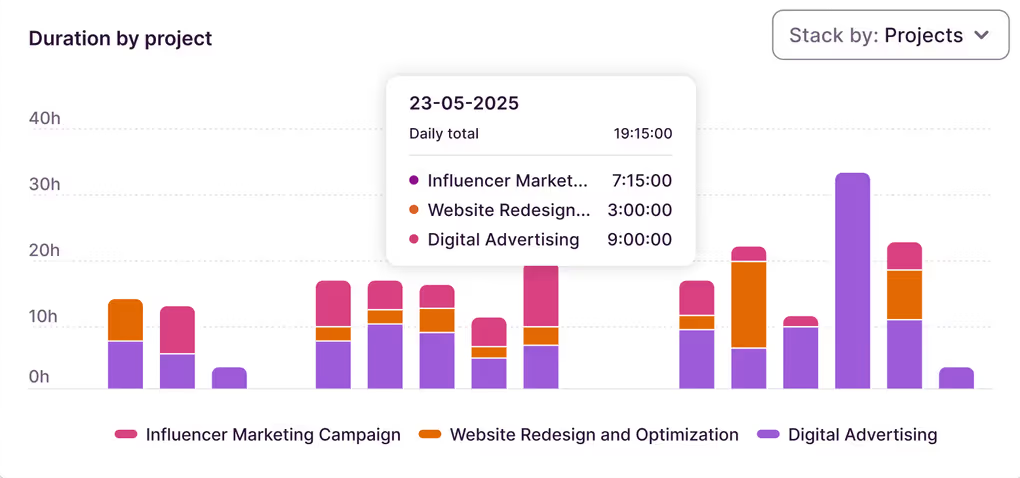
- See how time is distributed across teams, projects, and clients to improve resource allocation and manage time off more effectively.
With Toggl, teams can track time manually or automatically across web, desktop, Android, and iOS apps, with flexible integrations for connecting time data to the rest of the stack.
But unlike Hubstaff or Clokify, employee data is first stored locally on a personal timeline, and people can choose to share which entries get reported to managers.
The key difference: Toggl doesn’t collect surveillance data. Automated time tracking captures activity on a personal timeline stored locally, and that data isn’t shared with managers unless the employee chooses to turn it into a time entry.
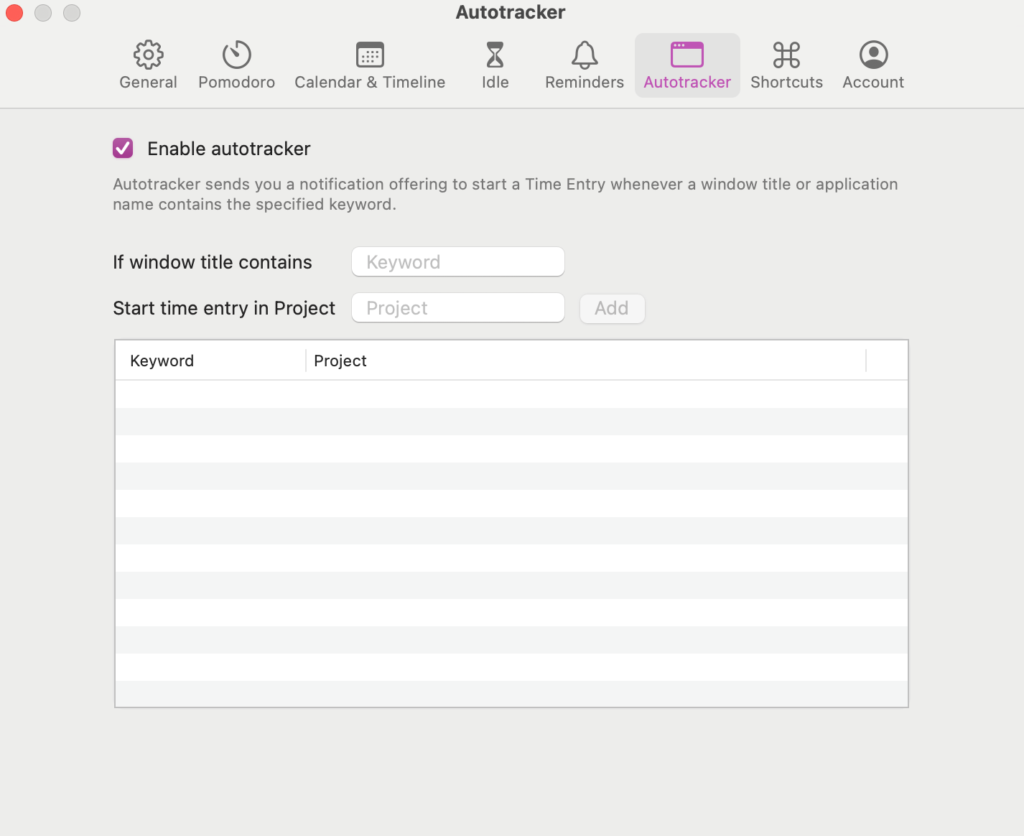
We believe that the team’s productivity hinges on results, not invasive surveillance, which promotes productivity theater and undermines real engagement.
Anti-surveillance case study
Enrique Galindo, Co-Founder and COO of Xmartlabs, came to the same conclusions. His software development company chose Toggl because “trust in the team is paramount,” and they did not want “anything intrusive, like a tool to take screenshots” of employees’ work or potentially sensitive client information.
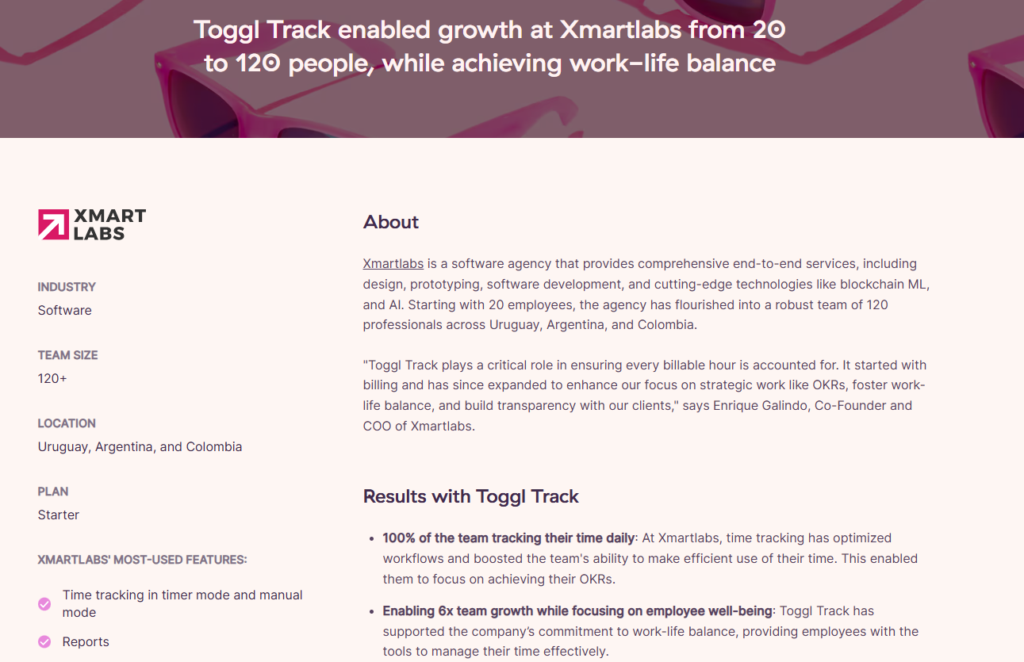
Xmartlabs grew from 20 to 120+ people and achieved 100% daily time tracking adoption because the workforce saw time data as an advantage, not a hindrance to their work.
Apart from client billing, Xmartlabs uses Toggl data to track company goals and individual OKRs. The company can easily see if they waste time on things like meetings, instead of being invested in strategic priorities.
With Toggl, real work becomes visible without making people feel watched.
So, which platform is better: Hubstaff, Clockify, or an alternative?
If you’re still trying to compare Hubstaff vs Clockify, the right choice depends on how much monitoring and feature depth your team needs.
- Choose Hubstaff if you manage field teams or contractors, where GPS tracking and payroll integration are a genuine advantage. It can solve real location-based accountability problems, but the tradeoff is higher cost, more setup, and a much more invasive monitoring experience.
- Go with Clockify if you need flexible time sheets and optional light monitoring. It’s easier to start with and cheaper to scale, but it won’t give you Hubstaff’s depth around workforce or payroll management.
- Choose Toggl if you want time tracking that connects billing, profitability, and capacity without employee surveillance. It gives teams the data to manage work clearly, without relying on screenshots, activity scores, or mouse clicks as proof that work is happening.
For a broader look at the category, compare more Hubstaff alternatives before you commit.
Frequently Asked Questions about Hubstaff and Clockify
Is Hubstaff better than Clockify?
Hubstaff is better than Clockify if you need deeper workforce management features like GPS tracking, geofencing, silent background tracking on devices, regular activity reports, and integrated payroll processing.
Clockify is a better option if you want cheaper, easier time tracking with optional light monitoring. The right choice depends on whether monitoring depth is a real operational need or just a micromanagement tendency.
Does Clockify monitor employees?
Yes, Clockify includes employee monitoring features like visited sites and app tracking, plus desktop screenshots. These features can be turned off by the app administrator, though.
Is Hubstaff free?
No, Hubstaff has no free plan. You can trial it for 14-days for free, but then it’s $4.99/seat per month for two users minimum.
What is the difference between Hubstaff and Clockify?
Clockify and Hubstaff both support manual and automated time tracking. Clockify also adds calendar-based tracking and kiosk tracking, while Hubstaff adds stronger manager controls and an optional always-on background timer.
In terms of employee monitoring, Hubstaff goes much further with screenshots, app and URL tracking, keyboard and mouse activity scores, unusual activity alerts, and engagement benchmarks. Clockify also offers screenshots and app/website tracking, but its monitoring is more light-touch, with more activity data kept private to the user.
Clockify is cheaper and has a free plan for up to five users, which makes it a popular option for freelancers. Hubstaff has no free plan, starts with a two-user minimum, and charges extra for add-ons like GPS tracking, Insights, silent background tracking, extra screenshots, and extended data retention.
Is there a time tracking tool without employee surveillance?
Yes, Toggl is a time tracking and capacity planning tool with a strong anti-surveillance stance. It doesn’t collect any sensitive data like screenshot captures, keyboard strokes, or mouse movements, nor does it restrict employees from reviewing and editing their time data before sharing it with managers.
Is Hubstaff GDPR compliant?
Hubstaff claims to be EU GDPR compliant as it provides a Data Processing Agreement, has a Data Protection Officer, and provides all the required privacy/security controls, such as data retention, deletion, exports, and role-based access.
But the company doesn’t publish any legal certifications from local regulators or share public compliance documentation. If that’s important for your company, verify the claim directly with the vendor.

Elena is a senior content strategist and writer specializing in technology, finance, and people management. With over a decade of experience, she has helped shape the narratives of industry leaders like Xendit, UXCam, and Intellias. Her bylines appear in Tech.Co, The Next Web, and The Huffington Post, while her ghostwritten thought leadership pieces have been featured in Forbes, Smashing Magazine, and VentureBeat. As the lead writer behind HLB Global’s Annual Business Leader Survey, she translates complex data and economic trends into actionable insights for executives in 150+ countries. Armed with a Master’s in Political Science, Elena blends analytical depth with sharp storytelling to create content that matters.