At first glance, Harvest and Hubstaff look like they’re solving the same problem, but really they’re built for two completely different kinds of teams.
Harvest is client billing software that gets you from tracked hours to paid invoice as painlessly as possible. Hubstaff is workforce management software, designed to monitor where your team’s time goes and automate what happens next.
Not sure which one best fits your operations?
- Choose Harvest if you’re concerned about recent price hikes and need a clean time-to-invoice workflow for client billing, without team monitoring features.
- Choose Hubstaff if you manage field teams, contractors, or remote workers who need GPS tracking, monitoring, and payroll integration.
- Consider Toggl if you need Harvest’s billing focus with better time tracking, project profitability reporting, capacity planning, and and no surveillance.
This guide breaks down how these tools compare across a range of key functions like billing, employee monitoring, reporting and more, so you can confidently pick the right option for your team.
Harvest vs Hubstaff: A quick comparison
Before we get into the weeds, here’s a snapshot of both tools at a glance.
| Harvest | Hubstaff | |
| Time tracking | Manual timer, browser extension, mobile app | Manual and automated tracking |
| Employee monitoring | None | Screenshots, app and URL tracking, keyboard/mouse activity |
| GPS & location tracking | None | Yes — GPS routes, geofencing (add-on) |
| Project profitability reporting | Premium plan only | Limited — reporting is monitoring-focused |
| Payroll integration | None | Yes — PayPal, Gusto, Wise |
| Free plan | Yes, for 1 seat and 2 projects | No, just 14-day free trial of paid plans |
| Starting price | From $9/user/month | From $4.99/user/month; Extra features like Screenshots & GPS add-ons from $3.33/seat each |
| Best for | Agencies, consultancies, and freelancers billing clients by the hour | Field teams, contractors, and distributed workforces needing monitoring and payroll |
What Harvest is (and who it’s for)
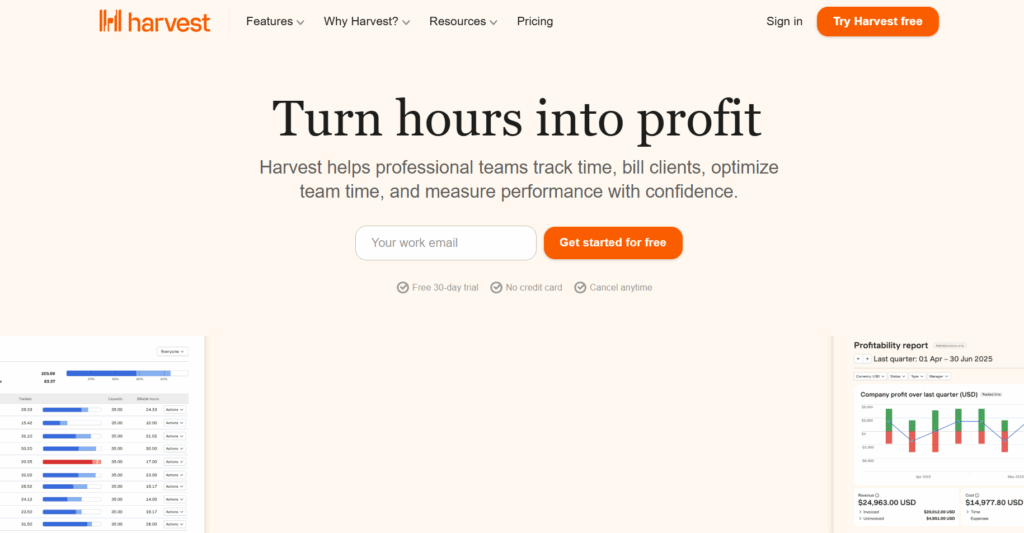
Harvest is a time tracking tool that turns manual time entries into a seamless billing and payment collection process. It lets you log your work hours against projects and turn that time data into insightful reports and professional invoices. You can collect cash without ever leaving the platform.
Who is Harvest for? Agencies, consultancies, and freelancers billing clients by the hour
✅ What Harvest does well
- Your team will probably adopt it: The one-click timer works across desktop, mobile, and browser extension, meaning low friction by design.
- Billing straight from your timesheet: Generate invoices directly from logged hours, with integrated expense tracking and clean separation of billable and non-billable time.
- Faster payments, less chasing: Clients can pay their invoice directly via Stripe or PayPal, without any back and forth.
- Fits into your existing workflow: 50+ native integrations with Xero, QuickBooks, Asana, Trello, Slack, and more.
- Built on trust, not surveillance: No mouse-tracking, screen-recording, or GPS; this is a meaningful differentiator for agencies and professional service teams where trust is non-negotiable.
❌ Where Harvest falls short
- Limited project management tools: Harvest doesn’t offer task dependencies or advanced project budgeting tools beyond basic budget tracking
- No native resource planning: Relies on an integration with partner tool Forecast for capacity reporting and project scheduling and monitoring
- No employee monitoring: If you need to keep tabs on your team, Hubstaff might be better-suited to you
- Per-user pricing adds up fast as teams scale: Starting at $9/user/month, Harvest feels reasonable for small teams, but starts to sting the bigger you grow
If you’re thinking of adopting Harvest, the biggest consideration you’ll face is pricing stability. Following Harvest’s acquisition by Bending Spoons in July 2025, many users have experienced huge, unexpected price hikes, sometimes as much as 10x the expected bill. One Harvest user, who used Harvest occasionally and had a one-seat plan, woke up to this email:
“On your next renewal date, February 13, 2026, your account will be transitioned to a Harvest Enterprise plan with Unlimited usage billing. You will be automatically billed $2,040.22 for your new monthly plan.”
Naturally, Harvest’s new pricing approach creates huge uncertainty around how much you’ll pay (both now and in the future). This has led teams to seek Harvest alternatives in recent months.
What Hubstaff is (and who it’s for)
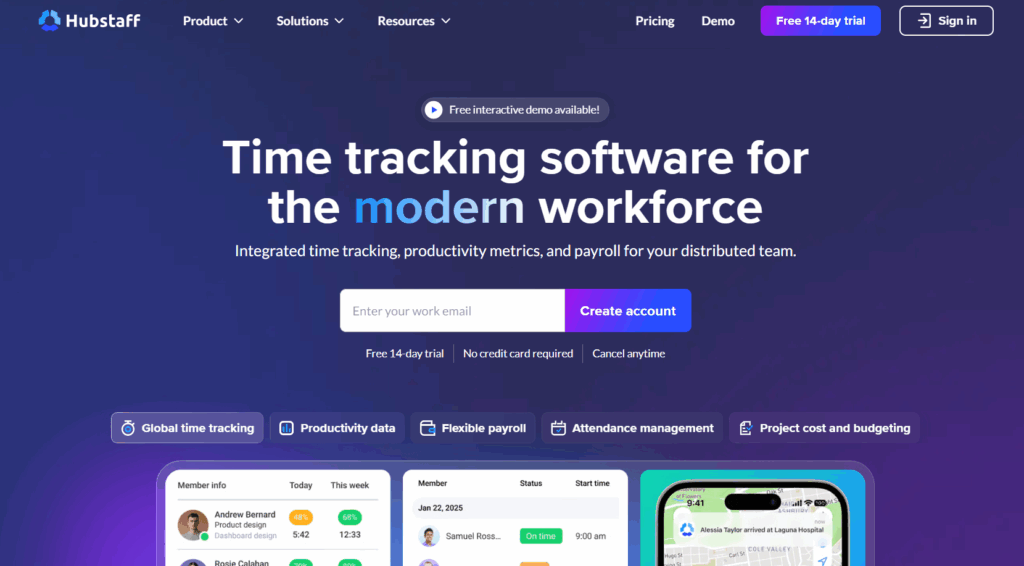
Hubstaff is a full-bodied workforce management and employee monitoring platform. Time tracking is just one part of a much broader stack that spans employee scheduling, shift management, GPS routing, activity monitoring, automated payroll, and workforce analytics. Where Harvest stops at billing, Hubstaff is designed to manage the entire operational lifecycle of a distributed or field-based team.
Who is Hubstaff for? Field teams, contractors, and distributed workforces needing employee monitoring and payroll
✅ What Hubstaff does well
- No manual time entry, ever: Automatic tracking runs across desktop, mobile, Windows, iOS, and Android. The platform captures hours without anyone having to remember to log them.
- Provides operational visibility for field teams: GPS routes and timestamps are logged automatically, with auto clock-in/out triggered by location, so you always know where your team is and when they arrived.
- Offers proof of work, on your terms: Optional screenshots capture up to three images per 10-minute window, with role-based controls to enable, disable, blur, or store them securely.
- Shows where working hours go: App and URL tracking gives managers a clear picture of where team time goes.
- Captures all idle time: Keyboard and mouse activity monitoring distinguishes active work from inactivity, reducing time theft without micromanaging.
- Runs payroll on autopilot: Tracked hours flow directly into payment runs via PayPal, Wise, or Gusto, without the need to manually reconcile anything.
- Manages scheduling and time off in one place: Shift creation, employee scheduling, and PTO tracking are built into the platform, not bolted on.
- Delivers deep operational insights: Robust reporting reveals activity, project progress, and logged hours in detail, which are particularly valuable for logistics, delivery, or contractor-heavy operations where accountability is non-negotiable.
❌ Where Hubstaff falls short
- Unpredictable pricing as you scale: Add-on pricing can balloon costs fast. GPS tracking, extra screenshots, and productivity monitoring features are all gated behind additional fees.
- Limited integrations: Hubstaff boasts about 30 integrations, noticeably fewer than Harvest’s ecosystem. Native QuickBooks sync isn’t available on lower paid tiers.
- Unintuitive UI: Users complain that navigation can be cumbersome. Some report difficulty finding features or knowing how much they owe their employees.
- Reporting isn’t optimized for profitability: Reports are built around monitoring data, so if your main need is understanding which client engagements make the most money, Hubstaff’s dashboard won’t give you a clean answer.
- Employee monitoring features: While surveillance is sometimes required in field worker or regulated industries, they can create real, measurable trust issues in knowledge worker environments. That’s why we at Toggl are so staunchly anti-surveillance — always have been, always will be.
Harvest vs Hubstaff: A detailed comparison
With all their differences, Harvest and Hubstaff do have some feature overlap. To help you decide what you need, this section leans on Toggl’s 20+ years of expertise as time tracking leaders. Learn how each tool compares across three of the most important factors — billing ease and accuracy, monitoring data and reporting, and pricing.
Billing: which tool provides easier, more accurate billing?
Harvest is the better option if your goal is to minimize time and friction from deliverable to paid invoice.
Although both Harvest and Hubstaff turn tracked time into invoices, they use opposite methods to support entirely different types of users.
Harvest’s approach to billing
Harvest collapses the time from work done to cash paid better than almost any other tool on the market. The entire product is built around the time tracking to invoicing billing cycle.
How it works:
- When a timer starts, the platform logs both billable and non-billable hours against a project and separates it cleanly into timesheets, making accurate time tracking invoicing effortless.
- A branded invoice is generated based on those timesheets.
- Stripe or PayPal collects payment, without the client leaving the app.
There’s no exporting, or copy-pasting hours into a separate tool. This streamlined approach to billing makes Harvest one of the better time billing software options for agencies and professional services teams.
Hubstaff’s approach to billing
Hubstaff treats billing like a bit more of an afterthought than the focus of the platform. It turns tracked time into invoices, but this is just one feature within a larger, more comprehensive workforce management platform. The invoicing workflow is less refined, and the tool’s main strength lies elsewhere.
Monitoring: what does Hubstaff capture that Harvest doesn’t?
If you’re a knowledge worker, Harvest is the non-intrusive platform you need. But if you operate in an industry with a genuine need for employee monitoring, Hubstaff is a no-brainer.
Hubstaff’s approach to employee monitoring
Hubstaff offers a range of monitoring features that makes them well-suited for construction crews, delivery fleets, and contractor-heavy operations. These are all industries where surveillance is a requirement.
In Hubstaff, you can capture:
- Up to three screenshots per 10-minute window
- App and URL activity tracking, logging what team members are doing on their devices
- Keyboard and mouse activity levels that generate productivity monitoring scores
- GPS tracking with full routes and timestamps for field-based staff
- Geofencing that triggers automatic clock-in/out when employees enter or leave a job site
- Real-time employee activity dashboards showing who’s working, on what, and where
Harvest’s approach to employee monitoring
In the context of knowledge workers like agencies, design firms, and legal teams, surveillance features feel invasive. These teams are built on trust, and nothing erodes that faster than knowing someone’s counting your keystrokes.
Unlike Hubstaff, Harvest doesn’t capture any employee activity, just their own timer. This makes Harvest better-suited to knowledge workers than Hubstaff.
Pricing: How do Harvest and Hubstaff compare on cost?
Hubstaff starts off cheaper, but balloons faster thanks to add-ons. Meanwhile, Harvest’s recent price hikes make it a more uncertain choice, and an automatic “No!” to some.
Harvest’s pricing summary
| Free Plan | Team Plan | Enterprise Plan |
| $0 | $9/user/month | $14/user/month |
| 1 seat, 2 projects | Unlimited seats | Unlimited seats |
| Forever | 30-day free trial | 30-day free trial |
Since Harvest’s acquisition by Bending Spoons in July 2025, its pricing has been the subject of frustration among users.
Bending Spoons is an Italian tech conglomerate that acquires established digital products, restructures them for profitability, and holds them long-term. Its portfolio includes the likes of Evernote, Vimeo, and WeTransfer. In each case, users reported significant pricing changes post-acquisition.
Harvest users are already seeing this play out. Documented Reddit posts show renewals jumping from $80/month to $1,900/month in some cases, and from $130/year to $168/year plus $720 in additional usage fees in others.
Pricing trajectory is a real factor to consider before committing to any tool long-term, and we’d be remiss not to warn you about it.
Hubstaff’s pricing summary
| Free Plan | Starter Plan | Grow Plan | Team Plan | Enterprise Plan |
| ❌ | $4.99/user/month | $7.50/user/month | $10/user/month | $25/user/month, billed annually |
| ❌ | 2-seat minimum | 2-seat minimum | 2-seat minimum | |
| ❌ | 14-day free trial | 14-day free trial | 14-day free trial | Via sales demo only |
At first glance, Hubstaff might seem like the better deal. But remember: Hubstaff offers select features like Insights or Tasks, as add-ons from $2.50/user/month, which can bloat costs fast if you need a lot of customization or have a large team.
What if neither Harvest or Hubstaff feels quite right?
If you need Harvest’s billing focus with better time tracking features, capacity planning, and project profitability reporting — and without either Harvest’s pricing uncertainty or Hubstaff’s monitoring features — Toggl is worth a look.
Toggl offers the billing-centred workflow Harvest users rely on, without the pricing uncertainty. It’s also a legitimate Hubstaff alternative for knowledge worker teams who’ve outgrown monitoring and are ready to transition into a more trust-based time tracker.
Built for freelancers, agencies, and consultancies, Toggl is an automatic time tracking tool that transforms your time data into powerful business insights, helping you make better capacity decisions, increase profitability, optimize pricing, and manage projects and teams with ease. It’s also fully GDPR-compliant, which is crucial for agencies working with European clients.
Set billing rates that reflect how your team works
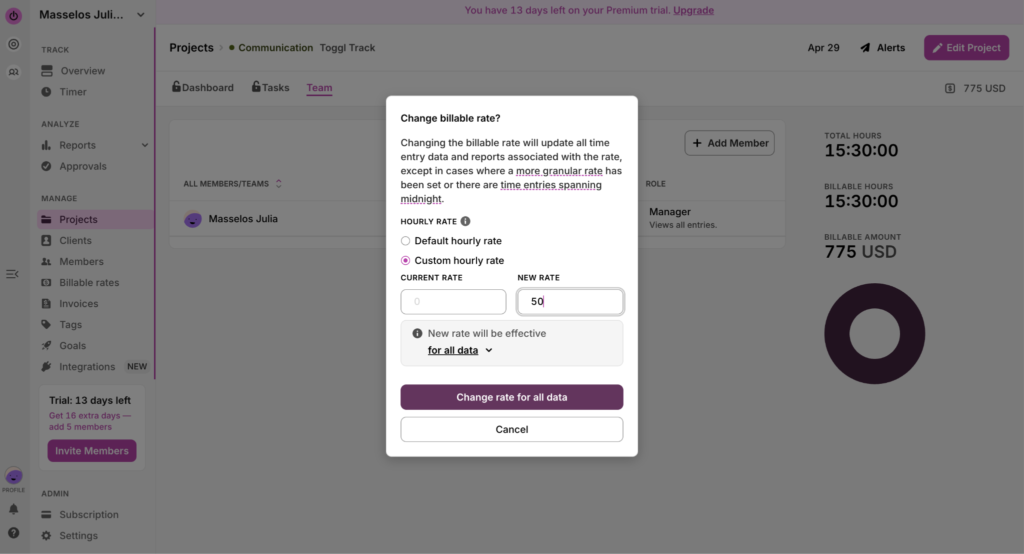
Toggl lets you set billing rates at workspace, project, team member, and task level, so you can fine-tune rates to any seniority or task-complexity level.
Head to Projects, and then click on the Teams sub-tab. Click on the dash under the Rate column to set the hourly rate per team member.
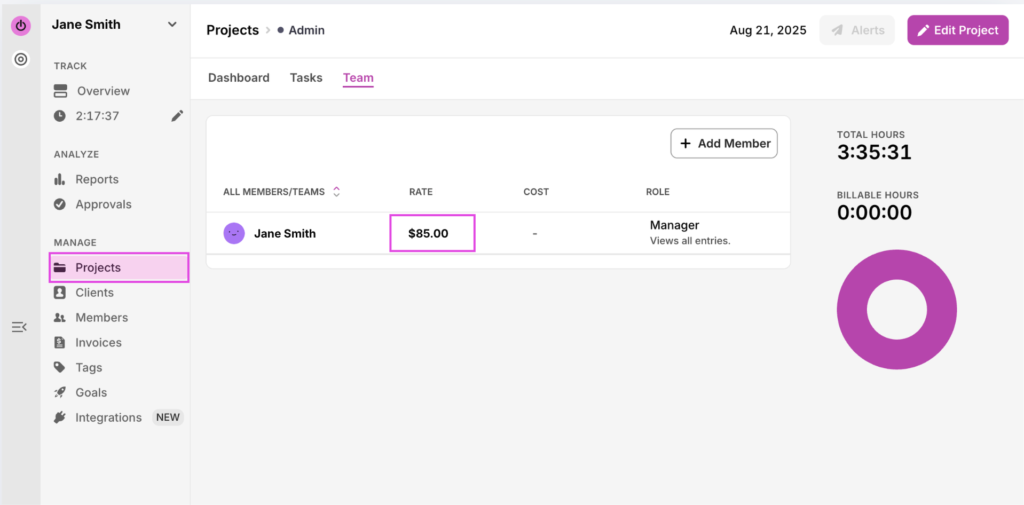
You can adjust the billable rate anytime from within the Project itself as well as set custom and default hourly rates. Before submitting, you can choose if you want to apply the new rate to all historic entries, or just going forward.
| Toggl case study Billing accurately can make a huge difference to your bottom line without changing anything else about your workflow or small business setup — a lesson Chris Harvey, CEO of law firm Harvey Esquire learned when his team switched to Toggl. “Our lifeblood is the billable hour,” he says. And with Toggl, his team recaptured 25% of billable hours that had previously gone unaccounted for. An inaccurate billing system is literally leaking money that could be going directly to your pocket. |
Connect project profitability to real time-data
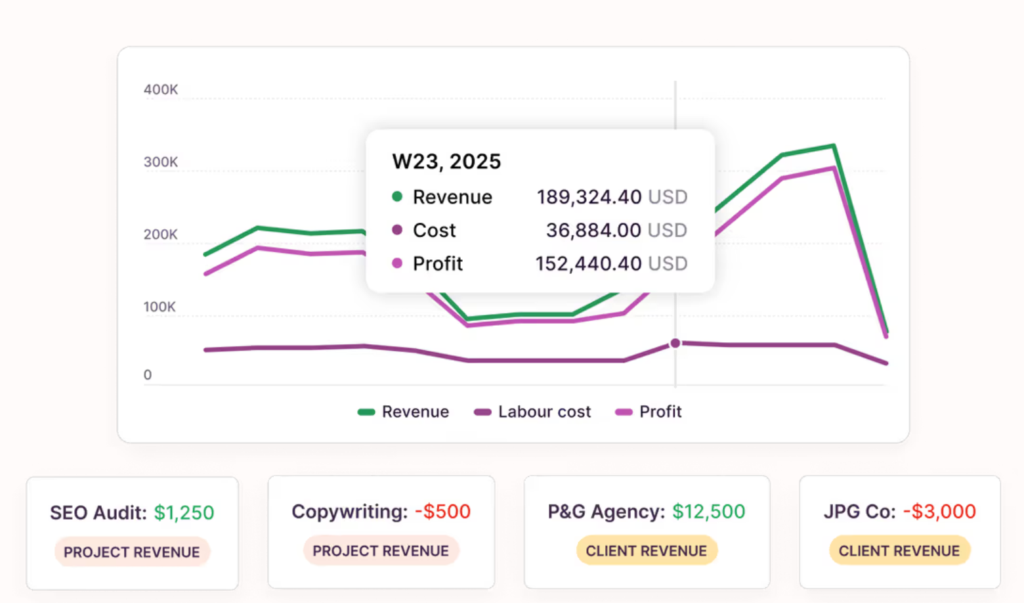
In Toggl, the Profitability report shows you revenue vs cost, broken down per Client or per Project, so you can see at a glance which type of assignments bring the most to your bottom line. Spoiler: it isn’t always the one with the fattest retainer!
| Toggl case study Darrell Keezer, CEO of Candybox Marketing, discovered through Toggl data that any project under $20,000 consistently led to a loss. Without that visibility, his team had no way of knowing. “If we didn’t have the data that Toggl provided, we might still be doing unprofitable projects today.” Armed with accurate time reporting data, Candybox won a $120k contract against competitors quoting $45k–$50k, because they could price themselves fairly and competitively with confidence. These data-driven project budgeting decisions also underpin their 40% year-over-year growth. |
Automated tracking that stays private
Toggl’s automated time tracking works in the background as you move through your work day.
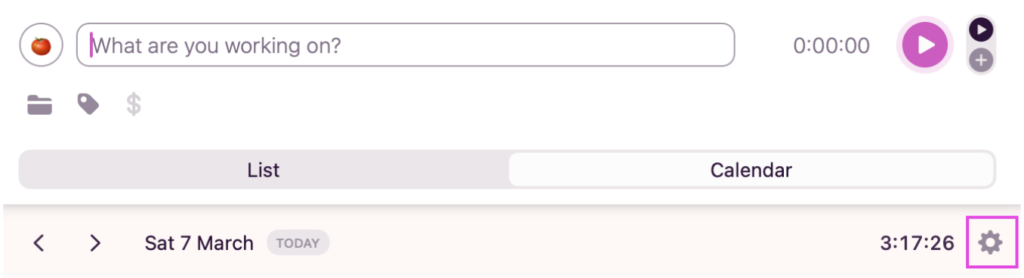
To activate it, open the Desktop app, head to the Calendar view, and click on the settings icon.
Then, select the Autotracker subtab, tick Enable Autotracker, and populate the screen with apps and webpages you’d like to track time for.
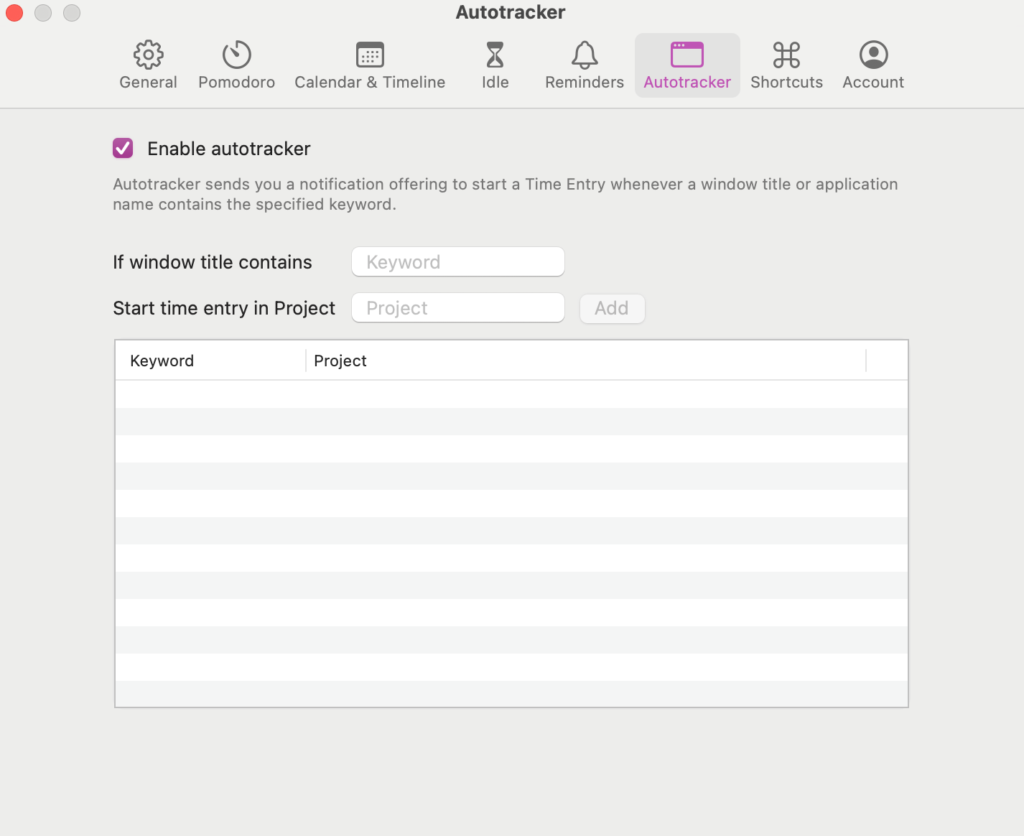
Toggl runs in the background, recording only the time spent on the sites and apps you defined. The result is a timeline of your workday, color-coded by activity.
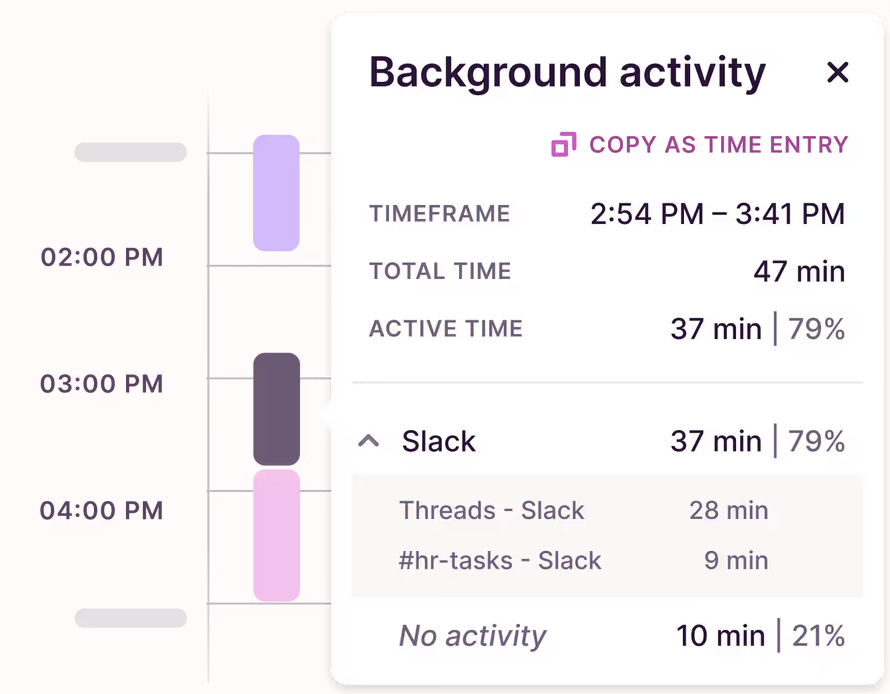
Before turning your time entries into timesheets, you can decide which entries to publish and which to keep private, empowering every team member with privacy and trust to report on their own time.
| Toggl case study Enrique Galindo, COO of 120-person software agency Xmartlabs was looking for a time tracking tool which aligned with his leadership value that “trust in the team is paramount.” Toggl’s anti-surveillance approach won him over. “We didn’t want anything intrusive, like a tool to take screenshots of what our employees are working on,” he shares. |
Flexible integrations, with GDPR-compliance
Toggl plays exceptionally well with others. It integrates with your favorite tools tools, including Jira, Asana, GitHub, Google Calendar, and more (via native integrations and browser extensions)
Which tool should you choose?
If you’re still undecided, we’ve put together a quick summary cheat-sheet to help you pick the best tool for your needs.
Choose Harvest if:
- You run an agency, consultancy, or professional services team
- The core workflow is billing clients by the hour
- Accurate billing is vital to your operations
See how Toggl stacks up as a Harvest alternative
Choose Hubstaff if:
- You manage field teams, contractors, or logistics operations
- GPS tracking, monitoring, and payroll integration are valid operational requirements
- You don’t need robust profitability reporting features
See how Toggl stacks up as a Hubstaff alternative
Choose Toggl if:
- You run an agency, consultancy, or professional services team
- A powerful, private, automated timer makes sense for your knowledge workers
- You need capacity planning based on reliable work hours and time-off data
- You want time tracking to run alongside your tasks and projects
- Detailed project profitability reporting is important to you
- You’re anti-surveillance and trust your team implicitly
- You value stable pricing (no surprise hikes)
Level-up your time data with Toggl
The companies that scale aren’t working more hours — they’re working with better time-data.
Toggl’s simple yet powerful time tracker couples ease of use and a user-friendly, intuitive interface with robust reporting and analytics that will help you:
- Make better business decisions
- Increase your productivity
- Broaden your margins
Built for teams that run on trust, create your free Toggl account and see for yourself — no credit card required.
Frequently asked questions about Harvest vs. Hubstaff
Is Harvest better than Hubstaff?
Harvest is usually a better fit than Hubstaff if you need time tracking software optimized for client billing. It’s the stronger choice for agencies, consultancies, and freelancers who need a clean time-to-invoice workflow. Hubstaff is a workforce management platform built around employee monitoring, GPS tracking, and payroll, so it’s better suited to field teams, contractors, and distributed operations where visibility and accountability are operational requirements.
Does Harvest have employee monitoring features?
No, Harvest doesn’t have employee monitoring features. It doesn’t capture any screenshots, doesn’t record any mouse, URL, or keyboard activity, and doesn’t do any GPS or location monitoring of any kind. If employee monitoring is a requirement for your operation, you’ll need to look at a tool like Hubstaff instead.
What’s the difference between Harvest and Hubstaff?
The difference between Harvest and Hubstaff is their fundamental purpose and the type of user they serve. Harvest is a client billing software with time tracking built-in. It helps users turn tracked billable hours into paid invoices. Hubstaff is a workforce management and employee monitoring platform, where time tracking is one component of a broader stack that includes GPS tracking, screenshots, activity monitoring, and payroll integration.
What is the best alternative to Harvest?
The best alternative to Harvest will depend on your specific needs. For teams that want Harvest’s billing-focused workflow with in-depth project profitability reporting and more reliable long-term pricing, Toggl is the strongest alternative. It offers private, automated time tracking, capacity planning, flexible integrations, billable rates at project, team, and task level, and no employee surveillance.
Does Hubstaff have invoicing features?
Yes, Hubstaff does have invoicing features. Tracked time can be turned into invoices and sent to clients directly from the platform. But invoicing isn’t Hubstaff’s primary focus. It sits within a larger workforce management platform, and the invoicing workflow is less refined than in tools built specifically for client billing.
Who owns Harvest time tracking?
Bending Spoons owns Harvest time tracking. The Italian tech conglomerate acquired Harvest in July 2025. The company also owns Evernote, Vimeo, WeTransfer, Eventbrite, and Airtable, among others. The company acquires established digital products, restructures them for profitability, and then holds them long-term. Following the acquisition, some Harvest users have reported significant price increases at renewal, which is a factor worth considering for any long-term commitment to the platform.

Julia Masselos is a remote work expert and digital nomad with 5 years experience as a B2B SaaS writer. She holds two science degrees Edinburgh and Newcastle universities, and loves writing about STEM, productivity, and the future of work. When she's not working, you'll find her out with friends, solo in nature, or hanging out in a coffee shop.