You’ve probably already found your accounting software of choice — something like Xero or QuickBooks that handles your ledger and keeps the financial data clean.
But those systems aren’t built to help you stay ahead of client deadlines, keep your team rowing in the same direction, and manage tasks efficiently. For that, you need full-bodied project management software for accountants — something that keeps you on top of your workload, with insights into what the rest of the team is doing, too.
This in-depth guide helps you make sense of the crowded project management software market. We’ve spotlighted nine different options — a mix of all-purpose project management tools, full practice management solutions, and specialist accounting workflow tools.
Here are all the options we’ll discuss:
- Toggl 2.0
- Asana
- Karbon
- TaxDome
- Canopy
- Jetpack Workflow
- Financial Cents
- Double
- Mango
Key takeaways
- Project management software for accountants gives you a structured way to plan client work, track progress, and keep your team on the same page. It fills the gaps your accounting system can’t — things like deadlines, task status, workflows, and the constant movement of client deliverables.
- Some firms use general-purpose tools to manage their accounting projects because they already live in them elsewhere in the business. That can work, especially if you want something flexible and familiar.
- Others gravitate toward accounting practice management software that bundles everything into one space. These tools offer workflows, client portals, document storage, billing, and sometimes tax-specific features, all in the same system.
- Accountants wouldn’t mess up the numbers on a tax return, but the same can’t be said of time forecasting. Without actual time data, you’re guessing how long work takes, which leads to faulty estimates and fuzzy capacity planning.
- Toggl 2.0 is the solution for accountants who want project precision. It’s built with time tracking at its core, so your project planning, scheduling, and resource management are based on rock-solid time data.
5 must-have features in any accounting project management software
Most accounting teams don’t need hundreds of features; they just need tools that move their work forward. Here are some important ones to consider:
- Built-in time tracking: Time data is the backbone of reliable planning. You can’t plan client work, price services, or forecast capacity without knowing how long tasks actually take. Look for tools that embed time tracking functionality directly in the software and make it central to project planning. If it’s only available as an add-on or requires a clunky integration to a third-party solution, consider that as a red flag.
- Clear workflow templates: Month-end close, payroll cycles, entity setup, sales tax filings — the best tools let you standardize all of these core accounting processes instead of rebuilding them every time.
- Recurring task automation: Accounting work is repetitive by nature. Your software should schedule recurring jobs, send reminders, and handle handoffs automatically.
- Capacity visibility: When deadlines loom, you need to see who’s overloaded and who you can shift work to. A live view of team availability keeps client delivery predictable.
- Client collaboration tools: You might hand over perfect figures to your clients and save some money along the way. But if your tool doesn’t make project progress easy to share, you’ll raise their stress levels (and yours).
9 best project management software for accountants
Now that you know the basics, let’s explore the actual tools. Note that the first two solutions are general project management and capacity platforms can serve the needs of accountants and finance teams, while the others are more specialized (most falling into the “practice management software” category).
1. Toggl 2.0
Best for: Accounting teams who want accurate, time-driven planning and capacity visibility
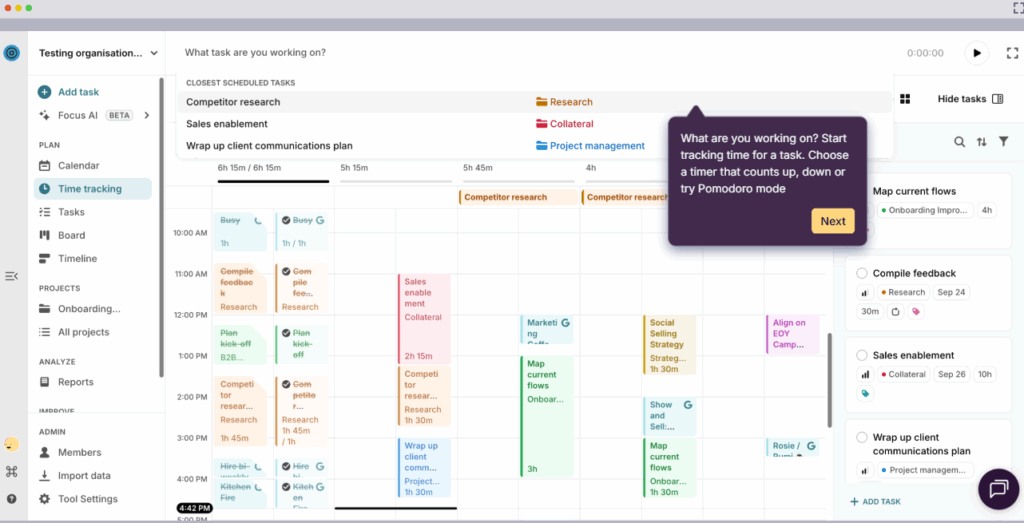
Toggl 2.0 is a planning and capacity management tool built on a foundation of your time data. It gives accountants and finance professionals a clear, realistic way to organize client work based on how long everything takes.
Where most project management platforms offer time tracking as a bolt-on feature, we’ve built our entire platform around it. Why? Because we know from experience that project plans shouldn’t be hashed together with a collection of estimates and guesswork.
Instead, Toggl 2.0 uses your real tracked hours to show and prove how much work your accounting team can actually take on. That makes it particularly useful for firms with recurring cycles like month-end close, payroll runs, sales tax filings, and client onboarding.
Once you have true time clarity into your routine operations, client management becomes a breeze. There’s no more worrying about missed deadline conversations or discovering halfway through a job that you’ve underpriced the work.
And with setup that takes minutes, not weeks, even small teams get instant visibility into their workload. You can keep your existing accounting software exactly where it is. Toggl Focus simply adds the planning precision your ledger system can’t.
Key features
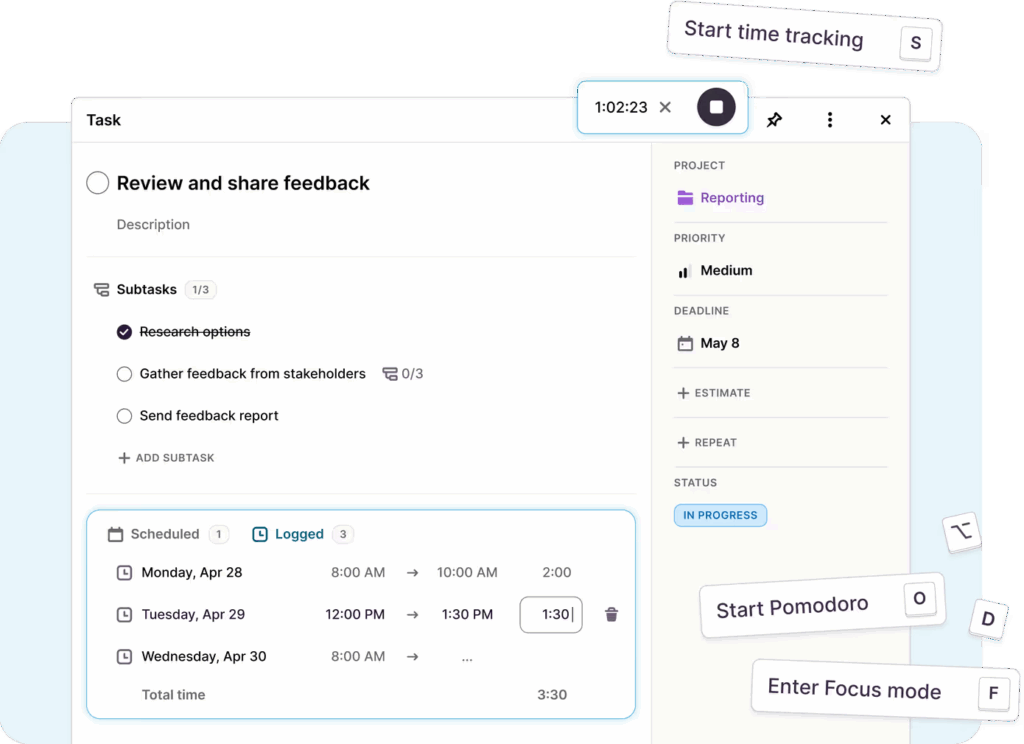
- Built-in one-click time tracking: Track time from your preferred device. Reminders prompt your team to log time daily or weekly, and required fields check that every entry includes the right client, project, task, and notes.
- Pomodoro timer for deep-focus work: Use built-in Pomodoro sessions to stay focused during intense accounting tasks like reconciliations or tax prep. Great for reducing distractions and context switching.
- Billable vs. non-billable tracking: Mark entries as non-billable or billable hours, assign hourly rates per client or project, and track earned revenue in real time.
- Clients, projects, tasks, and tags: Organize work by creating an accounting-friendly hierarchy for bookkeeping cycles, tax filings, payroll runs, month-end close, and advisory projects.
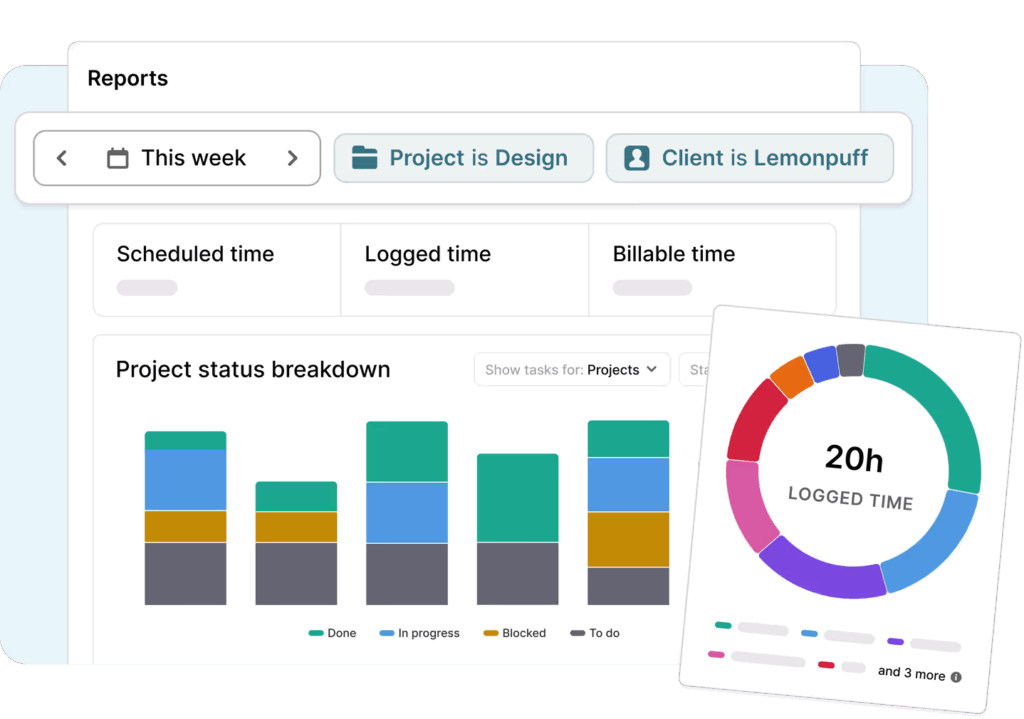
- Reporting: Generate summary or detailed reports by client, project, task, or timeframe, all perfect for billing transparency or profitability analysis.
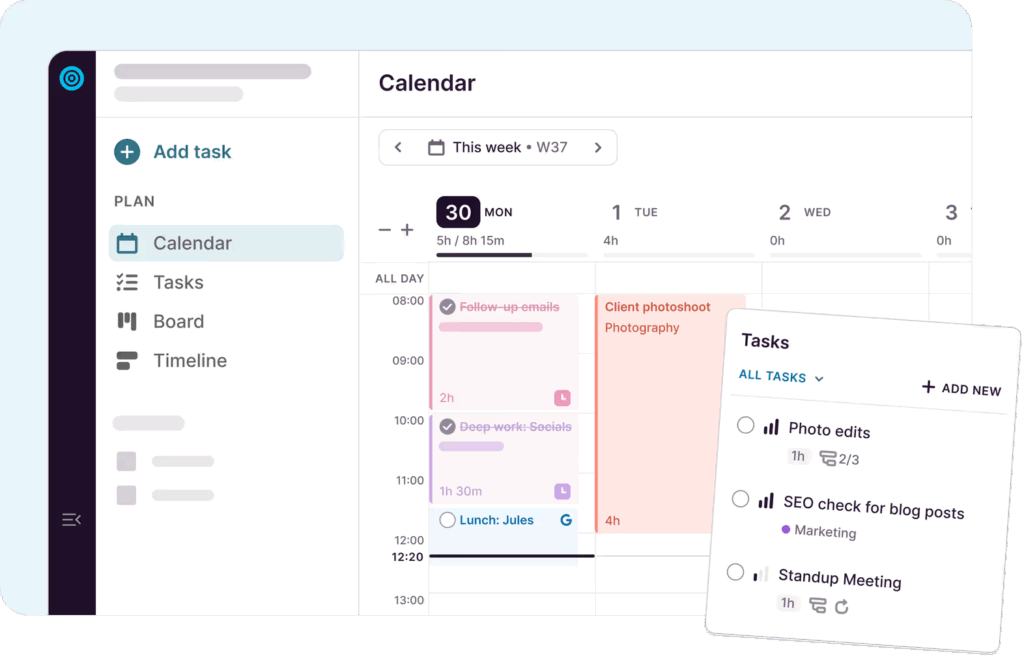
- Capacity and workload visibility: See who’s overloaded, who has availability, and when your team hits capacity limits, all based on real tracked time.
- Enterprise-grade security: ISO 27001–certified infrastructure, encryption, and restricted access controls to protect sensitive financial data.
User reviews
“Switching to Toggl has been one of the best decisions for our team. From the moment we started using it, the platform’s intuitive and user-friendly interface stood out, making it incredibly easy to track time and manage projects. The detailed, customizable reports provide invaluable insights into our productivity and project progress, helping us identify areas for improvement and celebrate our successes.” — Yugo M., a small business founder
“Toggl 2.0 is amazing. The UX is perfect and matches my workflow in a shocking way!” — Toggl Community feedback
Pricing
- Free: For up to five users. Includes time tracking for finance teams, simple planning tools, personal productivity insights, and core scheduling essentials.
- Starter: $9 per user/mo. Adds smarter planning, capacity basics, like PTO, public holidays, and flexible hours, and team visibility.
- Premium: $20 per user/mo. Adds full capacity management.
- Enterprise: Custom pricing is available for larger organizations needing scalable support.

2. Asana
Best for: Teams willing to adapt familiar general-purpose project management software to their accounting workflows
(Source: Asana)
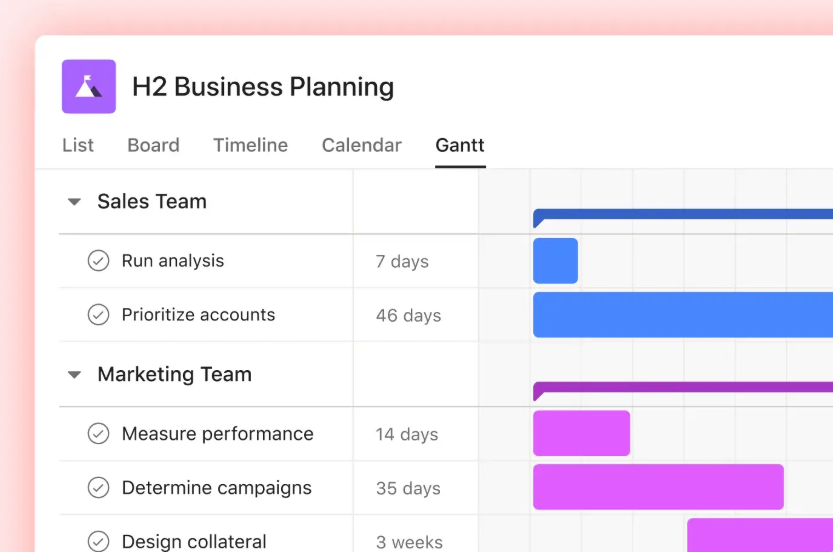
Asana is a flexible, general-purpose project management tool that works for almost any team, including accounting and finance.
As it’s not a niche software, it doesn’t come preloaded with anything accounting-centric like your tax-firm workflows or compliance deadlines. But if your firm works closely with other departments (think operations, advisory, consulting, admin), or you simply need a clean, adaptable workspace for task management and keeping deadlines under control, Asana can more than hold its own.
As a bonus: Asana’s famous celebration creatures occasionally fly across your screen when you complete a task. So, when you finally check off that umpteenth payroll run … a surprise unicorn swooping across your monitor is honestly kinda charming.
Key features
- Clear task dependencies: Map out multi-step processes like month-end close or audit prep.
- Reusable templates for finance workflows: Use Asana’s built-in finance templates or build your own for recurring tasks like budget planning or client deliverables.
- Automations that reduce manual work: Set rules to auto-assign tasks, move work between stages, or update statuses when client data or approvals come in.
- Workload view for balancing your team’s schedule: Get a visual plan of who’s overloaded during tax season and who has room for a new client.
- Flexible views for planning and tracking work: Switch between lists, boards, calendars, and project timelines depending on the workflow, from recurring bookkeeping tasks to ad-hoc internal projects.
- Strong cross-functional collaboration: Stay connected using a neat collection of comments, @mentions, shared dashboards, and integrations with tools like Slack and Google Workspace to coordinate with other departments.
User reviews
“As an accountant, I needed to be able to handle tasks and projects that I could program to recur on weekly, monthly, quarterly, etc. Asana does that AND has a great mobile platform. Exactly what I needed!” — Lyz K., accounting president for a small business
“Great for organizing daily, monthly, or yearly tasks for finance and accounting teams.” — Financial services user
Pricing
- Free trial for 30 days
- Asana Personal is available as a free tier
- Paid plans from $10.99 per user/mo
- 4 paid plans available: Starter, Advanced, Enterprise, and Enterprise+
3. TaxDome
Best for: Firms wanting an all-in-one practice management suite
Source: TaxDome
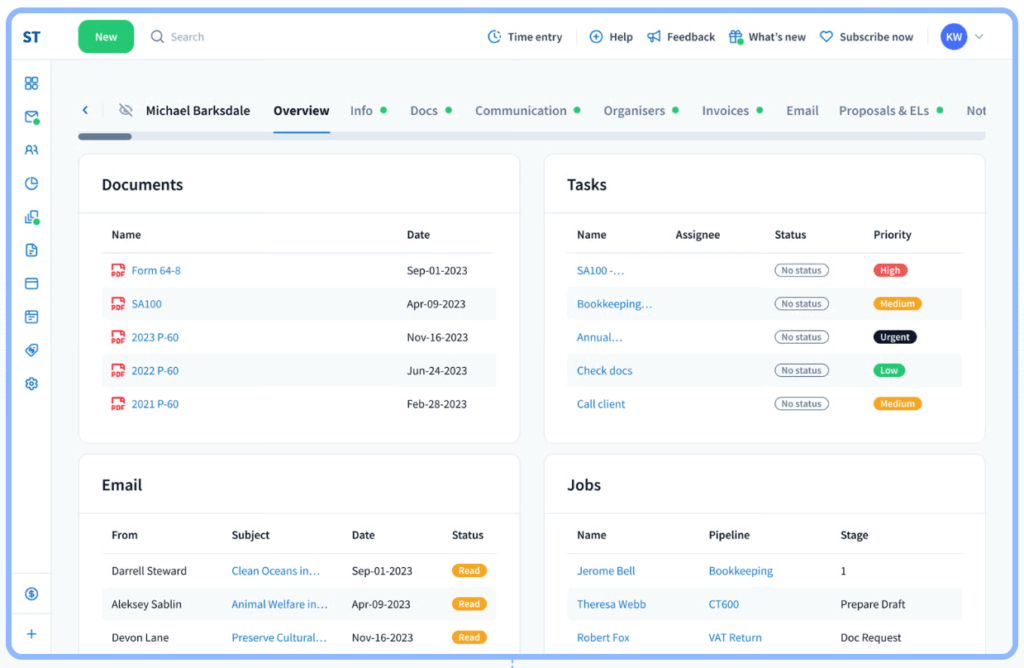
TaxDome is an all-in-one practice management platform built specifically for accounting, tax, bookkeeping, and professional services firms. Rather than working across dozens of generic tools (CRM + file-storage + emails + time tracking + billing), TaxDome is designed from the ground up to handle everything: client and document management, workflow automation, secure client portals, billing and payments, and firm-wide collaboration.
Because of that, many small and mid-sized firms, from solo practices to teams of 10-50+, rely on it to centralize their operations and reduce their client admin overhead.
Key features
- Client portal: Enable your clients to upload documents, answer organizers, e-sign forms, pay invoices, and message you in one secure spot.
- Automated workflows for recurring services: Build pipelines for tax prep, bookkeeping, payroll, whatever you do on repeat.
- Document management built for accountants: Store files, manage version histories, organize folders, and collect signatures in one place.
- Built-in billing and payments: Create proposals, send invoices, and collect payments (via Stripe and others) without needing an external billing system. You can even automate recurring invoices for ongoing services.
- Tight integrations with tax and accounting tools: Plug into popular tax software, payment processors, IRS transcripts, Companies House, QuickBooks Online, and more to keep your data flowing.
- Team member collaboration: Assign and track tasks to accounting team members (with configurable permissions), so you can see who’s doing what across the firm.
User reviews
“We’ve been using TaxDome for our accounting firm for over a year. The all-in-one platform eliminated the need to juggle multiple tools — everything from secure messaging and e-signatures to task tracking and client portals is right here in one place.” — Jason L., a small business owner
“We’ve been using TaxDome for 6 months now, and it’s completely transformed the way we manage our tax and accounting practice. From client communication to workflow automation, TaxDome has streamlined every part of our operations.” — Candy P., a bookkeeper and tax preparer
Pricing
- Plans available with 1-3 year commitments
- Plans from $700 per seat/yr with a 3-year commitment
- 3 plans available: Essentials, Pro, and Business
4. Karbon
Best for: accounting firms that want deep visibility into every engagement and tight internal workflow control
(Source: Karbon)
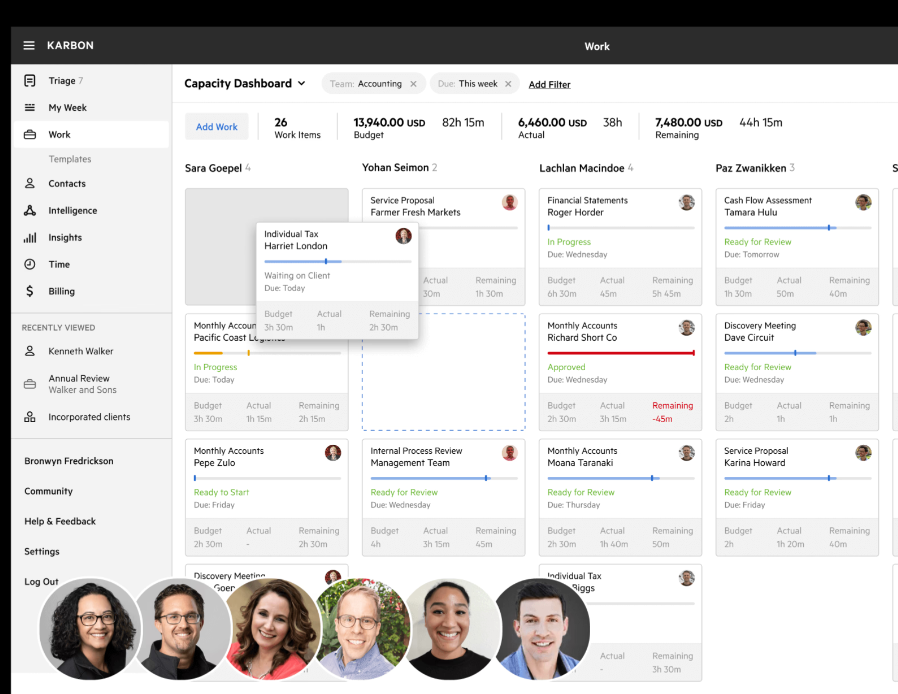
Karbon is a cloud-based practice management platform built for the rhythm of accounting work. Instead of scattering everything across inboxes and spreadsheets, Karbon pulls everything together so your team always knows:
- Where each client engagement stands
- What’s blocking month-end close
- Which tax returns are stuck waiting for documents
- Who’s overloaded heading into a busy deadline period.
Overall, Karbon is a good shout if you want deep internal visibility of your accounting work — with the structure firms need to stay compliant and hit statutory deadlines.
Key features
- Karbon Practice Intelligence: Get pre-modeled dashboards and real-time reporting on productivity, realization, WIP, time entry trends, and staff efficiency.
- Kanban view for cyclical work: Visualize every engagement, such as tax returns, monthly bookkeeping, audits, payroll cycles, in a Kanban board built for accounting workflows.
- Leaderboards: Track who’s completing the most jobs and which clients consume the most time.
- Global search across all clients, emails, documents, and jobs: Find anything, an email thread, a missing W-9, payroll notes, last year’s tax organizer, in seconds.
- Client portal: Give clients a single, secure place to upload files and make requests. You can also use this space to share updates with them.
- Integrations with accounting tools: Sync client data and automate workflows with QuickBooks Online Accountant, Xero Practice Manager, and thousands of apps via Zapier.
User reviews
“A new integration I have been really benefitting from is the updated QBO integration. This now pulls in payments received as well as the invoices issued. This has eliminated all manual bookkeeping on the sales side for me allowing me to focus on budgeting, expenses, and operations.” — Lisa R., a small business partner
“Karbon serves as a modern project management tool that scales appropriately with enterprise needs, providing me with increased visibility and insight into the status of our team’s work at any given moment. I love Karbon’s intuitive interface and simple framework, which make it easy to spin up new projects and involve the team, enhancing our workflow and efficiency in managing tax and accounting projects at our CPA firm.” — Barrett Y., a marketing partner
Pricing
- Free trial available
- Paid plans from $59 per user/mo
- 3 plans available: Team, Business, and Enterprise
5. Canopy
Best for: Firms growing their tech stack piece-by-piece
(Source: Canopy)
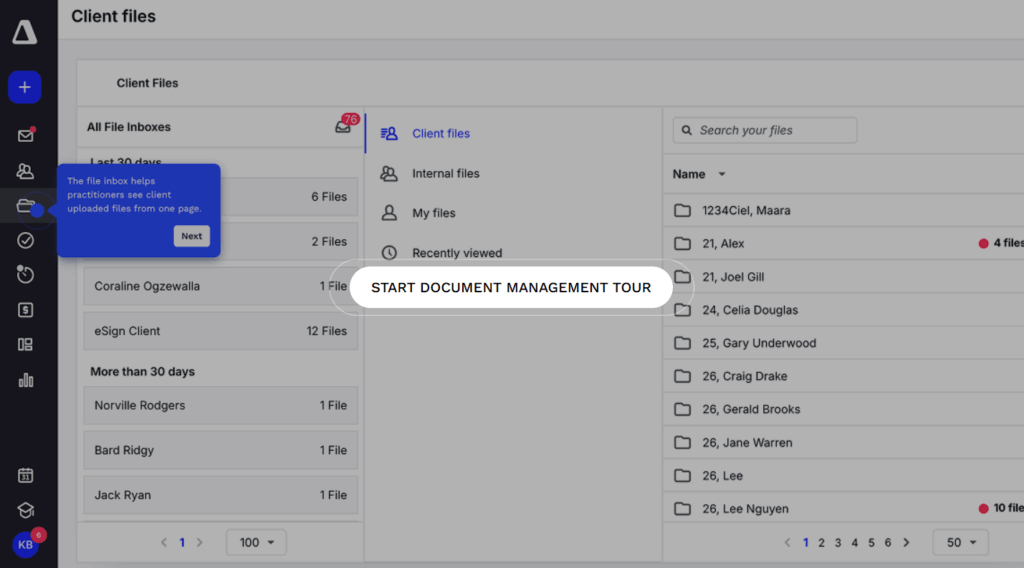
Canopy is practice management software that caters to accounting teams of any size, not just the big wigs. As their website puts it: “So you’re not KPMG, so what?”
Whether you’re a solo practitioner handling everything from client intake to invoicing, or a growing firm building out your tech stack piece by piece, Canopy meets you where you are. Its modular design means you can start small with the Client Engagement Platform, then add workflow automation, document management, billing, payments, or even IRS transcript tools as your services expand.
It’s a great fit for teams who want an all-in-one system without committing to the price or complexity of an enterprise suite.
Key features
- Canopy AI: Automate your client questionnaires and predict any required documents, summarize emails or auto-name uploaded files to remove any admin friction.
- Smart client intake: Create branded, streamlined intake forms that gather the right data upfront and flow directly into client records and workflows.
- Client portal: Give clients one clean hub to upload documents, complete tasks, sign forms, and pay invoices without endless email threads.
- Mobile app: Review tasks, upload files, message clients, and track work from your phone, ideal for accountants working on the go.
- Workflow automation: Standardize recurring accounting jobs and automate deadlines, client reminders, and task handoffs for tax, bookkeeping, payroll, and advisory work.
- Client Engagement Platform: Keep every file, note, message, and task for every client in one organized command center.
User reviews
“The transcript feature is one of my favorites because it pulls all transcripts quicker than I can via tax pros. The feature gives an account overview, CSED calculations, penalties and interest, payment history, bankruptcy, account transactions and assessment overview.” — Contessa C., an operations manager
“Everything I need is in one, centralized place. If I am working with a business client that owns several companies, I can connect everything with ease. Both personal and business accounts can be connected for ease of navigation for the accountant, and the client can use a single log in to access everything in one menu. I am looking forward to learning to use the AI powered features that have been rolling out.” — Teddy C., a tax accountant
Pricing
Small firm pricing is available for firms with fewer than four users, with Growing firms above this.
- Small firm Starter pricing from $45 per user/mo
- Growing firms Client Engagement pricing from $150 per month for unlimited users
- Add-ons available for tax resolution, collection cases, transcripts, and more
6. Jetpack Workflow
Best for: Small to mid-sized firms that want simple, accountant-friendly workflow management without full PM complexity
(Source: Jetpack Workflow)
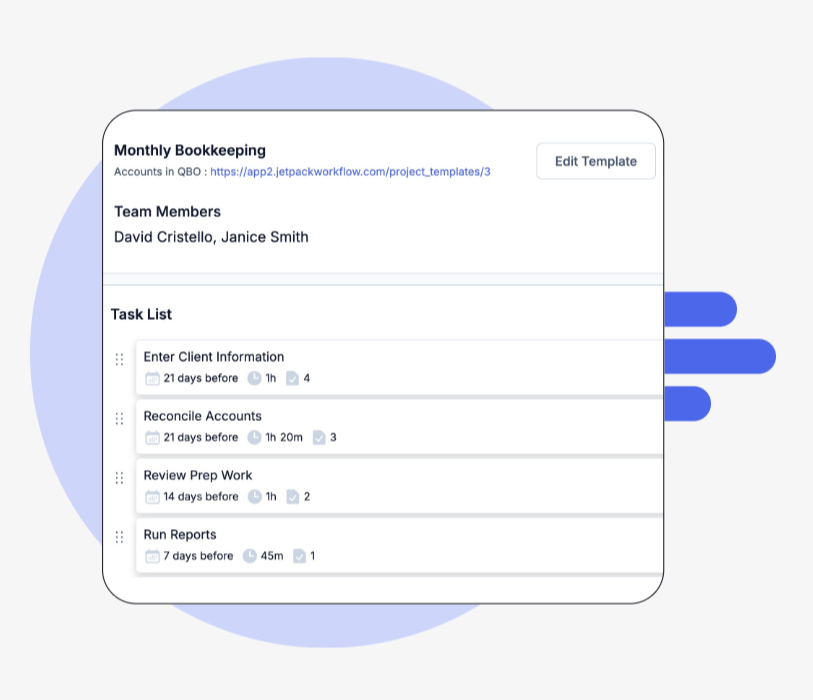
Unlike many of the other tools on this list, Jetpack Workflow isn’t practice management software, and it isn’t trying to be. Instead, it focuses on solving workflow and project management challenges that accountants and growing firms commonly struggle with. If you’re constantly burning out trying to hit client deadlines or just lack a standardized process for your client work, Jetpack Workflow could be worth a look.
It’s a lean tool that’s definitely not trying to be an all-in-one solution. Instead every product feature it offers is intentionally geared toward making life easier for accountants, bookkeepers, and firm owners. Launch is quick and productive, so you’ll have full visibility into your clients (and their projects) within a couple of days.
Key features
- Progress tracking: See the status of your client work, including who’s working on what, and catch potential issues in advance.
- Recurring tasks: Create automations for your most repetitive tasks, so you can focus on more value-adding work for your clients.
- Accounting workflows: Standardize your workflows, using custom templates that shave time off your processes.
- Bookkeeping workflows: Templatize your bookkeeping processes with workflow management software that saves time on your client deliverables.
User reviews
“Jetpack is a clean and straightforward workflow solution that is designed specifically for accounting practices. The designers are familiar with the accounting business and have made the functionality match, I especially enjoy the new UI in V2.” — James H., an accounting principal
“Jetpack Workflow records the daily operations or transactions in a cash book or the general ledger, ensuring that only the transparent deals are conducted. More so, Jetpack Workflow helps in cost analysis and budgeting, suitable for efficient planning and business operations.” — David L., a director
Pricing
- Free trial for 14 days
- Paid plans from $40 per user/mo
- 3 plans available: Starter, Organize, and Scale
7. Financial Cents
Best for: Practices replacing multiple disconnected tools with an all-in-one workflow and client portal solution
(Source: Financial Cents)
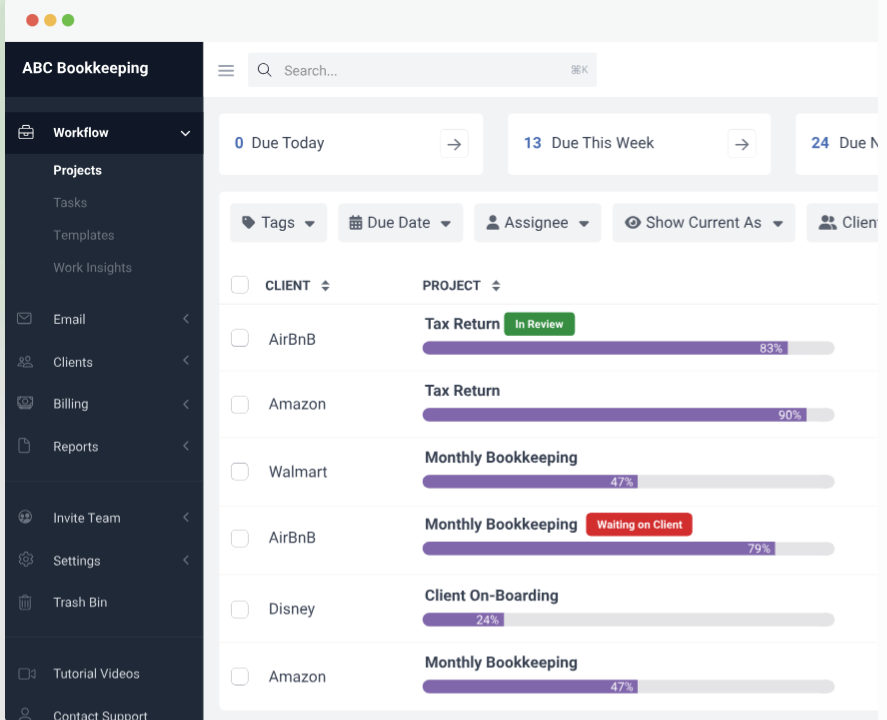
If you’ve been wrangling with a patchwork of accounting tools until now, and you’re bored of shelling out for their monthly subscriptions, or streamlining data across all of them, then Financial Cents could be the all-in-one solution you’re looking for. This practice management suite consolidates work management, client portal, email integrations, proposals, billing and payments, and a CRM, under one roof.
Key features
- Workflow templates: Set up standardized processes for bookkeeping, payroll, tax prep, or advisory work without reinventing the wheel every time.
- Client portal: Give clients a simple place to upload documents, answer requests, and track what you still need from them.
- Email integration: Connect your inbox so client messages, files, and follow-ups sit inside the same workspace as your tasks.
- Automated client reminders: Let Financial Cents nudge clients for missing documents or approvals so you don’t spend half your week chasing them.
- Capacity planning: See who on your team is overloaded, who’s available, and where you might need to redistribute.
User reviews
“I had a couple of years hanging on by the skin of my teeth through tax season, balancing my bookkeeping with tax preparation and workflow management. The automated client reminder is a game changer! No more forgetting when and what the client is supposed to be supplying me. I have a clear view of each stage of each client and they have a concise list of what is needed on their end for me to provide the best service!” — Richard R., an accountant
“Financial Cents has been a game-changer for our CPA firm. Before using it, we struggled with keeping client tasks, deadlines, and communications organized across our team. Now, everything is centralized and transparent, which has greatly improved our efficiency and reduced the risk of missed deadlines. The software is intuitive, easy to implement, and our staff adapted quickly.” — Victoria S., small business owner
Pricing
- Free trial for 14 days
- Paid plans from $19 per month
- 4 plans available: Solo, Team, Scale, and Enterprise
8. Double (formerly Keeper)
Best for: Layering on top of QuickBooks or Xero
(Source: Double)
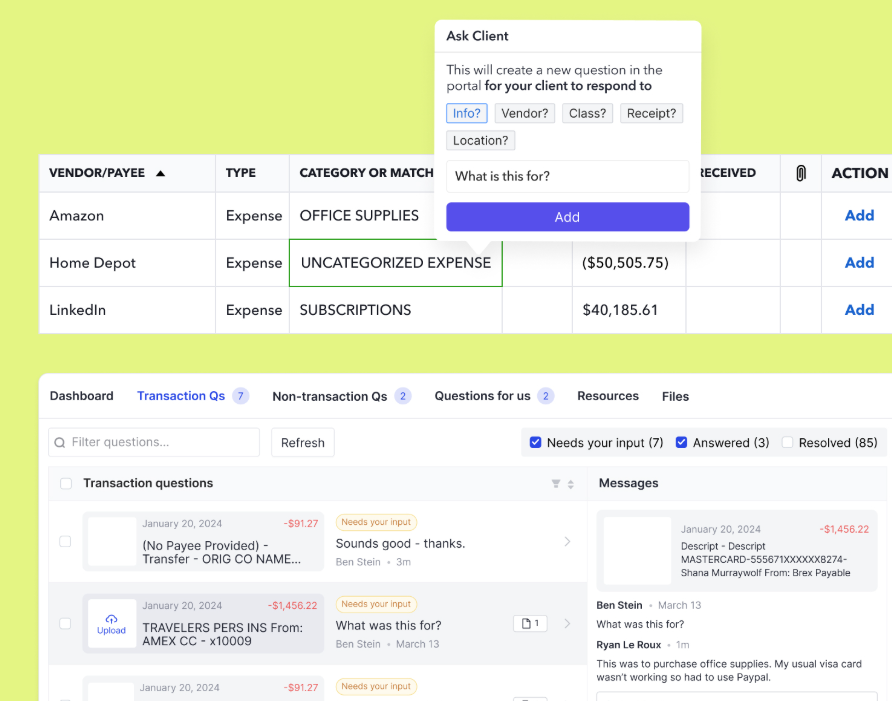
Double is built for bookkeeping and accounting teams who live inside QuickBooks or Xero all day and want a faster, more structured way to review client books. Instead of replacing your accounting system, Double plugs directly into it and adds the workflow layer those tools don’t have.
And because it works on top of QuickBooks and Xero, every change you make in Double syncs straight back into the ledger. You get the speed and clarity of a dedicated close-management system, without introducing yet another place your team has to reconcile or babysit.
Key features
- Bank-feed questions: Ask clients about unclear transactions directly from the bank feed, without exporting anything or drafting separate emails.
- In-app reclassification: Reclassify transactions inside Double based on client responses, then sync those changes back to QuickBooks or Xero.
- Error detection: Catch common coding mistakes automatically during month-end review so you’re not hunting for them later.
- Vendor-level reporting: Review P&L at the vendor level to spot issues or changes faster than digging through multiple QBO/Xero reports.
- 1099 vendor management: Identify vendors missing W-9s, request those W-9s inside Double, and export 1099 data for your filing tool.
- Executive-summary reporting: Build one-page summaries with KPIs and visuals, then publish those reports directly to each client’s portal.
- Integrated email: Work from a built-in email client, convert messages into tasks, and see a shared email history for every client.
User reviews
“Accountants love checks and balances and black and white and quality checks and Double does all this amazingly. They have added so many features through the years without increasing their base price. They have added premium features and added tiers, but they have never taken anything away.” — Martha C., a small business owner
“I appreciate how Keeper allows us to handle all of our clients’ monthly accounting tasks within a single program. I also really value how easy it is to communicate with clients about any questions and receive timely responses. Annual 1099 filing requirements are easily fulfilled with the ability to acquire W-9 info from vendors.” — Michael E., an accountant
Pricing
- Free trial available during 60-minute onboarding call
- Paid plans from $10 per client/mo
- 3 plans available: Core, Plus, Scale
9. Mango
Best for: Firms requiring traditional practice management essentials plus secure file sharing
(Source: Mango Practice Management)
Mango Practice Management is a client-friendly suite of software tools aimed at accounting firms of all shapes and sizes. It’s an all-in-one solution developed by Mango and ImagineTime, with 25 years of experience building software specifically for accountants. No surprise then, that it integrates with all the usual suspects like QuickBooks and Intuit ProConnect.
Alongside the practice management tools you’d expect, Mango also comes with an array of collaboration tools to optimize your client relationships and keep your accounting firm thriving.
Key features
- Engagement letters with built-in e-signatures: Create, send, and track engagement letters directly in Mango, and let clients sign electronically.
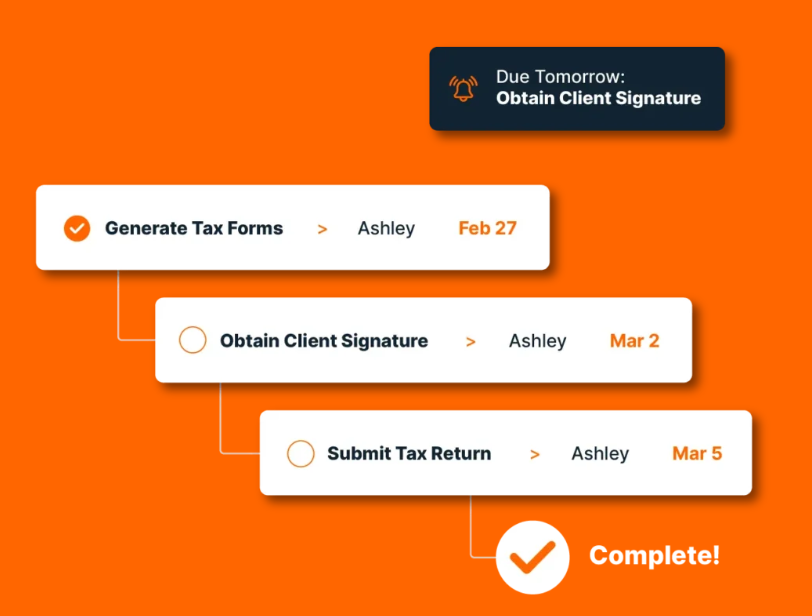
- Workflow management: Standardize recurring services (tax prep, bookkeeping, audits), assign tasks, track progress, and automate reminders to keep work moving.
- Document management and MangoShare: Securely share files, request documents with due dates, and give clients a centralized, user-friendly portal.
- Due-date tracking: Stay ahead of statutory deadlines with automated alerts, calendar views, and clear oversight across engagements.
- Centralized communication: Log emails, notes, and documents inside each client profile so your team has all context in one place.
- Reporting and analytics: Access WIP, realization, staff utilization, and engagement-level profitability reports.
User reviews
“I use Mango every day for timekeeping, billing and project due date management. Mango Share has also been an added bonus for secure file sharing with our clients.” — Accounting user
“Mango provides me with a stable platform to maintain client/engagement time and expense and easily create detailed invoices that are required in my forensic accounting practice.” — Dan R., a small business user
Pricing
- Free trial available
- Paid plans from $35 per user/mo
- 3 plans available: Basic, Plus, and Pro
5 top considerations before you commit to an accounting project management tool
Even after being introduced to this hitlist of PM tools for accountants, there’s still some head-scratching to do. This is the part where you really reflect on what you need from a particular platform. So we’ve created the checklist below to narrow down your shortlist before you start reaching out for customer demos or take a free trial.
1. Do you want to offer clients a portal at all?
Some firms prefer to move all document-sharing, signatures, requests, and updates into a dedicated portal. Others want their PM tool strictly for internal ops. Decide which camp you’re in before evaluating platforms, and it instantly narrows the field.
2. Does it integrate with the tools you already rely on?
Check for smooth integrations with your ledger, email, billing apps, document storage, or tax software. If a tool requires messy workarounds, it’ll cost you more time than it saves.
3. Is the pricing realistic for your team size?
Some tools scale user-by-user, others charge by client volume. Make sure the model matches your firm’s structure, both now and as you grow. Be warned: practice management suites can get pricey fast, if you’re not keeping an eye on your package.
4. What’s the customer support like?
You don’t want to be stuck in live-chat limbo when something breaks during your busy season. Look for rapid response times delivered by real, live humans, and onboarding that helps you get value quickly.
5. Will your workflows fit the software, or will you need to rebuild everything?
Some platforms come with accounting-ready templates; others require heavy customization. Pick the one that supports the way your firm works, rather than forcing you to reinvent your processes.
Take back control of your time with Toggl 2.0
You now have a clear map of the project management tools shaping modern accounting work, and the confidence to choose a system that truly supports the way your firm operates. The next step is to put that insight into motion.
If planning with real data feels like the right path forward, Toggl 2.0 is built to give you that clarity from day one. Try it free and experience what it’s like when your workload finally lines up with your team’s actual capacity. Sign up for free today.

Rebecca has 10+ years' experience producing content for HR tech and work management companies. She has a talent for breaking down complex ideas into practical advice that helps businesses and professionals thrive in the modern workplace. Rebecca's content is featured in publications like Forbes, Business Insider, and Entrepreneur, and she also partners with companies like UKG, Deel, monday.com, and Nectar, covering all aspects of the employee lifecycle. As a member of the Josh Bersin Academy, she networks with people professionals and keeps her HR skills sharp with regular courses.
![How To Calculate ROI For A Project [Steps, Formula, Example]](https://toggl.com/blog/wp-content/uploads/2024/04/calculate-project-roi-673x404.jpg)