Between client calls, case prep, and billing management, many firms spend an exorbitant amount of time on admin work. And even when you get extra hands on deck — more paralegals, another attorney, and perhaps an assistant — your billable hours still don’t budge much.
If that sounds familiar, the issue isn’t your team’s efficiency — it’s workload management and visibility.
Without an effective setup for managing tasks, dependencies, and team capacity, law firms risk missed billable hours, admin work overload, and rising stress levels.
Legal project management software coaxes clarity out of that chaos. The right tool can give you real-time visibility into case progress, resource use, and profitability, while making employee time tracking and client billing practically effortless.
In this guide, we’ve reviewed 9 of the best project management tools for legal teams, covering their standout features, limitations, and pricing. By the end, you’ll know which software will keep your firm efficient, compliant, and profitable.
8 features to consider when choosing legal project management software
Before committing to a legal project management tool, it’s worth knowing what separates the good from the great. Look for features that simplify your workload, protect your billable hours, and give you a bird’s-eye view of every open matter, like:
- Effective task management. Without clarity into work allocation, due dates, and dependencies, law firms risk rolling into chaos. Consider tools with visual timeline views, so you can review the general case flow. Ideally, your tool should give you immediate answers to questions like “What’s overdue?”, “What’s at risk?”, and “Who’s overloaded?”.
- Resource utilization. Your team should be able to work at a sustainable pace, not bogged down by an unmanageable case load. Look for a project management app that can clearly tell you who’s currently available (and who’s under-utilized). With better visibility into upcoming matters and current staff utilization rates, you can improve resource planning and management.
- Budget management. Knowing the profitability of different matters and the real costs of taking specific cases builds better profit margins. Some of the best legal project management tools provide dashboards that model operational costs by comparing set budgets against logged hours. Prioritize those that warn you when budget burn rates are high or near an overrun.
- Profitability analysis. High billable hours are the bar of successful performance. But revenue leakage can be evasive when you can’t link logged hours to specific activities. The best project management apps let you easily log hours per task, client, or project, and assign custom billable (or non-billable) rates. From here, you can easily visualize these time entries to compare actual vs. budgeted project time/cost, optimize billing, and capacity planning.
- Built-in collaboration tools. Inefficiencies are often the result of poor communication and information asymmetry — think lost emails, version confusion in documents, ad hoc comments, and missing task context. A good tool streamlines collaboration with prioritized task lists, task discussion threads, automatic version control, and customizable notification settings to avoid the endless alert pings.
- Invoicing. Some legal PM apps come with native invoicing features that let you create client bills in several clicks, based on the assigned attorney’s billable hours. Others provide integrations with popular accounting and financial systems for easy data exports. Clients appreciate the transparency and your admin staff will have less of the menial work.
- Data security. Legal work demands confidentiality, so your new tool should never be a potential liability. Look for software that’s audited for data security — at a minimum, it should comply with ISO 27001 or SOC 2 Type II. Check also for features like role-based access control and easily downloadable audit logs.
- Bonus: Document management system. This can be a secondary feature, since Google Drive (or similar cloud file shares) does this well, a built-in document management module can be a great aid for growing firms. You can store, organize, edit, and share standard templates, files, and case documents neatly across all practice areas without clicking around multiple apps. Centralized (and secured) document management also reduces data leak risks as you can configure custom access and sharing permissions.
9 best project management tools for legal teams
Most law firms mix and match different software. Some prefer general project management tools. Others go with more specialized case management software.
The choice depends on what you’re optimizing for: case and document management, client intake, billing accuracy, or overall firm efficiency?
The list below highlights different types of all-purpose and legal-specific project management apps that legal teams use to achieve tighter control over billable work and smoother collaboration.
1. Toggl 2.0
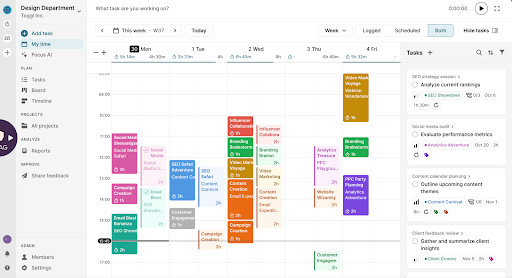
Toggl 2.0 is a project management tool built with our advanced time-tracking experience at its core. It helps you reclaim more time for actual legal work by showing exactly where your time drifts — and how those drifts impact case completion times, revenue growth, and client satisfaction.
While most project management tools tack on a basic timer, Toggl 2.0 gives legal teams a complete time intelligence system. We’re talking one-click tracking across web, desktop, and mobile, and automatic reminders, billable-rate tagging, and customizable reports that make every effort traceable.
From there, the platform translates accurate time data into better project planning and smarter billing. For example, our platform lets you:
- Easily allocate tasks to team members using a drag-and-drop visual editor.
- Add time estimates, assign deadlines, map dependencies, and use custom tags to keep everything organized.
- Monitor progress in your preferred view, whether that’s a standard timeline, a Kanban board or Gantt chart.
- Implement actual resource planning and capacity management using a clear view of everyone’s availability based on public holidays, time off, upcoming deadlines, and much more.
- Use the Analytics tab to compare planned vs. actual effort, track revenue trends, measure team capacity, and optimize utilization rates, with insights grounded in privacy-first time data.
Key features
- Billable vs. non-billable time tracking. Tag every minute as billable or internal. Set hourly rates per client, project, or task to see true profitability.
- Visual project planning experience. Plan, assign, and monitor projects in different canvas views. Set deadlines, link tasks to tracked time, and get a live view of team progress, grounded in real data.
- Customizable business reports. Build on-demand reports by client, project, or timeframe. Share live dashboards with clients for transparent updates or use data to rebalance team workloads.
- One-click invoicing. Turn tracked time into client-ready invoices, pre-filled with rates, descriptions, and totals. Add QuickBooks/Xero sync to finish billing in minutes.
- Enterprise-grade data security. ISO 27001-certified and built for privacy, Toggl 2.0 keeps sensitive data under an airtight virtual lock.
Limitations
- No dedicated matter management features or specialized legal document storage
- Invoicing currently doesn’t support LEDES or other country-specific task-based billing codes.
Pricing
- From €9/user per month. Free for up to five users.
Final verdict
Toggl 2.0 is ideal for teams that want to manage projects and billing with precision. It turns time tracking into a genuine advantage, powering smarter planning, accurate invoicing, and complete workload transparency. While it’s not a full legal practice suite, its accuracy, automation, and reporting make it a powerful companion for firms that live and bill by the hour.

2. Lawcus
Source: Software Advice
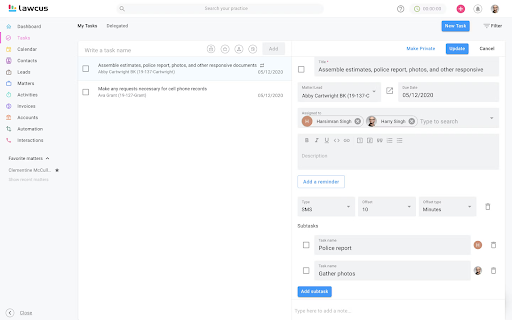
Lawcus takes a visual approach to law firm management — all active legal matters are available at a glance on Kanban-style dashboards. This makes it easy to populate every field manually or with no-code automation. From there, you can build custom workflows to streamline client intakes, easily replicate matters, and automate follow-ups or reminders.
The latest addition, Nova AI, brings generative intelligence into the mix. The agent can draft emails, summarize case notes, and even suggest task or matter descriptions in seconds. No matter how you use Nova, you’ll save time without losing your personal touch.
Key features
- Case management dashboard: Use drag-and-drop organization, editable client intake forms, and easy case replication as part of a Kanban view.
- Task management: Simplify delegation with shared to-do lists you can also use to set deadlines and track progress across your team.
- Workflow organization: Group automations into multi-level folders for easier navigation and cleaner process management.
- No-code automation: Automate client intake, reminders, and follow-ups without technical skills. Organize workflows, forms, and templates into structured folders.
- Nova AI assistant: Draft emails, text messages, notes, and task descriptions, helping teams communicate and document work faster.
Limitations
Oddly, you’ll need the top-tier plan to unlock “subtasks” — a pain if you’re juggling projects with lots of dependencies.
No automated time-tracking. Unless you’re meticulous, a few billable hours might quietly vanish.
Pricing
- From $34 per user/month. Free 14-day trial available.
Final verdict
If you’re looking for case management software, Lawcus has better pricing than most of its competitors, while offering the same features. Its task management experience is great too. But the tool is somewhat lacking in serious time-tracking and analytics functionality.
3. Trello

Source: Atlassian
Trello has made its name on simplicity. It nails one thing perfectly — visual task management.
Capture every to-do in an Inbox table from anywhere — your inbox, case management software, or 200+ other business tools. Then drag tasks onto shared Boards, or drop them into a Calendar view to timebox your week.
For each card, you can assign teammates, set due dates, add priority labels, attach files, and keep an open comms thread going. Need extra efficiency? Trello’s built-in automation handles repetitive work like adding members, updating due dates, sharing updates, or sending messages automatically.
Key features
- Three-way workflow. Funnel all tasks in an Inbox table, organize them on Kanban-style boards, or plan them visually in a calendar view.
- Multiple project views. Switch between dashboard, timeline, table, calendar, maps, and multi-dashboard views to zoom out for strategy or zoom in for daily details.
- Advanced checklists. Assign owners and due dates to checklist items for added context and accountability within each task.
- Built-in automation. Automate repetitive actions, from creating agenda cards to updating due dates, with rules, buttons, and commands.
- Templates for repeatable workflows. Save time by turning your best boards into templates. Reuse proven workflows for recurring case types, onboarding, or client projects.
Limitations
- No Gantt chart view makes it harder to visualize timelines or task overlaps.
- Built-in reporting capabilities are rather basic, but can be extended via integrations.
Pricing
- From $5/user per month. Free for up to 10 collaborators per Workspace.
Final verdict
Trello stays true to its mission; it provides a clean, visual space to collaborate, organize work, and track progress. While it may not be the best option for bigger and busier legal teams, Trello is a great option for smaller and solo firms that want a simple way to stay organized.
4. Clio Manage
Source: Clio
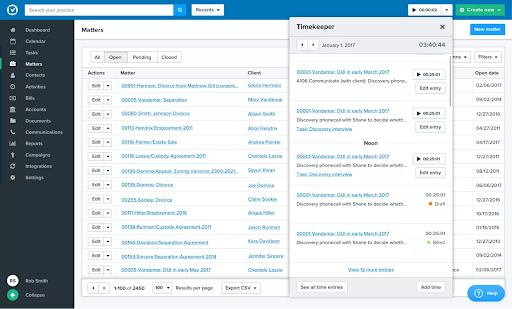
Clio is a widely recognized name in the legal industry … and for good reason. Used by thousands of law firms globally, it combines case management, billing, client communications, and compliance tools in one cloud-based platform.
Unlike all-purpose generic project management software, Clio was designed specifically for legal workflows, offering features like trust accounting, matter-based time tracking, and client intake automation.
The app’s impressive 250+ integrations connect up with industry staples like Microsoft Office 365, Google Workspace, DocuSign, and Dropbox. Recently, Clio also deployed AI functionality for several workflows — document drafting, legal research, and data lookup. For busy paralegals, this automation cuts down on manual work and clerical errors.
Key features
- Matter management. Upload, organize, and version control case documents to avoid information asymmetry and maintain complete visibility across all cases.
- Scheduling and task management. Streamline task and deadline management with an Outlook or Google Calendar integration.
- Client communication portal: Align stakeholders while maintaining confidentiality by centralizing all client correspondence and file sharing.
- Billing and payments: Generate invoices automatically, route them for approval, and let AI handle reminders. Integrated payment processing helps firms get paid faster.
- AI court calendar capture: Extract key dates and events directly from court documents, minimizing manual data entry.
Limitations
- Some integrations can be finicky, especially when syncing Clio Manage with other communication tools or document storage systems.
- Steeper learning curve as the sheer number of features and configurations makes the software feel less intuitive.
Pricing
- Plans start from €59/user per month. A free 7-day trial is also available.
Final verdict
Clio Manage is a higher-priced legal software. Many of its advanced workflow automation and document management features are locked behind upper-tier plans. If the costs are too steep for your practice, consider integrating several more affordable project management tools to gain a similar functionality stack.
5. Asana
Source: Asana
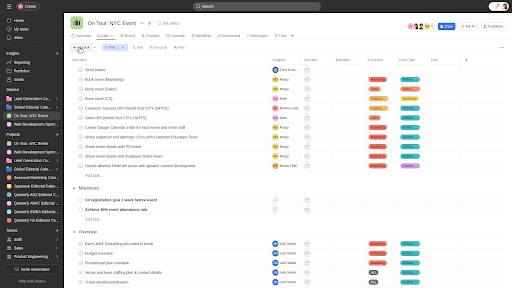
Asana has serious street cred among professional PMs in the tech sectors. Its lavish free plan lets you enjoy its strongest suit: flexibility. You can map out complex matters, coordinate tasks across departments, and visualize work any way you like: lists, Kanban boards, calendars, or even Gantt charts. The free plan covers up to 10 members with unlimited tasks, assignees, and storage, which makes it a strong long-term option for small firms or practice groups.
For larger teams, Asana adds layers of more granular controls through features like Workload View, Goals, and Portfolios — all designed to keep teams aligned on resources, timelines, and team results without the endless chat clutter. You can also stay on top of pending and work progress with an embedded time tracking and reporting system, and balance team capacity before burnout strikes.
With Asana AI, repetitive tasks like updates, organization, and workflow creation are handled automatically, freeing your team to focus on higher-value work.
Key features
- Flexible project views: Switch between list, Kanban, calendar, or Gantt chart layouts, depending on the workflow.
- Embedded time tracking. Measure how long each task takes, compare estimates to actuals, and create smarter, data-backed project timelines.
- Advanced workload management. Visualize everyone’s capacity to prevent overwork and ensure balanced caseloads.
- Custom reporting. Build charts and dashboards to monitor spend, track progress, and forecast resource needs in real time.
- AI for project management. Use AI to summarize updates, organize work, and keep your team aligned without manual check-ins.
Limitations
- The setup curve can be a bit steep as it’s an all-in-one platform with loads of nuts and bolts that companies offering legal services may not need.
- No dedicated calendar/appointment management features, which may be a deal-breaker for client-facing attorneys.
Pricing
- From $10.99/user per month.
Final verdict
Asana is a Swiss-army-knife among project management tools. It can replace cluttered spreadsheets, endless email chains, and hundreds of document copies with a much cleaner collaborative pane. But if you don’t want to spend too much time on setup and team training, there are simpler software solutions out there.
6. MyCase
Source: Software Advice
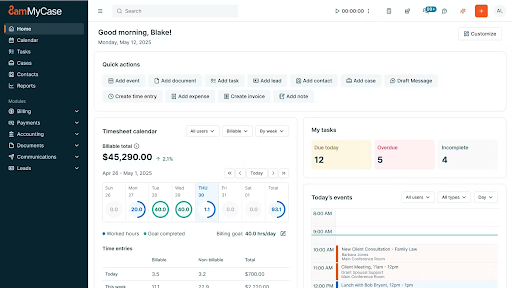
MyCase is another standout legal practice management software, loved by small and mid-sized law firms. It’s packed with all the essentials, like document automation, time tracking, task assignment, billing, and client communications, sans the overwhelming interface.
But the real edge of MyCase is automated workflows. A simple drag-and-drop canvas allows you to build repeatable workflows for similar case types, triggered by newly-added tasks, events, or document uploads. Meanwhile, smart intake forms and templates handle the data entry — you’ll auto-fill names, dates, and clauses as you can say goodbye to copy-paste fatigue.
Overall, MyCase is a great piece of legal technology for anyone feeling done with time-sucking admin.
Key features
- Case workflow automation. Build reusable workflow templates with triggers that auto-generate follow-up steps or documents based on your settings.
- Smart client intake. Cut manual data wrangling using digital forms to automatically create new leads in your database or populate existing case files with extra deets.
- Streamlined time logging. Track all work hours with one-click timers. Configure custom hourly rates and flat fees (including expenses) to understand profitability trends.
- Split billing. Automatically divide invoices to reflect co-counsel arrangements or shared client responsibilities across teams.
- Reporting and analytics: Gain clarity on workload, billing, and firm revenue. Analyze fee allocations, accounts receivable, and aging invoices for better revenue forecasting.
Limitations
- Lacks automatic notifications for changes in tasks or scheduled meetings, so key details can slip by unnoticed.
- The desktop app isn’t the most intuitive. You can share single files, but not an entire case folder.
Pricing
- From $39per user/month. Free 10-day trial available.
Final verdict
MyCase is simple, well-structured, and doesn’t drown you in menus or settings. The automation tools and email sync alone can reclaim hours each week, though the platform could benefit from deeper reporting polish.
7. monday work management
Source: monday.com
Similar to Asana, monday work management hasn’t been exclusively built for law firms. But it has won serious brownie points for its versatility.
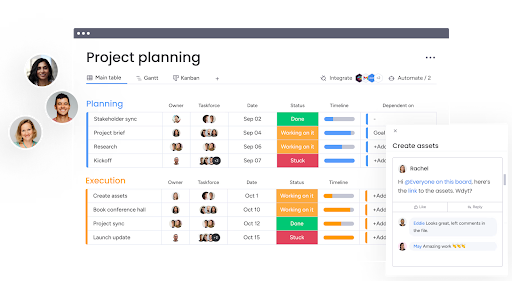
One subscription gives you access to a customizable work management hub with grids, Kanbans, calendars, timelines, galleries, and lists to organize your to-dos. You can build your workboards any way you like with 36+ different column types.
On top of this, a drag-and-drop workflow builder enables you to streamline common business processes (+ 200 pre-made templates for quick setup). And real-time document and whiteboard collaboration, “if this, then that” process automation, time-tracking, workload management, and communication threads are also part of the deal.
Key features
- Project and task management. Plan, assign, and track work across teams in your preferred format. Built-in automations keep work moving, deadlines visible, and everyone accountable.
- Data-driven dashboard. Use widgets to build custom dashboards to turn project data into business insights. Track goals, timelines, and workloads at a glance.
- Capacity monitoring: See instantly who’s overloaded (or underutilized) with real-time capacity data from time logs and task assignments.
- Integrations marketplace: Connect over 200 other business tools, like Slack, Google Drive, Salesforce, and Microsoft 365, to keep every workflow in one place.
- New AI features. The new Digital Workforce works (and continuously learns) in real time to scan for project risks, suggest better task distribution, categorize project requests, and supply curated team performance insights.
Limitations
- Resource and capacity management features are only available at the Enterprise tier, unlike other tools.
- Teams will need extensive training to get to grips with everything the platform has to offer.
Pricing
- From €9/user per month. Free for up to two seats.
Final verdict
If you don’t mind investing time in the setup, you can use this platform to create a fully-custom virtual HQ with customized workflows for document management, client intakes, case management, time tracking, and pretty much any other feature your team desires.
8. Dashboard Legal

Source: Law Next
After being acquired by Bloomberg Law in 2024, Dashboard Legal got quite a glow-up. The platform still has the signature “snapshot” dashboard that gives firms a bird’s-eye view of all active matters. Plus, individual case dashboards deliver deep dives into tasks, deadlines, and legal documents.
But the latest update makes it even more powerful. New features like External Checklists and the Outlook Add-In make your comms more effective. With the first, you can dispatch automatic client status updates via secure, real-time dashboards. The second lets attorneys sync tasks, files, and emails directly from Outlook to their case dashboards.
The result? Less admin back-and-forth, more big-picture conversations — right where most legal teams would rather spend their time.
Key features
- Visual matter dashboards. Visual overviews of every active case, complete with deadlines, owners, and key documents for instant context.
- Triage checklists. Prioritize incoming legal requests automatically and route them to approved workstreams.
- External client checklists. Improve client relationships with live case timelines and full milestone visibility.
- AI Uploader enhancements. Turn Word documents, Excel spreadsheets, or PDF files into structured checklists for team members to act upon.
- Deep integrations. Sync with Outlook, iManage, and NetDocuments for unified access to emails, documents, and versions within one dashboard.
Limitations
- Lacks time-tracking features for capacity planning or allocating work among lawyers.
- Likewise, no budget or financial management tools are available in the current app version.
Pricing
- On-demand.
Final verdict
Less spreadsheet chaos, more smart collaboration. Bloomberg’s polish makes Dashboard Legal a serious contender in the legal project management software space. While the company doesn’t have a public product roadmap, the platform would likely get some extra cool features for workload management.
9. Smokeball
Source: Smokeball
Smokeball is built around one mission: make small law firms more profitable by automating everything that gets in the way of practicing law. It’s particularly popular with estate planning, family law, and real estate firms — all practice areas where document-heavy workflows and small tasks can eat up countless unbilled hours.
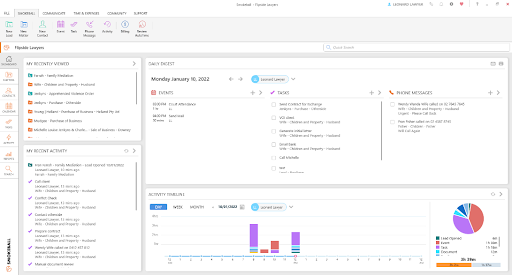
With AutoTime, Smokeball automatically tracks team activity in the background and provides reports on billing and productivity trends.
The app also shines in document automation. With over 20,000 preloaded legal forms and one-click merge capabilities, you can generate fully populated contracts, pleadings, and letters in seconds. Deep integration with Microsoft Word and Outlook keeps lawyers working in familiar tools, while the platform’s “white-glove” onboarding and client support make setup painless — which is perfect for firms without an IT team.
Combined with lead management, calendaring, and workflow automation, Smokeball feels like a virtual office manager that never misses a beat.
Key features
- Smart case management. Keep all case assets connected and easy to find with prebuilt fields, customizable workflows, and automatic matter tagging.
- Legal calendaring. Sync seamlessly with Outlook, sends smart reminders, and lets clients view or book appointments via the secure portal.
- Workflow and task automation. Assign, track, and manage tasks via a convenient dashboard. Build repeatable workflows with an easy drag-and-drop builder.
- Lead management. Capture, qualify, and convert leads in a few clicks with built-in conflict checks and value estimates.
- Deep Office integration. Rely on the tight integration with Word and Outlook which lets lawyers stay in their usual workspace while Smokeball handles organization.
Limitations
- Doesn’t integrate with Google Calendar (only Outlook), which is a bit of a nuisance.
- Time tracking and advanced analytics features are only available with the highest-tiered plans.
Pricing
- On-demand. No free trial available.
Final verdict
Smokeball does the heavy lifting on document automation and task management. But it drops the ball when it comes to invoicing. Many users find billing confusing and short on features compared to other legal PM tools.
Improve operational efficiency with Toggl 2.0
Project management isn’t just another admin layer for law firms. It’s a proven path to faster case development, more effective client acquisition, and higher team utilization rates.
With the right software, your team will have more time to focus on actual lawyering than endless busywork.
If you’re looking to streamline collaboration, make time tracking effortless (and useful), understand capacity constraints, and spot bottlenecks before they cause problems, check out Toggl 2.0. Our platform helps you plan smarter, invoice faster, and stay in full control of every matter.

Elena is a senior content strategist and writer specializing in technology, finance, and people management. With over a decade of experience, she has helped shape the narratives of industry leaders like Xendit, UXCam, and Intellias. Her bylines appear in Tech.Co, The Next Web, and The Huffington Post, while her ghostwritten thought leadership pieces have been featured in Forbes, Smashing Magazine, and VentureBeat. As the lead writer behind HLB Global’s Annual Business Leader Survey, she translates complex data and economic trends into actionable insights for executives in 150+ countries. Armed with a Master’s in Political Science, Elena blends analytical depth with sharp storytelling to create content that matters.