How well do your QuickBooks and time tracker accounts play together? If you’re still manually copying your time entries into QuickBooks Online (QBO) at the end of every billing cycle — re-entering client details and recalculating totals — we promise you there’s a better way.
With the right Intuit QuickBooks time tracking integration, you can eliminate your invoice admin entirely. This guide walks you through 7 time tracking apps that integrate seamlessly with QuickBooks Online to save you time and struggle.
| QBO version | Use case | QBO subscription required? | Paid plan required? | Main limitation | |
| Toggl Track | Online only | Project billing | ❌No | $9/user/mo | No payroll |
| Harvest | Online only | Project billing | ❌No | $12/user/mo | Timesheet approvals only on Enterprise plan |
| Clockify | Online only | Project billing & field service | ❌No | $4.99/user/mo | QuickBooks Payroll incompatible |
| QuickBooks Time | Online only | Field service & payroll | ✅Yes | $20/mo + $8/user/mo | Requires QBO subscription |
| Buddy Punch | Online + Desktop | Field service & payroll | ❌No | $19/mo + 4.49/user/mo | Invoicing not supported |
| ClockShark | Online only | Field service & payroll | ❌No | $40/mo + $8/user/mo | Pricey for small teams |
| Timesheets.com | Online only | Field service & payroll | ❌No | $5.50/user/mo | Very basic functionality |
Do you need a QuickBooks integration for billing or payroll?
Whether you need a QuickBooks time tracking integration for billing or payroll determines the type of time tracking software we recommend for you.
Billing
If you’re a freelancer, consultant, or agency tracking billable hours by project and client, you need a time-to-billing workflow. You log hours against a client or project, review them, generate an invoice, and push it to QuickBooks Online. The integration is about helping you automate the workflow by eliminating the manual data entry step between your time tracker and your invoicing.
Payroll
If you run a field service business like construction, trades, or home services, you need GPS-verified employee clock-ins feeding into QuickBooks payroll. The integration serves timesheets, not invoices.
This article covers both use cases. If you fall in the first camp, the first three tools in our list — purpose-built for project invoicing and billing clients — are what you need. If you fall in the second camp, jump to the last four tools, which are built specifically for field service and payroll.
What makes a QuickBooks integration useful?
Some time tracking tools claim to “integrate with QuickBooks,” then make you manually export a CSV and import it into QBO manually. To avoid similar traps, it’s worth asking yourself a few questions to vet any tools you’re considering before committing.
1. Does it work with QuickBooks Online or QuickBooks Desktop?
These are two different products with different APIs, and most time trackers only support QuickBooks Online. If your business runs on QuickBooks Desktop, your options narrow fast. Confirm which version you’re on before you fall in love with a tool.
2. What data syncs, and in which direction?
The depth of integration varies wildly. Some tools sync clients and projects in both directions (from time tracker to QBO, and vice versa). Others push approved hours from the time tool to auto-generate draft invoices in QBO.
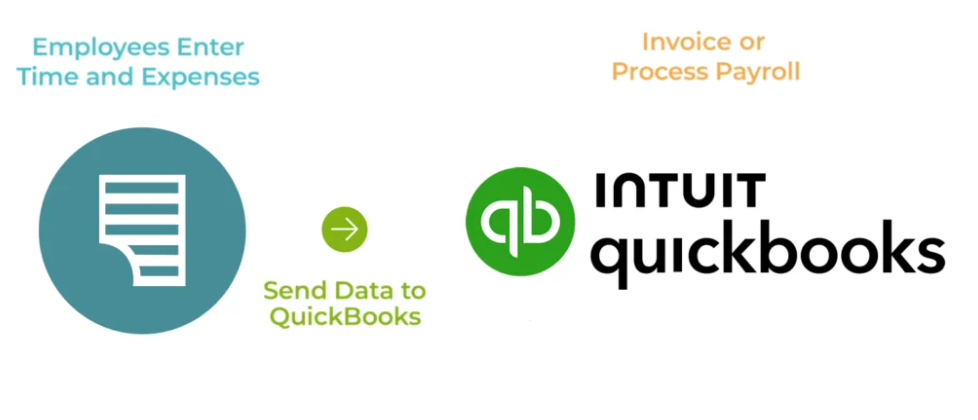
In our opinion, the workflow you’re looking for looks something like this: log your time → review it → transfer time, client, and project data to QBO in one click → draft invoice appears in QBO, ready to be sent with client data already matched.
3. Is it a native integration or a Zapier connector?
Native integrations are built and maintained by the time tracking tool specifically for QuickBooks. Because both tools are cloud-based, a native integration also means your data stays in sync in real-time without manual exports or middleware.
Going through Zapier isn’t a deal-breaker, but it does increase the risk of things slipping through the cracks, and is just a clunkier experience someone on your team will have to keep an eye on regularly. Only you can decide if it is worth the overhead.
4. Does it require a QuickBooks subscription to function?
QuickBooks Time requires you to have an active QBO subscription just to access the time tracker at all. Most standalone tools, like Toggl Track, Harvest, or Clockify, treat QBO as an optional integration. You can connect it if you want, but the time tracker itself works fine without it.
5. Does it handle timesheet approvals and billable hour flagging?
Imagine sending a client an invoice with incorrect time data that hasn’t been reviewed or approved — mortifying! Save yourself the embarrassment and make sure your time tracking tool has a review-and-approve step built-in that lets you flag individual time entries in your timesheet as billable or non-billable. This way, only accurate, locked time data flows into your invoices.
7 best time tracking apps that integrate with QuickBooks
To arm you with all the information you need to make the best decision, we’ve put together this comprehensive guide based on 20 years of expertise as leaders in the time tracking industry.
1. Toggl Track
🌟Best for: Consultants, agencies, and in-house teams tracking billable hours by project and client
🔧Use case: Project billing and invoicing, accurate and easy time tracking, advanced time reporting
🕵️ How it works
Toggl Track lets you track time by both Project and Client, and turn all your time entries into client-ready invoices in one click with our native QBO integration. No copy-pasting, manual recalculation, or re-typing the same client details for the fourth time this month.
First, you’ll need to set up Billable Rates. This can be a blanket rate or customized per Project. Head to Projects, select the relevant project, and click on the Team tab.
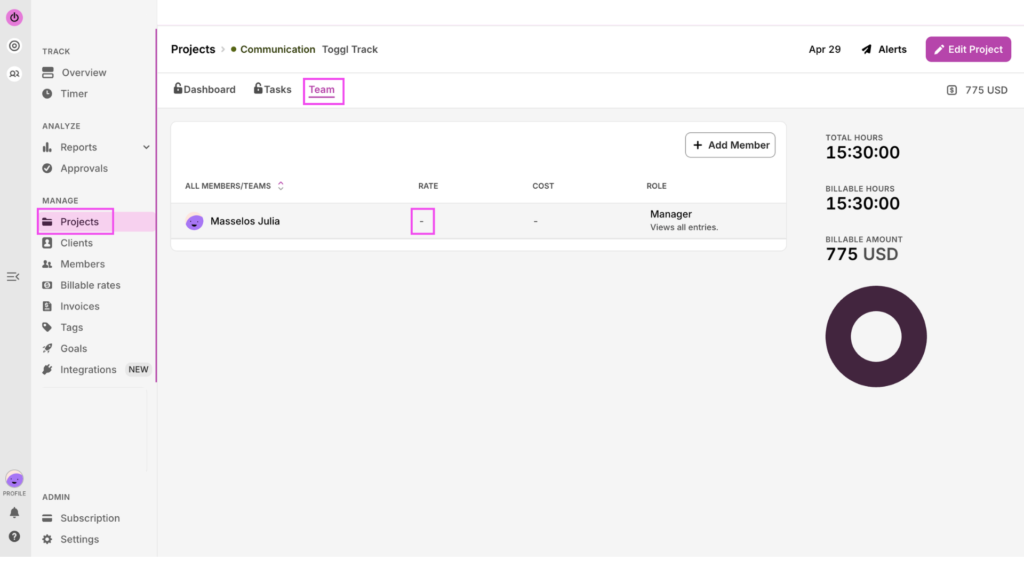
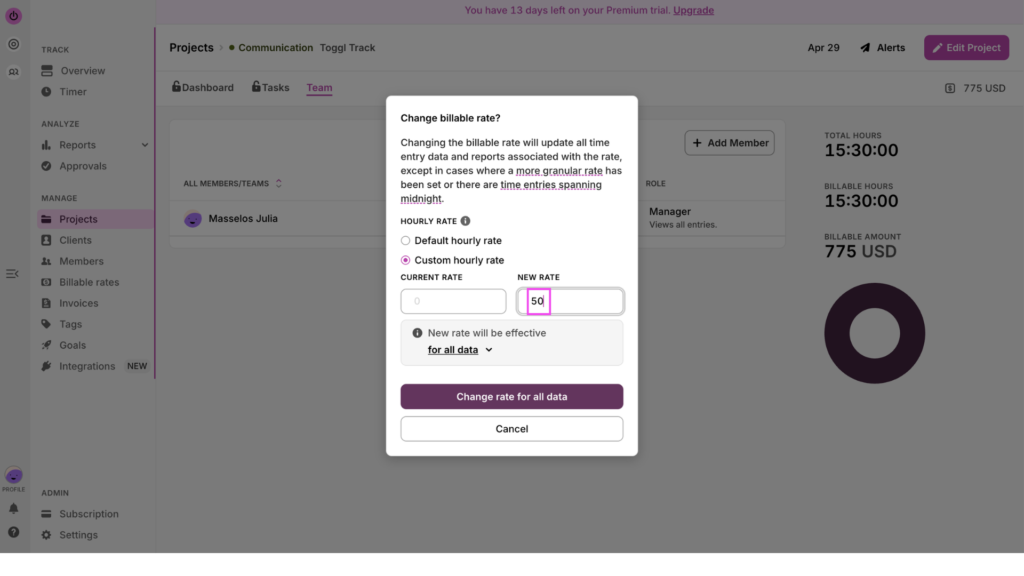
Click the Rate column, and select default or custom rates. Once applied, this will be reflected automatically in your time entries and invoices.
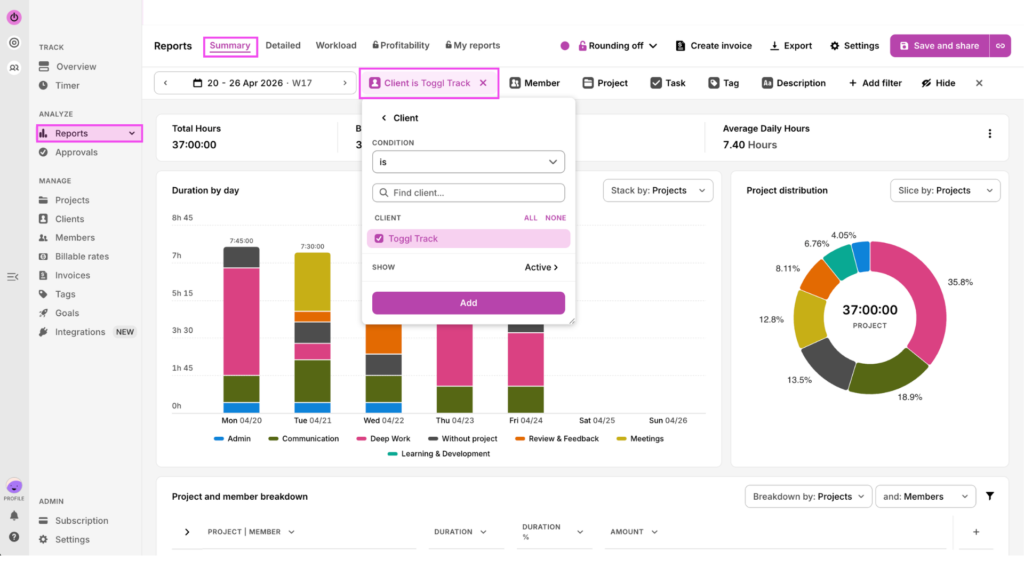
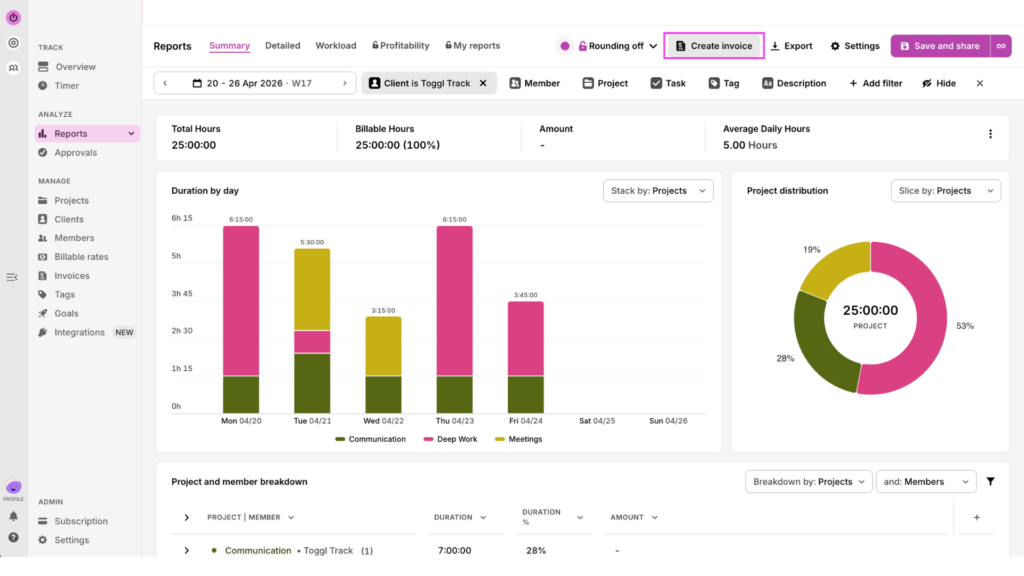
To generate an invoice, go to Summary Reports, and filter by Client and timeframe.
Then, click on Create Invoice in the top right.
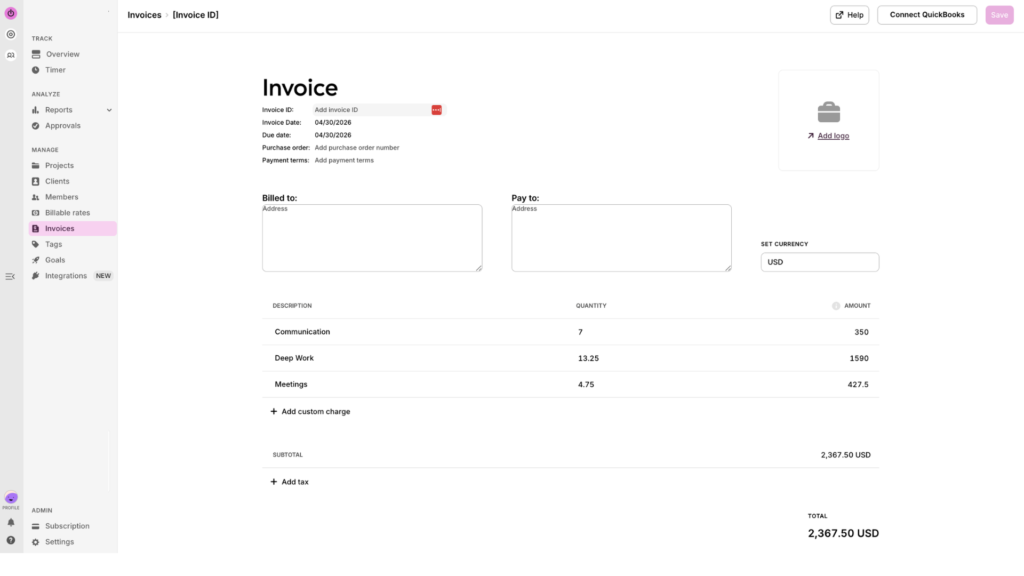
This will create your Toggl Track invoice, populated with the relevant projects each at their billable rate, already calculated out.
On the invoice page, select the appropriate customer from the QuickBooks Customer dropdown.
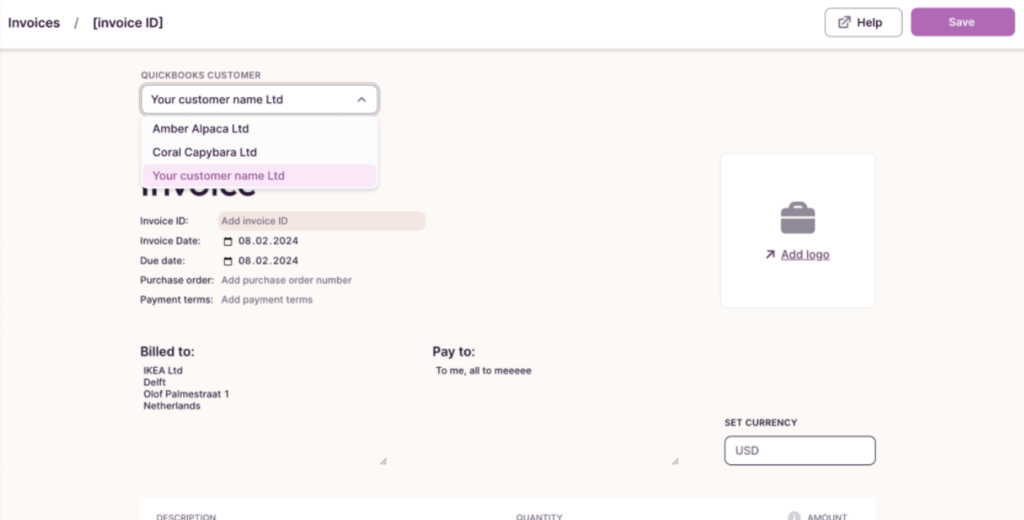
Modify your invoice as necessary, then click “Save & send.” At this point, you’ll be redirected to QuickBooks, where you can edit the invoice further.
💡Note: While Toggl Track is available to use for free, this integration is only available on paid plans.
🔑Key features
- One-click invoice generation directly from tracked time
- All-in-one, user-friendly time tracking solution, with automated time tracking
- Billable vs. non-billable hour flagging per time entry
- 100+ other integrations with popular SaaS tools
- Timesheet approvals on paid plans — so only clean, reviewed hours reach QBO
- No screenshots, activity monitoring, or GPS tracking (more about that in our anti-surveillance statement)
- Available on mobile devices (iOS and Android), desktop, and browser
🧩Integration details
| QBO Online or Desktop? | Online only |
| Data Synced | Invoices (not payroll) |
| QBO Subscription Required? | ❌No |
| Paid Toggl Track plan required? | ✅ Yes — Starter ($9/user/month) and above |
🚧The main limitation
Once you create your QBO invoice via the Toggl Track integration, they aren’t connected anymore. That means if you make changes in one platform, they aren’t reflected in the other — you need to make the update manually on both sides.
2. Harvest
🌟Best for: Small businesses offering professional services that want time tracking, invoicing, and payment collection in one tool.
🔧Use case: Project billing and invoicing
🕵️ How it works
Harvest is a light-weight time tracker with a native QBO integration. Once you generate an invoice inside Harvest, you can sync it with your QuickBooks Online account.
Harvest also integrates with Stripe and PayPal directly, so clients can pay invoices directly through the tool, without you chasing them across platforms.
🔑Key features
- Native QBO Online integration for syncing invoices
- Built-in invoicing and payment collection with both Stripe and PayPal
- Team time tracking with project management, project budgets, and expense tracking
- Clean, widely praised interface
- Basic analytics
🧩Integration details
| QBO Online or Desktop? | Online only |
| Data Synced | Invoices |
| QBO Subscription Required? | ❌No |
| Paid Harvest plan required? | ✅ $12/user/month, no free plan |
🚧The main limitation
There’s no free plan at all, and timesheet approvals only become available at the Enterprise level. If you need manager sign-off before hours hit an invoice, Harvest isn’t the tool for you.Recent price hikes have also put some users on edge, with some coming in over 10x their original payments at renewal time. If this leaves you feeling too uncertain about the tool, we’ve got a list of the best Harvest alternatives for you to go deeper into other options.
3. Clockify
🌟Best for: Budget-conscious teams that want solid project and client time tracking with a QBO integration
🔧Use case: Project billing & invoicing, and field service
🕵️ How it works
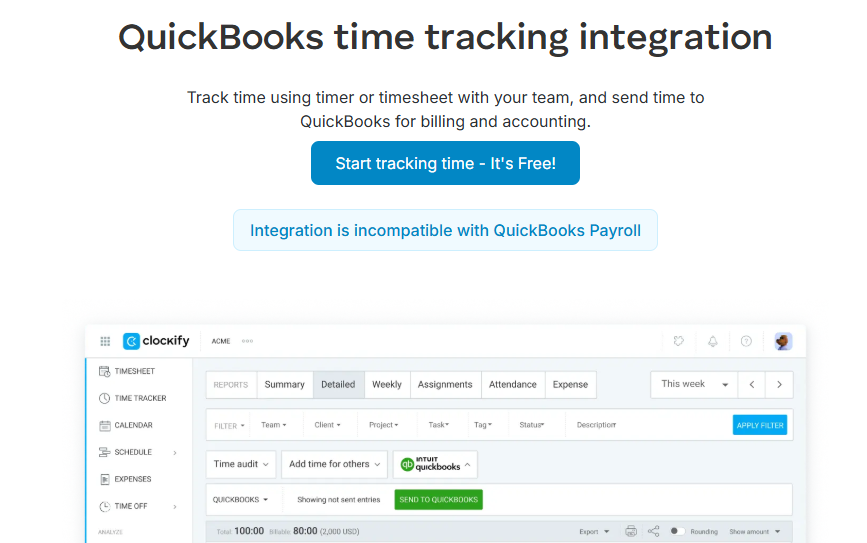
Clockify straddles both use cases — project billing and field service workers.
It allows you to review timesheets from both knowledge workers starting and stopping a timer, and a time kiosk where workers can clock-in and out on a shared device. In both cases, you can differentiate between billable and non-billable time entries, and then generate invoices inside the platform which sync to QuickBooks Online.
The free plan allows up to 5 users, and the QBO integration sits behind a paid plan.
🔑Key features
- Up to 5 users on the free plan
- Project and client time tracking with billable hour flagging
- Built-in invoicing on paid plans
- Kiosk mode for clock-in/out on a shared device
🧩Integration details
| QBO Online or Desktop? | Online only |
| Data Synced | Invoices |
| QBO Subscription Required? | ❌No |
| Paid Clockify plan required? | ✅ QBO integration from $4.99/user/month |
🚧The main limitation
Clockify’s QBO integration only works for invoicing — it’s incompatible with QuickBooks Payroll. The interface can feel clunky at scale, so if you’re a larger team with complex billing needs, you might outgrow it faster than you’d like.
4. Quickbooks Time
🌟Best for: Businesses already fully committed to the QBO ecosystem that need payroll sync, scheduling, and GPS tracking in one place
🔧Use case: Field service and payroll
🕵️ How it works
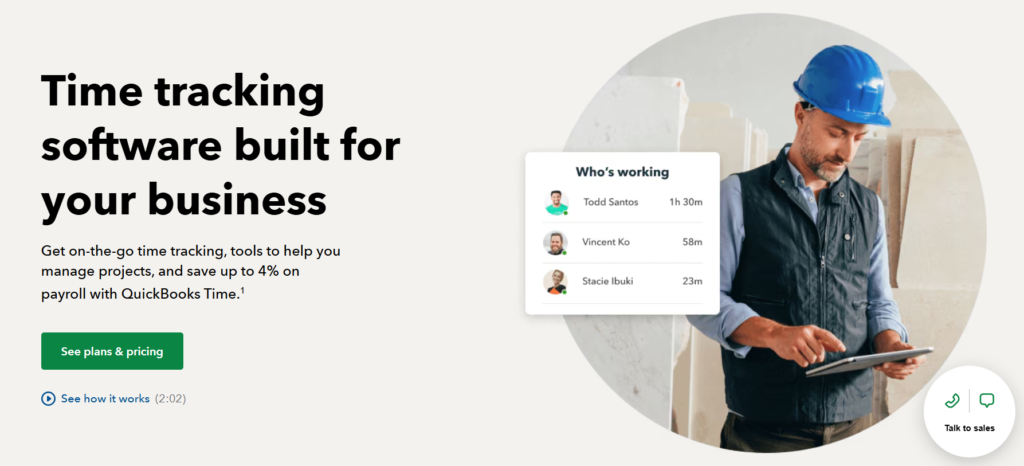
QuickBooks Time lets employees clock in via mobile app, web, or time kiosk. Once a manager reviews the timesheets, the approved hours sync automatically to QuickBooks Payroll. Two-way sync with your Quickbooks account means client, project, and employee data stays consistent across both platforms — no need to manually update both sides.
However, to use QuickBook Time, you must have an active QBO subscription — which is an additional cost to consider.
🔑Key features
- Two-way sync with QuickBooks Online and QuickBooks Payroll
- Download the QuickBooks Workforce app to track, submit, and approve time from anywhere
- GPS tracking and geofencing for on-site verification
- Kiosk mode for shared device clock-in
- Shift scheduling and time off management
- Real-time visibility into who’s clocked in and where
🧩Integration details
| QBO Online or Desktop? | Online only |
| Data Synced | Payroll |
| QBO Subscription Required? | ✅ Requires active QBO subscription |
| Paid QBT plan required? | ✅ Premium from $20/month base + $8/user/month |
🚧The main limitation
You can’t use QuickBooks Time without an active QuickBooks subscription. If you ever move away from QBO, your time tracker goes with it. Factoring in both subscriptions makes this the most expensive option on this list.
5. BuddyPunch
🌟Best for: Field-based and shift-based teams that need GPS clock-in with direct QuickBooks payroll sync
🔧Use case: Field service and payroll
🕵️ How it works
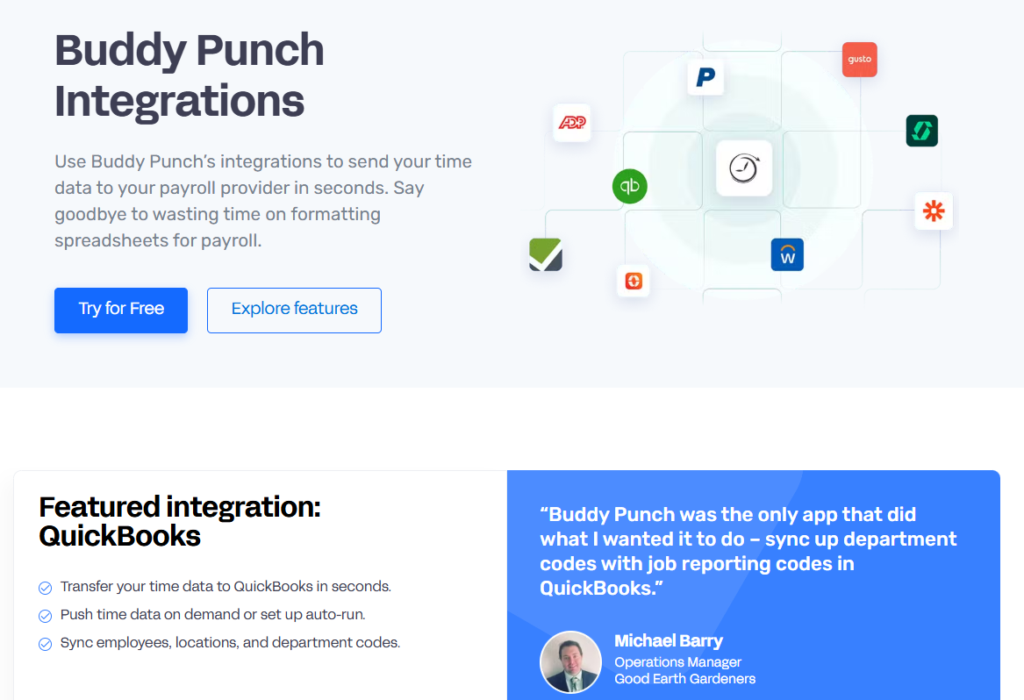
Buddy Punch is the only tool on this list that supports both QuickBooks Online and QuickBooks Desktop.
Employees can clock in via mobile app, web, or kiosk, which is reinforced by geofencing. Their entries can be reviewed and approved by a manager, before being synced automatically to QuickBooks for payroll processing.
🔑Key features
- GPS tracking and geofencing for on-site clock-in verification
- Kiosk mode for shared device clock-in at job sites
- Automatic payroll sync to QBO — Online and Desktop
- Scheduling, time off, and overtime tracking
- Real-time visibility into employee hours and locations
🧩Integration details
| QBO Online or Desktop? | Online and Desktop |
| Data Synced | Payroll |
| QBO Subscription Required? | ❌No |
| Paid Buddy Punch plan required? | ✅From $4.49/user/month + $19/month base |
🚧The main limitation
Buddy Punch is built for hourly and shift-based staff who need to log work hours. If you’re tracking billable hours by project for client invoicing, this isn’t the right fit. Also, reporting is solid for payroll, but limited for other analytics like project-level profitability analysis.
6. ClockShark
🌟Best for: Construction and field service teams that need GPS accuracy, job costing, and QBO sync in one place.
🔧Use case: Field service and payroll
🕵️ How it works
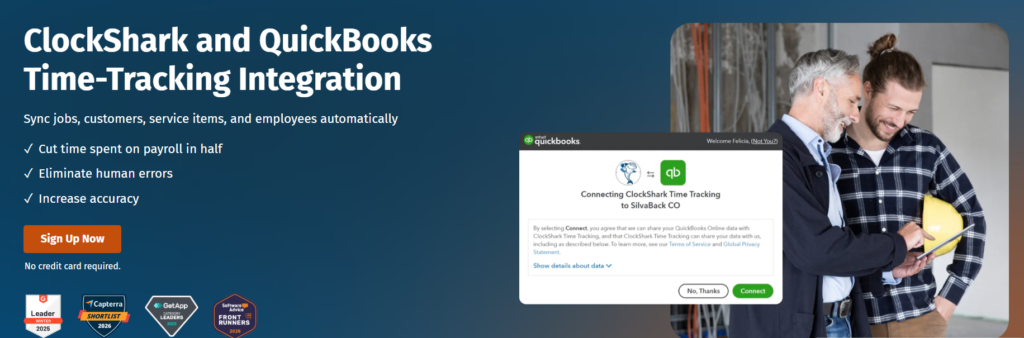
ClockShark is specifically designed for trades and construction workers, so site-level tracking and job costing are first-class features rather than afterthoughts.
Employees can start their time entries even in areas with poor signal with offline clock-in. While they work, GPS tracking logs their location throughout the shift. Their approved timesheets sync to QBO for both payroll and invoicing.
🔑Key features
- GPS tracking with breadcrumb trails for full shift visibility
- Job costing — track labor costs by job site or project
- Offline clock-in for sites with poor signal
- Kiosk mode for shared device clock-in at job sites
- Scheduling, time off, and crew management
🧩Integration details
| QBO Online or Desktop? | Online |
| Data Synced | Payroll and invoices |
| QBO Subscription Required? | ❌No |
| Paid ClockShark plan required? | ✅From $8/user/month + $40/month base |
🚧The main limitation
Limited application outside the construction/trade industries. Plus, the pricing structure makes it pricey for small teams where the per-seat cost gets diluted by the base fee.
7. Timesheets.com
🌟Best for: Small businesses that want straightforward clock-in/out at a low price point.
🔧Use case: Field service and payroll
🕵️ How it works
Timesheets.com does what it says on the tin. It’s a simple timekeeping tool with minimal functionality beyond exporting your time data to QuickBooks for payroll processing.
You can also configure custom rules around breaks, overtime, and time off — a small setup that saves disproportionate time across large teams.
🔑Key features
- Simple clock-in/out with timesheet approvals
- Expense tracking and time off management
- Mileage tracking
- Overtime and break rule configuration
🧩Integration details
| QBO Online or Desktop? | Online |
| Data Synced | Payroll |
| QBO Subscription Required? | ❌No |
| Paid Timesheets.com plan required? | ✅From $5.50/user/month |
🚧The main limitation
Timesheets.com only offers basic features — no geofencing, no job costing. If you need anything beyond basic clock-in/out and payroll export, you’ll hit the ceiling quickly.
Toggl Track and QuickBooks invoicing go together like peanut butter and jelly
If you’re a freelancer, consultant, or agency invoicing billable time, every hour you spend copying time data into QuickBooks invoices manually is an hour you’re not turning a profit on.
Toggl Track’s QuickBooks Online integration streamlines that process for you. Track time, build in an approval system, generate an invoice, and push it to QBO in just one click.
Good tech will automate this type of repetitive task for you, saving you an entire working day per month. Whether you use that to grow your business, learn new skills, or enjoy more time with your loved ones is up to you.
Create a free Toggl Track account (no credit card required!) and try our QuickBooks integration on the 14-day free trial of the Premium plan.
Frequently asked questions (FAQs) about QuickBooks time tracking integrations
Does Toggl Track integrate with QuickBooks?
Yes, Toggl Track integrates with QuickBooks via a native integration that allows you to create client-ready invoices from your time data in one click. The integration is available on Starter ($9/user/month), Premium, and Enterprise plans.
What time tracking apps work with QuickBooks Desktop?
Very few time tracking apps work with QuickBooks Desktop, as most integrations are built for QuickBooks Online only. Buddy Punch is the only exception on this list, supporting both QuickBooks Online and Desktop.
Can I track billable hours in a separate app and still use QuickBooks for invoicing?
Yes, you can track billable hours in a separate app and still use QuickBooks for invoicing. That’s exactly what tools like Toggl Track are built for. You don’t need to use QuickBooks Time as your time tracking app to get the benefits of QBO.
Does the Toggl Track QuickBooks integration work with QuickBooks Payroll?
No, the Toggl Track QuickBooks integration doesn’t work with QuickBooks Payroll. It’s an invoicing integration, not a payroll sync. Toggl Track is designed for knowledge workers tracking billable hours by project and client, not for syncing employee clock-ins to payroll.
What is the difference between a time tracking integration for invoicing vs. payroll?
A time tracking integration for invoicing and one for payroll solve two completely different problems. An invoicing integration, like Toggl Track, Harvest, or Clockify, takes tracked hours, organizes them by client and project, and pushes them into QuickBooks as draft invoices for client billing. A payroll integration, like QuickBooks Time, Buddy Punch, or ClockShark, takes employee clock-in and clock-out data, often GPS-verified, and syncs approved timesheets to QuickBooks Payroll for wage processing.

Julia Masselos is a remote work expert and digital nomad with 5 years experience as a B2B SaaS writer. She holds two science degrees Edinburgh and Newcastle universities, and loves writing about STEM, productivity, and the future of work. When she's not working, you'll find her out with friends, solo in nature, or hanging out in a coffee shop.