What percentage of last week did you spend on focused, high-value work? On meetings? On email?
Not sure? That’s because most people think they know where their time goes. They’re usually wrong.
A time audit reveals the glaring differences between where you think your time goes and where it ends up. This step-by-step guide covers what a time audit is, how to run one in a week using Toggl, and — the part every other guide skips — how to read your results and turn them into something useful.
What is a time audit (and how is it different from time tracking)?
A time audit is a defined, time-boxed diagnostic exercise: you track everything you do for one representative working week, then analyze the output to answer specific questions about how you allocate your time. Time tracking produces the logged data; the audit produces the insight.
Time auditing is different from time tracking in both scope and purpose. Time tracking is ongoing — you log hours against projects and clients as part of your regular workflow. A time audit is a snapshot aiming to provide insights into improving time management, productivity, and work organization.
Example of a successful time audit
Take a freelance designer who assumes she spends most of her week on billable client work. Without a thorough time audit, she’d track the expected 40 work hours per week and not think much more about it.
But if she were to analyze where her time actually goes, she’d be surprised to find only 18 of her 40 hours are actually billable, spent on things like:
- Interviews with ICPs
- Designing assets
- Revision meetings with the client
The remaining 22 hours are eaten up by non-billable tasks like:
- Business admin (invoicing, accounting, back and forth emails)
- Drafting and sending proposals
- Marketing activity for her own business
Armed with this breakdown, she adjusts her workflow to increase her billable hours per week. This includes batching all client communication, content creation, and having just one dedicated day for client calls.
Without working more hours, she increases her billable hours from 45% to 65% of her total working time, increasing revenue by 20%.
Note: You can use our billable hours calculator to easily calculate key metrics like billable efficiency and effective hourly rate.
What you’ll learn from running a time audit
Everyone remembers their first time — realizing the report they built up into a Goliath in their head didn’t really take two hours to complete, or being shocked that they really spent six hours designing a landing page that felt like half an hour. The joy of getting into flow, right?
If you’re stuck for creativity, here are some prompt questions to help you get the most out of your first time audit.
Am I spending time on priority work or am I reacting to noise?
You might suspect this to be the case if your weeks feel full but you don’t seem to be moving the needle. Auditing your time will reveal the split between important tasks, and low-value work like putting out fires in Slack, unproductive multitasking or things that you could automate.
How many hours are billable time vs. admin, meetings, and overhead?
This one’s especially relevant to freelancers and agencies. How many hours did you spend on revenue-generating deliverables, and how many were tied up in drafting proposals, managing invoices and payroll, or cleaning up internal systems? If you’re billing for 20 hours but working 35, your effective hourly rate is almost half of what you think it is.
Where’s the gap between what I planned to do and what I did?
You might’ve blocked Tuesday afternoon for deep work, but got pulled into two unplanned calls and a debate on LinkedIn. Auditing your time will highlight how your aspirations and day-to-day compare, so you can design more realistic days and optimize your work time.
Which clients or projects are eating more time than they’re worth?
Friendly reminder — your highest-paying client isn’t necessarily your most profitable one. Once you factor in scope-creep, back-and-forth communication, and all the revision cycles, that juicy retainer might translate into your lowest hourly rate. And the only way to catch it is with a time audit.
Is my team’s time distributed in a way that reflects our priorities?
Too often, there’s a mismatch between where managers think their team’s time is going and where theirteam member’s time is going. Instead of micromanaging your team to death (please don’t do that), pull a team time audit and have a quick glance through something like Toggl’s Summary Report. It’ll show you in one click how your team’s time is split across projects and clients so you can shift the focus to priority tasks if needed.
How to set up your time audit in 3 steps
Here’s how to create an effective time audit in a simple three-step action plan.
Step 1. Pick a representative week
You might be tempted to run this experiment during a slow week — after a big presentation or deadline, or during a slower season in your business. But capturing an atypical week will capture data that doesn’t truly reflect your day-to-day, which will produce bad decisions. You don’t want to build your castle on sand, do you? Pick the most boring, normal, average week you can find, and commit to it.
Step 2. Define your categories before you start
Next, you need to determine what you will and won’t track, and how those entries will be organized. Batching this strategic decision-making before starting your week means you don’t have to make micro-decisions with every time entry throughout the week, making your time tracking process much smoother.
The trick is finding the sweet spot between too many and too few categories. You don’t want your data to be too granular to be useful, but you also don’t want categories so broad, you don’t know what’s in them.
We recommend most knowledge workers start with these — you can always tweak them as you go, depending on what you feel is missing/too much:
- Deep Work — focused, high-value output with no interruptions
- Meetings — all of them, internal and external
- Email and async comms — Slack, email, voice notes, the works
- Admin — scheduling, expenses, invoices, internal forms
- Client-facing — calls, reviews, deliverables
- Learning and development — courses, reading, training
- Personal during work hours — yes, log your free time.
Need more guidance on how to structure these? Go deeper with our article on time tracking categories.
Step 3. Track everything (including the embarrassing stuff)
Something funny happens when people know they’re being observed — they start acting differently. This is known as the Hawthorne Effect, and it applies just as much when you’re auditing yourself as when someone else is watching.
You’ll be tempted not to log the 45-min social media scroll sessions or the quick personal errands you run during your work day. But an audit that reflects your aspirational week instead of your actual week is just a very elaborate way of lying to yourself. It will hide your true time wasters and give you a more favorable look at your work-life balance since you’re underreporting your time worked.
A sneaky way around it is to use Toggl’s automated tracker, which runs in the background and captures your activity passively, without check-ins. You don’t have to make any conscious decisions about what to log (or feel guilty about not logging).
Keep this up for a minimum of five days to start seeing patterns — anything less won’t be that useful.
How to audit your time in Toggl
The manual approach to time auditing involves setting a reminder alarm every 30 minutes, jotting down what you’re working on, and compiling it into a spreadsheet at the end of each day.
It works in theory, but it requires a level of consistency most people can’t sustain for five days straight. Here’s how to do it with Toggl instead.
Step 1: Set up your time categories in Toggl
If you’re doing a personal time audit, create Projects for each category you outlined in the previous section (Deep Work, Meetings, Admin, etc.).
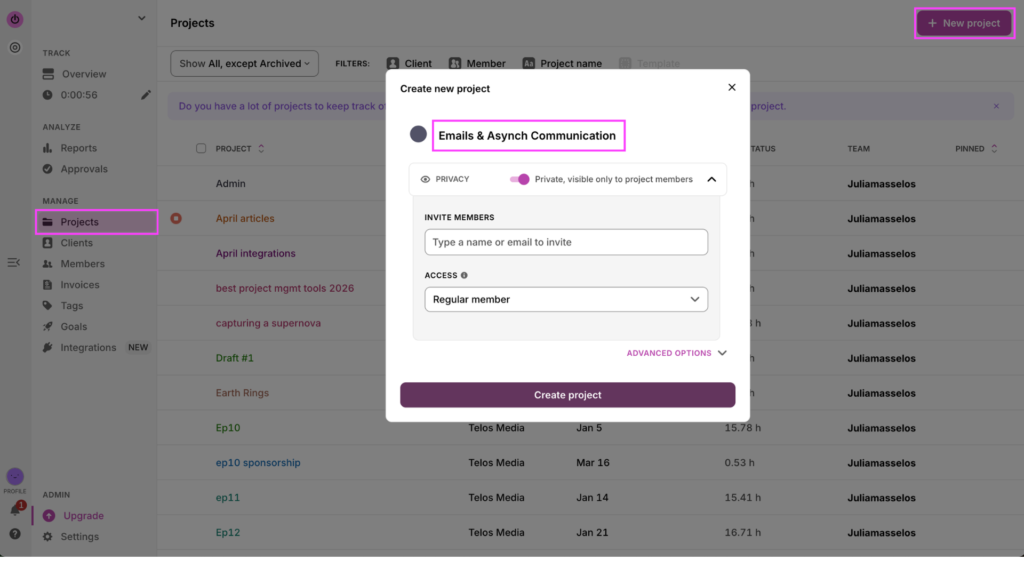
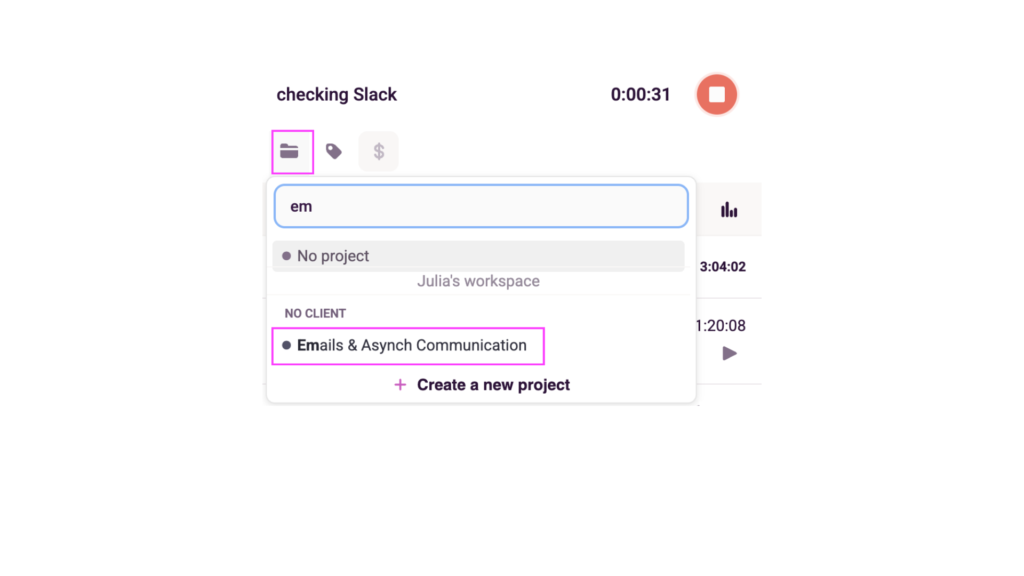
Then, when you’re tracking time, you can associate your entries with the relevant project, depending on which category your work falls into.
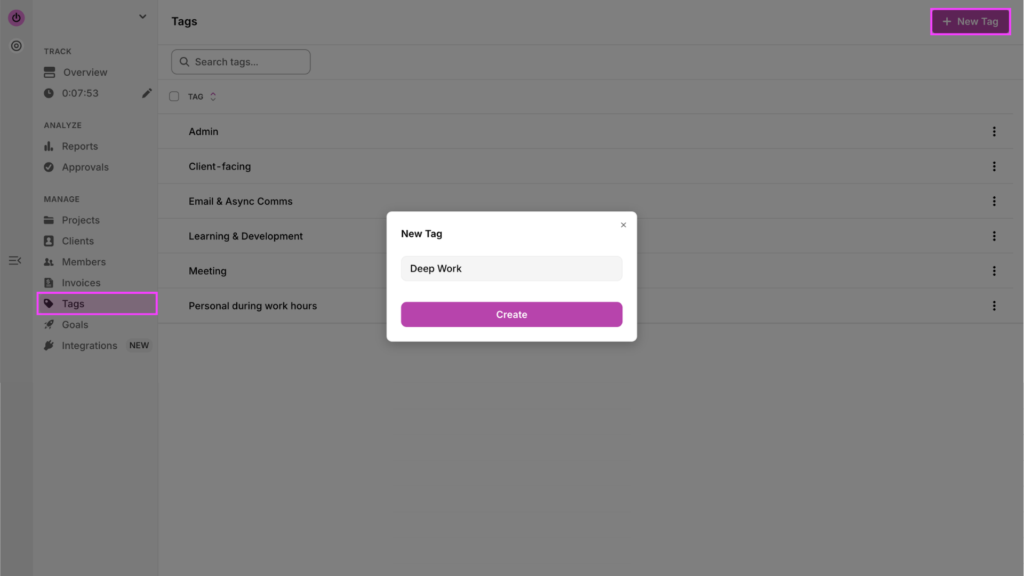
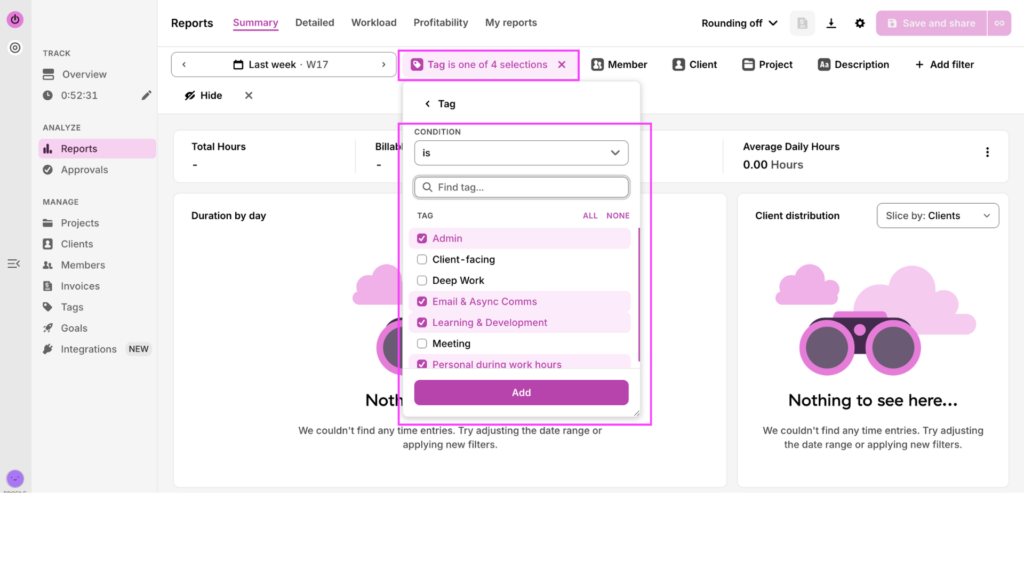
If you’re a small business running a team audit, keep your existing Client/Project structure, and add a Tag layer for each time category. Go to Tags, create a New Tag in the top right corner, and populate all the categories.
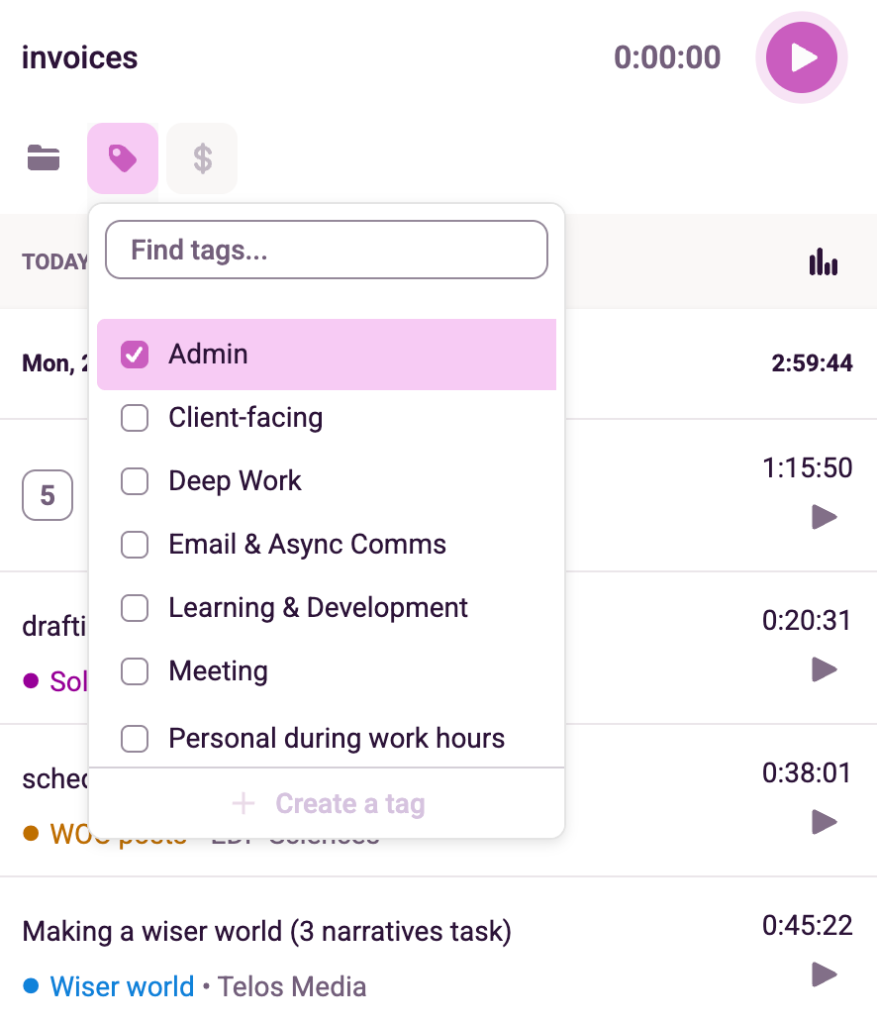
Then, when you start a time entry, you’ll be able to tag it to the relevant category.
Step 2: Track throughout the week
You have two options here, depending on how much you trust yourself. The first is our one-click timer, which you can access from the mobile app, desktop app, web app, or Chrome extension. You have to remember to hit start and stop with every task, so it could take some getting used to. But once you do, it becomes second nature.
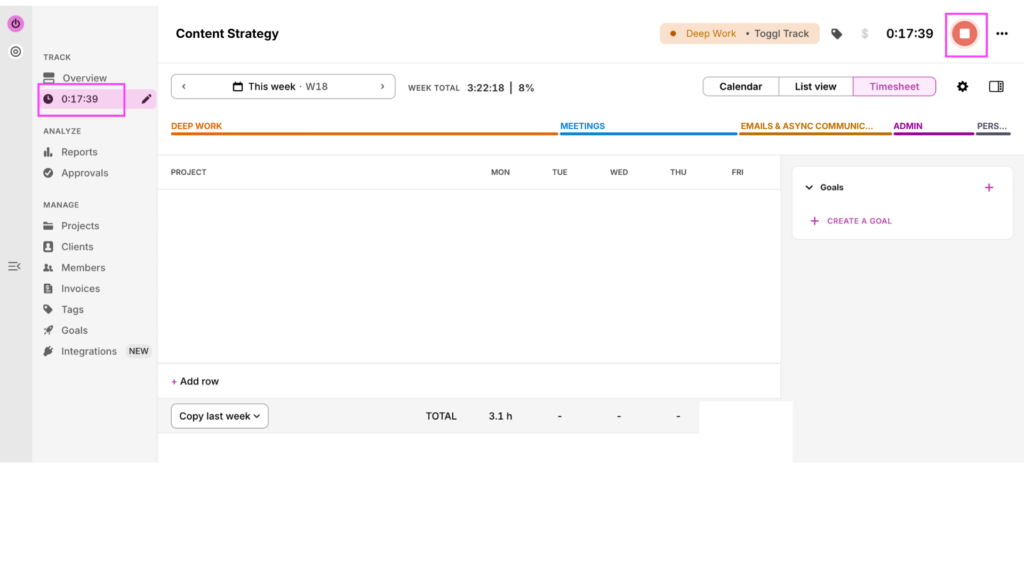
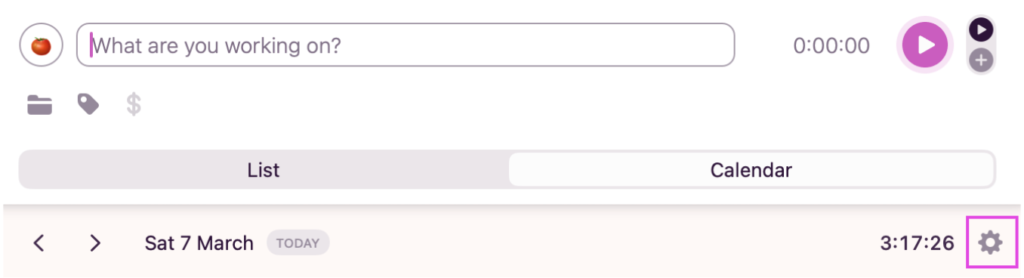
The second option is our automated tracker. To enable it, head to your Toggl desktop app, switch over the Calendar mode and click on settings.
Click on the Autotracker tab, and tick the box to enable it.
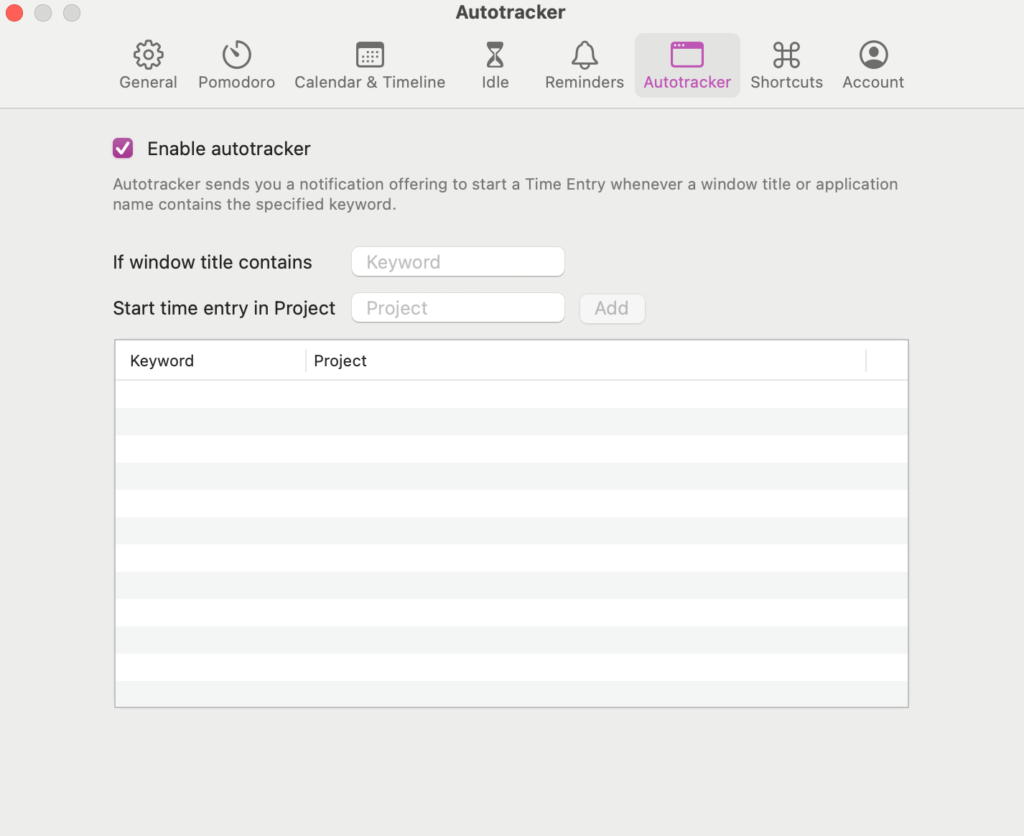
Then — and this is the crucial part — map your most used apps and websites to the relevant projects. This will ensure your autotracker runs in the background all week, capturing how much time you spend in each of the apps you predefine for it.
It’s a bit of leg-work upfront, but it saves you tons of time down the line — no more I’ll-log-that-later, snap-what-did-I-do-yesterday-afternoon?, or our favorite, ahhhh-it’s-probably-fine-I-don’t-really-need-to log-that.
Step 3: Pull your Summary Report
When your five days are up, you’ll have a beautifully colorful Toggl dashboard, filled with all the details of exactly how your work days went. To find it, open your Summary Report and filter by your audit week. You can change how you see the breakdown of your time in the dropdown — either by Client, Project, or Tag.
No calculators, spreadsheets, or time-wasting required!
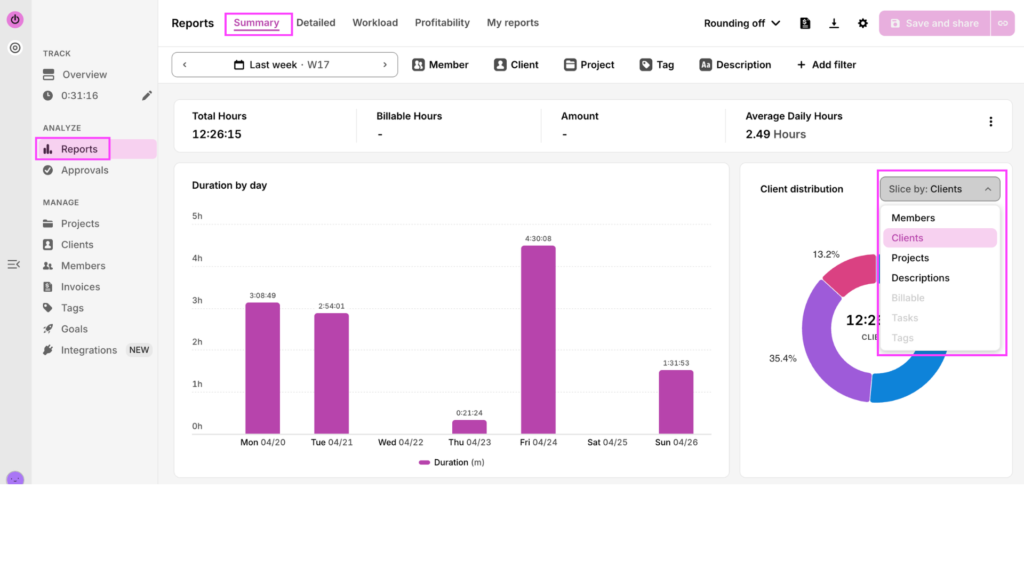
You can export this into a PDF if you want to review it offline or share it with another stakeholder.
And that’s IT! With Toggl, it takes about 60 minutes of setup and one click at the end of the week.
How to read your results
The last and most important step is to deep dive into the data. This is the difference between using data to just feel smarter compared to using it to live and work smarter. So, how do you read your time report results?
The perception gap
People suck at estimating their own time — a problem known as the Planning Fallacy. So we’re going to work on that muscle.
Before looking at your Summary Report, pull out a notebook and jot down what you thought your week looked like. Put a rough percentage next to each of your time categories. Then compare it to what Toggl shows you.
If the gap is significant, it might indicate you have some assumptions about your work that aren’t reflected in your day to day life, like that your meetings eat up your whole day – but in reality, maybe they’re only 30% of your tracked time. Armed with accurate data, you can do something about those assumptions and adjust accordingly to boost productivity.
Your overhead tax
Add up all your time spent on non-billable activities — in our example, that would be Admin, Email & Async Communications, Personal Errands, Learning & Development, and possibly some tasks within the Deep Work category.
Turn that number into a percentage of your total time. For example, if you spend 18 hours of your 40-hour work week on non-billable items, that’s 45% of your time.
Once you’re aware of this overhead tax, you can decide how to reduce it to streamline your profit margins. Will you raise your rates to absorb that cost? Will you make concerted efforts to track and reduce that percentage through company-wide incentives? Only you know the best answer for your industry, niche, and clients. But the point is your time audit gives you options.
The gap between intention vs. reality
If you planned to spend 50% of your week on deep work, but the report says 18% — that isn’t a character flaw, it’s a design problem. Your current setup clearly isn’t protecting enough time for your priority work.
You can finally stop beating yourself up for not working “hard enough” or being “focused enough.” Instead, there are structural barriers to achieving your work goals. Now that you can identify them, they’ll be 100x easier to clear.
Your effective hourly rate (freelancers and agencies, this one’s for you)
Warning: this one might be a cold bucket to the face.
Let’s say you have two clients on $5,000 monthly retainers (about $1,250 per week), with a time allocation of 10 hours per week, for an effective hourly rate of $125/hour. But taking a look at your audit, you see Client A took 16 hours of your time this week, while Client B only took seven.
Now, doing the math, you see your effective hourly rate with Client A is really more like $78/hour, while your effective hourly rate with Client B is $178/hour.
This might be uncomfortable to confront, but it’s a great argument for raising your rates with Client A, renegotiating terms in your partnership, or ceasing the relationship entirely in favor of replacing them with another client that will take less time.
What took longer than it should have?
In Toggl, you can compare logged time against time estimates.
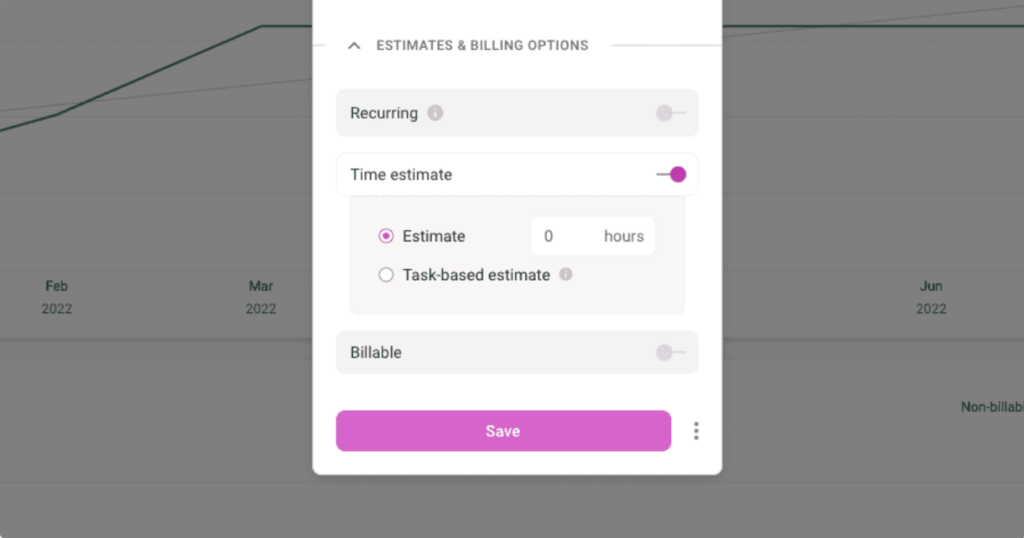
If client proposals are consistently taking twice as long as you expect, your process needs work — whether that’s a better template, a clearer brief from the client upfront, or fewer revision cycles built into the scope. Either way, now you can see and improve it.
What to do next — one change at a time
A time audit often reveals multiple problems simultaneously, but resist the urge to tackle them all at once. Instead, pick one thing — it could be the biggest time drain, the most uncomfortable finding, or the discrepancies that surprised you most. Start there with these tips in mind.
Design your week from the data, not from ideology
A time audit beats every productivity framework by grounding you in reality. If the data shows you’re only capable of 90 minutes of deep work on a Tuesday morning, don’t time-block three hours of deep work on Tuesday morning. If your overhead tax is 45%, don’t set a goal of getting it to 10% by next month. Only by accepting and working with your reality can you gradually reshape it.
When to run your next time audit
Think of your time audit as a regular health check. You can run it quarterly, or decide just to deploy it every time something shifts or feels off. For example, if you start missing deadlines, when a new client comes onboard, or when the team composition changes.
Like anything, the first audit is always the hardest. Your intuition around the amount of time tasks should take vs how long they do take will get sharper, you’ll get more comfortable diving into your time data, and your team will know the routine like the back of their hand.
For what to do with your findings, whether that’s restructuring your daily schedule, adopting new time management skills, or figuring out what time tracking tools can best support you — these are valuable resources to read next: time management methods,time management tips, and time management tools.
Run your next time audit with Toggl
A time audit is the precondition for everything else. Every productivity framework, every time management technique, every decision about how to restructure your week — none of it works until you know what your actual problem is.
A time audit won’t fix your week. But it will show you exactly what’s breaking it.
Toggl is designed to make that as painless as possible, with 60 minutes of setup, one normal working week, and a Summary Report that does the analysis for you.
Start your first time audit with Toggl by signing up for a free account now.
Frequently asked questions (FAQs) about time audits
How long should a time audit take?
A time audit should run for five consecutive working days minimum. One day gives you an anecdote; a week gives you a pattern. The setup — defining your categories and configuring your tracking tool — takes about an hour upfront. Reading and interpreting your Summary Report at the end adds another 30-60 minutes.
What’s the best tool for a time audit?
The best tool for a time audit is one that reduces friction enough that you’ll stick to it for five days straight. A time tracking software like Toggl is purpose-built for this — the one-click timer and automated tracker mean logging takes seconds, and the Summary Report compiles everything automatically, so there’s no spreadsheet math at the end.
How is a time audit different from just tracking time?
A time audit is different from tracking time in both scope and purpose. Time tracking is an ongoing process — you log hours against projects indefinitely. A time audit is a defined, time-boxed diagnostic: you track everything for one representative week, then analyze the output to answer specific questions about how your time is really allocated.
How often should I do a time audit?
You should do a time audit at least once a quarter, or whenever something feels off — consistently missed deadlines, a new client onboarding, a change in team structure, or just a nagging sense that your weeks are full but unproductive. The first one is the hardest. After that, the process gets faster and the insights get sharper.
What should I do after completing a time audit?
After completing a time audit, resist the urge to fix everything at once. Pick the single biggest finding — the worst overhead tax, the most underpriced client, the deep work that keeps getting crowded out — and start there. Once you’ve made one meaningful change, run another audit to measure the impact before tackling the next thing.

Julia Masselos is a remote work expert and digital nomad with 5 years experience as a B2B SaaS writer. She holds two science degrees Edinburgh and Newcastle universities, and loves writing about STEM, productivity, and the future of work. When she's not working, you'll find her out with friends, solo in nature, or hanging out in a coffee shop.