Should we take on this new client? Can we squeeze another project in before the end of the year? If we say yes, do we have enough people and budget left actually to tackle everything?
These are just some of the questions we all face when planning our business workloads. And honestly, they’re getting pretty old. Because running around in confusion, trying to guess what we’re capable of, while being limited by our time, budget, and personnel, is exhausting.
Poor planning is usually to blame. Even the best, most creative ideas that should be a profitability slam dunk are doomed when you don’t have all your ducks in a row.
Capacity planning and resource planning are both key to making confident, data-driven decisions about your team’s workload. But they tackle different questions. Confuse one for the other, and you risk missing half the picture.
In this guide, we’ll break down exactly what each planning term means, when to use them, and how they work together in practice. We’ll also show you how Toggl 2.0, with its built-in time tracking and visual planning tools, empowers you to strategize and deliver work that fits your team’s real capacity.
Capacity planning vs. resource planning: What’s the difference?
Effective capacity planning sets the limits of what’s possible, while resource planning figures out how to make the most of what you’ve got. Put simply, capacity planning and resource planning are close cousins in the world of project planning — definitely related, but each with its own agenda.
Imagine you’re planning a party. Capacity planning gives you the bigger picture of what’s feasible by answering questions like:
- How many guests can we fit in the venue?
- How many chairs, pizzas, and playlists do we need?
- Will it be carnage if we try to host 100 people?
Resource planning gets you into the tactical details, so you can decide things like:
- Who’s on DJ duty?
- Who’s running the snack table?
- Who’s making sure the lights don’t explode?
But business isn’t just about parties. So, before we dive into what each planning methodology looks like in the working world, here’s a quick table to give you the gist upfront.
| Capacity planning | Resource planning | |
| Definition | Determines the total workload your team can handle within a specific timeframe based on available people, tools, and hours. | Allocates specific people and skills to tasks and projects to deliver the work efficiently. |
| Core question | “How much work can we take on?” | “Who’s doing what, and when?” |
| Primary focus | Forecasting future demand vs. available capacity to avoid overcommitment. | Scheduling and optimizing the right resources (people, time, tools) to execute current work smoothly. |
| Time horizon | Long-term (weeks, months, or quarters ahead). | Short-term (days or weeks ahead). |
| Key inputs | Headcount, working hours, utilization targets, time-off data, project pipeline, historic data as evidence of your workload. | Skill sets, task durations, individual availability, project timelines, priorities. |
| Output and deliverables | Forecast reports, hiring or resourcing plans, “what-if” demand scenarios. | Detailed schedules, task assignments, workload charts, project dashboards. |
| Tools and data | Capacity planning tools, templates, dashboards, time-tracking trends, and forecasting functionality | Project management software, or scheduling tools with live workload views |
| Typical use case | “Can our design team handle three more clients next quarter?” | “Who should design this client’s new landing page next week?” |
| Ownership | Operations or senior project managers (strategic leadership level). | Project managers or team leads (tactical execution level). |
What is capacity planning?
Capacity planning in project management estimates your ability to meet future demand. It’s strategic and long-term in its approach, relying heavily on the availability of your current resources and on historical evidence to forecast whether you can realistically handle upcoming projects.
Or as agency operations expert Kyle Hunt puts it, “Capacity, I define as how many clients can this person take on with excellence and still perform at a high quality.”
When you start tracking your team’s capacity, a few magical things start to happen:
🧩 You stop guessing and start balancing. No more heroic all-nighters or random lulls, just a healthy rhythm of work.
🔥 You stop burnout dead in its tracks. Spot workload spikes before they turn into Slack meltdowns.
📊 You make better business calls. Real data means knowing when to take on new projects and when to say “ooooh….not yet.”
🚀 You plan with confidence. Capacity tracking gives you the clarity to grow sustainably.
💸 You catch revenue leaks and price smarter. If your team’s maxed out, you can justify raising rates or hiring instead of stretching people thin.
On this last point, experienced agency owner Eli Rubel uses capacity planning to test price sensitivity at Profit Labs.
How to calculate capacity planning
If project management had a NASA mission control room, capacity planning would be the blinking dashboard at the center, tracking all the inputs that go into your project requirements and operations — think billable hours, time off, utilization, resource demand, the list goes on …
You can use this complex data to answer the most important capacity question: Can we take this on?
Here’s a capacity planning formula you can use to find out. It’s far simpler than it looks.
Team Capacity = (Available Hours × Utilization Rate) − Time Off
This formula helps you translate headcount and working hours into real, usable capacity — the hours your business can actually dedicate to projects after accounting for holidays, meetings, and the occasional cat-on-keyboard moment.
Let’s break it down.
Step 1. Determine your total available hours
Start with the number of people and the period you’re planning for (a week, month, or quarter).
Example: A five-person team working 40 hours a week gives you 200 total hours.
Step 2. Adjust for utilization rate
No one is productive 100% of the time. Factor in meetings, admin, and context-switching. A healthy utilization rate usually lands between 70-85% for creative and project-based teams.
Example: 200 hours x 0.8 = 160 hours of usable time
Step 3. Subtract time off
Remove vacation, public holidays, and personal leave from the total.
Example: If two team members take a day off each, that’s 16 hours less, leaving 144 hours of available capacity.
Step 4. Compare capacity to demand
Now, stack that capacity against your project workload.
Example: If your upcoming sprint requires 180 hours of work, but your team only has 144 hours of capacity, you’re 36 hours short, meaning something’s gotta give … you might reprioritize, hire, or push those timelines.
3 capacity planning strategies you can use
You’ve run the numbers and balanced the math. Now’s the perfect time to get a handle on your capacity. Should you hire ahead of demand, wait until you’re bursting at the seams, or find a happy medium?
Here are three proven capacity planning strategies to help you choose.
Lag strategy
Best for: Startups or smaller teams that want to stay lean and flexible
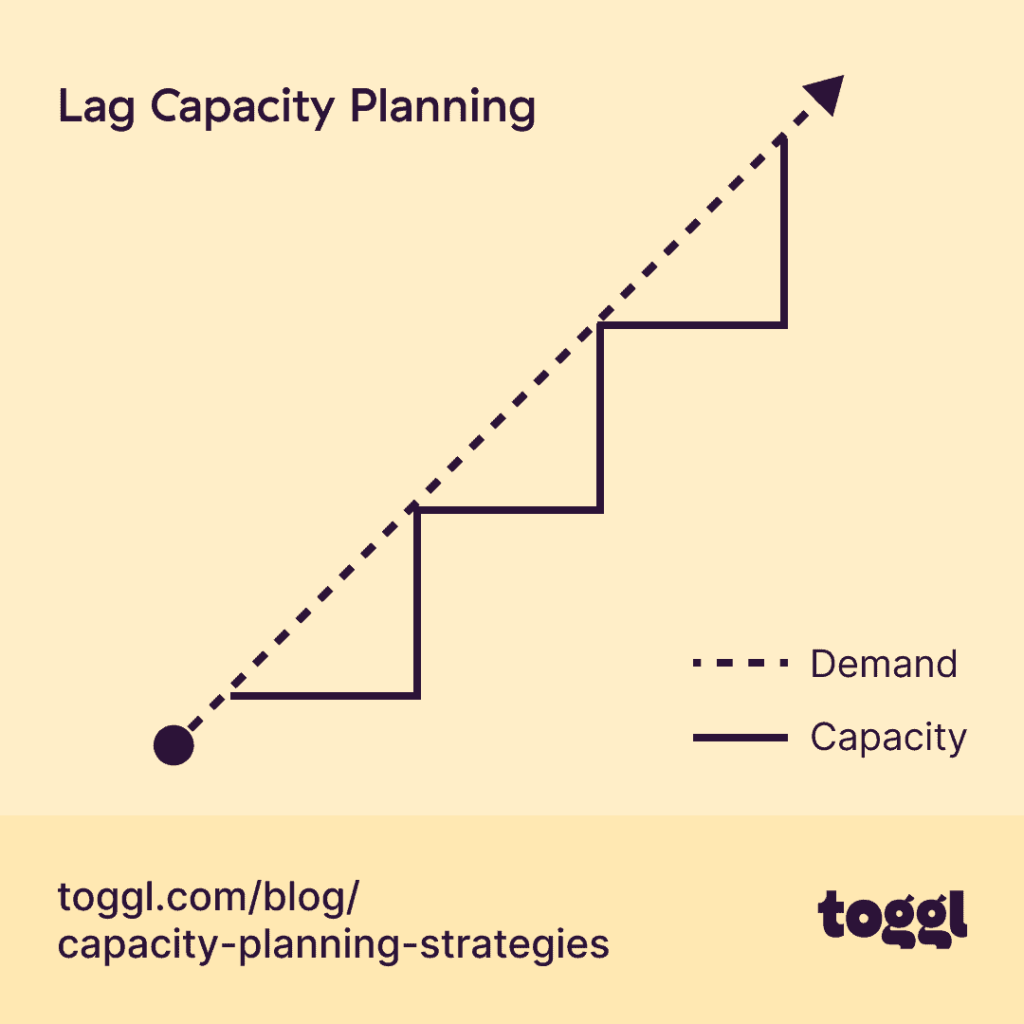
If you’re looking for a safe, budget-friendly approach, why not wait until you feel the squeeze and adopt the “Lag?” You’ll only add capacity after you’ve hit your limit.
On the plus side, you won’t risk wasting your resources if you commit too early. But you need to be prepared to do a little firefighting when your projects start backing up and your teams are running on caffeine and hope!
Lead strategy
Best for: Fast-growing teams or agencies that can confidently forecast new work
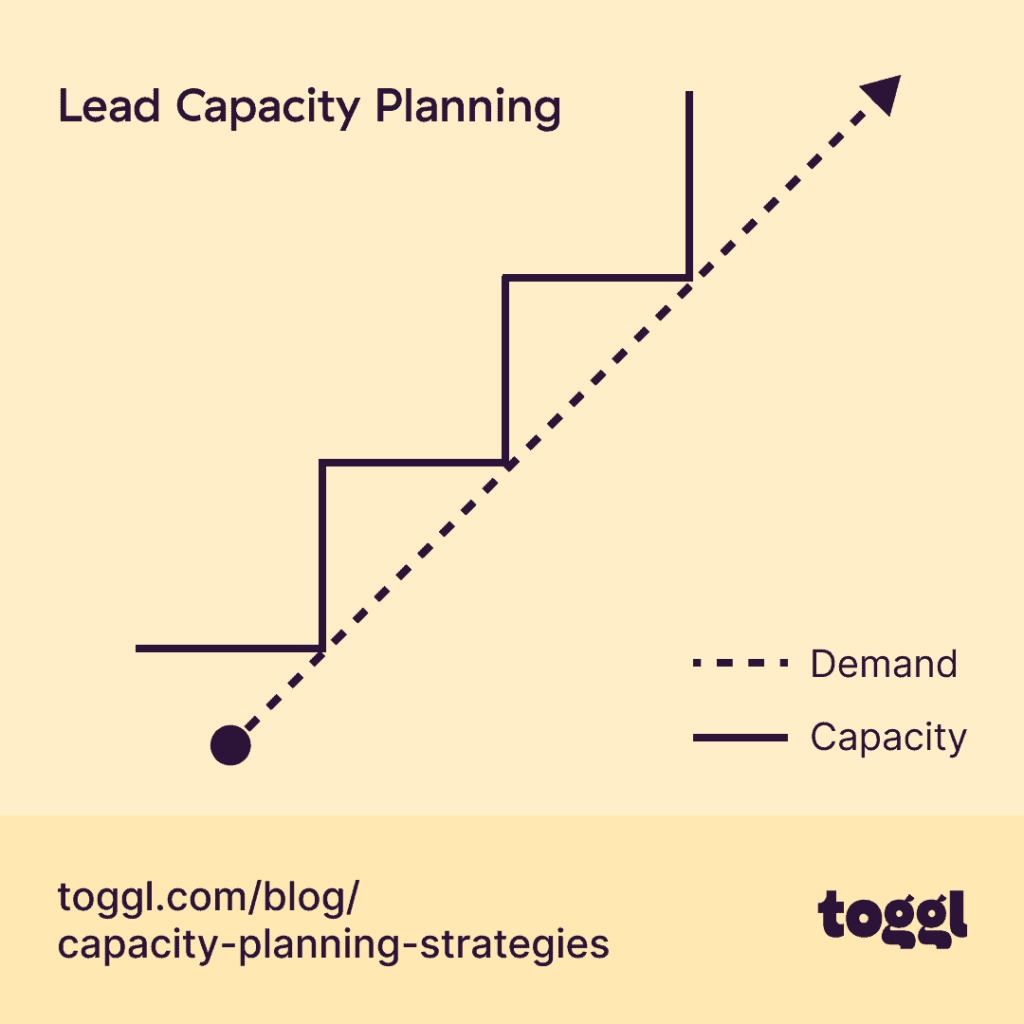
The “Lead” strategy is always one step ahead of the game. With this approach, you’ll add capacity as a proactive measure before you actually need it.
Founder John Doherty describes using the Lead method to plan capacity at his content editing and writing agency, Editor Ninja: “Once the whole group is 75 to 80% full, we go and recruit,
He begins by asking the agency’s existing editors if they have any more bandwidth. “Often, someone will raise their hand and say ‘I’ve got five or 10 more hours,’” he says, which enables them to increase their capacity and assign them the next client.
While this approach smooths out growing pains and positions you for quick scaling, the downside is it can force you to carry higher costs upfront while you wait for that extra work to land.
Match strategy
Best for: Teams with steady workloads who want to stay efficient, agile, and data-driven
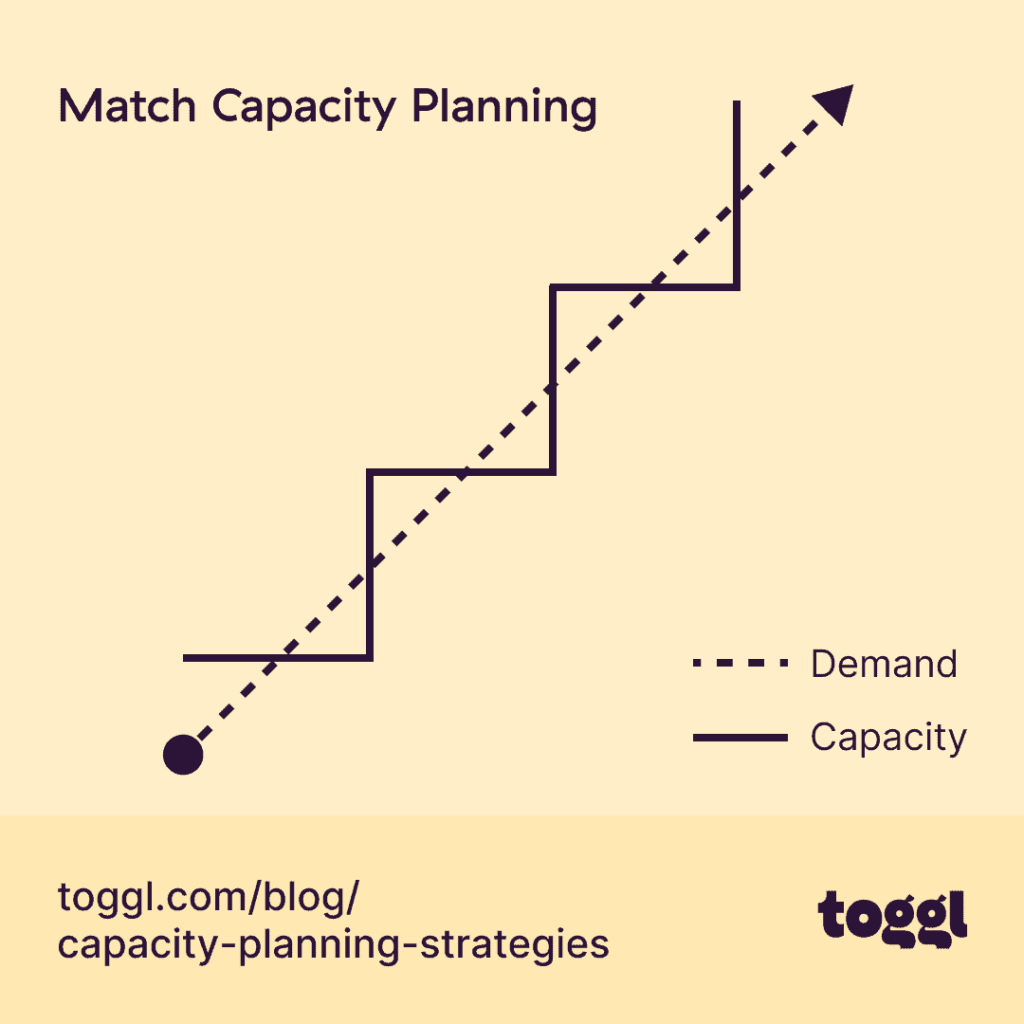
The “Match” strategy is the Goldilocks of capacity management. It makes sure you’re neither too early or too late — everything is “juuuuust right.” But how does this work?
Essentially, you adjust your capacity incrementally, based on real-time data, scaling up or down as your demand shifts. It’s certainly the most balanced strategy, but it depends on accurate, up-to-date information, which is where time tracking becomes your best friend.
What is resource planning?
Resource planning is the process of making sure you have enough resources for your project or operations, and then allocating specific resources appropriately. Trust us, there are heaps to choose from.
The obvious resources are people, time, and budget. But don’t forget about other necessary resources that may be lesser-known but each play a vital role, like tools, skills, and workspace.
Maybe it’s that extra Figma license you need to renew, the shared testing environment everyone needs access to, or the one designer who knows how to use After Effects. Each of these additional resources can make or break your delivery schedule.
Effective resource planning helps you:
- 🧭 Stay on course. Keep every project moving by making sure the right people with the right skills are in the right place at the right time.
- ⚙️ Spot bottlenecks early. See where workloads or approvals are stacking up before they stall progress.
- 📅 Maximize resource utilization. Balance workloads so your A-team isn’t overloaded while others are twiddling their thumbs.
- 🧑🤝🧑 Use all your available resources wisely. From contractors to cloud licenses, every piece of the puzzle is tracked and accounted for.
- 📈 Level up your resource management. Be prepared with scheduling and deliver visibility into who’s available, when, and for what.
How to calculate your resource requirements
Resource planning is the zoom lens that gets you up close and personal as you start matching people to projects. Yes, there’s still some math involved in calculating the exact amount of resources you need. But with a few quick checks, you can see who’s overbooked and if any bottlenecks are holding you back.
Here’s how to calculate your resource requirements step by step.
Step 1. Map your workload
Start with your project plan or backlog. List out every major task or deliverable, plus its estimated effort (in hours or story points).
Then group tasks by role or discipline, such as designers, developers, copywriters, QA, etc. This gives you a clear view of the type of work you need to resource before you start assigning names.
Step 2. Check your available resources
Next, look at your resource availability, including who’s free, for how long, and what else they’re working on.
Look for resource conflicts and overlaps. Someone might technically have 20 hours free, but if half of that’s tied up in meetings or context-switching, their real availability is much lower.
Use a live workload or resource availability chart to see if people have breathing room to spare or if they’re struggling with bottlenecks.
Step 3. Allocate resources based on skills and priorities
Prioritization is the heart of resource allocation. It’s the stage where you’ll match the right people to the right tasks based on their unique skill sets, experience, and deadlines.
Avoid the “whoever’s free gets it” trap. This thinking seems like it’s faster short-term, but it often leads to rework or burnout later.
So, when resources are scarce, assign your most critical tasks first. Often, these are the ones with client visibility or dependencies, and then work outward from there.
Step 4. Calculate resource utilization
Next, you can look at your utilization rates — a metric that delivers balance. Use this formula:
Utilization Rate = Assigned Hours / Available Hours × 100
Example: If a designer is booked for 32 hours in a 40-hour week, they’re at 80% utilization, which is a healthy sweet spot. But if another team member’s consistently over 95%, it’s time to redistribute work.
4 resource planning strategies
Once you’ve mapped workloads and checked availability, the next step is organizing your resources day to day. Different teams prefer different approaches; some plan like chess grandmasters, others like jazz musicians.
Here are four tried-and-true resource planning strategies:
1. Top-down planning
Best for: Projects with fixed budgets, deadlines, or compliance requirements
The top-down approach starts from your project goals and constraints — what needs to be done, by when, and with what resources. You allocate people, money, and tools according to strategic priorities. For example, this might mean locking in your budget before assigning hours, or securing software licenses before tasking the team.
This method keeps spending predictable and aligns delivery with business outcomes. On the downside, it can feel a tad rigid if things change midstream.
2. Bottom-up planning
Best for: Collaborative teams that need flexibility in both effort and costs.
With a bottom-up approach, teams estimate all the different types of resources they’ll need, such as tools, subscriptions, workspace, support functions, and, of course… hours on the clock.
Based on these inputs, you’ll create a realistic budget and schedule you have a cat in hell’s chance of sticking to. It’s ideal for creative or technical projects where effort and costs can fluctuate. Beware, though, as it takes more time to align across your teams.
3. Rolling or dynamic planning
Best for: Environments with frequent scope shifts, changing budgets, or shared tools.
Rolling planning is all about staying adaptable as things change. You continuously monitor your resource utilization and availability, reallocating hours, budgets, or access to shared tools as you need. The key to getting this strategy right is visibility.
Let’s say your video team finishes early, freeing up editing software licenses. A rolling plan allows you to quickly reassign those to another team.
4. Scenario-based planning
Best for: Teams managing multiple variables, like headcount, budgets, or client priorities.
The scenario-based approach allows you to stress-test your resourcing based on “what-if” outcomes.
- What if a major client expands their scope mid-project?
- What if your budget is cut by 10%?
- What if a crucial piece of software goes down?
Exploring each of these scenarios allows you to mock up and run through your backup plans. For example, you might explore hiring a freelancer or shift your budget between departments. Alternatively, you could pause nonessential work altogether.
Capacity planning and resource planning: Better together
If you’ve been paying attention, you’ll understand that capacity planning vs. resource planning isn’t an either-or situation. You need both. While the capacity planning process looks at the big picture and resource planning zooms in on daily execution, the two work best as a continuous cycle. Focusing on one without the other limits your impact.
Kyle Hunt is a master of partnering these two essential planning processes, knowing exactly how to maximize his agency’s resources to free up more capacity. His solution is to use a pod model, where he groups together “highly skilled people that are working together on the same group of clients.”
As a result of the pod approach, Hunt’s agency unlocks 20-30% more capacity. He doesn’t need to hire more people; he just groups existing resources around shared goals. That’s the compounding effect of aligning resource planning with capacity planning.
Together, they create a self-reinforcing loop: the better you allocate and structure your resources, the more capacity you generate, and the more accurately you can plan for growth.
Capacity planning vs. resource planning: Which do you need?
Not sure which type of planning to start with? The answer kinda depends on the problem you’re trying to solve. If you’re forecasting what’s possible, you need capacity planning. If you’re optimizing how that work actually gets done, you need resource planning.
Learn to tell them apart with this handy guide.
| If your challenge sounds like this… | You need … | Because … |
| “We keep saying yes to new projects, then realize we don’t have the people to deliver.” | Capacity planning | You need to forecast demand and compare it against real, available hours before overcommitting. |
| “Our projects stall because we don’t have the right mix of skills or tools assigned.” | Resource planning | You need to allocate the right people, tools, and budgets to the right tasks for smooth execution. |
| “Some teams are overloaded while others have gaps in their schedules.” | Both | You need capacity visibility and smart resource allocation to balance workloads across teams. |
| “We’re trying to plan next quarter’s staffing and hiring needs.” | Capacity planning | You’re looking at the big picture — predicting future needs and identifying where to scale. |
| “We’re constantly juggling who’s doing what each week.” | Resource planning | You’re managing day-to-day project execution and need clarity on task ownership and availability. |
| “We want to optimize performance and prevent burnout long-term.” | Both | You’ll get the best results by using capacity planning for forecasting and resource planning for daily balance. |
Capacity and resource planning are a breeze in Toggl 2.0
Every successful project plan begins and ends with time.
If you don’t know how much time your team truly has, you can’t know your capacity. And if you don’t track where that time goes, you can’t manage your resource needs. Time is the thread that connects the two — the one project resource you can’t stretch, pause, or get back once it’s spent.
That’s why we’ve built Toggl 2.0 with time at the center of your workflows. It combines accurate time tracking with real capacity and resource planning, all visualized through intuitive tools like Kanban boards, calendars, and Gantt charts. You’ll gain a true picture of what’s possible, not just what’s on paper.
With Toggl 2.0, you can:
- See your real, current capacity by factoring in availability, time off, and utilization automatically.
- Plan resources that match your reality, allowing you to assign work based on true hours, not placeholders.
- Streamline without friction, dragging and dropping tasks or timelines as your priorities and initiatives shift.
- Trust your numbers, as every report and workload chart is powered by real tracked time.
When you make time the foundation of planning, decision-making is a cinch because the rest of your project demands make sense. That’s the promise of Toggl 2.0: capacity and resource planning that delivers clarity you can trust. Start better planning for free today.

Rebecca has 10+ years' experience producing content for HR tech and work management companies. She has a talent for breaking down complex ideas into practical advice that helps businesses and professionals thrive in the modern workplace. Rebecca's content is featured in publications like Forbes, Business Insider, and Entrepreneur, and she also partners with companies like UKG, Deel, monday.com, and Nectar, covering all aspects of the employee lifecycle. As a member of the Josh Bersin Academy, she networks with people professionals and keeps her HR skills sharp with regular courses.