Timely and Harvest represent two fundamentally different philosophies about how time tracking and automation should work. Harvest asks you to tell it what you worked on, while Timely automatically records your activity and asks you to confirm it.
Not sure which time tracker you need?
- Choose Timely if you regularly forget to log time and want AI to capture everything automatically and your billing needs are relatively simple.
- Choose Harvest if you need a structured, project-attributed billing workflow with client invoicing and are comfortable with its unpredictable pricing.
- Consider Toggl if you want both automatic and manual time capture, combined with strong capacity planning and project management features (and without Harvest’s pricing volatility).
Let’s get up close and personal with the key features of each of these tools to reveal which best fits your needs.
Timely vs. Harvest: A quick comparison
Before we get into it, here’s a summary of the two time tracking tools in question.
| Timely | Harvest | |
| Tracking method | AI automatic capture | Manual start/stop timer |
| Free plan | ❌No — 14-day free trial of paid plans | ✅ Yes — for 1 user and 2 projects |
| Starting paid price | Starter plan from $9/user/month | Teams plan from $9/user/month |
| Payment collection | ❌ No | ✅ Yes — via PayPal or Stripe |
| Project budgeting | ✅ Yes — track against project costs | ✅ Yes — set total project fees or rates per task |
| Profitability reporting | ✅ Yes — available on Premium plan and above | ✅ Yes — only available on Enterprise plan |
| Native integrations | 18 | 50+ |
| Pros of using this platform | – Removes timer friction completely – Captures time that would otherwise be lost – Excellent support quality – Privacy-respecting, GDPR-compliant Memory data – Strong for creative professionals and accountants who context-switch constantly | – Fast time-to-payment workflow – Real-time budget alerts – Capacity reportingStripe and PayPal payment collection – 50+ integrations – No surveillance features – Strong agency heritage |
| Cons of using this platform | – Limited invoicing – No built-in payment collection functionality – No expense tracking – Task management is a paid add-on – AI suggestions require daily review to stay accurate | – Timer is entirely manual — no AI capture – Users frequently lose billable hours by forgetting to log them – Pricing uncertainty a big factor following the Bending Spoons acquisition |
| Best for | Teams who keep forgetting to track their time and are happy to review and confirm their activity later | Teams whose bottleneck is billing, not tracking |
Timely vs. Harvest: What does each tool do?
Timely is an AI time tracking tool that records your work automatically — you review and confirm your entries, rather than create them yourself. Harvest is a billing-first time tracker where every minute is deliberately attributed to a client and project.
Here’s a closer look at what each tool covers.
Timely: the AI-Powered automatic timer
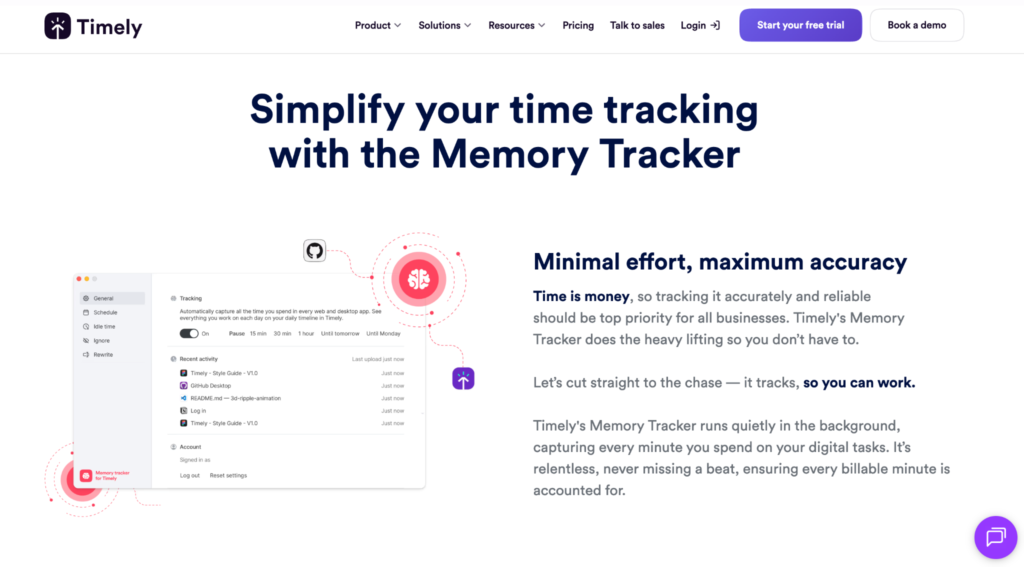
Timely is an AI-powered time tracker built around the idea of eliminating manual time entry altogether. Its Memory tracker runs silently in the background, recording activity across apps and devices. The platform leans on AI to draft and allocate timesheet entries automatically, so teams can review and approve accurate time data with minimal effort.
Timely’s key features
- Capture all activity with an automatic timer, from apps and websites, to documents, calendar events, and meetings
- Set time and money budgets to keep track of project time tracking actuals vs. estimates (available on the Premium plan)
- Generate basic invoices from tracked time
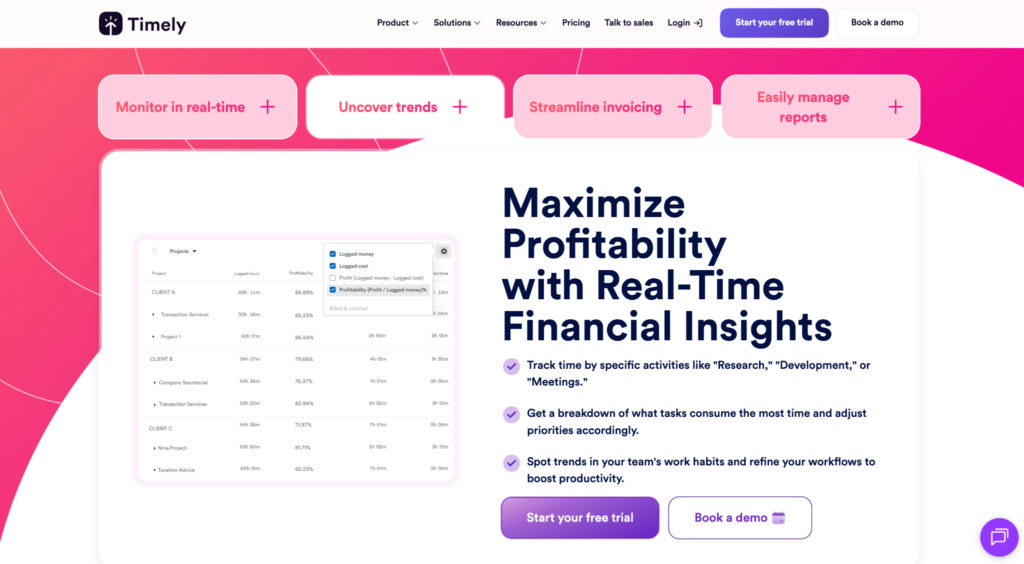
- See project profitability as a percentage of the hours logged
- Export reports to CSV, PDF, and Excel, or share them internally or externally with clients
Harvest: the client billing tool
Harvest is a time tracking and invoicing tool designed for teams that need to connect hours worked directly to client billing and project budgets. It lets you log time via timers or timesheets, tracks costs and billable rates against project estimates, and turns that data into visual reports and client invoices, all in one place.
Harvest’s key features
- Log work hours with a manual start/stop timer
- Track time across browser extension, mobile app, or desktop timer
- Tag every entry to a project and client
- Receive real-time budget alerts when pre-defined milestones are hit
- Improve resource planning with capacity reporting for immediate visibility into which team members are overworked and which are underutilized
- Turn tracked time into branded invoices
- Collect payment directly from the platform via Stripe or PayPal
- Track expenses on every tier plan
- Get detailed time reporting with billable hours, project profitability, and team utilization
- Export reports to CSV, PDF, and Excel, or share them internally or externally with clients
Harvest vs. Timely comparison: a deep-dive
We’ve used our expertise at Toggl to bring you a detailed breakdown of how Harvest and Timely compare across five key areas — time accuracy, invoicing, price, user experience, and integrations.
Harvest vs. Timely: which time tracking approach is most accurate?
The time tracking mechanics behind Timely and Harvest are radically different. Each comes with its own tradeoff between accuracy and effort.
Time tracking in Timely
Timely’s whole pitch is centered around removing the inaccuracies of manual time tracking. It claims manual timesheets are only 67% accurate, but its Memory tracker is 100% accurate. At face value, this probably makes sense; the tracker captures your tasks whether you remember to log them or not. For anyone who context-switches a lot, this could be a real life-saver.
The problem: this solution creates two new problems.
- AI can misclassify entries, for example, labeling a Slack conversation as a meeting instead of communication, or a YouTube rabbit hole as research.
- You must remember to review your entries daily. If you let the time entries pile up, you’ll end up facing the same problem the automatic timer was designed to eliminate in the first place — reconstructing timesheets from memory.
Time tracking in Harvest
In Harvest, manual input means every entry is intentional, which is great for accuracy if you log your time. But when you forget, or get too busy, those hours are gone.
Both tools rely on you remembering to take regular action. For Timely, that’s reviewing AI entries, while for Harvest, it’s starting and stopping the timer.
Harvest vs Timely: which platform is better for invoicing and billing?
If getting from tracked hours to a paid invoice is your primary goal, Harvest is hands-down the stronger tool.
Invoicing and billing in Harvest
Harvest’s billing workflow takes you from time tracked to invoice paid as fast as possible. Here’s how it works:
- When a timer starts, the platform logs both billable and non-billable hours against a project and separates them cleanly into timesheets, making accurate time tracking invoicing effortless.
- A branded invoice is then generated directly from those timesheets
- Payment is collected via Stripe or PayPal without the client needing to leave the app
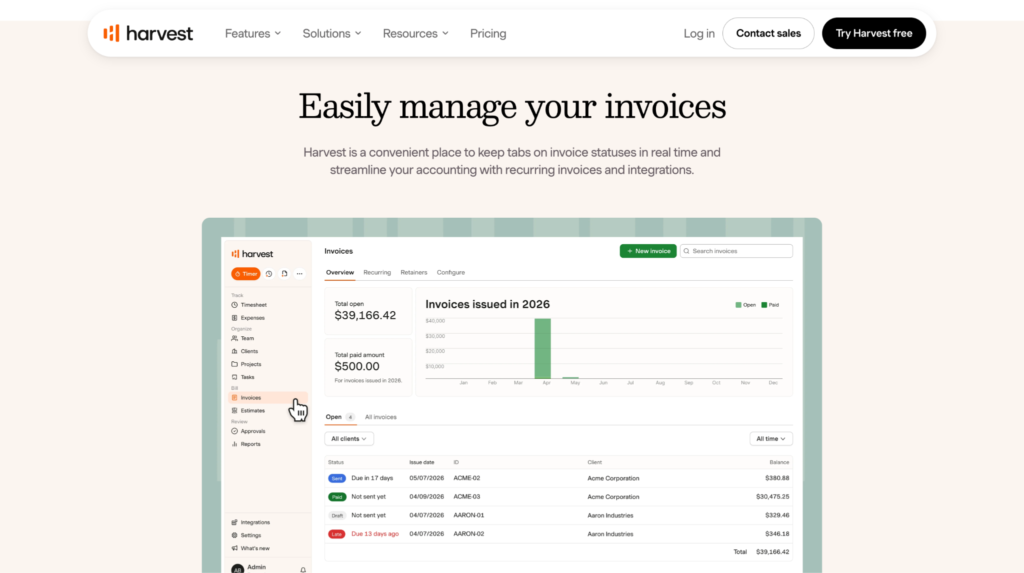
There’s no exporting, or copy-pasting hours into a separate tool, which makes Harvest one of the slicker time billing software options for agencies and professional services teams. You can also integrate it with expense tracking features to get the complete financial picture of any project.
Invoicing and billing in Timely
Timely offers a much more basic invoicing experience. You can generate an invoice from tracked time and send it to a client — but that’s as far as it goes. The platform lacks native payment collection, expense tracking, or detailed profitability reporting.
And these missing features are a shame, because getting insights like profitability from accurate, timely billing is the lifeblood of a successful business.
Darrell Keezer, CEO ofCandybox Marketing, used profitability data from his Toggl timer to discover that any project under $20,000 consistently ran at a loss. This insight helped his team win a $120k contract against competitors quoting half the price. Keezer admitted:
“If we didn’t have the data Toggl provided, we might still be doing unprofitable projects today.”
Harvest vs Timely: which tool provides deeper profitability reporting?
Profitability reporting is more robust in Harvest compared to Timely.
Profitability reporting in Harvest
Harvest’s time reporting covers billable hours, project profitability, and team utilization, each in plenty of detail and available in the same place.
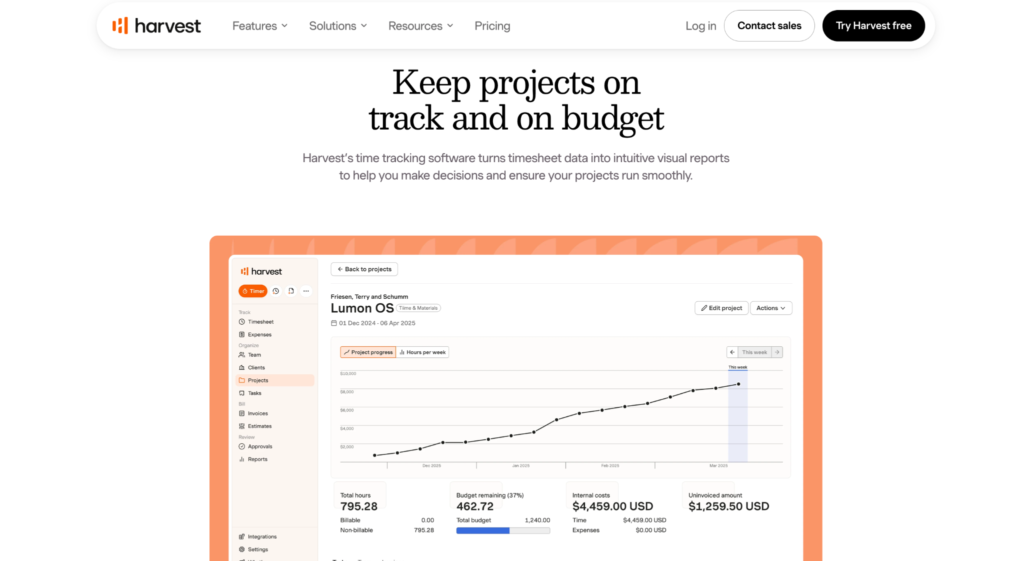
With Harvest, you can set project budgets upfront, and view a real-time update as your team logs hours — alerts ping when you’re approaching the limit. Profitability reports reveal how tracked time and internal costs stack up against what you’re billing, at both the project and client level.
It’s also possible to review past project data to sharpen future estimates, which is especially useful if you regularly scope new work and want to price it better.
Profitability reporting in Timely
Timely’s reporting is more focused on real-time visibility than deep financial analysis. You can see project profitability as a percentage of hours logged, track billable vs. non-billable time, and monitor budget spend as it happens.
The People Dashboard adds a team-level view of hours, overtime, and billable percentages — handy for managers keeping an eye on utilization. That said, the cost-rate features (which let you compare internal costs against billable rates) are locked behind the Premium plan, so freelancers on Starter won’t get the full benefits of these features.
Harvest vs Timely: how do project budget trackers compare?
Both tools track project budgets, but Harvest goes further with real-time alerts and capacity reporting.
Project budget tracking in Harvest
Harvest offers project budgeting — the platform sends real-time budget alerts when certain defined milestones are hit. The platform also makes resource planning easier with its capacity reports, which auto-display which team members are overworked and which are underutilized.
Project budget tracking in Timely
Timely lets you set both time and money budgets at the project level, so you can keep track of how actual project time tracking and costs align with estimates, keeping everything running smoothly. Note that this feature is only available from its Premium plan upward.
Harvest vs Timely: how do they compare on pricing?
At comparable paid tiers, Timely and Harvest price similarly. But Harvest’s recent acquisition has brought its pricing firmly into the spotlight.
Timely’s pricing summary
| Free | Starter | Premium | Unlimited |
| ❌ | From $9/user/month | From $16/user/month | From $22/user/month |
| ❌ | 5 seats, 20 projects | 50 seats, unlimited projects | Unlimited seats and projects |
| ❌ | 14-day free trial | 14-day free trial | 14-day free trial |
Important: Tasks are only available as an add-on, at $5/user/month, which can balloon costs as teams scale.
Harvest’s pricing summary
| Free Plan | Team Plan | Enterprise Plan |
| $0 | From $9/user/month | From $14/user/month |
| 1 seat, 2 projects | Unlimited seats | Unlimited seats |
| Forever | 30-day free trial | 30-day free trial |
Harvest has recently been acquired by Italian conglomerate Bending Spoons in July 2025, and its pricing has garnered plenty of attention. In some cases, renewal prices have jumped from $80/month to $1,900/month in some cases, or from $130/year to $168/year plus $720 in extra fees.
An unexpected pricing trajectory can rock confidence in a tool, and Harvest’s pricing trajectory is genuinely uncertain. This is something to seriously consider before committing to any SaaS product long-term. If you’re curious about what else is out there, our Harvest alternatives guide is a good place to start.
Harvest vs Timely: which platform offers a smoother user experience and onboarding process?
Based on hundreds of user reviews on G2, Timely beats Harvest in terms of user-friendliness. Here’s how both tools stack up across key user experience metrics.
| (all out of 10) | Timely | Harvest |
| Ease of completing timesheets | 9.4 | 9.3 |
| Ease of setup | 9.2 | 9.0 |
| Ease of use | 9.5 | 9.1 |
| Mobile time tracking | 9.2 | 9.4 |
| Quality of support | 9.5 | 8.7 |
Harvest’s onboarding gets you up and running fast
Harvest’s onboarding is fast, functional, and notably user-friendly. Create a project, assign tasks, and start your timer. That’s all there is to it.
Timely’s user experience takes an adjustment period
Timely requires you to connect several apps, download and configure your Memory Tracker before you can get going. Some users report a calibration period as long as 2-3 weeks before their AI suggestions become reliably accurate, but G2 scores suggest that users won’t find this initial period daunting.
Harvest vs Timely: how well do they integrate with the wider Saas ecosystem?
Harvest has 50+ native integrations and Timely has 18, which is a broad difference. For freelancers and small agencies, both sets of integrations cover core tools; for teams with specific accounting or CRM integration needs, Harvest’s broader ecosystem is a practical advantage.
Harvest’s suite of integrations
Harvest integrates with several accounting and project management tools, namely Xero, QuickBooks, Asana, Trello, Basecamp, Slack, Google Calendar, Parallax and others.
Timely’s suite of integrations
Timely integrates with several productivity tools like Asana, Jira, GitHub, Slack, Google Calendar, Microsoft 365, but lacks payroll integrations. This can be a significant disadvantage for users who crave frictionless time-to-payroll workflows.
Both tools offer Zapier support and API access for extending beyond native integrations.
What if neither Timely nor Harvest is quite right? Enter Toggl
If you want both automatic time tracking features and a built-in payment collection system, with over 100 integrations and no pricing uncertainty, Toggl is the tool for you. It promises Timely’s automatic capture, and Harvest’s billing depth, without any pricing uncertainty.
Toggl is a simple yet powerful time tracking and capacity planning tool that turns your employees time data into actionable business insights. Capture time automatically or manually, and see how your team splits their work hours across projects, clients, and tasks. Armed with this info, you’ll easily be able to track billable hours, project budgets, profitability, team capacity, and ultimately make better business decisions.
Automated tracking that stays private
Toggl’s automated time tracking works in the background as you move through your work day. To start, open the Desktop app, navigate to the Calendar view, and click on Settings.
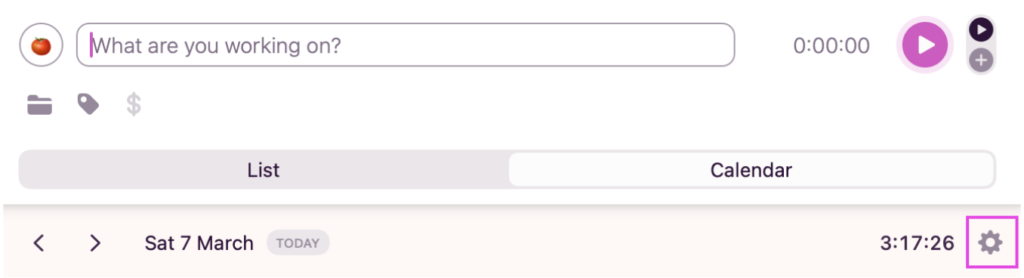
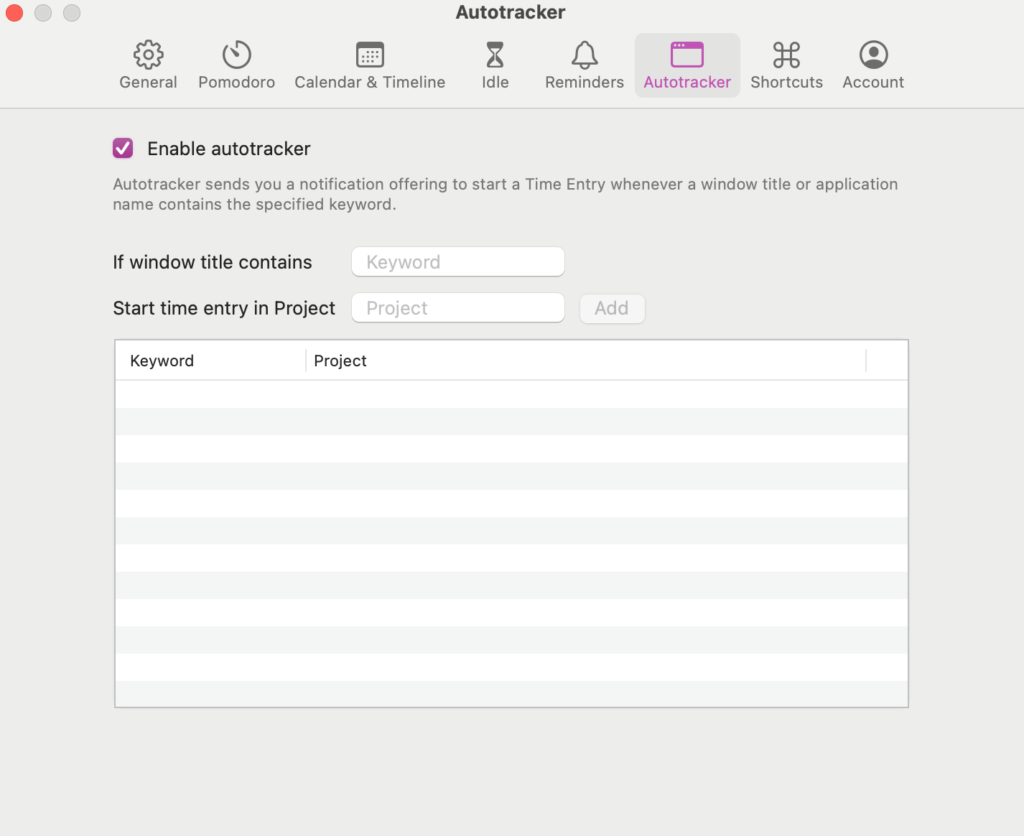
From the Autotracker subtab, select the checkbox to enable the Autotracker. Make sure to define which apps and webpages you’d like the timer to track time for, by adding them one by one. You only have to do this step once, and can edit your list any time.
Toggl will run an automatic timer in the background, recording only the time spent on the sites and apps you defined. The result is a timeline of your workday, color-coded by activity.
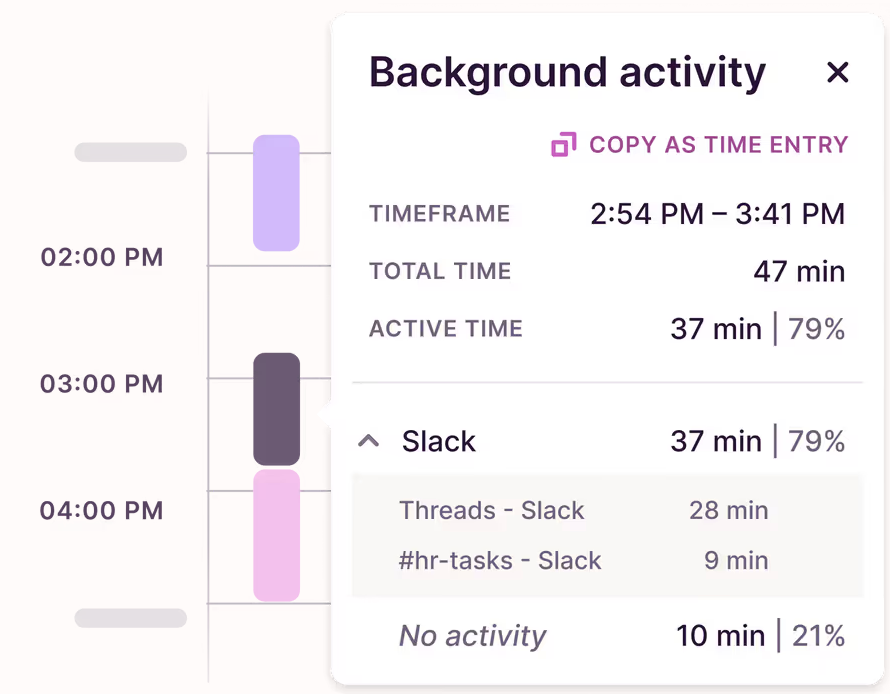
Before turning your time entries into timesheets, decide which entries to publish and which to keep private. Every team member retains absolute privacy over their time, empowering them with the trust to report their own time.
Manual timer and browser extension for structured billing attribution
If you’d rather time things manually, the start/stop timer is available across Toggl’s mobile, desktop, and web apps.
“Not only is Toggl easy to use, it’s actually difficult to forget to track our time,” says Megan Harris, Digital Strategist at Mediacurrent — a 90-person web development agency who relies on Toggl’s one-click timer to maximize their productivity.
Navigate to the timer on the top left, and start it on the top-right corner. It runs until you stop it.
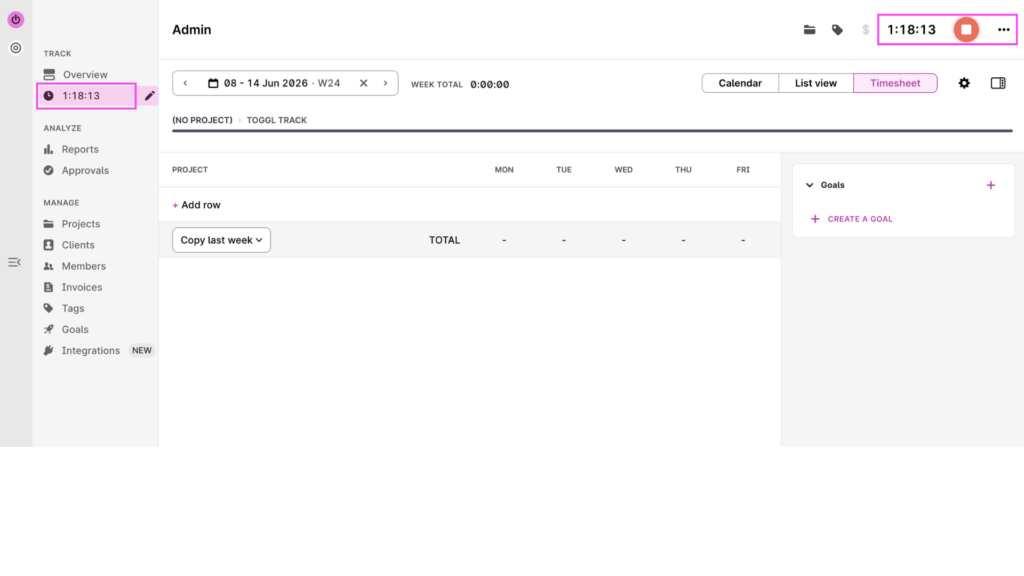
To keep billing attribution clean and get the most out of Toggl’s powerful reporting features (think profitability, team capacity, and project budgeting), make sure every time entry is labeled and tagged to a Project and Client.
From the time entry overview, click on the folder icon to see your active projects. Select the relevant one, and your time entry will map to the project and associated client.
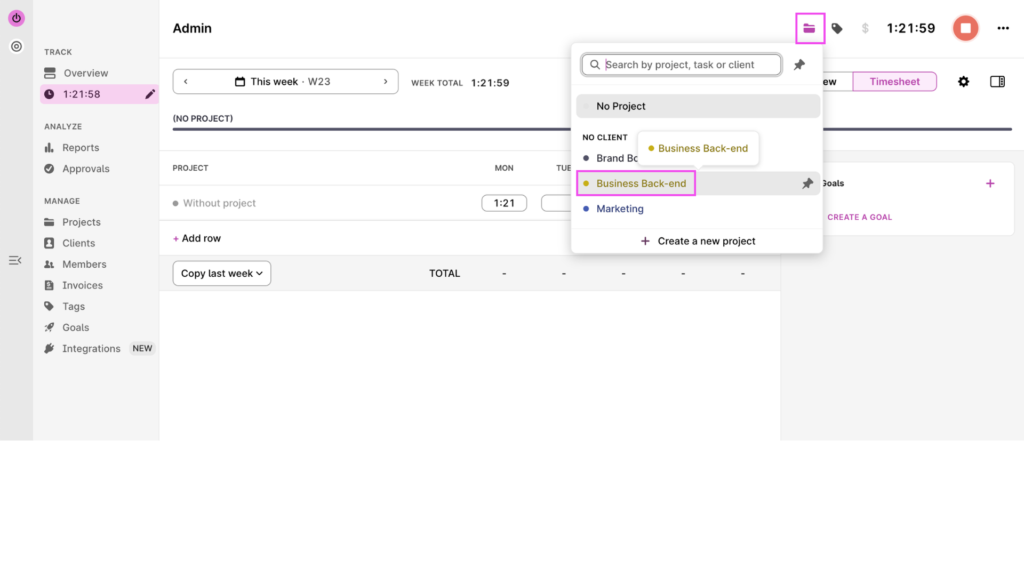
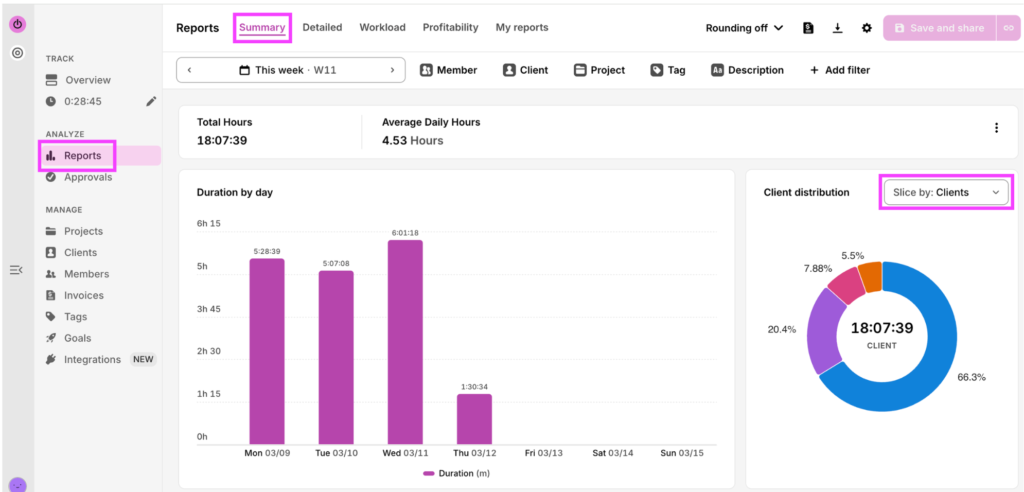
Getting into the habit of tagging your time entries gives you beautiful Summary reports that clearly show how your week was spent. Spoiler: It probably looks very different to what you assumed!
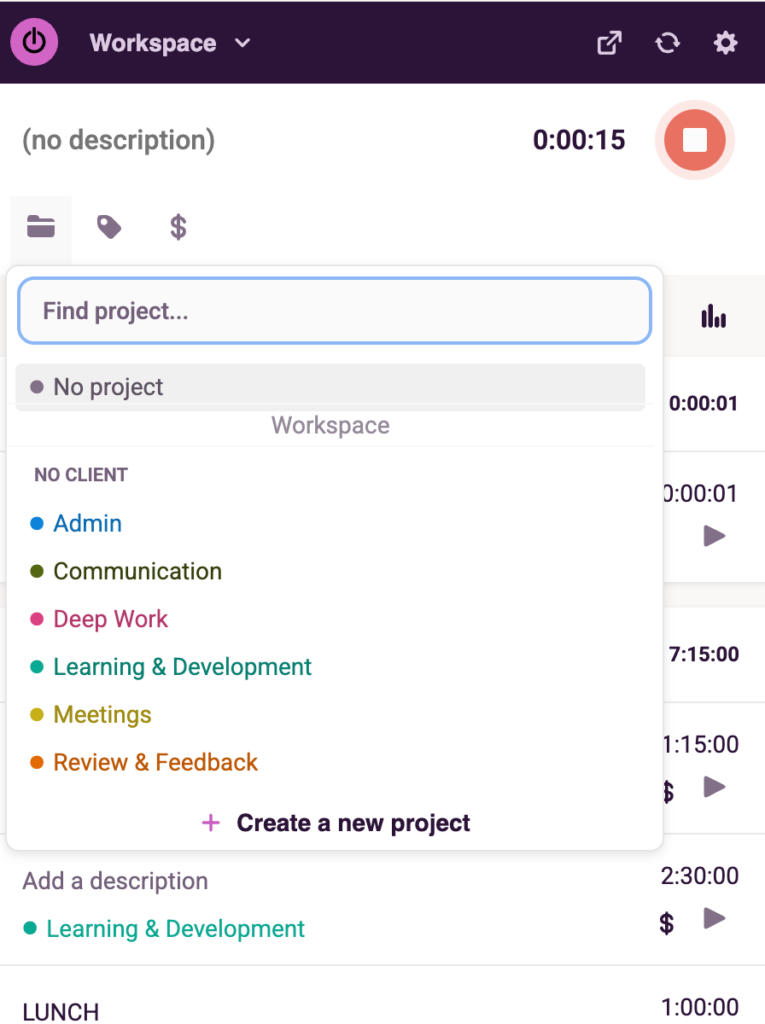
The manual timer also comes as a Chrome Extension, a great hack for tracking entries without switching apps or tabs. The same logic holds; tag your entries to a project with the folder icon, and these feed directly into your reporting.
Billing rates that reflect your team’s work
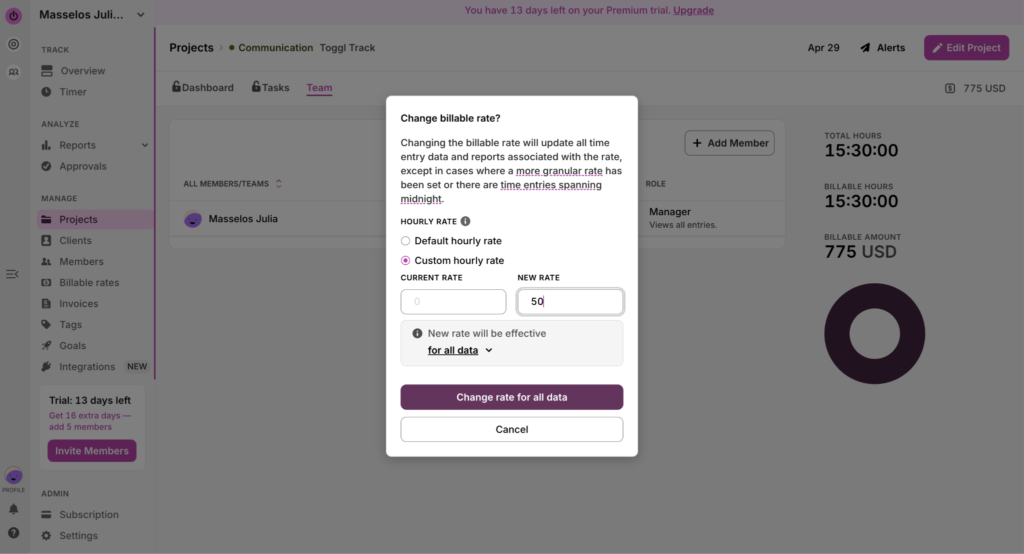
Toggl lets you fine-tune your billing rates across workspace, project, team member, and task level. This gives you detailed control to adapt your rates for any level of seniority, project complexity, or custom pricing logic.
Go to Projects, and then head to the Teams sub-tab. Click on the dash under the Rate column to set the hourly rate per team member.
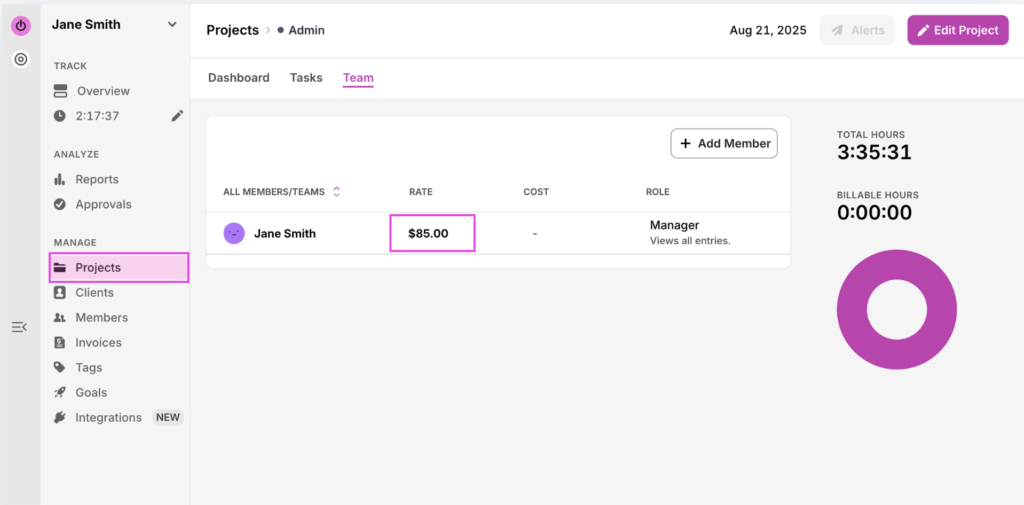
Of course, these billing rates aren’t set in stone. You can update them directly in the Project at any time, with the option to apply the change retroactively to past entries, or from that point forward.
Project profitability connected to real time-data
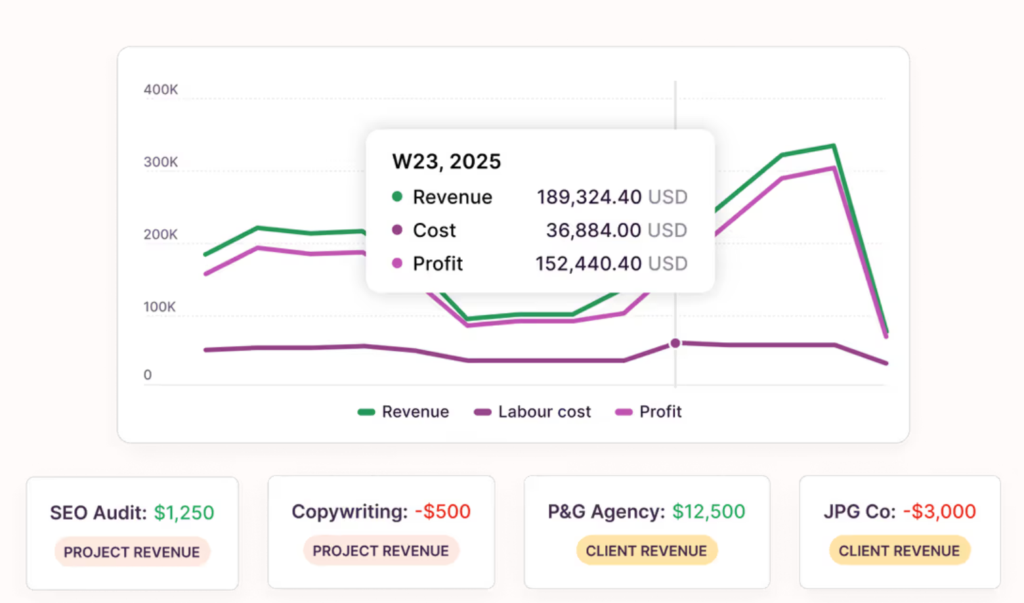
Toggl’s Profitability report is made to highlight your most profitable Clients and/or Projects at a glance. Get a glimpse of revenue, cost, and profit in one sleek table. Armed with this data, you’ll make better pricing decisions and better prioritize the people and projects that add the most to your bottom line.
Native integrations and browser extensions
Toggl offers integrations to connect time tracking into the rest of your tech stack. Combine it with Jira, Asana, Google Calendar, GitHub, and your other everyday tools.
Dedicated Harvest importer
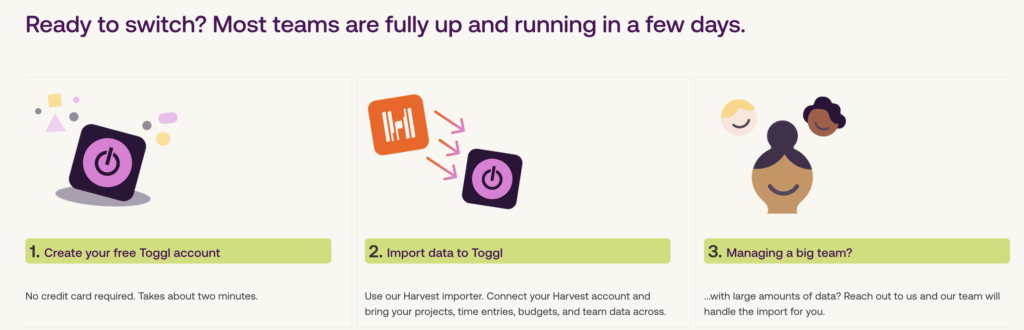
Our dedicated Harvest migration tool simplifies the job of moving from Harvest to Toggl. All you do is create a Toggl account, connect your Harvest account, and let it pull across your projects, time entries, budgets, and team data to our platform in one go.
Callie Flack, Account Director at Forum Communications, moved the team from Harvest to Toggl after a decade because of the recent pricing spikes. The migration took less than a week:
“Toggl made it easy to switch, and helped us track time more accurately than before,” she shared.
Timely or Harvest: which tool should you use?
If you’re still undecided, we’ve put together a quick summary cheat-sheet to pick the best tool for your needs.
Choose Timely if:
- You regularly forget to log time
- You work across many contexts throughout the day
- Your billing needs are relatively straightforward (basic invoicing rather than end-to-end payment collection)
See how Toggl stacks up as a Timely alternative.
Choose Harvest if:
- Your workflow is billing-first
- You need the shortest possible time-to-invoice workflow with Stripe and PayPal payment collection
- You’re comfortable with an uncertain pricing trajectory
See what Toggl offers as a Harvest alternative.
Choose Toggl if:
- You need a time tracker for an agency, consultancy, or professional services team
- You want simple and useful project and task management alongside time tracking
- You want to use your time data for accurate capacity planning
- You want both automatic capture and structured billing depth
- You’re anti-surveillance — you trust your team implicitly
- You value stable pricing (no ugly surprises)
Best for: those who want it all, without the tradeoffs
Unlock the power of accurate time tracking with Toggl
The good news is you don’t have to choose between automatic tracking and seamless billing. With Toggl, you can have your cake and eat it too.
Designed for high-trust remote teams, Toggl features profitability reporting, flexible billing rates, and over 100 native integrations in one sleek, simple timer. And if you’re moving from Harvest, our dedicated migration tool will do the heavy-lifting for you in just a few days.
Create your free Toggl account today and experience time tracking without the trade-offs.
Frequently asked questions about Timely vs. Harvest
Is Timely better than Harvest?
Whether Timely is better than Harvest, depends on your use case. Timely is better if you regularly lose billable hours because you forget to log time. Harvest is better if your priority is a clean, end-to-end billing workflow with native invoicing and payment collection. Both tools are great; they just solve different problems for different teams.
Does Timely track time automatically?
Yes, Timely tracks time automatically. Its Memory Tracker runs silently in the background on Windows and macOS, capturing everything you work on, across apps, websites, documents, meetings, and calendar events. At the end of the day, simply review the records and approve what goes into your timesheet. Nothing is published without your say-so.
Does Harvest have automatic time tracking?
No, Harvest doesn’t include automatic time tracking. Its timer is entirely manual. You have to start and stop it with each task, and log the entry against a client and project. There’s no AI capture or background tracking; everything relies on you remembering to click the timer. For teams where logging discipline is already a struggle, that’s a real risk to consider.
What is the best alternative to Harvest for agencies?
The best alternative to Harvest for agencies is Toggl. It covers the core reasons agencies leave Harvest, such as pricing stability, flexible billing rates, project profitability reporting, and 100+ integrations, without the post-acquisition uncertainty. It also offers both manual and automated time tracking, so teams that want the benefits of automatic tracking don’t have to give up structured billing to get it. Forum Communications, an 18-person marketing agency, made the switch from Harvest after a decade and migrated in under a week.
How accurate is Timely’s AI time tracking?
Timely’s AI time tracking is more accurate than manual timesheets. The company claims manual timesheets are only 67% accurate, and automatic tracking improves on this number. But Timely’s AI isn’t perfect, either. The workflow still relies on human input, just at a different point of the process. If you fall behind on reviewing suggestions, misclassified entries can make it into approved timesheets. Accuracy depends on user behavior, not the tool. Timely trades one discipline (logging) for another (reviewing).

Julia Masselos is a remote work expert and digital nomad with 5 years experience as a B2B SaaS writer. She holds two science degrees Edinburgh and Newcastle universities, and loves writing about STEM, productivity, and the future of work. When she's not working, you'll find her out with friends, solo in nature, or hanging out in a coffee shop.


