How Sleek Consulting got its team tracking time their own way, without surveillance
Consulting
26-50
Premium
United States
Toggl AI
Project Dashboards
Project Time Estimates
Tasks and subtasks as billable line items
Smart time log suggestions
Reports
Multiple ways to log time
About
Sleek Consulting is a Salesforce Partner that helps nonprofits and higher education institutions implement and get more out of Salesforce. A single project can have around 20 billable line items.
When Amanda Viehman, Vice President of Professional Services, went looking for a replacement for Teamwork, she had a clear brief:
"We wanted something that could be adopted in a couple of different ways to improve the user experience, but without doing any tracking, keeping that local. So not really having any surveillance on our team."
— Amanda Viehman, Vice President of Professional Services, Sleek Consulting
Results with Toggl
"I've had great feedback from all the different users. I think that time tracking has improved on Toggl compared to Teamwork, which was our previous product."
— Amanda Viehman, Vice President of Professional Services, Sleek Consulting
The trigger: a tool that couldn't connect to Salesforce
Sleek Consulting runs its own client portal in Salesforce, where clients see their burn alongside status reports and resources. Teamwork couldn't feed it.
"Our previous tool doesn't integrate with Salesforce or have an open API."
The requirements: detail, flexibility and privacy
Amanda's shortlist had to meet three conditions.
- Line-item detail. Time needs to be tracked against each billable line item, so the team can bill accurately and keep track of scope.
- Flexibility. The team works in very different ways, so logging time couldn't depend on one method.
- No surveillance. Some tools she looked at shared activity data with supervisors, and one took screenshots. For consultants who spend their days inside clients' Salesforce orgs, that ruled them out.
"There were some tools that would track activity and then it'd be shared with supervisors, or one even went so far as to take screenshots of your screen, and that's just bad for my team's privacy and for if we're in a client org taking snapshots of potentially sensitive data. So that was something I really didn't want to do, and Toggl doesn't do that."
The solution
Every way to log time, so everyone logs it
Amanda's days are full of defined meetings, so she logs time from her calendar. Others on the team use the timer, the desktop app, the timer button inside Slack or the browser extension. One team member plans her whole week in advance.
"My adding in meetings, like just in a block and scooting them over to the time logs, works well for me. But then we have a lot of people that work differently, and so the timer, different ways to log time, was important just to improve adoption."
The automated time tracking has made the biggest difference for people who lose track of time on deep work.
"There's one developer in particular who gets absorbed and doesn't log time, and he's been doing better in this one."
Project manager Tracy Frank points to how many places Toggl shows up:
"If you get the browser extension, almost every website has a thing that pops up that says, do you want to track your time?… I think it's really convenient how many places it can be to make it easier."
Unexpected win: Smart time log suggestions
Smart time log suggestions use machine learning to suggest time logs based on each person's activity and tracking patterns. The team didn't see them in the initial demo. They found them during the end-user training session run by their Customer Success Manager, and both Amanda and Tracy brought them up.
"If you do the same thing at the same time every day, it's like, are you doing this? And I'm like, why, yes I am. It only saves a minute, but it's really convenient."
— Tracy Frank, Project Manager, Sleek Consulting
Line items, workloads and client burn in one place
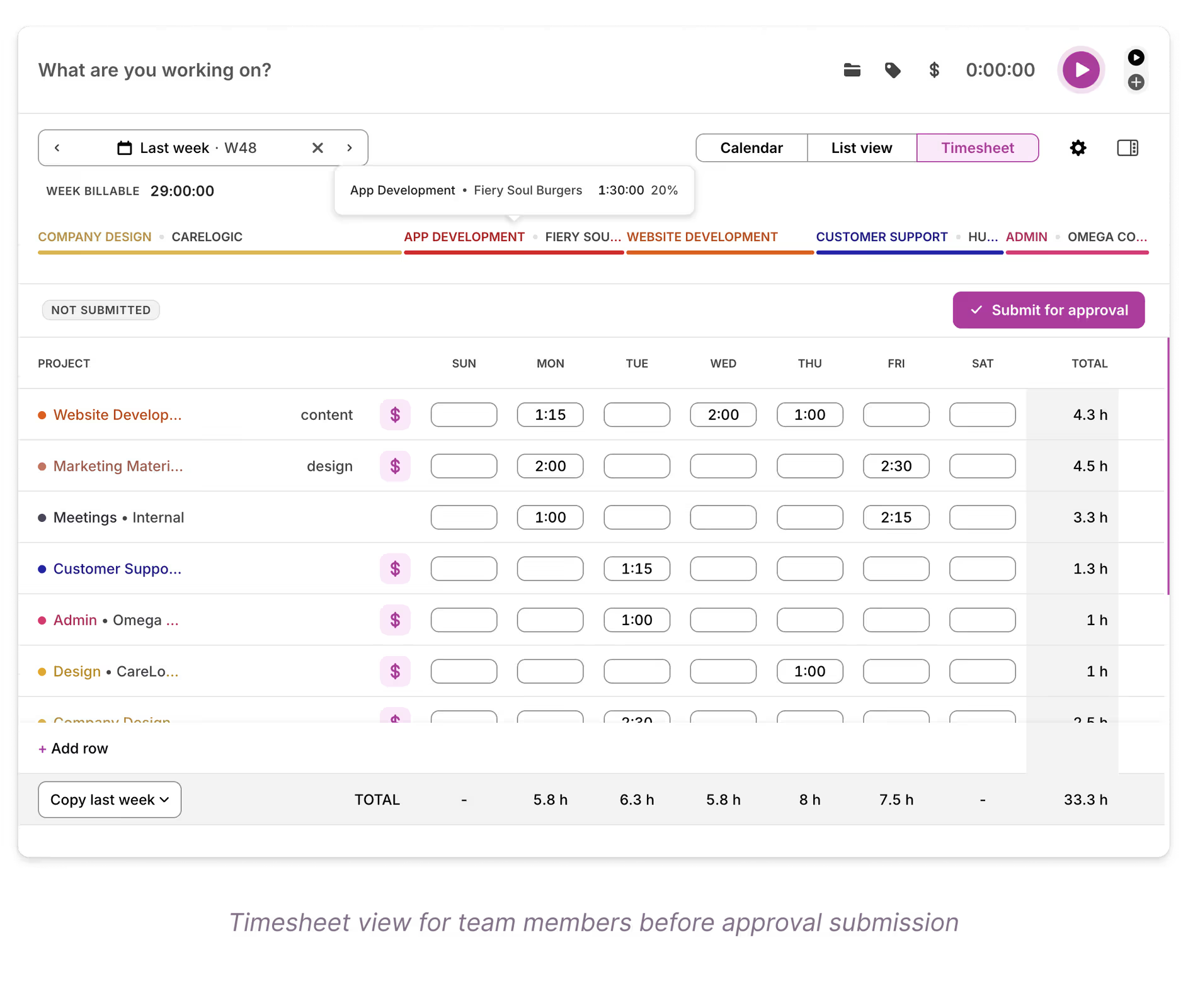
Each billable line item is set up as a task (project management, development, training, and so on), with time estimates to track against. Each person has their own billable target. Amanda uses reports and project dashboards to check individual workloads and each project's burn, and reviews billed time every week.
"Overall looking at everything that was billed this week, just to see if anybody needs a reminder to be like, hey, you need to go log your time, or if anything looks weird."
Toggl AI for the story behind the hours
For one client burning through a lot of hours, Amanda asked Toggl AI to describe the work mix and fed that into the client's status reports. It sits alongside the reports rather than replacing them.
"As we're reporting on what their hours spent is looking like, I ask it for descriptions on the work mix of it so I can feed that context back."
What's next: Salesforce, capacity and budgets
Toggl's open API was one of the reasons the team switched. The next step is bringing time entries into a custom time log object in their Salesforce client portal, so clients see burn, status reports and resources in one place. Amanda also plans to explore capacity planning, which the team didn't do in its previous tool, and to compare Toggl data with the project plans they keep in Smartsheet.
Why Toggl worked for Sleek Consulting
Sleek Consulting needed time tracking that could keep up with line-item billing and connect to Salesforce, without asking the team to give up their privacy or change how they work. They got a tool each person can use their own way, and a team that's logging time more reliably than before. Moving from Teamwork came with a learning curve, especially for admin workflows, but the team describes it as a curve worth climbing.
"It's just a different tool and the learning curve is fine. Loving Toggl, no complaints."
— Karly Merrill, Chief of Staff & Operations, Sleek Consulting